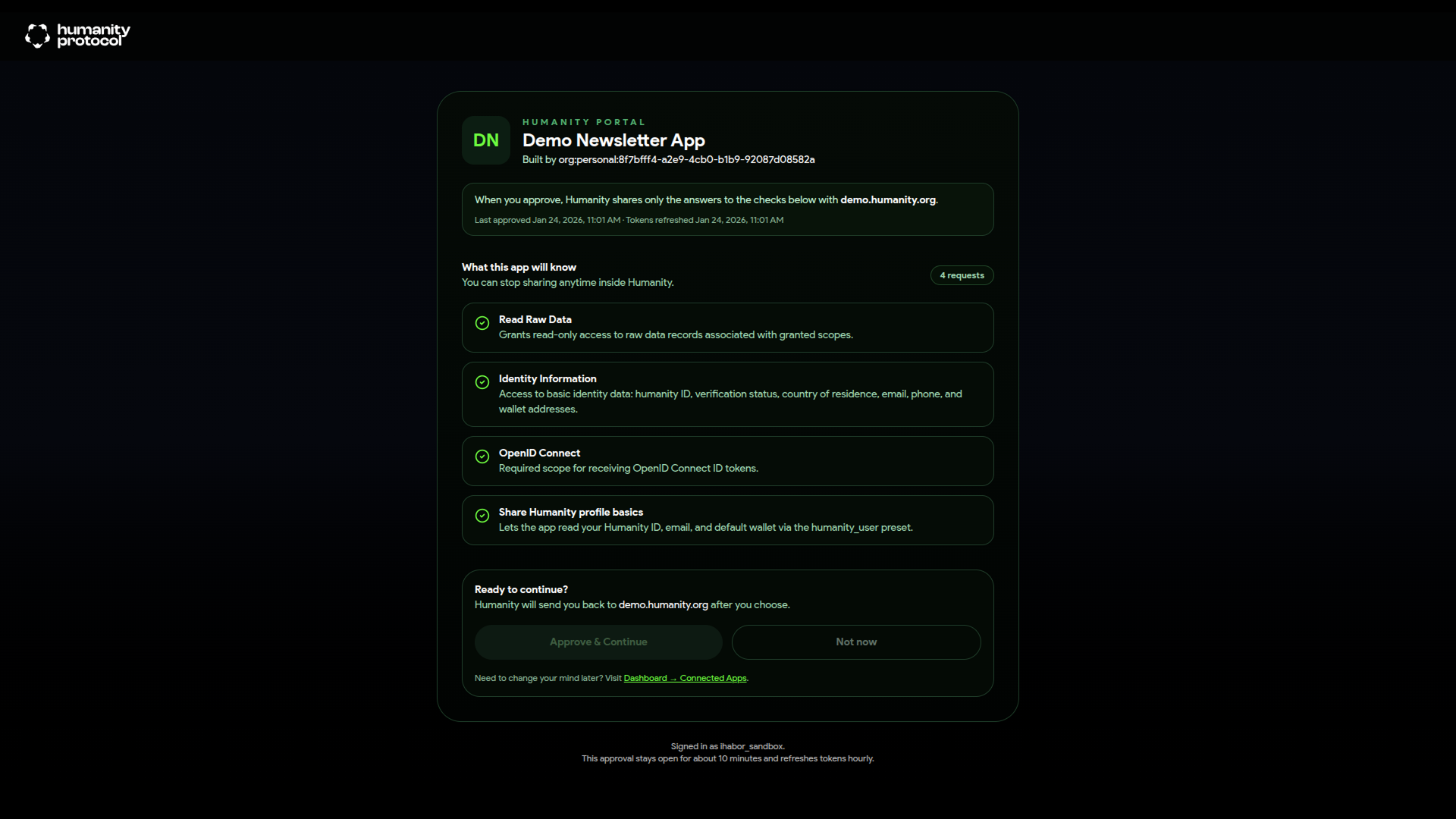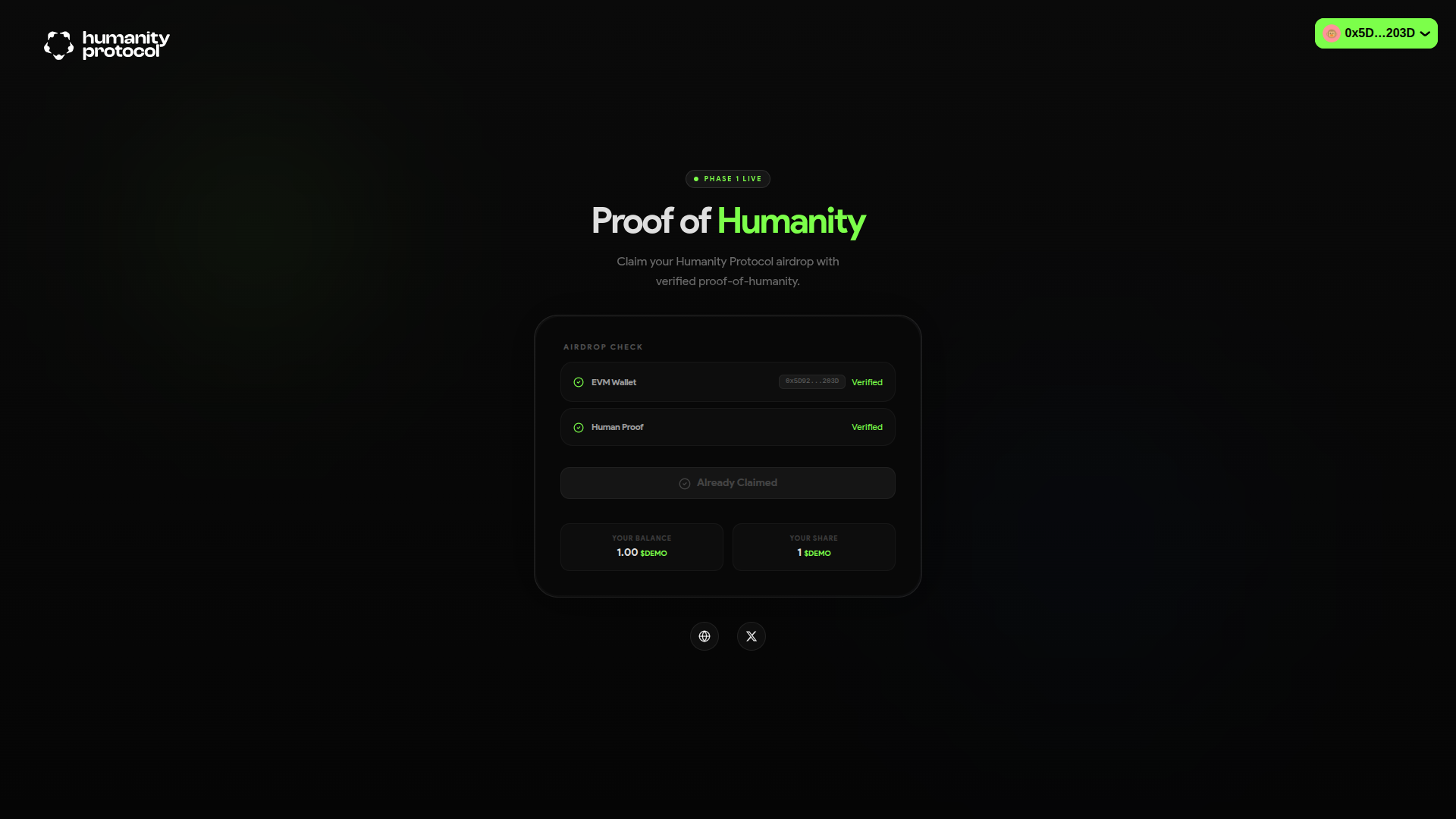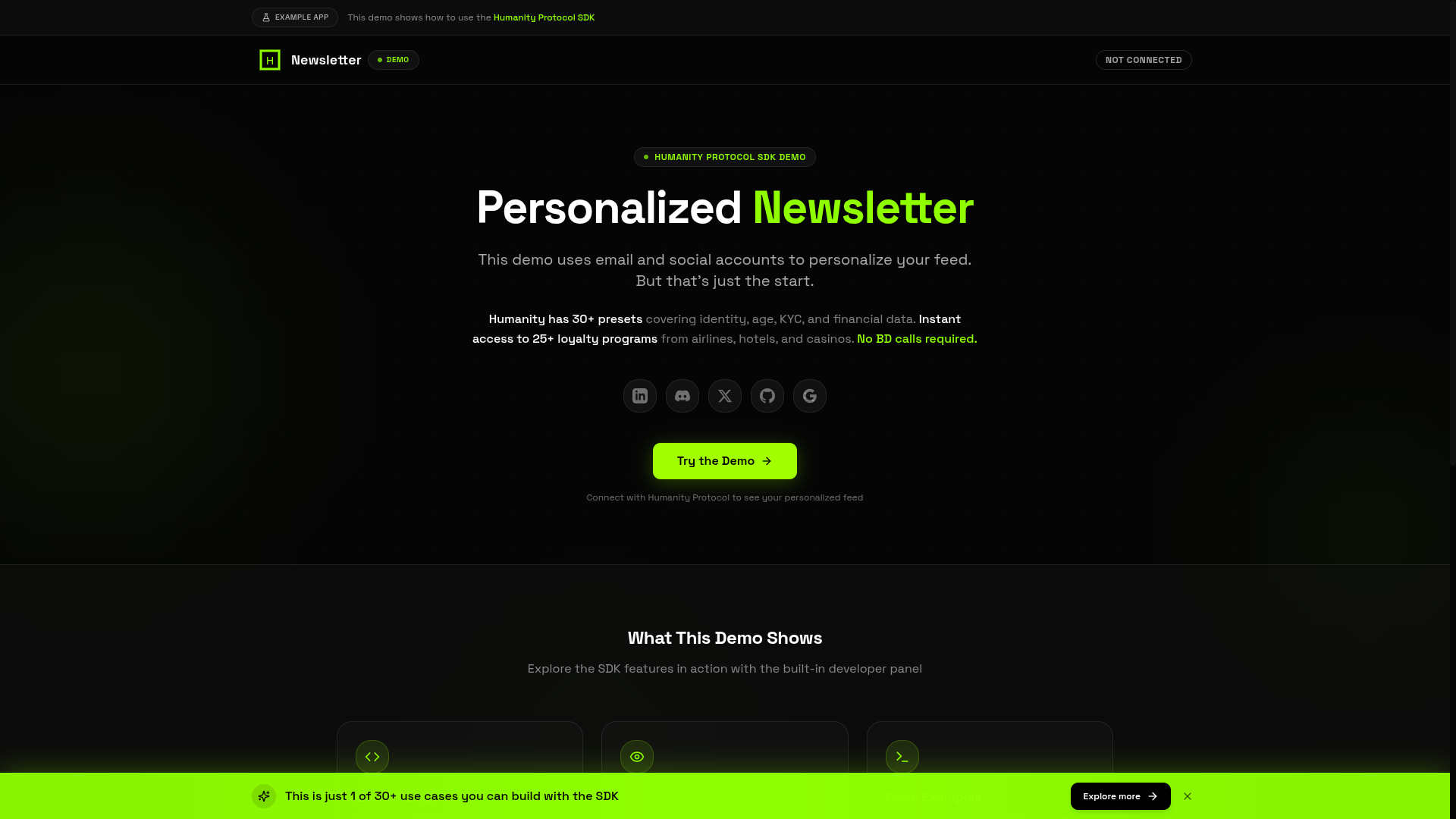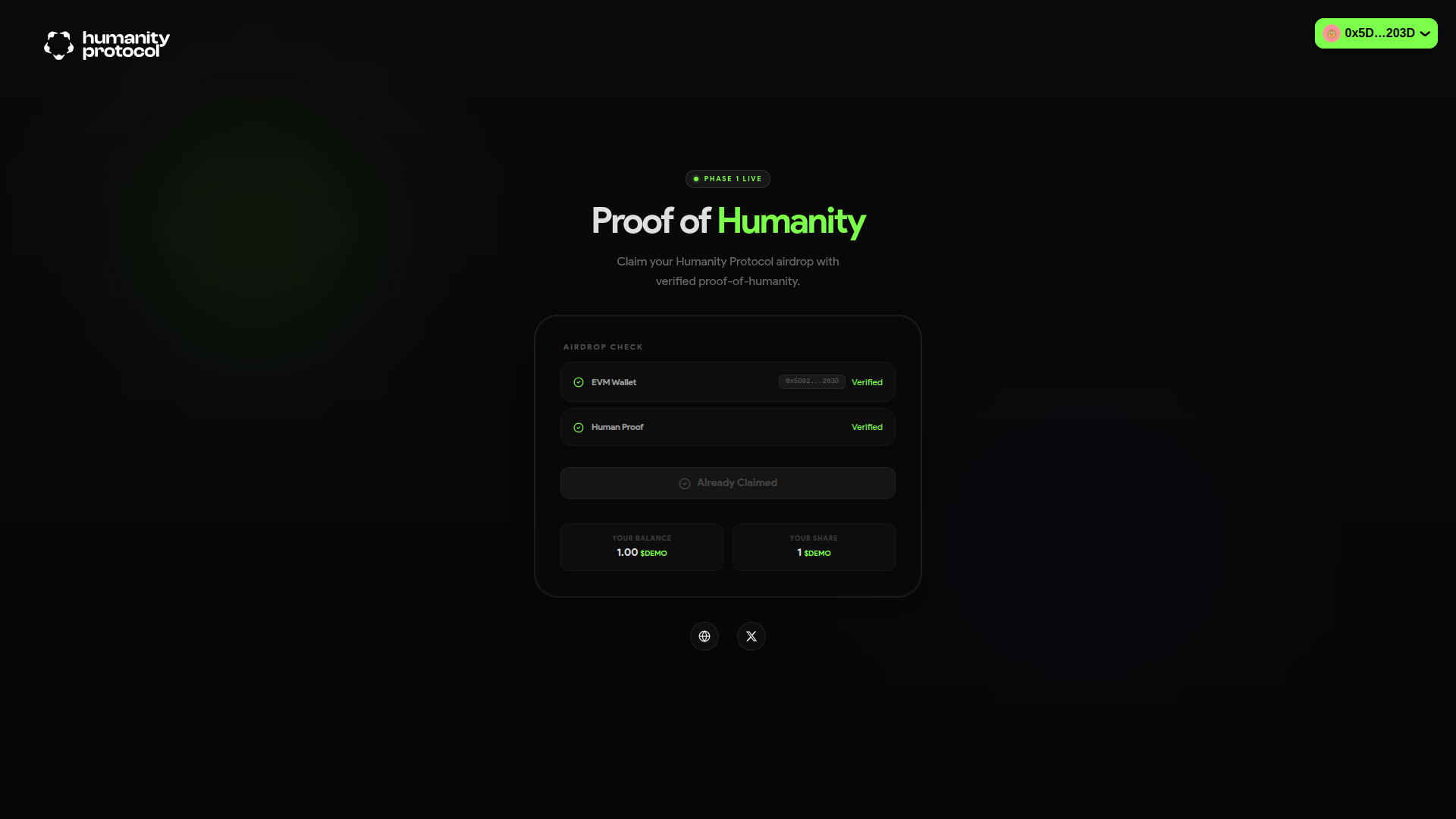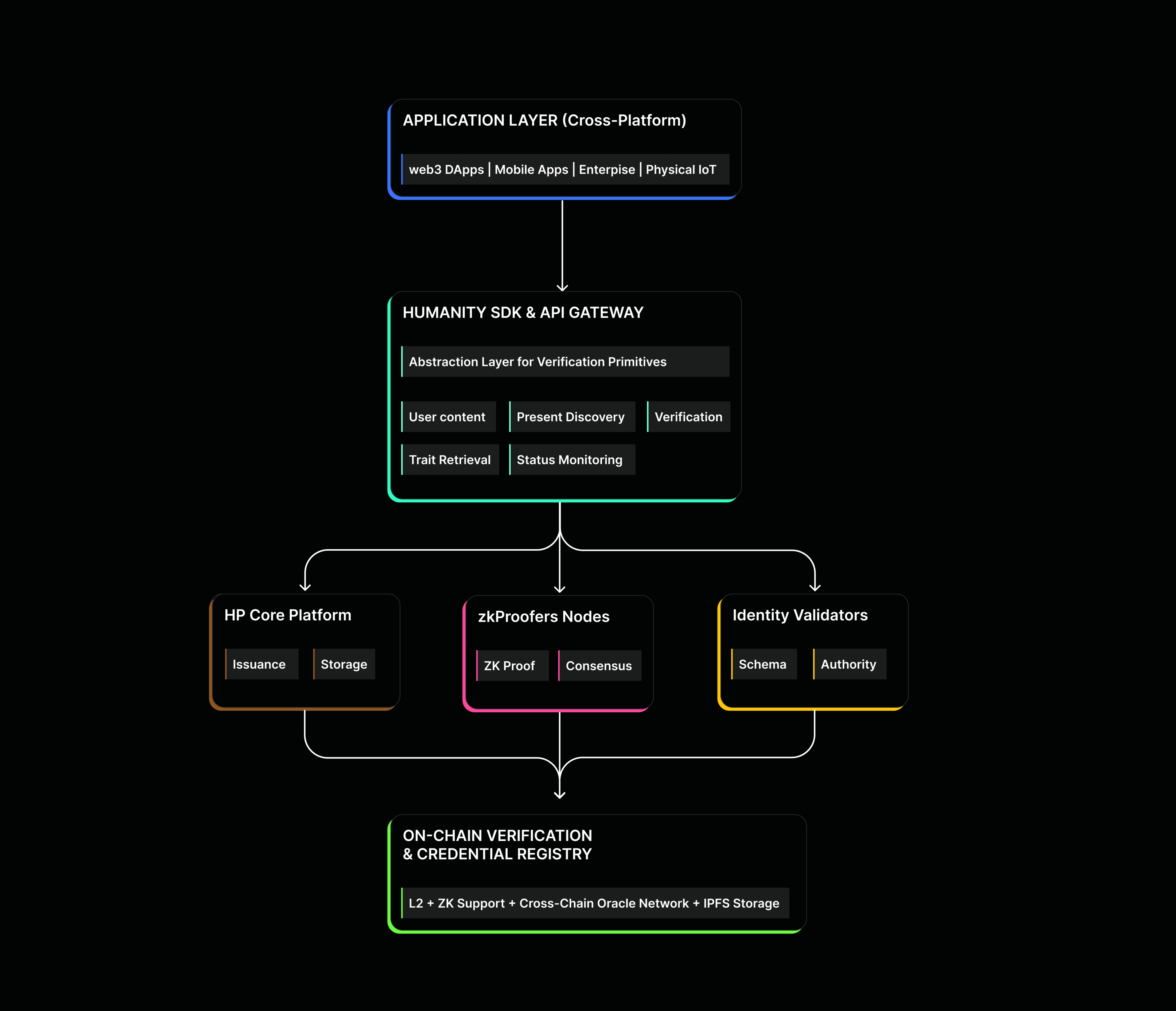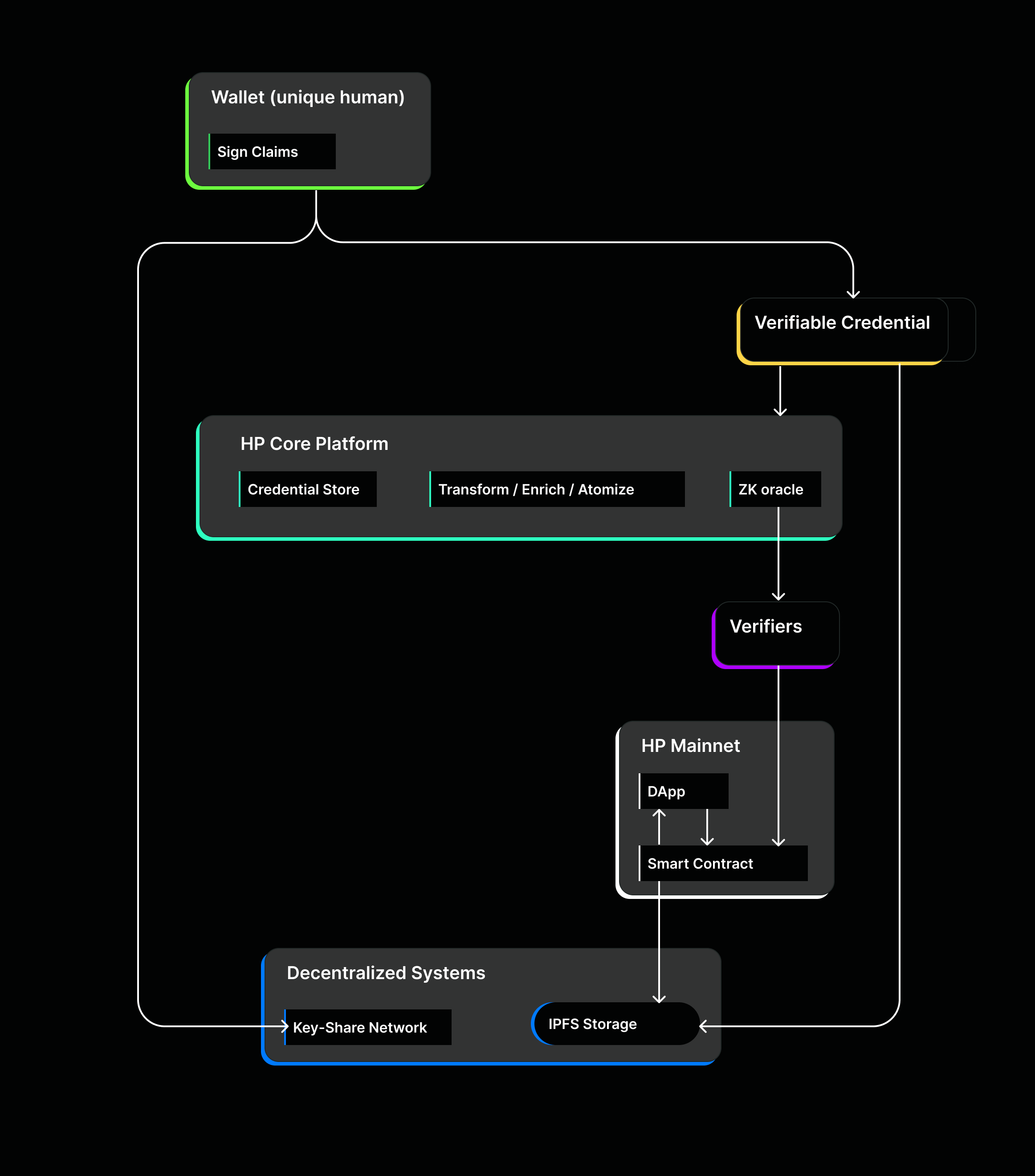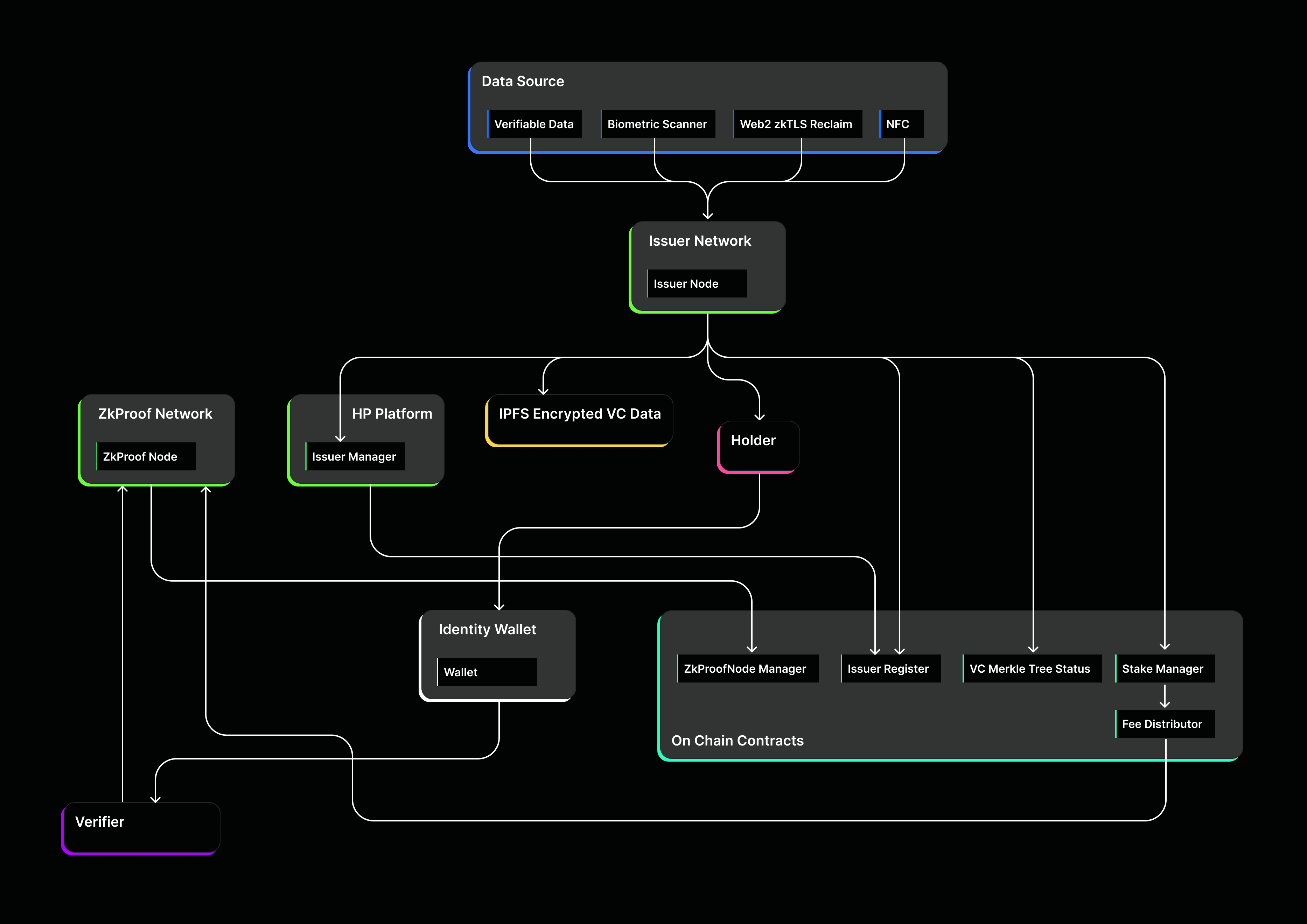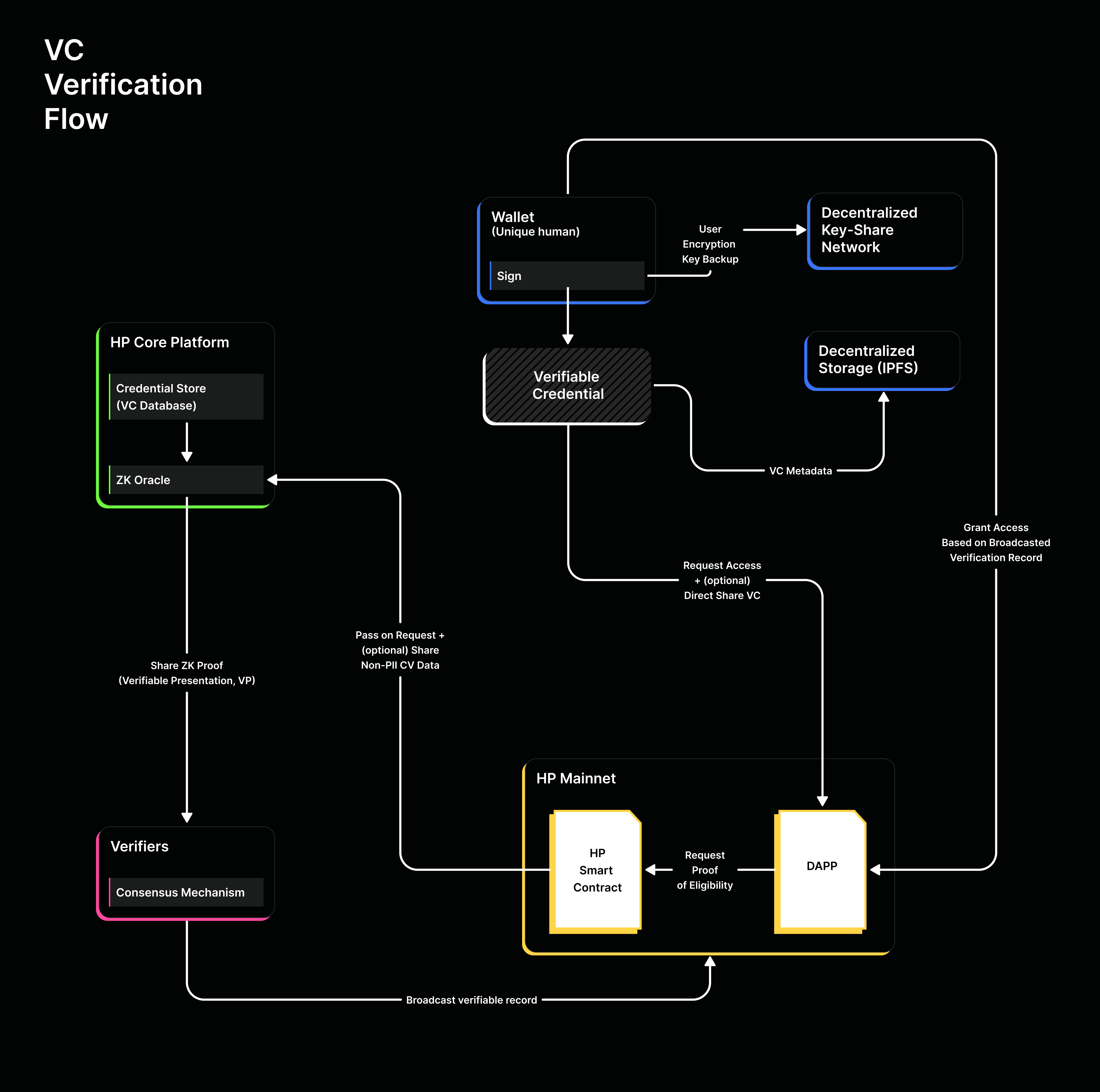
# Build with Humanity

Choose between SDK/API integration (traditional web2) or on-chain smart contracts (web3) to add proof-of-humanity verification. Includes quickstart links for both paths.

{% hint style="info" %}
🔐 **Looking for SSO?** Our SDK quickstart provides "Sign in with Humanity" — same OAuth pattern as Google or GitHub login, working integration in \~10 minutes.\
\
:arrow\_forward: [SDK QuickStart](/build-with-humanity/build-with-the-sdk-api/sdk-quickstart)\
\
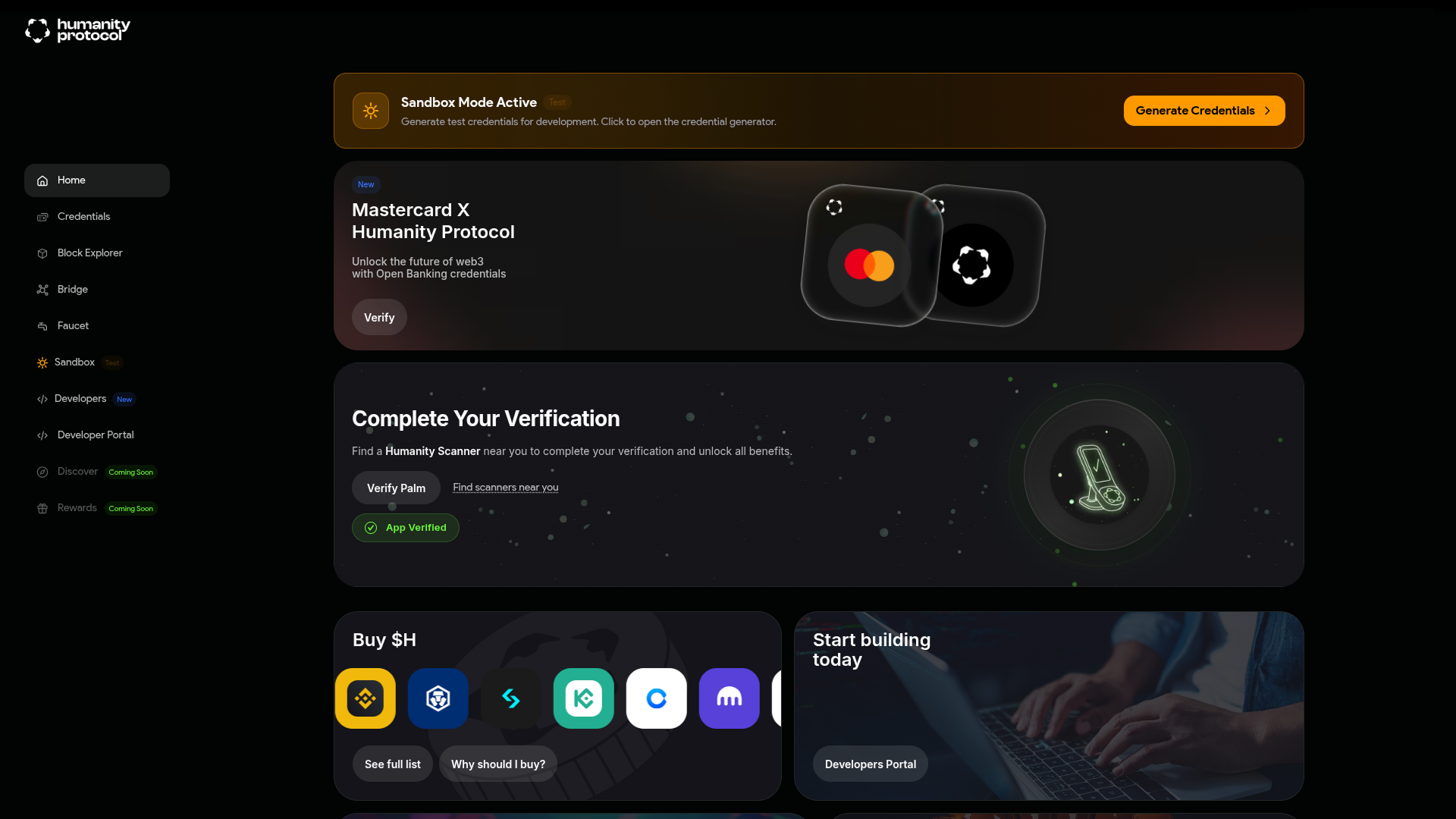
**Want to start testing against Sandbox?** You do not need real users to start building on Humanity.\
\
:arrow\_forward: [Generating Mock Credentials](/developer-guides-and-tutorials/generating-mock-credentials)
{% endhint %}

Humanity is an identity and verification layer you can add to web apps, mobile apps, and smart contracts.

<table data-card-size="large" data-view="cards"><thead><tr><th></th><th></th><th></th><th data-hidden data-card-cover data-type="image">Cover image</th><th data-hidden data-card-target data-type="content-ref"></th></tr></thead><tbody><tr><td><h3><strong>SDK / API</strong> </h3></td><td><mark style="color:$primary;"><strong>For web, backend, and mobile applications</strong></mark></td><td>Human verification and much more via OAuth. React SDK, Connect SDK, and REST API.</td><td><a href="https://383350980-files.gitbook.io/~/files/v0/b/gitbook-x-prod.appspot.com/o/spaces%2FL1EBectYBMnvu9vU5N1M%2Fuploads%2FSXhHdNa7tDH1gk19LNft%2Foff-chain-cover.png?alt=media&amp;token=b4f7d0b5-0dc6-46fd-abb1-e7993d0d9e2b">off-chain-cover.png</a></td><td><a href="/build-with-humanity/build-with-the-sdk-api/sdk-quickstart">SDK QuickStart</a></td></tr><tr><td><h3>ON-CHAIN</h3></td><td><mark style="color:$primary;"><strong>For decentralized applications</strong></mark></td><td>Work directly in smart contracts using the Verification Oracle.</td><td><a href="https://383350980-files.gitbook.io/~/files/v0/b/gitbook-x-prod.appspot.com/o/spaces%2FL1EBectYBMnvu9vU5N1M%2Fuploads%2FEKqX6gyyj8nutNgZsS3P%2Fon-chain-cover.png?alt=media&amp;token=b2602790-b79b-426a-ad70-3006287aadb7">on-chain-cover.png</a></td><td><a href="/build-with-humanity/build-on-chain/on-chain-quick-start-guide">On-Chain Quick Start Guide</a></td></tr></tbody></table>

{% hint style="info" %}
👀 Not sure where to start? Explore the [Demo Hub](https://demo.humanity.org/) to see what you can build with Humanity.
{% endhint %}


# Start Here - Choose Your Integration Path

Choose between SDK/API integration (traditional web2) or on-chain smart contracts (web3) to add proof-of-humanity verification. Includes quickstart links for both paths.

{% hint style="info" %}
🔐 Looking for SSO? The React SDK is "Sign in with Humanity" — same OAuth pattern as Google or GitHub login, working integration in \~10 minutes\
\
:arrow\_forward: [@humanity-org/react-sdk](/build-with-humanity/build-with-the-sdk-api/humanity-org-react-sdk)
{% endhint %}

Humanity is an identity and verification layer you can add to web apps, mobile apps, and smart contracts.

<table data-card-size="large" data-view="cards"><thead><tr><th></th><th></th><th></th><th data-hidden data-card-cover data-type="image">Cover image</th><th data-hidden data-card-target data-type="content-ref"></th></tr></thead><tbody><tr><td><h3><strong>SDK / API</strong> </h3></td><td><mark style="color:$primary;"><strong>For web, backend, and mobile applications</strong></mark></td><td>Human verification and much more via OAuth. React SDK, Connect SDK, and REST API.</td><td><a href="https://383350980-files.gitbook.io/~/files/v0/b/gitbook-x-prod.appspot.com/o/spaces%2FL1EBectYBMnvu9vU5N1M%2Fuploads%2FSXhHdNa7tDH1gk19LNft%2Foff-chain-cover.png?alt=media&amp;token=b4f7d0b5-0dc6-46fd-abb1-e7993d0d9e2b">off-chain-cover.png</a></td><td><a href="/build-with-humanity/build-with-the-sdk-api/sdk-quickstart">SDK QuickStart</a></td></tr><tr><td><h3>ON-CHAIN</h3></td><td><mark style="color:$primary;"><strong>For decentralized applications</strong></mark></td><td>Work directly in smart contracts using the Verification Oracle.</td><td><a href="https://383350980-files.gitbook.io/~/files/v0/b/gitbook-x-prod.appspot.com/o/spaces%2FL1EBectYBMnvu9vU5N1M%2Fuploads%2FEKqX6gyyj8nutNgZsS3P%2Fon-chain-cover.png?alt=media&amp;token=b2602790-b79b-426a-ad70-3006287aadb7">on-chain-cover.png</a></td><td><a href="/build-with-humanity/build-on-chain/on-chain-quick-start-guide">On-Chain Quick Start Guide</a></td></tr></tbody></table>

{% hint style="info" %}
👀 Not sure where to start? Explore the [Demo Hub](https://demo.humanity.org/) to see what you can build with Humanity.
{% endhint %}


# Build with the SDK / API

Build web applications with Humanity using OAuth 2.0 like Google or Stripe. Complete integration guide for web2 developers.


# SDK QuickStart

Add Sign in with Humanity to your React app in under 10 minutes — same OAuth pattern as Google or GitHub, with biometric human verification built in.

{% hint style="warning" %}
This guide uses the sandbox environment
{% endhint %}

{% embed url="<https://drive.google.com/file/d/1zVGVrae8tf77dMk8q87cDygtDgBMcotP/view?usp=sharing>" %}

<a href="https://tally.so/r/obQy0b" class="button primary">Test your knowledge of this walkthrough!</a>

The easiest way to integrate with Humanity is using our [@humanity-org/react-sdk](/build-with-humanity/build-with-the-sdk-api/humanity-org-react-sdk)

By the end of this guide, you have a React app where users authenticate with the **Sign in with Humanity** button and their biometric verification status shows up on screen. Under 10 minutes, start to finish.

***Sign in with Humanity*** works like Sign in with Google — same OAuth flow, same redirect pattern. What you get back is different: not just an attestation, but a signed biometric credential tied to a unique person.

## Before you start

You need:

* [Node 18](https://nodejs.org/en) or higher
* [Bun](https://bun.sh) — used throughout this quickstart
* Access to [Developer Portal](/developer-portal)  — register at [developers.humanity.org](https://developers.humanity.org/) &#x20;
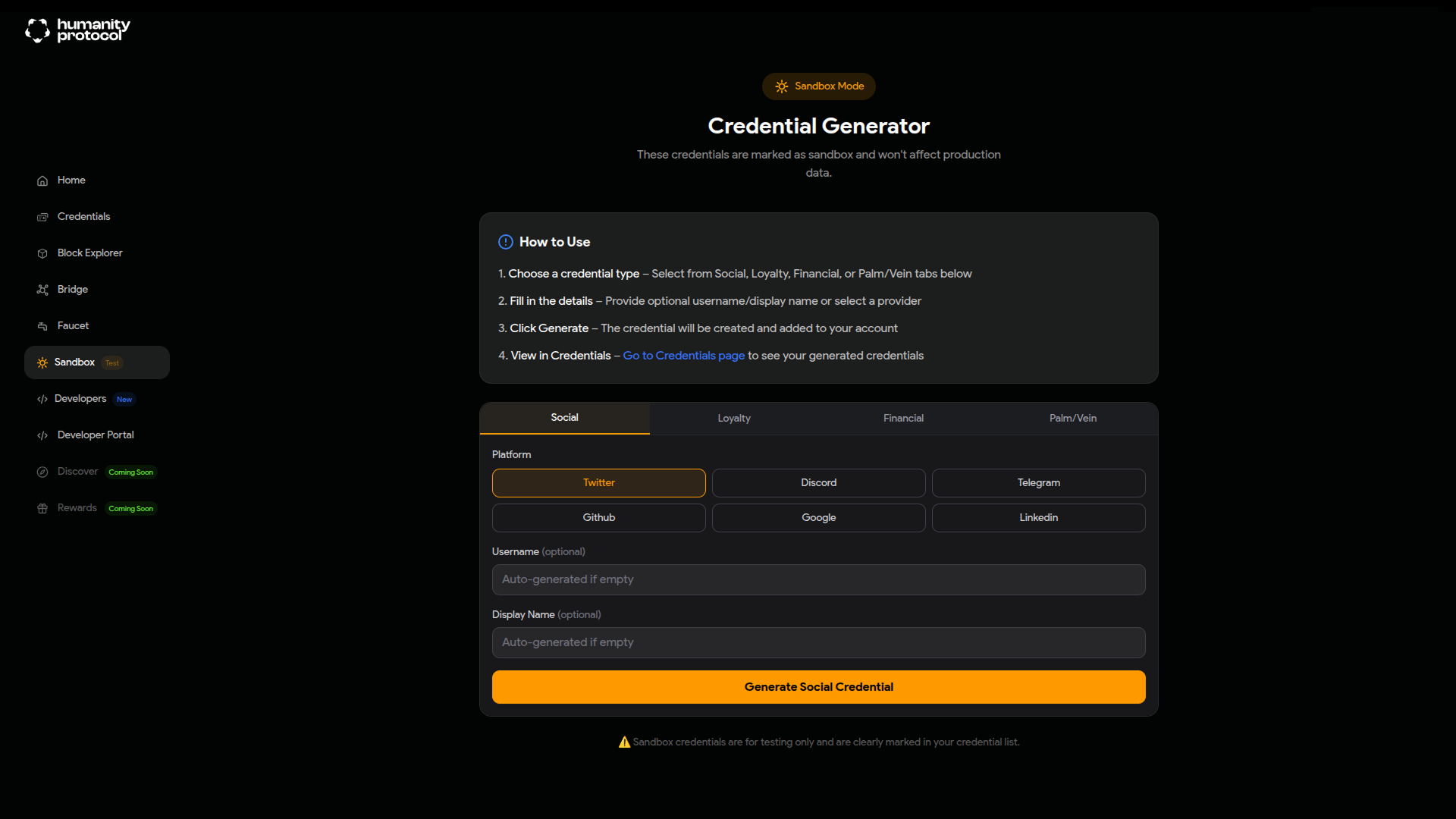
* A sandbox **Palm Print** credential — generate one at the [Sandbox Credential Generator](https://app.sandbox.humanity.org/sandbox).&#x20;

{% hint style="info" %}
New to this? See the [Generating Mock Credentials](/developer-guides-and-tutorials/generating-mock-credentials) guide
{% endhint %}

## **How this Quickstart works**

1. Register your app in the Developer Portal and get credentials
2. Install the React SDK
3. Configure your environment
4. Wrap your app with `HumanityProvider`
5. Add a sign-in button and biometric verification
6. Run the app

## Quick Start

{% stepper %}
{% step %}

### Get your credentials

Go to the [Humanity Developer Portal](https://developers.humanity.org/) and create an app. You'll need:

* `clientId` generated as you create the app — e.g. `app_xxx`
* `redirectUri` — the OAuth callback URL you'll register (e.g. `http://localhost:3000/callback`)

Under **Settings** register the `redirectUri` in this case `http://localhost:3000/callback` .

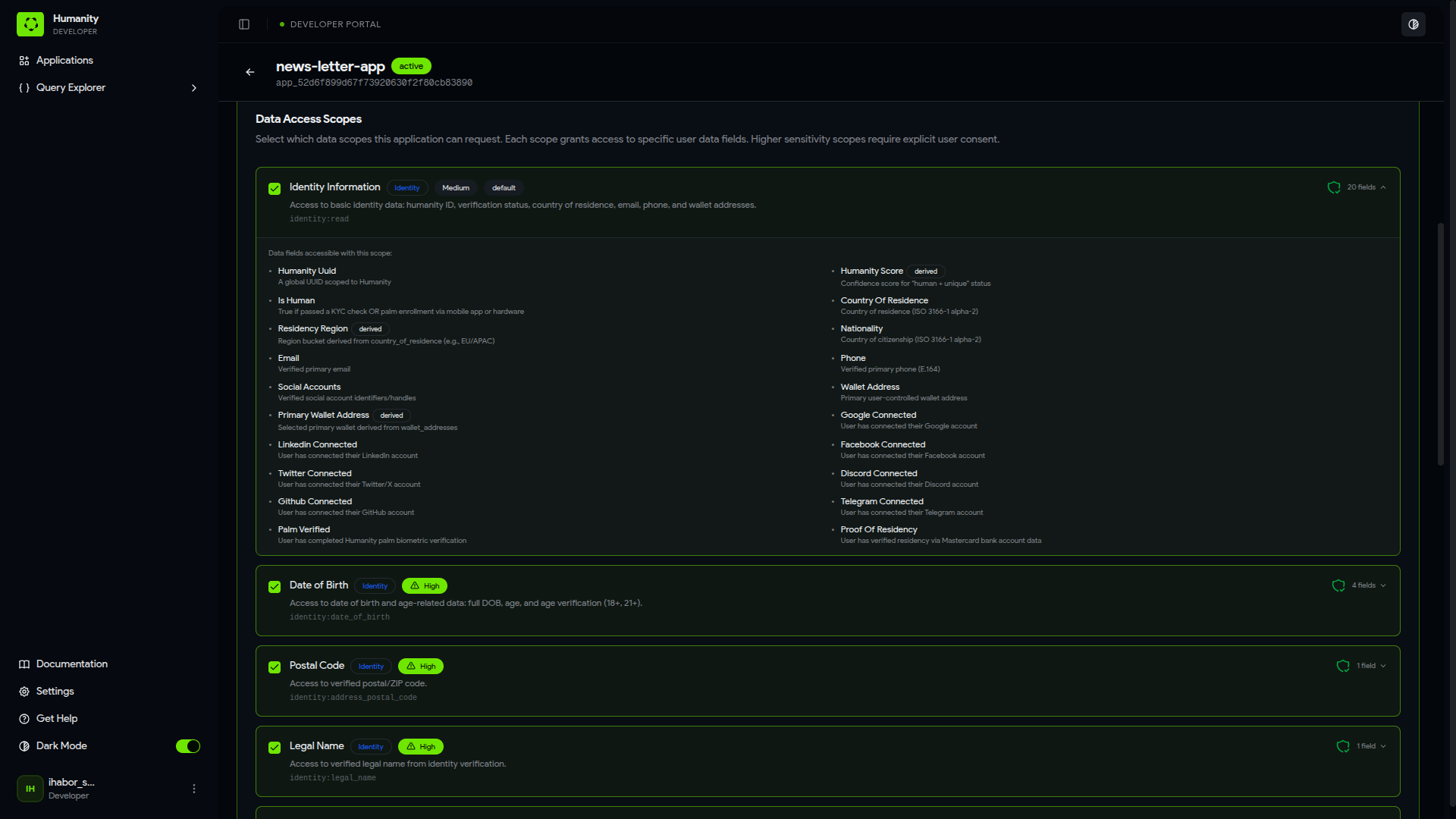
Also under **Settings** you'll also select which **scopes** your app will request. For this example we need to request ***Identity Information (identity:read)*** that contains **Palm Verifed** and ***OpenID Connect (openid)***.
{% endstep %}

{% step %}

### Create the project and install dependencies

Scaffold a new Vite + React + TypeScript project:

```bash
bun create vite hello-humanity-react-sdk-app --template react-ts
```

When prompted "*Install with bun and start now?*" select "**no"** then

```shellscript
cd hello-humanity-react-sdk-app
```

Install the React SDK and its dependencies:

```bash
bun add @humanity-org/react-sdk react-router-dom
bun add -d vite-plugin-node-polyfills @types/node
```

The SDK uses Node crypto APIs internally — `vite-plugin-node-polyfills` makes these available in the browser. Update `vite.config.ts`:

```tsx
import { defineConfig } from 'vite';
import react from '@vitejs/plugin-react';
import { nodePolyfills } from 'vite-plugin-node-polyfills';

export default defineConfig({
  plugins: [
    react(),
    nodePolyfills({
      include: ['crypto', 'buffer', 'stream', 'util'],
      globals: { Buffer: true, process: true },
    }),
  ],
  server: { port: 3000 },
});
```

{% endstep %}

{% step %}

### Configure your environment

Create a `.env.local` file at the project root:

```
VITE_HUMANITY_CLIENT_ID=app_your_client_id_here
VITE_HUMANITY_ENVIRONMENT=sandbox
VITE_REDIRECT_URI=http://localhost:3000/callback
```

{% hint style="warning" %}
Make sure you are using the `cliend_id` from the **sandbox** environment tab.
{% endhint %}
{% endstep %}

{% step %}

### Wrap your app with `HumanityProvider`

Replace `src/main.tsx` with:

```tsx
import React from 'react';
import ReactDOM from 'react-dom/client';
import { BrowserRouter } from 'react-router-dom';
import { HumanityProvider } from '@humanity-org/react-sdk';
import '@humanity-org/react-sdk/styles.css';
import './index.css';
import App from './App';

const clientId = import.meta.env.VITE_HUMANITY_CLIENT_ID;
const environment = import.meta.env.VITE_HUMANITY_ENVIRONMENT || 'sandbox';
const redirectUri = import.meta.env.VITE_REDIRECT_URI || window.location.origin + '/callback';

ReactDOM.createRoot(document.getElementById('root')!).render(
  <React.StrictMode>
    <BrowserRouter>
      <HumanityProvider
        clientId={clientId}
        redirectUri={redirectUri}
        environment={environment as 'production' | 'sandbox'}
        storage="sessionStorage"
        onError={(error) => console.error('[Humanity]', error)}
      >
        <App />
      </HumanityProvider>
    </BrowserRouter>
  </React.StrictMode>,
);
```

{% hint style="info" %}
`BrowserRouter` must wrap `HumanityProvider` — the SDK uses the router to handle the OAuth return.
{% endhint %}
{% endstep %}

{% step %}

### Add authentication and biometric verification

Replace `src/App.tsx` with:

```tsx
import { Routes, Route, useNavigate } from 'react-router-dom';
import {
  HumanityConnect,
  useHumanity,
  useVerification,
  clearVerificationCache,
} from '@humanity-org/react-sdk';
import { useEffect } from 'react';

function IsHumanCheck() {
  const { verify, result, isLoading } = useVerification(); 
  useEffect(() => {  
    verify('is_human');
  // eslint-disable-next-line react-hooks/exhaustive-deps
  }, []);
 
  const isHuman = result?.value === true;

  return (
    <div className="status-card">
      {isLoading && <p className="status-checking">Checking biometric status...</p>}
      {!isLoading && isHuman && <p className="status-verified">✓ Biometrically verified</p>}
      {!isLoading && !isHuman && <p className="status-unverified">✗ Not biometrically verified</p>}
      {!isLoading && (
        <button
          className="btn-secondary"
          onClick={() => { clearVerificationCache(); verify('is_human'); }}
        >
          Re-check
        </button>
      )}
    </div>
  );
}

function Home() {
  const { isAuthenticated, isLoading, logout } = useHumanity();

  if (isLoading) return <div className="screen"><p>Loading...</p></div>;

  if (!isAuthenticated) {
    return (
      <div className="screen">
        <h1>Humanity react-sdk-quickstart</h1>
        <p>Connect your Humanity account to check your biometric verification status.</p>
        <HumanityConnect
          mode="redirect"
          scopes={['openid', 'identity:read']}
          onError={(err) => console.error(err)}
        />
      </div>
    );
  }

  return (
    <div className="screen">
      <h1>Humanity react-sdk-quickstart</h1>
      <IsHumanCheck />
      <button className="btn-ghost" onClick={logout}>Sign out</button>
    </div>
  );
}

function Callback() {
  const { isAuthenticated, isLoading } = useHumanity();
  const navigate = useNavigate();

  useEffect(() => {
    if (!isLoading && isAuthenticated) navigate('/', { replace: true });
  }, [isAuthenticated, isLoading, navigate]);

  return <div className="screen"><p>Completing sign-in...</p></div>;
}

export default function App() {
  return (
    <Routes>
      <Route path="/" element={<Home />} />
      <Route path="/callback" element={<Callback />} />
    </Routes>
  );
}
```

{% hint style="danger" %}
**Firefox and Safari users:** both browsers clear session storage during cross-domain OAuth redirects, which can break the callback step and cause sign-in to fail silently. Recommended browsers are **Chrome** or **Brave**
{% endhint %}

Replace `src/index.css` with:

```css
*, *::before, *::after {
  box-sizing: border-box;
  margin: 0;
  padding: 0;
}

body {
  font-family: system-ui, -apple-system, sans-serif;
  background: #0a0a0a;
  color: #ededed;
  -webkit-font-smoothing: antialiased;
}

.screen {
  min-height: 100vh;
  display: flex;
  flex-direction: column;
  align-items: center;
  justify-content: center;
  gap: 1.5rem;
  padding: 2rem;
  text-align: center;
}

.screen h1 {
  font-size: 1.75rem;
  font-weight: 600;
}

.screen p {
  color: #888;
  font-size: 0.95rem;
}

.status-card {
  border: 1px solid #2a2a2a;
  border-radius: 12px;
  padding: 2rem;
  width: min(100%, 360px);
  display: flex;
  flex-direction: column;
  align-items: center;
  gap: 1rem;
  background: #141414;
}

.status-checking {
  color: #666;
}

p.status-verified {
  font-weight: 600;
  font-size: 1.1rem;
  color: #4ade80;
}

p.status-unverified {
  font-weight: 600;
  font-size: 1.1rem;
  color: #f87171;
}

.btn-secondary {
  padding: 0.5rem 1.25rem;
  border: 1px solid #333;
  border-radius: 8px;
  background: #1f1f1f;
  color: #ededed;
  cursor: pointer;
  font-size: 0.875rem;
}

.btn-ghost {
  padding: 0.5rem 1.25rem;
  border: 1px solid #2a2a2a;
  border-radius: 8px;
  background: none;
  cursor: pointer;
  font-size: 0.875rem;
  color: #666;
}

.btn-secondary:hover { background: #2a2a2a; }
.btn-ghost:hover { background: #141414; }
```

{% endstep %}

{% step %}

### Run it

```shellscript
bun dev
```

Open <http://localhost:3000>. Click the ***Sign-in with humanity button***, complete the OAuth flow, and you'll land back on the home page with the biometric status visible.
{% endstep %}
{% endstepper %}

## Next Steps

* Explore the [react SDK reference](https://docs.humanity.org/build-with-humanity/build-with-the-sdk-api/humanity-org-react-sdk) → All components, hooks, and error types
* Use our [code references](/starter-templates-and-examples/sdk-integration-templates/react-sdk-examples)  → Ready-to-run projects if you'd rather start from a working example

{% hint style="info" %}
Not building in React, or need full OAuth control? → [@humanity-org/connect-sdk](/build-with-humanity/build-with-the-sdk-api/humanity-org-connect-sdk)
{% endhint %}


# SDK OAuth Scopes and Presets

Configure what user data your app can access using OAuth scopes. Complete list available presets including identity, KYC, financial, and social data.

> Working with sandbox?. Create your credentials for testing directly [from the Dashboard ](https://app.humanity.org/sandbox)

## OAuth Scopes

Scopes control what data your application can request from users. When a user authorizes your app, they consent to sharing data covered by the requested scopes.

### Scope Model

* **Category scopes** (e.g., `identity:read`) grant access to all low/medium sensitivity presets in that category
* **Field-level scopes** (e.g., `identity:date_of_birth`) are required for high/critical sensitivity presets
* Derived fields are automatically available when the parent field scope is granted

***

## Available Scopes

### Core Scopes

<table><thead><tr><th width="372.640625">Scope</th><th>Description</th></tr></thead><tbody><tr><td><code>openid</code></td><td>Required for OpenID Connect flows</td></tr><tr><td><code>profile.full</code></td><td>Access to full Humanity profile</td></tr></tbody></table>

### Identity Scopes

| Scope                          | Sensitivity | Description                                                      |
| ------------------------------ | ----------- | ---------------------------------------------------------------- |
| `identity:read`                | Low/Medium  | Access to basic identity presets (email, phone, is\_human, etc.) |
| `identity:date_of_birth`       | High        | Access to date of birth and age-related presets                  |
| `identity:legal_name`          | High        | Access to legal name                                             |
| `identity:address_postal_code` | High        | Access to postal/ZIP code                                        |
| `identity:address_full`        | High        | Access to full verified address                                  |

### KYC Scopes

| Scope                 | Sensitivity | Description                                |
| --------------------- | ----------- | ------------------------------------------ |
| `kyc:read`            | Low/Medium  | Access to KYC status and document metadata |
| `kyc:document_number` | High        | Access to ID document number               |

### Financial Scopes

| Scope                    | Sensitivity | Description                             |
| ------------------------ | ----------- | --------------------------------------- |
| `financial:net_worth`    | High        | Access to net worth data and thresholds |
| `financial:bank_balance` | High        | Access to bank balance totals           |
| `financial:loan_balance` | High        | Access to loan balance totals           |

***

## Presets by Scope

Preset availability within each scope, across sandbox and production. ✅ available · ❌ not yet available.

{% hint style="info" %}
You can use camel case when requesting scopes as well so, for example `is_human` can also be requested as `isHuman` .&#x20;
{% endhint %}

### `identity:read`

Grants access to basic identity verification presets.

<table><thead><tr><th width="206.8515625">Preset</th><th width="102.7578125">Type</th><th width="226.81640625">Description</th><th width="113.04296875">Sandbox</th><th>Production</th></tr></thead><tbody><tr><td><code>humanity_uuid</code></td><td>string</td><td>User’s Humanity unique identifier</td><td>✅</td><td>✅</td></tr><tr><td><code>humanity_score</code></td><td>number</td><td>Confidence score for human verification</td><td>✅</td><td>✅</td></tr><tr><td><code>is_human</code></td><td>boolean</td><td>Whether user passed palm/vein verification</td><td>✅</td><td>✅</td></tr><tr><td><code>country_of_residence</code></td><td>string</td><td>Country of residence (ISO 3166-1 alpha-2)</td><td>✅</td><td>✅</td></tr><tr><td><code>nationality</code></td><td>string</td><td>Country of citizenship (ISO 3166-1 alpha-2)</td><td>✅</td><td>✅</td></tr><tr><td><code>residency_region</code></td><td>string</td><td>Region bucket (EU, APAC, NA, LATAM, OTHER)</td><td>✅</td><td>✅</td></tr><tr><td><code>email</code></td><td>string</td><td>Verified primary email address</td><td>✅</td><td>✅</td></tr><tr><td><code>phone</code></td><td>string</td><td>Verified primary phone (E.164 format)</td><td>✅</td><td>✅</td></tr><tr><td><code>social_accounts</code></td><td>array</td><td>Linked social account identifiers</td><td>✅</td><td>✅</td></tr><tr><td><code>primary_wallet_address</code></td><td>string</td><td>Primary wallet address</td><td>✅</td><td>✅</td></tr><tr><td><code>palm_verified</code></td><td>boolean</td><td>Whether user completed palm verification</td><td>✅</td><td>✅</td></tr><tr><td><code>proof_of_residency</code></td><td>boolean</td><td>Whether residency is verified</td><td>✅</td><td>✅</td></tr></tbody></table>

### `identity:date_of_birth`

Grants access to date of birth and derived age presets.

<table><thead><tr><th width="209.56640625">Preset</th><th width="101.7578125">Type</th><th width="226.58203125">Description</th><th width="114.40625">Sandbox</th><th>Production</th></tr></thead><tbody><tr><td><code>date_of_birth</code></td><td>date</td><td>Full date of birth (YYYY-MM-DD)</td><td>✅</td><td>❌</td></tr><tr><td><code>age</code></td><td>integer</td><td>User’s current age</td><td>✅</td><td>❌</td></tr><tr><td><code>is_18_plus</code></td><td>boolean</td><td>Whether user is 18 or older</td><td>✅</td><td>❌</td></tr><tr><td><code>is_21_plus</code></td><td>boolean</td><td>Whether user is 21 or older</td><td>✅</td><td>❌</td></tr></tbody></table>

### `identity:legal_name`

<table><thead><tr><th width="213.6484375">Preset</th><th width="97.0390625">Type</th><th width="233.37890625">Description</th><th width="107.60546875">Sandbox</th><th>Production</th></tr></thead><tbody><tr><td><code>legal_name</code></td><td>string</td><td>Full legal name from identity verification</td><td>❌</td><td>❌</td></tr></tbody></table>

### `identity:address_postal_code`

<table><thead><tr><th width="217.7265625">Preset</th><th width="97.7578125">Type</th><th width="231.01953125">Description</th><th width="108.96484375">Sandbox</th><th>Production</th></tr></thead><tbody><tr><td><code>address_postal_code</code></td><td>string</td><td>Postal/ZIP code</td><td>❌</td><td>❌</td></tr></tbody></table>

### `identity:address_full`

<table><thead><tr><th width="223.16796875">Preset</th><th width="97.48046875">Type</th><th width="227.6640625">Description</th><th width="108.9609375">Sandbox</th><th>Production</th></tr></thead><tbody><tr><td><code>address_full</code></td><td>string</td><td>Full verified address</td><td>❌</td><td>❌</td></tr></tbody></table>

### `kyc:read`

Grants access to KYC verification status and document metadata.

<table><thead><tr><th width="223.1640625">Preset</th><th width="98.8359375">Type</th><th width="234.45703125">Description</th><th width="104.88671875"></th><th></th></tr></thead><tbody><tr><td><code>kyc_passed</code></td><td>boolean</td><td>Overall KYC verification status</td><td>✅</td><td>✅</td></tr><tr><td><code>kyc_last_updated_at</code></td><td>datetime</td><td>Timestamp of last KYC update</td><td>✅</td><td>✅</td></tr><tr><td><code>document_country</code></td><td>string</td><td>Issuing country of identity document</td><td>❌</td><td>❌</td></tr><tr><td><code>document_expiry_date</code></td><td>date</td><td>Document expiration date</td><td>❌</td><td>❌</td></tr></tbody></table>

### `kyc:document_number`

<table><thead><tr><th width="223.16796875">Preset</th><th width="98.8359375">Type</th><th width="232.1015625">Description</th><th width="104.88671875">Sandbox</th><th>Production</th></tr></thead><tbody><tr><td><code>document_number</code></td><td>string</td><td>ID document number (sensitive)</td><td>❌</td><td>❌</td></tr></tbody></table>

### `financial:net_worth`

Grants access to net worth data and verification.

<table><thead><tr><th width="223.1640625">Preset</th><th width="98.8359375">Type</th><th width="231.73828125">Description</th><th width="104.8828125">Sandbox</th><th>Production</th></tr></thead><tbody><tr><td><code>net_worth_total</code></td><td>number</td><td>Total net worth (USD)</td><td>✅</td><td>✅</td></tr><tr><td><code>net_worth_above_10k</code></td><td>boolean</td><td>Whether net worth exceeds $10,000</td><td>✅</td><td>✅</td></tr><tr><td><code>net_worth_above_100k</code></td><td>boolean</td><td>Whether net worth exceeds $100,000</td><td>✅</td><td>✅</td></tr><tr><td><code>proof_of_assets</code></td><td>boolean</td><td>Whether user has verified assets</td><td>✅</td><td>✅</td></tr><tr><td><code>proof_of_investments</code></td><td>boolean</td><td>Whether user has verified investments</td><td>✅</td><td>✅</td></tr><tr><td><code>proof_of_retirement</code></td><td>boolean</td><td>Whether user has verified retirement savings</td><td>✅</td><td>✅</td></tr></tbody></table>

### `financial:bank_balance`

<table><thead><tr><th width="223.16796875">Preset</th><th width="98.83984375">Type</th><th width="233.45703125">Description</th><th width="104.88671875">Sandbox</th><th>Production</th></tr></thead><tbody><tr><td><code>bank_balance_total</code></td><td>number</td><td>Total bank balance (USD)</td><td>❌</td><td>❌</td></tr></tbody></table>

### `financial:loan_balance`

<table><thead><tr><th width="231.32421875">Preset</th><th width="100.2734375">Type</th><th width="229.09765625">Description</th><th width="104.88671875">Sandbox</th><th>Production</th></tr></thead><tbody><tr><td><code>loan_balance_total</code></td><td>number</td><td>Total loan balance (USD)</td><td>❌</td><td>❌</td></tr><tr><td><code>proof_of_mortgage</code></td><td>boolean</td><td>Whether user has verified mortgage</td><td>❌</td><td>❌</td></tr></tbody></table>

### `profile.full`

<table><thead><tr><th width="221.80859375">Preset</th><th width="103.91796875">Type</th><th width="231.1015625">Description</th><th width="106.24609375">Sandbox</th><th>Production</th></tr></thead><tbody><tr><td><code>humanity_user</code></td><td>string[]</td><td>Full Humanity profile access</td><td>✅</td><td>✅</td></tr></tbody></table>

***

## Example Scope Requests

### Minimal - Human Verification Only

```
scope=openid identity:read
```

Grants access to: `is_human`, `humanity_uuid`, `email`, `phone`, etc.

### Age Verification (21+)

```
scope=openid identity:date_of_birth
```

Grants access to: `age_over_21`, `age_over_18`, `age`, `date_of_birth`

### Full Identity Profile

```
scope=openid identity:read identity:date_of_birth identity:legal_name
```

Grants access to all identity presets including age and legal name.

### KYC Verification

```
scope=openid kyc:read
```

Grants access to: `kyc_passed`, `document_country`, `document_expiry_date`

### Financial Verification

```
scope=openid financial:net_worth
```

Grants access to: `net_worth_total`, `net_worth_above_10k`, `net_worth_above_100k`

### Comprehensive Access

```
scope=openid identity:read identity:date_of_birth kyc:read financial:net_worth
```

Grants access to identity, age, KYC status, and net worth presets.

***

## Preset Queries

All presets are defined as declarative queries evaluated by the query engine.

### Identity Presets

#### `humanity_uuid`

```tsx
{ check: { claim: 'identity.humanity_id', operator: 'get' } }
```

#### `humanity_score`

```tsx
{ check: { claim: 'identity.humanity_score', operator: 'get' } }
```

#### `is_human`

```tsx
{
  policy: {
    anyOf: [
      { check: { claim: 'identity.palm_verified', operator: '==', value: true } },
      { check: { claim: 'identity.vein_verified', operator: '==', value: true } },
    ],
  },
}
```

#### `country_of_residence`

```tsx
{ check: { claim: 'identity.country_of_residence', operator: 'get' } }
```

#### `age`

```tsx
{ check: { claim: 'identity.age', operator: 'get' } }
```

#### `address_postal_code`

```tsx
{ check: { claim: 'identity.postal_code', operator: 'get' } }
```

#### `legal_name`

```tsx
{ check: { claim: 'identity.legal_name', operator: 'get' } }
```

#### `residency_region`

```tsx
{ check: { claim: 'identity.region', operator: 'get' } }
```

#### `age_over_18`

```tsx
{ check: { claim: 'identity.age', operator: '>=', value: 18 } }
```

#### `nationality`

```tsx
{ check: { claim: 'identity.nationality', operator: 'get' } }
```

#### `address_full`

```tsx
{ check: { claim: 'identity.address', operator: 'get' } }
```

#### `date_of_birth`

```tsx
{ check: { claim: 'identity.date_of_birth', operator: 'get' } }
```

#### `email`

```tsx
{ check: { claim: 'identity.email', operator: 'get' } }
```

#### `phone`

```tsx
{ check: { claim: 'identity.phone', operator: 'get' } }
```

#### `age_over_21`

```tsx
{ check: { claim: 'identity.age', operator: '>=', value: 21 } }
```

#### `social_accounts`

```tsx
{ check: { claim: 'identity.social_accounts', operator: 'get' } }
```

#### `wallet_addresses`

```tsx
{ check: { claim: 'identity.wallet_addresses', operator: 'get' } }
```

#### `primary_wallet_address`

```tsx
{ check: { claim: 'identity.wallet_addresses', operator: 'get' } }
```

#### `palm_verified`

```tsx
{ check: { claim: 'identity.palm_verified', operator: '==', value: true } }
```

### KYC Presets

#### `kyc_passed`

```tsx
{
  policy: {
    anyOf: [
      { check: { claim: 'kyc.passed', operator: '==', value: true } },
      { check: { claim: 'kyc.status', operator: '==', value: 'verified' } },
      { check: { claim: 'kyc.status', operator: '==', value: 'passed' } },
      { check: { claim: 'kyc.status', operator: '==', value: 'approved' } },
      { check: { claim: 'kyc.status', operator: '==', value: 'complete' } },
    ],
  },
}
```

#### `kyc_last_updated_at`

```tsx
{ check: { claim: 'kyc.last_updated_at', operator: 'get' } }
```

#### `document_number`

```tsx
{ check: { claim: 'kyc.document_number', operator: 'get' } }
```

#### `document_country`

```tsx
{ check: { claim: 'kyc.document_country', operator: 'get' } }
```

#### `document_expiry_date`

```tsx
{ check: { claim: 'kyc.document_expiry', operator: 'get' } }
```

### Financial Presets

#### `net_worth_above_10k`

```tsx
{ check: { claim: 'financial.net_worth', operator: '>', value: 10000 } }
```

#### `net_worth_above_100k`

```tsx
{ check: { claim: 'financial.net_worth', operator: '>', value: 100000 } }
```

#### `net_worth_total`

```tsx
{ check: { claim: 'financial.net_worth', operator: 'get' } }
```

#### `bank_balance_total`

```tsx
{ check: { claim: 'financial.bank_balance', operator: 'get' } }
```

#### `loan_balance_total`

```tsx
{ check: { claim: 'financial.loan_balance', operator: 'get' } }
```

### Legacy/Compound Presets

#### `humanity_user`

```tsx
{
  policy: {
    allOf: [
      { check: { claim: 'identity.humanity_id', operator: 'exists' } },
      {
        policy: {
          anyOf: [
            { check: { claim: 'identity.palm_verified', operator: '==', value: true } },
            { check: { claim: 'identity.vein_verified', operator: '==', value: true } },
          ],
        },
      },
    ],
  },
}
```

#### `proof_of_assets`

```tsx
{ check: { claim: 'financial.net_worth', operator: '>', value: 0 } }
```

#### `proof_of_investments`

```tsx
{ check: { claim: 'financial.investment_balance', operator: '>', value: 0 } }
```

#### `proof_of_mortgage`

```tsx
{ check: { claim: 'financial.loan_balance', operator: '>', value: 0 } }
```

#### `proof_of_residency`

```tsx
{ check: { claim: 'identity.country_of_residence', operator: 'exists' } }
```

#### `proof_of_retirement`

```tsx
{ check: { claim: 'financial.retirement_balance', operator: '>', value: 0 } }
```

***

## Query Operators

| Operator       | Description                                                          |
| -------------- | -------------------------------------------------------------------- |
| **get**        | Returns the claim value if present (used for data retrieval presets) |
| **exists**     | Passes if claim value is present (not null/undefined)                |
| **==**         | Strict equality comparison                                           |
| **!=**         | Not equals comparison                                                |
| **>**          | Greater than (numeric)                                               |
| **>=**         | Greater than or equal (numeric)                                      |
| **<**          | Less than (numeric)                                                  |
| **<=**         | Less than or equal (numeric)                                         |
| **in**         | Value is in the provided array                                       |
| **notIn**      | Value is not in the provided array                                   |
| **contains**   | String/array contains the expected value                             |
| **startsWith** | String starts with the expected prefix                               |
| **regex**      | Value matches the regex pattern                                      |

***

## Notes

* **Scope Requirements**: Your application’s `allowedScopes` must include any scope you request. Configure this in the developer dashboard.
* **User Consent**: Users must explicitly approve each scope category during authorization.
* **`get` vs `exists`**: Use `get` when you need the actual value (e.g., email, phone). Use `exists` for presence checks in compound queries.
* **Claim Normalization**: The ClaimResolver normalizes incoming claim values to canonical types before evaluation.
* **Query Evaluation**: All presets are evaluated by the QueryEngineService using credentials from the user’s context.

## Claim Paths (Advanced)

Presets are built on top of a set of verified data points called **claim paths**.

Claim paths represent attributes that Humanity can evaluate against a user’s credentials, such as identity signals, KYC status, financial indicators, or connected accounts. Most integrations **do not need to work with claim paths directly**.

Presets provide a stable, opinionated way to request common checks (for example, `is_human` or `is_21_plus`) without dealing with underlying data structures.

**For advanced use cases**—such as composing more granular policies or understanding what data powers a preset—you can explore the full list of available claim paths in the Developer Dashboard.

[Developer Dashboard](https://developers.humanity.org/dashboard/queries/paths)


# @humanity-org/react-sdk

React-first setup, core components and hooks, authentication flow, and essential usage patterns for the Humanity React SDK.

{% hint style="info" %}
Not building in React, or need full OAuth control? → [@humanity-org/connect-sdk](/build-with-humanity/build-with-the-sdk-api/humanity-org-connect-sdk)
{% endhint %}

The `@humanity-org/react-sdk` is the official React integration for Humanity. It provides pre-built components and hooks for OAuth authentication and credential verification **with full Typescript typings** — reducing integration time from days to \~30 minutes.

{% hint style="warning" %}
ℹ️ **Node requirement:** Node 18 or higher.
{% endhint %}

## Installation

```bash
npm install @humanity-org/react-sdk
# or
yarn add @humanity-org/react-sdk
# or
pnpm add @humanity-org/react-sdk
```

**Peer dependencies** (install if not already present):

```bash
npm install react react-dom
```

***

## Prerequisites

Before integrating, you need a **Humanity client ID**. Register your application in the [Humanity Developer Portal](https://developers.humanity.org/) and note your:

* `clientId` — e.g. `hp_xxx`
* `redirectUri` — the OAuth callback URL you registered (e.g. `https://yourapp.com/callback`)

***

## Getting started

#### Step 1 — Wrap your app with `HumanityProvider`

Place `HumanityProvider` at the root of your application. All SDK components and hooks must be rendered inside it.

```tsx
import { HumanityProvider } from '@humanity-org/react-sdk';

function App() {
  return (
    <HumanityProvider
      clientId={process.env.HUMANITY_CLIENT_ID!}
      redirectUri={process.env.HUMANITY_REDIRECT_URI!}
    >
      {/* rest of your app */}
    </HumanityProvider>
  );
}
```

#### Step 2 — Add a login button

```tsx
import { HumanityConnect } from '@humanity-org/react-sdk';

function LoginPage() {
  return (
    <HumanityConnect
      scopes={['openid', 'profile.full', 'identity:read']}
      onSuccess={(result) => console.log('Logged in!', result)}
    />
  );
}
```

#### Step 3 — Gate content on verification

```tsx
import { useAuth, HumanityGate } from '@humanity-org/react-sdk';

function Dashboard() {
  const { user, isAuthenticated, logout } = useAuth();

  if (!isAuthenticated) return <p>Please log in</p>;

  return (
    <HumanityGate
      preset="is_21_plus"
      fallback={<p>Age verification required</p>}
    >
      <h1>Welcome, {user?.name}!</h1>
      <button onClick={logout}>Sign Out</button>
    </HumanityGate>
  );
}

```

***

## Sandbox vs Production

Use `environment="sandbox"` during development to test without real credentials:

```tsx
<HumanityProvider
  clientId="app_xxx"
  redirectUri="http://localhost:3000/callback"
  environment="sandbox"
>
  <App />
</HumanityProvider>
```

{% hint style="warning" %}
⚠️ **Warning:** Register separate redirect URIs for sandbox and production in the [Developer Portal](https://developers.humanity.org).
{% endhint %}

***

## Token Storage

The `storage` prop controls where OAuth tokens are kept:

| Value            | Security | Persists on refresh |
| ---------------- | -------- | ------------------- |
| `memory`         | Highest  | No                  |
| `sessionStorage` | Medium   | No                  |
| `localStorage`   | Lower    | Yes                 |

`memory` is the default and recommended for most apps. Use `localStorage` only if you require persistence and understand the XSS risk (Cross-site Scripting).

***

{% hint style="success" %}
Need integration examples?. Head to [react-sdk-examples](/starter-templates-and-examples/sdk-integration-templates/react-sdk-examples)
{% endhint %}


# Components

In-depth component reference: UI building blocks, required props, customization options, and composition patterns for the Humanity React SDK.

All components must be rendered inside a [`HumanityProvider`](#humanityprovider).

## `HumanityProvider`

The root context provider. Wrap your entire application with it.

```tsx
import { HumanityProvider } from '@humanity-org/react-sdk';

<HumanityProvider
  clientId="hp_xxx"
  redirectUri="https://app.com/callback"
  environment="production"
  storage="memory"
  theme="system"
  onError={(err) => console.error(err)}
>
  <App />
</HumanityProvider>
```

**Props**

<table><thead><tr><th width="126.40234375">Prop</th><th width="317.53125">Type</th><th>Default</th><th>Description</th></tr></thead><tbody><tr><td><code>clientId</code></td><td><code>string</code></td><td><strong>required</strong></td><td>Your Humanity application client ID.</td></tr><tr><td><code>redirectUri</code></td><td><code>string</code></td><td><strong>required</strong></td><td>OAuth callback URI registered in the Developer Portal.</td></tr><tr><td><code>environment</code></td><td><p><code>'production'</code> </p><p> <code>'sandbox'</code></p></td><td><code>'production'</code></td><td>Which Humanity API environment to target.</td></tr><tr><td><code>storage</code></td><td><p><code>'memory'</code></p><p><code>'localStorage'</code></p><p><code>'sessionStorage'</code></p></td><td><code>'memory'</code></td><td>Token storage strategy. <code>memory</code> is most secure — tokens are cleared on page refresh.</td></tr><tr><td><code>theme</code></td><td><p><code>'light'</code></p><p><code>'dark'</code></p><p><code>'system'</code></p></td><td><code>'system'</code></td><td>Controls built-in component theming. <code>system</code> follows the OS preference.</td></tr><tr><td><code>baseUrl</code></td><td><code>string</code></td><td>—</td><td>Advanced: override the API base URL (e.g. for proxies or custom environments).</td></tr><tr><td><code>onError</code></td><td><code>(error: HumanityReactError) => void</code></td><td>—</td><td>Global error handler called for any auth or verification error across all child components.</td></tr></tbody></table>

***

## `HumanityConnect`

OAuth login button that handles the full authentication flow.

```tsx
import { HumanityConnect } from '@humanity-org/react-sdk';

<HumanityConnect
  scopes={['openid', 'identity:read']}
  mode="popup"
  variant="primary"
  size="md"
  label="Sign in with Humanity"
  onSuccess={(result) => handleLogin(result)}
  onError={(error) => console.error(error)}
/>
```

**Props**

<table><thead><tr><th width="121.734375">Prop</th><th width="329.01171875">Type</th><th width="196.83203125">Default</th><th>Description</th></tr></thead><tbody><tr><td><code>scopes</code></td><td><code>string[]</code></td><td><code>['openid', 'profile']</code></td><td>OAuth scopes to request.</td></tr><tr><td><code>mode</code></td><td><p><code>'popup'</code></p><p><code>'redirect'</code></p></td><td><code>'popup'</code></td><td>OAuth flow type. Use <code>redirect</code> if popups are blocked.</td></tr><tr><td><code>onSuccess</code></td><td><code>(result: AuthResult) => void</code></td><td>—</td><td>Called after successful authentication.</td></tr><tr><td><code>onError</code></td><td><code>(error: HumanityReactError) => void</code></td><td>—</td><td>Called on authentication error.</td></tr><tr><td><code>onLoading</code></td><td><code>(loading: boolean) => void</code></td><td>—</td><td>Called when loading state changes.</td></tr><tr><td><code>variant</code></td><td><p><code>'primary'</code></p><p><code>'secondary'</code></p><p><code>'outline'</code></p></td><td><code>'primary'</code></td><td>Button visual variant.</td></tr><tr><td><code>size</code></td><td><code>'sm' | 'md' | 'lg'</code></td><td><code>'md'</code></td><td>Button size.</td></tr><tr><td><code>label</code></td><td><code>string</code></td><td><code>'Sign in with Humanity'</code></td><td>Button label text.</td></tr><tr><td><code>disabled</code></td><td><code>boolean</code></td><td><code>false</code></td><td>Disable the button.</td></tr><tr><td><code>className</code></td><td><code>string</code></td><td>—</td><td>Additional CSS class.</td></tr><tr><td><code>style</code></td><td><code>React.CSSProperties</code></td><td>—</td><td>Inline styles.</td></tr><tr><td><code>children</code></td><td><code>React.ReactNode</code></td><td>—</td><td>Custom children — replaces default button content.</td></tr></tbody></table>

***

## `HumanityVerify`

One-click verification button for a single preset.

```tsx
import { HumanityVerify } from '@humanity-org/react-sdk';

<HumanityVerify
  preset="ageOver21"
  onVerified={(result) => {
    if (result.verified) grantAccess();
  }}
/>
```

**Props**

<table><thead><tr><th width="125.81640625">Prop</th><th width="337.53125">Type</th><th>Default</th><th>Description</th></tr></thead><tbody><tr><td><code>preset</code></td><td><code>string</code></td><td><strong>required</strong></td><td>Preset key to verify (e.g. <code>'ageOver21'</code>, <code>'kycPassed'</code>).</td></tr><tr><td><code>onVerified</code></td><td><code>(result: VerificationResult) => void</code></td><td>—</td><td>Called after verification completes.</td></tr><tr><td><code>onError</code></td><td><code>(error: HumanityReactError) => void</code></td><td>—</td><td>Called on verification error.</td></tr><tr><td><code>label</code></td><td><code>string</code></td><td>—</td><td>Custom button label.</td></tr><tr><td><code>variant</code></td><td><code>'primary' | 'secondary' | 'outline'</code></td><td><code>'primary'</code></td><td>Button visual variant.</td></tr><tr><td><code>size</code></td><td><code>'sm' | 'md' | 'lg'</code></td><td><code>'md'</code></td><td>Button size.</td></tr><tr><td><code>autoVerify</code></td><td><code>boolean</code></td><td><code>false</code></td><td>Trigger verification automatically on mount.</td></tr></tbody></table>

***

## `HumanityGate`

Conditionally renders children when a preset is verified; shows `fallback` otherwise.

```tsx
import { HumanityGate } from '@humanity-org/react-sdk';

<HumanityGate
  preset="kycPassed"
  fallback={<CompleteKYC />}
  loadingFallback={<Spinner />}
>
  <SecureContent />
</HumanityGate>
```

**Multi-preset gate (AND logic):**

```tsx
<HumanityGate
  presets={['ageOver18', 'kycPassed']}
  requireAll={true}
  fallback={<VerificationRequired />}
>
  <RestrictedContent />
</HumanityGate>
```

**Props**

| Prop              | Type              | Default | Description                                                |
| ----------------- | ----------------- | ------- | ---------------------------------------------------------- |
| `preset`          | `string`          | —       | Single preset key. Gate passes when verified.              |
| `presets`         | `string[]`        | —       | Multiple presets. Use with `requireAll` for AND/OR logic.  |
| `requireAll`      | `boolean`         | `true`  | `true`: all presets must pass. `false`: any one is enough. |
| `fallback`        | `React.ReactNode` | —       | Rendered when the gate condition is not met.               |
| `loadingFallback` | `React.ReactNode` | —       | Rendered while verification is in progress.                |

{% hint style="info" %}
Use either `preset` (single) or `presets` (multiple), not both.
{% endhint %}

***

## `HumanityProfile`

Displays the authenticated user's profile with optional verification badges.

```tsx
import { HumanityProfile } from '@humanity-org/react-sdk';

<HumanityProfile
  variant="card"
  showAvatar={true}
  showBadges={true}
  showFields={['email', 'humanity_score']}
/>
```

**Props**

<table><thead><tr><th width="131.25390625">Prop</th><th width="279.78515625">Type</th><th>Default</th><th>Description</th></tr></thead><tbody><tr><td><code>variant</code></td><td><code>'card' | 'inline' | 'minimal'</code></td><td><code>'card'</code></td><td>Display variant.</td></tr><tr><td><code>showAvatar</code></td><td><code>boolean</code></td><td><code>true</code></td><td>Show user avatar.</td></tr><tr><td><code>showBadges</code></td><td><code>boolean</code></td><td><code>true</code></td><td>Show verification badges.</td></tr><tr><td><code>showFields</code></td><td><code>string[]</code></td><td>—</td><td>Profile fields to display.</td></tr><tr><td><code>className</code></td><td><code>string</code></td><td>—</td><td>Additional CSS class.</td></tr></tbody></table>

***

## `HumanityErrorBoundary`

React error boundary for catching and displaying errors within the Humanity component tree.

```tsx
import { HumanityErrorBoundary } from '@humanity-org/react-sdk';

<HumanityErrorBoundary
  fallback={(error) => <p>Something went wrong: {error.message}</p>}
  onError={(error, info) => Sentry.captureException(error)}
>
  <HumanityConnect />
</HumanityErrorBoundary>
```

**Props**

<table><thead><tr><th width="126.62890625">Prop</th><th width="405.1796875">Type</th><th>Description</th></tr></thead><tbody><tr><td><code>fallback</code></td><td><code>(error: Error) => React.ReactNode</code></td><td>Render function for the error state.</td></tr><tr><td><code>onError</code></td><td><code>(error: Error, info: React.ErrorInfo) => void</code></td><td>Called when a child component throws.</td></tr><tr><td><code>children</code></td><td><code>React.ReactNode</code></td><td>The component tree to protect.</td></tr></tbody></table>

{% hint style="success" %}
Wrap authentication-critical UI with `HumanityErrorBoundary` as a best practice. See [Error Handling](broken://pages/33792431a1291de7c4cfa047cd192ccb77278a0f) for the full pattern.
{% endhint %}

***

## Theming

Customize component appearance with CSS variables:

```css
:root {
  --humanity-primary: #000000;
  --humanity-primary-hover: #222222;
  --humanity-success: #10b981;
  --humanity-error: #ef4444;
  --humanity-border-radius: 8px;
  --humanity-font-family: inherit;
}
```

Set `theme="dark"` or `theme="light"` on `HumanityProvider` to control the built-in theme. `theme="system"` (default) follows the OS preference.


# Hooks

In-depth hooks reference: data fetching and mutations, cache behavior, auth/session hooks, and common usage patterns for the Humanity React SDK.

All hooks must be called inside a component that is a descendant of [`HumanityProvider`](/build-with-humanity/build-with-the-sdk-api/humanity-org-react-sdk/components#humanityprovider). Calling them outside will throw an error.

***

## TypeScript Types

All types are exported directly from `@humanity-org/react-sdk`:

```typescript
// Auth
type AuthStatus = 'loading' | 'authenticated' | 'unauthenticated';
type Environment = 'production' | 'sandbox';
type StorageStrategy = 'memory' | 'localStorage' | 'sessionStorage';
type OAuthMode = 'popup' | 'redirect';

// User profile (returned after login)
interface UserProfile {
  sub: string;             // Unique user ID
  email?: string;
  name?: string;
  humanity_score?: number;
  // Additional fields depending on granted scopes
}

// Auth operation result
interface AuthResult {
  user: UserProfile;
  accessToken: string;
}

// Verification result
interface VerificationResult {
  preset: string;
  verified: boolean;
  status: 'valid' | 'expired' | 'pending' | 'unavailable';
  expiresAt?: string;
}

type PresetStatus = 'valid' | 'expired' | 'pending' | 'unavailable';
```

## `useHumanity()`

Full-access hook to the entire SDK context. Includes both auth state and verification operations.

```tsx
import { useHumanity } from '@humanity-org/react-sdk';

function MyComponent() {
  const {
    user,
    accessToken,
    authStatus,
    isAuthenticated,
    isLoading,
    error,
    login,
    logout,
    refreshToken,
    verify,
    verifyMultiple,
  } = useHumanity();
}
```

> ℹ️ **Note:** For most use cases, prefer the focused hooks below (`useAuth`, `useVerification`) — they select only what they need and avoid unnecessary re-renders.

***

**Returns**

| Field             | Type                                                    | Description                                              |
| ----------------- | ------------------------------------------------------- | -------------------------------------------------------- |
| `user`            | HumanityUser                                            | null                                                     |
| `accessToken`     | string                                                  | null                                                     |
| `authStatus`      | 'idle'                                                  | 'loading'                                                |
| `isAuthenticated` | boolean                                                 | true when the user is authenticated.                     |
| `isLoading`       | boolean                                                 | true while an auth or verification request is in-flight. |
| `error`           | HumanityReactError                                      | null                                                     |
| `login`           | () => Promise                                           | Initiate the login flow.                                 |
| `logout`          | () => void                                              | Log out and clear the session.                           |
| `refreshToken`    | () => Promise                                           | Manually refresh the access token.                       |
| `verify`          | (preset: string) => Promise                             | Verify a single preset.                                  |
| `verifyMultiple`  | (presets: string\[]) => Promise\<VerificationResult\[]> | Verify multiple presets at once.                         |

## `useAuth()`

Auth-focused hook. Selects only authentication state and operations from the context.

```tsx
import { useAuth } from '@humanity-org/react-sdk';

function LoginButton() {
  const { isAuthenticated, login, logout, isLoading } = useAuth();

  if (isLoading) return <Spinner />;
  if (isAuthenticated) return <button onClick={logout}>Sign Out</button>;
  return <button onClick={() => login()}>Sign In</button>;
}
```

**Returns**

| Field             | Type                                       | Description                              |
| ----------------- | ------------------------------------------ | ---------------------------------------- |
| `isAuthenticated` | boolean                                    | true when the user is authenticated.     |
| `isLoading`       | boolean                                    | true while an auth request is in-flight. |
| `login`           | ({ scopes: \['your\_scopes'] }) => Promise | Initiate the login flow.                 |
| `logout`          | () => void                                 | Log out and clear the session.           |

## `useVerification()`

Runs preset verifications against the Humanity Protocol API. Returns a **discriminated union** `status` for type-safe state narrowing.

```tsx
import { useVerification } from '@humanity-org/react-sdk';

function AgeCheck() {
  const { verify, status, result, isLoading } = useVerification();

  return (
    <div>
      <button onClick={() => verify('ageOver21')} disabled={isLoading}>
        Check Age
      </button>
      {status === 'success' && (
        <p>{result.verified ? '✅ Verified' : '❌ Not verified'}</p>
      )}
      {status === 'error' && <p>Verification failed</p>}
    </div>
  );
}
```

**Returns**

{% hint style="info" %}
`verifyMultiple()` accept a maximum of 10 presets per call.
{% endhint %}

<table><thead><tr><th width="130.70703125">Field</th><th width="423.57421875">Type</th><th>Description</th></tr></thead><tbody><tr><td><code>status</code></td><td><code>'idle' | 'loading' | 'success' | 'error'</code></td><td>Discriminated union status. Narrow with <code>switch</code> or <code>if</code>.</td></tr><tr><td><code>result</code></td><td><code>VerificationResult | null</code></td><td>Verification result when <code>status === 'success'</code>; null otherwise.</td></tr><tr><td><code>error</code></td><td><code>HumanityReactError | null</code></td><td>Error when <code>status === 'error'</code>; null otherwise.</td></tr><tr><td><code>isLoading</code></td><td><code>boolean</code></td><td><code>true</code> while a request is in-flight.</td></tr><tr><td><code>verify</code></td><td><code>(preset: string) => Promise&#x3C;VerificationResult></code></td><td>Verify a single preset.</td></tr><tr><td><code>verifyMultiple</code></td><td><code>(presets: string[]) => Promise&#x3C;VerificationResult[]></code></td><td>Verify multiple presets at once.</td></tr><tr><td><code>reset</code></td><td><code>() => void</code></td><td>Reset to <code>idle</code> state.</td></tr></tbody></table>

{% hint style="info" %}
Use `result.value` to access the actual value for a particular credential.
{% endhint %}

***

## `usePresets()`

Manages and caches multiple preset verifications. Stores results in an internal map for easy per-preset access. Ideal for dashboards that need to check several presets at once.

```tsx
import { usePresets } from '@humanity-org/react-sdk';
import { useEffect } from 'react';

function Dashboard() {
  const { verifyAll, isVerified, getResult, isLoading } = usePresets();

  useEffect(() => {
    verifyAll(['ageOver18', 'kycPassed']);
  }, [verifyAll]);

  if (isLoading) return <Spinner />;

  return (
    <div>
      <p>Age 18+: {isVerified('ageOver18') ? '✅' : '❌'}</p>
      <p>KYC: {isVerified('kycPassed') ? '✅' : '❌'}</p>
    </div>
  );
}
```

{% hint style="info" %}
`verifyAll()` accept a maximum of 10 presets per call.
{% endhint %}

**Returns**

<table><thead><tr><th width="148.3828125">Field</th><th width="373.78515625">Type</th><th>Description</th></tr></thead><tbody><tr><td><code>status</code></td><td><code>'idle' | 'loading' | 'success' | 'error'</code></td><td>Discriminated union status.</td></tr><tr><td><code>results</code></td><td><code>Map&#x3C;string, VerificationResult></code></td><td>Map of preset key → verification result.</td></tr><tr><td><code>error</code></td><td><code>HumanityReactError | null</code></td><td>Error when <code>status === 'error'</code>; null otherwise.</td></tr><tr><td><code>isLoading</code></td><td><code>boolean</code></td><td><code>true</code> while a verification batch is in-flight.</td></tr><tr><td><code>verifyAll</code></td><td><code>(presets: string[]) => Promise&#x3C;VerificationResult[]></code></td><td>Verify a batch of presets; stores all results internally.</td></tr><tr><td><code>getResult</code></td><td><code>(preset: string) => VerificationResult | undefined</code></td><td>Get the cached result for a specific preset.</td></tr><tr><td><code>isVerified</code></td><td><code>(preset: string) => boolean</code></td><td>Quick check: is the given preset verified?</td></tr><tr><td><code>reset</code></td><td><code>() => void</code></td><td>Clear all stored results and reset to <code>idle</code>.</td></tr></tbody></table>

***

## `useCredentialUpdates()`

Polls the Humanity Protocol API for credential updates. Useful for keeping verification status in sync without requiring a full page reload.

```tsx
import { useCredentialUpdates } from '@humanity-org/react-sdk';

function CredentialDashboard() {
  const { data, isLoading, error, refetch } = useCredentialUpdates({
    pollInterval: 30_000, // poll every 30 seconds
    enabled: true,
  });

  if (isLoading && !data) return <Spinner />;
  if (error) return <p>Failed to load credentials</p>;

  return (
    <div>
      <p>Active credentials: {data?.credentials.length ?? 0}</p>
      <button onClick={refetch}>Refresh Now</button>
    </div>
  );
}
```

**Options**

| Option         | Type      | Default | Description                                             |
| -------------- | --------- | ------- | ------------------------------------------------------- |
| `pollInterval` | `number`  | `0`     | Polling interval in milliseconds. `0` disables polling. |
| `enabled`      | `boolean` | `true`  | Whether polling is active.                              |

**Returns**

| Field       | Type                         | Description                          |
| ----------- | ---------------------------- | ------------------------------------ |
| `data`      | `CredentialUpdates \| null`  | Latest credential updates, or null.  |
| `isLoading` | `boolean`                    | `true` while a request is in-flight. |
| `error`     | `HumanityReactError \| null` | Most recent error, or null.          |
| `refetch`   | `() => Promise<void>`        | Manually trigger a fetch.            |

***

## Utilities

## `clearVerificationCache()`

Clears all cached verification results, across every preset, not just the one you most recently checked.

Call it when:

* The user just completed a verification step and you need the new state reflected immediately.
* You've run the user through a re-verification flow and the cached result no longer matches reality.
* You're testing and want a clean slate without reloading the page

```typescript
import { clearVerificationCache } from '@humanity-org/react-sdk';

clearVerificationCache();
```


# Error handling

In-depth error handling: error types, retry strategies, user messaging, and recovery patterns for the Humanity React SDK.

The SDK provides typed error classes and utilities so you can handle failures precisely — whether it's an expired token, a blocked popup, or a failed verification.

## Error Types

All SDK errors are instances of `HumanityReactError`, which carries:

* **`message`** — human-readable description
* **`code`** — machine-readable error code (e.g. `'invalid_grant'`, `'token_expired'`, `'popup_blocked'`)
* **`status`** — HTTP status code when applicable

```tsx
import { isHumanityError, type HumanityReactError } from '@humanity-org/react-sdk';

function handleError(err: unknown) {
  if (isHumanityError(err)) {
    console.error('Humanity error:', {
      message: err.message,
      code: err.code,
      status: err.status,
    });
  }
}
```

## Global Error Handler

Use the `onError` prop on `HumanityProvider` to catch all auth and verification errors in one place — ideal for routing to an error reporting service:

```tsx
import { HumanityProvider } from '@humanity-org/react-sdk';
import * as Sentry from '@sentry/react';

<HumanityProvider
  clientId="hp_xxx"
  redirectUri="https://app.com/callback"
  onError={(error) => {
    Sentry.captureException(error, {
      extra: { code: error.code, status: error.status },
    });
  }}
>
  <App />
</HumanityProvider>
```

## Per-Component Error Callbacks

Each component that performs async operations (`HumanityConnect`, `HumanityVerify`) accepts an `onError` prop for local handling:

```tsx
<HumanityConnect
  scopes={['openid', 'profile']}
  onSuccess={(result) => handleLogin(result)}
  onError={(error) => {
    if (error.code === 'popup_blocked') {
      showToast('Please allow popups for this site.');
    } else {
      showToast('Login failed. Please try again.');
    }
  }}
/>
```

## Error Boundary

Wrap authentication-critical UI with `HumanityErrorBoundary` to catch unexpected render-time errors:

```tsx
import { HumanityErrorBoundary, HumanityConnect } from '@humanity-org/react-sdk';

<HumanityErrorBoundary
  fallback={(error) => (
    <div>
      <p>Authentication unavailable: {error.message}</p>
      <button onClick={() => window.location.reload()}>Retry</button>
    </div>
  )}
  onError={(error, info) => {
    console.error('Boundary caught:', error, info.componentStack);
  }}
>
  <HumanityConnect />
</HumanityErrorBoundary>
```

## Hook-Level Error State

Hooks expose an `error` field you can check directly:

```tsx
import { useAuth, useVerification } from '@humanity-org/react-sdk';

function AuthStatus() {
  const { error: authError } = useAuth();
  const { status, error: verifyError } = useVerification();

  if (authError) return <p>Auth error: {authError.message}</p>;
  if (status === 'error') return <p>Verification error: {verifyError?.message}</p>;

  return null;
}
```

## Error Utilities

| Export            | Description                                                         |
| ----------------- | ------------------------------------------------------------------- |
| `isHumanityError` | Type guard — returns `true` if the value is a `HumanityReactError`. |
| `createError`     | Factory for creating typed SDK errors.                              |
| `normalizeError`  | Converts any thrown value into a `HumanityReactError`.              |
| `parseOAuthError` | Parses OAuth error parameters from a callback URL.                  |

## Common Error Codes

| Code             | Cause                                               | Fix                                                   |
| ---------------- | --------------------------------------------------- | ----------------------------------------------------- |
| `popup_blocked`  | Browser blocked the OAuth popup                     | Prompt user to allow popups, or use `mode="redirect"` |
| `token_expired`  | Access token has expired                            | Call `refreshToken()` or prompt re-login              |
| `invalid_grant`  | Refresh token is invalid or revoked                 | Prompt re-login                                       |
| `access_denied`  | User declined the OAuth consent screen              | Show an informative message and retry option          |
| `network_error`  | Request failed due to connectivity                  | Retry after checking network                          |
| `scope_mismatch` | Requested scopes don't match registered application | Verify scopes in the Developer Portal                 |

## Production Checklist

Before going live, verify:

* [ ] `onError` global handler is configured and routes to your monitoring service
* [ ] `HumanityErrorBoundary` wraps authentication-critical UI
* [ ] `popup_blocked` case is handled (show instructions or fall back to redirect mode)
* [ ] Token expiry is handled gracefully (auto-refresh or re-login prompt)
* [ ] Redirect URI is registered for both sandbox and production environments
* [ ] `storage="memory"` is used, or you've explicitly accepted the XSS risk of `localStorage`


# @humanity-org/connect-sdk

In-depth SDK reference: TypeScript interfaces, query engine documentation, error handling, and advanced usage patterns for the Humanity Connect SDK.

{% hint style="info" %}
Looking for a simple a front end solution with React? → [@humanity-org/react-sdk](/build-with-humanity/build-with-the-sdk-api/humanity-org-react-sdk)
{% endhint %}

## 1. About humanity-org/connect-sdk

The `@humanity-org/connect-sdk` package is the **official TypeScript** **integration layer** for Humanity’s Public API.

## 2. Common SDK use cases

Use `@humanity-org/connect-sdk` if you are building a Node.js or TypeScript application and want:

* Typed helpers instead of raw HTTP calls
* Built-in handling for OAuth, PKCE, and preset verification
* Safer defaults for retries, errors, and token handling

## 3. Installation

```bash
npm install @humanity-org/connect-sdk
# or
yarn add @humanity-org/connect-sdk
# or
pnpm add @humanity-org/connect-sdk
```

```tsx
import { HumanitySDK } from '@humanity-org/connect-sdk';
```

## 4. Initialization & configuration

| Option           | Required | Description                                                                                       |
| ---------------- | -------- | ------------------------------------------------------------------------------------------------- |
| `clientId`       | ✅        | Issued when your app is approved.                                                                 |
| `redirectUri`    | ✅        | Must match one of the URIs registered with Humanity.                                              |
| `environment`    | ➖        | `sandbox` or `production`. Sets the Humanity base URL automatically (defaults to `sandbox`).      |
| `baseUrl`        | ➖        | Advanced override for regional/private deployments (takes precedence over `environment`).         |
| `clientSecret`   | ➖        | Only required for confidential clients or service-to-service flows. Never ship it to the browser. |
| `fetch`          | ➖        | Provide your own implementation of `fetch`                                                        |
| `defaultHeaders` | ➖        | Pass a map of header names → values, and the SDK will merge them into all outgoing requests       |

### **Full Interface**

```typescript
interface HumanitySdkConfig {
    clientId: string;
    redirectUri: string;
    clientSecret?: string;           // For confidential clients
    environment?: EnvironmentName | string;
    baseUrl?: string;                // Override API base URL
    defaultHeaders?: Record<string, string>;
    fetch?: typeof fetch;            // Custom fetch implementation
}
```

### **Example: Local or serverless project**

```tsx
const sdk = new HumanitySDK({
  clientId: process.env.HUMANITY_CLIENT_ID!,
  redirectUri: process.env.HUMANITY_REDIRECT_URI!,
  environment: process.env.HUMANITY_ENVIRONMENT ?? 'sandbox',
  clientSecret: process.env.HUMANITY_CLIENT_SECRET, // optional
});
```

Create a new SDK instance per request (common in serverless), or reuse a shared instance and pass tokens as needed.

> :warning:\
> \
> Build-time vs Runtime SDK Instantiation\
> \
> When using Next.js or similar SSG/SSR frameworks, the SDK cannot be instantiated at module level (build time) because environment variables may not be available.
>
> ```tsx
> // ❌ This breaks builds:
> export const sdk = new HumanitySDK({ clientId: process.env.HUMANITY_CLIENT_ID! });
>
> // ✅ Use lazy initialization:
> let sdk: HumanitySDK | null = null;
> export function getHumanitySDK() {
>     if (!sdk) {
>         sdk = new HumanitySDK({ ... });
>     }
>     return sdk;
> }
> ```

### Confidential vs public clients

| App type                | Client type  | Uses `clientSecret` |
| ----------------------- | ------------ | ------------------- |
| Browser SPA             | Public       | No                  |
| Mobile app              | Public       | No                  |
| Next.js backend         | Confidential | Yes                 |
| API server              | Confidential | Yes                 |
| Background job / worker | Confidential | Yes                 |

* **Frontend apps** → do not set `clientSecret`
* **Backend apps** → may use `clientSecret` for confidential flows
* **Serverless** → create a new SDK instance per request (stateless)
* **Node server** → initialize once and pass tokens into helpers as needed

{% hint style="warning" %}
Always store credentials in a secrets manager—never commit them to source control.
{% endhint %}

## 5. OAuth helpers

These helpers implement the full OAuth redirect flow: redirecting the user to Humanity, exchanging the authorization code, and managing tokens.

**Build the authorization URL**

```tsx
const { url, codeVerifier } = sdk.buildAuthUrl({
  scopes: ['identity:read', 'kyc:read']
  additionalQueryParams: { prompt: 'consent' }
});
```

**Redirect the user to `url`. When Humanity calls back with `?code=...`, exchange it**

```tsx
const token = await sdk.exchangeCodeForToken({
  code: callbackQuery.get('code')!,
  codeVerifier, // must match the one from buildAuthUrl
});
```

{% hint style="info" %}
Store `codeVerifier` and `state` temporarily (for example, in a session or HTTP-only cookie) and reuse them when handling the callback.
{% endhint %}

{% hint style="warning" %}
**Avoid these common mistakes:**

* Forgetting to store `codeVerifier` between the redirect and callback
* Passing a redirect URI that does not match the one registered
* Missing required preset scopes during URL construction
  {% endhint %}

The SDK returns a structured **TokenResult** object that contains more than just the access and refresh tokens.

This object includes important metadata you should store for your session management and user mapping.

### TokenResult raw interface

```typescript
interface TokenResult {
  accessToken: string;
  tokenType: string;
  expiresIn: number;
  scope: string;
  grantedScopes: string[];
  presetKeys: DeveloperPresetKey[];
  authorizationId: string;

  // 🔑 Stable user identifier for your application
  appScopedUserId: string;

  issuedAt?: string;
  refreshToken?: string;
  refreshTokenExpiresIn?: number;
  refreshIssuedAt?: string;
  idToken?: string;

  raw: OauthTokenResponse;
  rateLimit?: RateLimitInfo;
}
```

### TokenResult interface description

| Property                | Type       | Description                                                    |
| ----------------------- | ---------- | -------------------------------------------------------------- |
| `accessToken`           | `string`   | Bearer token for API requests.                                 |
| `tokenType`             | `string`   | Always `"Bearer"`.                                             |
| `expiresIn`             | `number`   | Seconds until the access token expires.                        |
| `scope`                 | `string`   | Space-separated list of granted scopes.                        |
| `grantedScopes`         | `string[]` | Array of granted scopes.                                       |
| `presetKeys`            | `string[]` | Preset keys available for verification.                        |
| `authorizationId`       | `string`   | Unique ID for this authorization grant.                        |
| `appScopedUserId`       | `string`   | User ID scoped to your app — use this for user identification. |
| `issuedAt`              | `string?`  | ISO timestamp when the token was issued.                       |
| `refreshToken`          | `string?`  | Refresh token (confidential clients only).                     |
| `refreshTokenExpiresIn` | `number?`  | Seconds until the refresh token expires.                       |
| `refreshIssuedAt`       | `string?`  | ISO timestamp when the refresh token was issued.               |
| `idToken`               | `string?`  | OIDC ID token (when `openid` scope is requested).              |
| `raw`                   | `object`   | Raw API response for advanced use cases.                       |
| `rateLimit`             | `object?`  | Rate limit information from response headers.                  |

### **Token revocation**

```tsx
await sdk.revokeToken({
  token: token.refreshToken,
  tokenType: 'refresh_token',
});
```

## 6. Preset verification

Call preset verification after you have an access token—typically right after sign-in or when gating a sensitive action.

```tsx
const presets = await sdk.verifyPresets({
  accessToken: token.accessToken,
  presets: ['is_human', 'is_21_plus'],
});

// Example output:
// {
//   results: [
//     { preset: 'is_human', value: true, status: 'valid', ... },
//     { preset: 'is_21_plus', value: true, status: 'valid', ... }
//   ],
//   errors: []
// }
```

* `verifyPreset`, `verifyPresets`, and `getPreset` expose the `/presets/*` endpoints with fully typed responses (including evidence payloads).
* Use `listPresets()` to discover all available presets with their metadata.
* Maximum of 10 presets per batch request; the helper enforces this before hitting the API.

### **PresetBatchResult Interface**

`VerifyPresets` helper returns a `PresetBatchResult` describing the outcome of each requested check.

```typescript
interface PresetBatchResult {
  results: PresetCheckResult[];  // Successful verifications
  errors: PresetError[];         // Failed verifications
}

interface PresetCheckResult {
  preset: string;                // The preset key (e.g., "is_human")
  value: boolean | string | number | null;  // The verification result
  status: 'valid' | 'expired' | 'pending' | 'unavailable';
  evidence?: object;             // Credential evidence (varies by preset)
  expiresAt?: string;            // ISO timestamp when the result expires
}

interface PresetError {
  preset: string;
  error: {
    error: string;               // Error code
    error_description?: string;  // Human-readable description
  };
}
```

## 7. Query Engine <a href="#query-engine" id="query-engine"></a>

For declarative queries against user credentials.

```typescript
// Predicate query (boolean check)
const ageCheck = await sdk.evaluateQuery({
  accessToken: token.accessToken,
  query: {
    check: { claim: 'identity.age', operator: '>=', value: 21 }
  }
});

if (ageCheck.passed) {
  // User is 21+
}

// Compound policy with multiple conditions
const eligibility = await sdk.evaluateQuery({
  accessToken: token.accessToken,
  query: {
    policy: {
      allOf: [
        { check: { claim: 'kyc.passed', operator: '==', value: true } },
        { check: { claim: 'identity.country', operator: 'in', value: ['US', 'CA'] } }
      ]
    }
  }
});

// Projection query (data extraction)
const userData = await sdk.evaluateQuery({
  accessToken: token.accessToken,
  query: {
    projections: [
      { claim: 'identity.email', lens: 'pluck' },
      { claim: 'identity.country', lens: 'pluck' }
    ]
  }
});
```

* Responses include verification outcomes and safe evidence metadata.
* The SDK normalizes return types so you can write stable application logic.
* Errors propagate as typed `HumanitySDKError` objects (see below).

## 8 Using the generated client directly

The generated sdk.client exposes every API endpoint exactly as defined in the OpenAPI specification. Both the SDK helpers and the raw client share the same authentication and transport logic

```tsx
const preset = await sdk.client.presets.getPreset('humanity_user', {
  headers: { Authorization: `Bearer ${token.accessToken}` },
});
```

**Why this is useful**

* For advanced edge cases
* For writing internal abstractions
* For accessing controllers not wrapped by the SDK
* For debugging or prototyping low-level requests

{% hint style="info" %}
The SDK and API reference regenerate from the same DTOs (`src/contracts`), TypeScript will always warn you about breaking changes before deploy time.
{% endhint %}

## 9. Error handling

The SDK exports typed error classes for precise error handling:

```tsx
import { HumanitySDKError, HttpError } from '@humanity-org/connect-sdk';

try {
  const token = await sdk.exchangeCodeForToken(code, codeVerifier);
} catch (error) {
  if (error instanceof HumanitySDKError) {
    console.error('SDK error:', {
      message: error.message,
      code: error.code,        // e.g., "invalid_grant", "E4003"
      status: error.status,    // HTTP status code
      details: error.details,  // Additional context from the API
    });
  }
}

```

### HumanitySDKError Interface description

| Error Class        | Description                                                                             |
| ------------------ | --------------------------------------------------------------------------------------- |
| `HumanitySDKError` | Base error for all SDK operations. Includes `message`, `code`, `status`, and `details`. |
| `HttpError`        | Network-level errors such as timeouts and connection failures.                          |

* Rate limits follow the guidance in [Environments & tooling](https://humanity-eaeda8f6.mintlify.app/development). Honor `Retry-After` headers and reuse `idempotency_key` values when retrying POSTs.
* If you lose track of the SDK abstraction, call `sdk.client` directly—both layers share the same authentication headers and transport pipeline.

## **10. Before You Ship to Production**

A final checklist for production readiness:

* The PKCE flow works end-to-end across all supported browsers
* Redirect URIs are registered for both sandbox and production
* Preset scopes requested by the app are enabled and verified
* Error cases are handled gracefully (expired tokens, revoked access, etc.)
* Retries are safe and don’t create duplicate actions
* Advanced use cases using the raw client have been validated
* The build and deployment pipeline points to the production environment

{% hint style="success" %}
Need integration examples?. Head to [connect-sdk-examples](/starter-templates-and-examples/sdk-integration-templates/connect-sdk-examples)
{% endhint %}


# SDK / API Integration Overview

Complete guide to Humanity's API surface, SDK capabilities, OAuth flows, and use cases for web2 authentication and verification.

The Humanity Public Dev API gives developers end-to-end guide for integrating with Humanity’s verification platform

## Key Concepts

Understanding three core concepts will help you navigate the API surface:

### **Presets**

Predefined verification checks such as `is_human`, `is_21_plus`

### **Attestations**

Signed statements Humanity issues after performing verification (e.g., *“government ID verified”*, *“liveness completed”*).

Attestations are the building blocks behind presets.

### **Evidence payloads**

Secure data to derive attestations.

* Presets are the verification questions your application asks.
* Each preset is evaluated using one or more attestations performed by Humanity.
* The result is returned to your application along with an evidence payload that can be audited without exposing raw user data.

```
┌──────────────────────────────┐
│          Preset              │
│  (What your app asks)        │
│                              │
│  is_human                    │
│  is_21_plus                  │
│  humanity_user               │
└─────────────┬────────────────┘
              │
              ▼
┌──────────────────────────────┐
│        Attestations          │
│  (What Humanity verifies)    │
│                              │
│  • Liveness completed        │
│  • Government ID verified    │
│  • Age threshold met         │
└─────────────┬────────────────┘
              │
              ▼
┌──────────────────────────────┐
│        Evidence Payloads     │
│  (What is returned securely) │
│                              │
│  • Timestamps                │
│  • Issuer + signatures       │
│  • Verified attributes       │
└──────────────────────────────┘

```

***

## What you can build

* Verify specific user claims (e.g. age, humanity status).
* Authenticate users and manage consent using OAuth.
* Access validated user identity data.
* Keep systems in sync as authorizations or credentials change.

One common approach is an **OAuth-based flow**, shown below (**similar to Google or Stripe**).

```
┌──────────────────┐
│     Your App     │
└─────────┬────────┘
          │
          │ 1. Redirect user to /oauth/authorize
          ▼
┌──────────────────────────────────┐
│  Humanity OAuth /authorize       │
│  (User sees consent + performs   │
│   required verification)         │
└─────────┬────────────────────────┘
          │ 2. User completes consent
          │    and is redirected back
          ▼
┌──────────────────────────────────┐
│   Redirect Back (your redirect)  │
└─────────┬────────────────────────┘
          │ 3. Exchange authorization code
          ▼
┌──────────────────────────────────┐
│     /oauth/token                 │
│     (Get access token)           │
└─────────┬────────────────────────┘
          │ 4. Call preset endpoint
          ▼
┌──────────────────────────────────┐
│   /presets/<preset_name>         │
│   (e.g., is_human, is_21_plus)   │
└─────────┬────────────────────────┘
          │ 5. Receive verdict / result
          ▼
┌─────────────────┐
│     Your App    │
└─────────────────┘
```

The example below demonstrates a simple application that uses verified email and connected social accounts to tailor user content:

<a href="https://demo.humanity.org/newsletter-demo" class="button primary" data-icon="arrow-up-right-from-square">Personalized Newsletter Demo App</a><br>

***

## When to use the SDK vs the API

Use the API directly for custom integrations, non-TypeScript stacks, or generic OAuth/OIDC clients.

Use the SDK when building Node.js or TypeScript applications that benefit from typed helpers and reduced boilerplate.

### Getting started

| 📦 **@humanity-org/connect-sdk**                                                                  | 💻 **API Reference**                                     |
| ------------------------------------------------------------------------------------------------- | -------------------------------------------------------- |
| A TypeScript SDK for working with the Humanity API                                                | Complete documentation for every API endpoint            |
| [@humanity-org/connect-sdk](/build-with-humanity/build-with-the-sdk-api/humanity-org-connect-sdk) | [API Reference](https://docs.humanity.org/api-reference) |


# SDK Environments & Tooling

Sandbox vs production environments, API credentials, test data, debugging tools, and developer portal access for SDK integration.

Base URLs, auth requirements, feature flags, and operational endpoints.

## 1. Environment matrix

<table><thead><tr><th width="113.02734375">Environment</th><th width="446.16796875">Base URL</th><th>When to use it</th></tr></thead><tbody><tr><td>Sandbox</td><td><code>https://api.sandbox.humanity.org/v2/</code></td><td>Default target for development, QA, and staging. Mirrors production contracts with synthetic data.</td></tr><tr><td>Production</td><td><code>https://api.humanity.org/v2/</code></td><td>Live data. Available once your app passes certification and receives production credentials.</td></tr></tbody></table>

### How to select the environment

You can configure environments in one of two ways:

* Using the SDK (recommended)

If you are using `@humanity-org/connect-sdk`, set the environment when initializing the SDK

```solidity
const sdk = new HumanitySDK({
  clientId: process.env.HUMANITY_CLIENT_ID!,
  redirectUri: process.env.HUMANITY_REDIRECT_URI!,
  environment: 'sandbox', // or 'production'
});
```

* **Using environment variables (raw HTTP or custom clients)**

If you are calling the API directly, configure the base URL via environment variables

```bash
HUMANITY_BASE_URL=https://api.sandbox.humanity.org/v2/
```

> 💡 Note
>
> Humanity is a hosted service and does not run locally.
>
> For development, run your app locally while pointing it at the sandbox API.
>
> If you need to work offline or simulate responses, you can mock the API using the published OpenAPI schema with tools such as [Postman](https://learning.postman.com/docs/design-apis/mock-apis/set-up-mock-servers/)

## 2. OAuth & Authentication

Humanity uses OAuth to let users grant your application permission to request verification results.

In practice, this means:

* Your app redirects the user to Humanity
* The user reviews consent and completes any required verification
* Your app receives a token that allows it to call preset endpoints

### How authentication works

For browser and mobile applications, Humanity uses a secure redirect-based flow with PKCE.

Backend services can also authenticate using client secrets in trusted environments.

You don’t need to implement OAuth yourself — the SDK and API handle the details — but it helps to understand the basics below.

#### **What you must use**

* **PKCE (`code_challenge_method=S256`)** is required for browser and mobile apps to prevent security leaks.
* **Authorization Code flow** is the primary way to obtain tokens are exchanged for access tokens after the user returns to your app.
* **Client secrets** are used in server-side or backend integrations and should never be exposed to end users.

### **Token types you will use**

| Grant Type           | Use Case                                            | Endpoint            |
| -------------------- | --------------------------------------------------- | ------------------- |
| `authorization_code` | User signs in and grants consent                    | `POST /oauth/token` |
| `refresh_token`      | Extend an existing session without user interaction | `POST /oauth/token` |

### Additional OAuth endpotins (advanced)

* `POST /oauth/authorize/approve` — customize or control consent approval.
* `POST /oauth/authorize/deny` — reject an authorization request.
* `POST /oauth/revoke` — revoke access or refresh tokens.

### Discovery & token verification

Humanity provides public endpoints that help your application verify tokens and integrate with standard OAuth tooling available under `/.well-known/*`:

* `openid-configuration` — standard OIDC metadata
* `jwks.json` — public keys for verifying ID tokens
* `hp-configuration` — Humanity-specific metadata (preset catalog, environment switches)

#### **Recommended environment variables:**

```
HUMANITY_CLIENT_ID=...
HUMANITY_CLIENT_SECRET=...  # confidential clients only
HUMANITY_REDIRECT_URI=https://app.example.com/oauth/callback
HUMANITY_ENVIRONMENT=sandbox
```

> ⚠️ **Common pitfall** \
> \
> Redirect URIs must match your registered list exactly. A different port, protocol, or trailing slash causes authorization failures.<br>
>
> For example, these are considered different:
>
> * <http://localhost:3000/oauth/callback>
> * <http://localhost:3000/oauth/callback/>

## 3. Feature availability & runtime behavior

Humanity enables and rolls out features per application, based on your client ID. This includes:

* Which presets your app can request
* Access to beta or experimental endpoints
* Gradual rollout of new verification flows

**You don’t need to manage feature flags yourself — everything is handled server-side by Humanity.**

### Runtime details to be aware of

When integrating with the Humanity API, there are a few consistent behaviors worth knowing:

* **Idempotency keys**<br>

  Some POST requests return an `idempotency_key`. Reusing this key when retrying the same request ensures the operation is only processed once. This is useful when handling retries caused by network timeouts or transient errors.<br>
* **Timestamps**<br>

  All timestamps returned by the API follow the **ISO-8601** standard in UTC format.

  See: <https://en.wikipedia.org/wiki/ISO_8601><br>
* **Feed cursors**<br>

  Feed endpoints return a cursor (for example, `updatedSince`) that marks the last event your app has processed.

  Store this value and send it with your next request so you only receive new changes, even if your job restarts or runs multiple times.

> 💡 Tip
>
> When retrying a POST request, always reuse the original `idempotency_key` to avoid creating duplicate operations.

## 4. Rate limits & resiliency

To keep the platform reliable for everyone, Humanity applies rate limits per application (client ID). Most apps won’t hit these limits during normal usage, but it’s important to handle them correctly—especially for background jobs and feeds.

### Presets & OAuth requests

These endpoints are designed for user-driven interactions such as login and verification.

* **Burst**: 10 req/s\
  A brief spike in requests caused by a user action. For example, a user signs in and your app verifies several presets at once.
* **Sustained**: 60 req/min\
  Continuous traffic over time, such as many users signing in throughout the minute.<br>

If these limits are exceeded, requests may be temporarily throttled.

### Feeds (`/credentials`, `/authorizations`)

Feeds are meant for background sync, not real-time usage.

* Maximum of **500 items** per page - Large enough to process batches efficiently.
* **2-second minimum delay** before fetching the next window - Prevents aggressive polling while ensuring steady progress.

### Retry guidance

Transient failures (rate limits, timeouts, network issues) are expected in distributed systems.\
When a request fails, retry it carefully to avoid making the situation worse.<br>

* Use **exponential backoff** (max 30 seconds)\
  \
  Space out retries instead of retrying immediately. Example: wait 1s → 2s → 4s → 8s before trying again.
* Honor `Retry-After` headers\
  \
  The API can tell you how long to wait. Using that value is best practice.
* Reuse `idempotency_key` on POST retries\
  \
  This ensures retrying a request does not create duplicate operations

> ⚠️ **Common pitfall**
>
> Not persisting your feed cursor (`updatedSince`) causes missed downstream state changes.

## 5. Operational endpoints

Humanity exposes a small set of operational endpoints that help you monitor the API, verify readiness, and discover environment metadata.

These endpoints are typically used by infrastructure, deployment pipelines, and backend services—not during normal user flows.

<table><thead><tr><th width="349.61328125">Endpoint</th><th>Purpose</th><th>Action</th></tr></thead><tbody><tr><td><code>GET /health</code></td><td>Check that the API process is running and responding. Useful for basic uptime monitoring.</td><td>Is the service up?</td></tr><tr><td><code>GET /ready</code></td><td>Confirm the API and its dependencies are ready to serve traffic. Use this before sending real workload traffic</td><td>Is it safe to send traffic right now?</td></tr><tr><td><code>GET /.well-known/hp-configuration</code></td><td>Humanity-specific metadata such as available presets, OAuth URLs, and environment details.</td><td>What presets, OAuth URLs, and environment settings are available right now?</td></tr><tr><td><code>GET /.well-known/openid-configuration</code></td><td>Standard OAuth/OIDC discovery information used by libraries and tooling.</td><td>How does Humanity’s OAuth/OIDC setup work for clients and libraries?</td></tr><tr><td><code>GET /.well-known/jwks.json</code></td><td>Public keys used to verify token signatures.</td><td>Which public keys should I use to verify Humanity-issued tokens?</td></tr></tbody></table>

> 💡 **Tip** \
> \
> Integrate health and readiness checks into your deployment pipeline to confirm the API is available before sending production traffic.

## **6. Before you go live**

Before switching to production credentials, do a final pass to confirm:

* Your app is pointing at the production environment
* Redirect URIs match what’s registered
* Presets requested by your app are enabled
* Background jobs pick up feed processing where they left off
* Health and readiness checks are in place
* Retries are safe and don’t trigger the same operation twice
* Token verification caches signing keys instead of fetching them on every request


# Build On-Chain

Build decentralized applications with Humanity's smart contracts. Deploy verification logic directly on-chain for web3 applications.


# On-Chain QuickStart

Get your first Humanity on-chain integration. Clone the scaffold, deploy a verification contract to Humanity testnet, and confirm a wallet is linked to a verified human.

**This guide walks you through a complete on-chain integration using the testnet environment.**

> ℹ️ The testnet is a safe development environment that behaves the same as mainnet but uses test tokens and sandbox credentials instead of real assets and real biometric data. Your contract runs on Humanity's testnet chain and connects to the live Verification Oracle on that network.

***

## How this Quickstart Works

Here's the flow you are about to implement:

1. **Generate a sandbox credential**.
2. **Clone and configure** the Humanity Scaffold.
3. **Deploy `HumanityVerifier`** to Humanity testnet.
4. **Run the front end** and verify a connected wallet against the oracle.

You'll complete this loop in less than 10 minutes.

***

## Prerequisites

Before you begin, make sure you have the following installed:

* Node.js >= 20.18.3
* Git
* [MetaMask](https://metamask.io/) browser extension with a dedicated test wallet

> ⚠️ Always use a dedicated **test wallet** for development — never use a wallet that holds real assets.

***

## 1. Generate a Sandbox Credential

The Humanity Verification Oracle checks whether a wallet address is linked to a verified human. For the oracle to return a positive result during development, your test wallet needs a sandbox credential registered against it.

{% embed url="<https://app.sandbox.humanity.org/>" %}

### Steps to follow

* Log in to the account with the linked wallet you plan to use for testing.
* Generate a credential — choose either **Palm Print** or **Palm Vein** biometric type.
* Once created, the credential is registered in the sandbox and the oracle will return `verified = true` for that wallet address.

***

## 2. Configure MetaMask and Get Testnet Tokens

Before deploying, connect MetaMask to the Humanity testnet and fund your wallet with test tokens.

#### Testnet Network Details

The quickest way to add the network is via ChainList:

{% embed url="<https://chainlist.org/chain/7080969>" %}

Get testnet tokens from the faucet:

{% embed url="<https://www.alchemy.com/faucets/humanity-testnet>" %}

> ℹ️ You'll need at least **0.1 tHP** to cover the FeeEscrow deposit made during deployment. The scaffold defaults to exactly this amount.

***

## 3. Project Setup

Clone the scaffold and enable the correct package manager:

```bash
git clone https://github.com/humanity-org/scaffold-humanity.git
cd scaffold-humanity
```

### Enable Yarn via Corepack

This project uses **Yarn 3.2.3** via Corepack. Run the following to activate it:

```bash
corepack enable
corepack prepare yarn@stable --activate
```

If prompted to confirm a download, type `y`.

### Install dependencies

```bash
yarn install
```

> ⚠️ This repo is Yarn 3.2.3. Do not run `npm install` — it will cause dependency resolution issues.

***

## 4. Configure Environment

Copy the example env file for the Hardhat package:

```bash
cp packages/hardhat/.env.example packages/hardhat/.env
```

Open `packages/hardhat/.env`. It ships pre-filled with the correct testnet defaults — the only values you need to provide are your Alchemy API key and your deployer private key (added in the next step):

```bash
# Filled in by yarn account:import — do not edit manually
DEPLOYER_PRIVATE_KEY_ENCRYPTED=

# Get a free key at https://dashboard.alchemy.com/
ALCHEMY_API_KEY=

# Humanity Testnet defaults — no changes needed
VERIFICATION_ORACLE_CONTRACT=0x67c0A5cA2Fb19E8E0Ff008d727aff5f128b00E09
FEE_ESCROW_CONTRACT=0x1a247b7d7076e4c4D97D87c62947Ab5495C13423
REQUIRED_CLAIMS=humanity_identity
MAX_VERIFICATION_AGE_SECONDS=2592000

# Auto-funds FeeEscrow after deployment (0.1 tHP)
FEE_ESCROW_FUNDING_WEI=100000000000000000
```

To get your Alchemy API key, follow the instructions here:

{% embed url="<https://www.alchemy.com/support/how-to-create-a-new-alchemy-api-key>" %}

***

## 5. Import Your Deployer Key

The scaffold encrypts your private key at rest. Run the import script from the hardhat package:

```bash
cd packages/hardhat
yarn account:import
```

You'll be prompted to enter your private key and choose a password. **Save this password** — you'll need it every time you deploy.

The script writes the encrypted key to `DEPLOYER_PRIVATE_KEY_ENCRYPTED` in your `.env` automatically.

```bash
cd ../..
```

***

## 6. Deploy `HumanityVerifier`

From the repo root, run:

```bash
npm run deploy
#or for specific tests yarn workspace @se-2/hardhat deploy --network humanityTestnet --tags HumanityVerifier
```

You'll be prompted for the password you set in step 5. Expected output:

```bash
🚀 Deploying HumanityVerifier contract...
📡 Network: humanityTestnet
👤 Deployer: 0xYourAddress...
🔎 Oracle: 0x67c0A5cA2Fb19E8E0Ff008d727aff5f128b00E09
🏦 FeeEscrow: 0x1a247b7d7076e4c4D97D87c62947Ab5495C13423
🧾 Claims: humanity_identity
⏱️ Max Age (s): 2592000
✅ HumanityVerifier deployed at 0xABC123...
💸 Funding FeeEscrow for 0xABC123... with 100000000000000000 wei...
✅ FeeEscrow funded (tx: 0xDEF456...)
```

> ℹ️ **FeeEscrow — prepaid model**
>
> Humanity Protocol uses a prepaid fee model. Your dApp deposits `tHP` into the FeeEscrow once. Verification fees are deducted automatically per successful verification. **Users never pay fees directly.** The deploy script handles the initial deposit for you.

You can top up at any time by calling `deposit(dapp)` on the [FeeEscrow contract](https://humanity-testnet.explorer.alchemy.com/address/0x1a247b7d7076e4c4D97D87c62947Ab5495C13423?tab=read_write_proxy).

***

## 7. Verify a Wallet

Start the front end:

```bash
npm run start
# or yarn start
```

Then open <http://localhost:3000> in your browser.

1. Connect the same test wallet you used in step 1 (the one with the sandbox credential).
2. Click **Verify Wallet**.
3. Sign the permission message when your wallet prompts — this authorises the oracle to check your credentials.
4. Wait for the oracle callback. The status will update to `Success` or `Failed`.

> ℹ️ The oracle processes verification requests asynchronously. The callback typically arrives within a few seconds on testnet. The front end polls for status updates automatically.

***

## Troubleshooting

| Issue                                     | Solution                                                                                                       |
| ----------------------------------------- | -------------------------------------------------------------------------------------------------------------- |
| `yarn install` fails                      | Ensure you ran `corepack enable` and accepted the Yarn download prompt.                                        |
| Deployment fails at key decryption        | Double-check the password you set during `yarn account:import`.                                                |
| Verification stays `Pending` indefinitely | Check that your FeeEscrow balance is above zero using `getEscrowAvailable()`.                                  |
| Oracle returns `Failed`                   | Confirm your wallet has a sandbox credential at [app.sandbox.humanity.org](https://app.sandbox.humanity.org/). |
| No testnet tokens                         | Use the [Humanity testnet faucet](https://www.alchemy.com/faucets/humanity-testnet).                           |


# On-Chain Quick Start Guide

Coming soon


# Network Information - Testnet

Humanity testnet connection details: RPC endpoints, chain ID, block explorer, faucet links, and network configuration for development.

## Reference

<table><thead><tr><th width="312.8125">Key</th><th>Value</th></tr></thead><tbody><tr><td>Network</td><td><code>Humanity testnet</code></td></tr><tr><td>RPC URL</td><td><code>https://humanity-testnet.g.alchemy.com/public</code></td></tr><tr><td>Chain ID</td><td><code>7080969</code></td></tr><tr><td>Add network to wallet</td><td><a href="https://chainlist.org/chain/7080969">https://chainlist.org/chain/7080969</a></td></tr><tr><td>Currency symbol</td><td><code>tHP</code></td></tr><tr><td>Block Explorer URL</td><td><a href="https://humanity-testnet.explorer.alchemy.com/">https://humanity-testnet.explorer.alchemy.com/</a></td></tr></tbody></table>


# Network Information - Mainnet

Humanity mainnet connection details: RPC endpoints, chain ID, block explorer, bridge information, and production network configuration.

{% hint style="danger" %}
Mainnet temporarily offline\
\
Humanity Mainnet is being relaunched with updated infrastructure following a security incident. Network values below remain accurate but the network is not currently available for transactions. It will be restored in the coming weeks with the new H token as its native gas token.<br>

Read the full incident report → <https://x.com/Humanityprot/status/2066825020530127313>
{% endhint %}

## Reference

<table><thead><tr><th width="288.33984375">Key</th><th>Value</th></tr></thead><tbody><tr><td>Network</td><td><code>Humanity</code></td></tr><tr><td>RPC URL</td><td><code>TBA</code></td></tr><tr><td>Chain ID</td><td><code>TBA</code></td></tr><tr><td>Add network to wallet</td><td><code>TBA</code></td></tr><tr><td>Currency symbol</td><td><code>H</code></td></tr><tr><td>Block Explorer URL</td><td><code>TBA</code></td></tr></tbody></table>


# Credentials Verification Service

On-chain oracle interface for querying user credentials. Smart contracts can verify claims (presets) within categories (scopes) without exposing personal data.

The Humanity Credentials Verification Service allows your DApp to verify if users meet specific conditions, such as:

* Has the user completed KYC identity verification?
* Has the user connected social accounts like Google or Twitter?
* Does the user's net worth reach a certain tier?
* Is the user a member of a specific airline or hotel loyalty program?

**In simple terms**: Your smart contract can ask Humanity questions like "Does this user have a Google account?" or "Has this user passed KYC?", then decide whether to allow user actions based on the answer.

***

## How It Works

### 1. User clicks "Verify Identity" button

The user initiates the verification process from your DApp's frontend interface.

### 2. User signs authorization

The user signs a permission message using their wallet (e.g., MetaMask) to authorize the verification request.

### 3. Your DApp contract calls the Oracle

Your DApp contract submits the verification request to the Humanity Verification Oracle, including the user's signature.

### 4. Oracle backend checks user credentials

The Oracle's off-chain backend validates the user's humanity credentials against Humanity's verification system.

### 5. Oracle calls back your contract with the result

The Oracle creates an on-chain attestation and calls your contract's `onVerificationComplete` callback with the verification result.

### 6. Your contract executes business logic

Your contract processes the result (verified or not) and executes the appropriate action, such as granting access or distributing tokens.

***

## **Core Concepts**

<table><thead><tr><th width="307.375">Concept</th><th>Description</th></tr></thead><tbody><tr><td><strong>Credential</strong></td><td>A verifiable claim held by the user — may be a W3C Verifiable Credential (VC), a Zero-Knowledge proof, or a proof generated from another protocol</td></tr><tr><td><strong>Issuer</strong></td><td>The entity responsible for assessing user attributes/behavior and issuing credentials — this may be a KYC provider, the protocol itself, or an external partner</td></tr><tr><td><strong>Holder</strong></td><td>The user's wallet address that stores the credential/proof and presents it to the DApp when required</td></tr><tr><td><strong>Verifier Contract</strong></td><td>The smart contract provided by this service, responsible for verifying credentials</td></tr><tr><td><strong>Claim</strong></td><td>A specific verification condition (e.g., google_connected, mc_kyc)</td></tr><tr><td><strong>Category</strong></td><td>A grouping of related claims (e.g., IDENTITY, SOCIAL, FINANCE)</td></tr></tbody></table>

## Supported Verification Claims

### Social Account Verification

The simplest and most common verification - confirms users have connected social accounts:

| Claim ID             | Meaning                           |
| -------------------- | --------------------------------- |
| `github_connected`   | User has connected GitHub         |
| `google_connected`   | User has connected Google         |
| `discord_connected`  | User has connected Discord        |
| `twitter_connected`  | User has connected Twitter/X      |
| `linkedin_connected` | User has connected LinkedIn       |
| `telegram_connected` | User has connected Telegram       |
| `email_verified`     | User has verified email ownership |
| `humanity_identity`  | User has verified via Palm check  |

**Use Cases**: Community verification, sybil attack prevention, ensuring real users

### Identity & Financial Verification (Mastercard)

Verify user identity and assets through bank account data:

| Claim ID         | Meaning                                     | Category |
| ---------------- | ------------------------------------------- | -------- |
| `mc_kyc`         | User has completed KYC verification         | Identity |
| `mc_residency`   | User residency verification                 | Identity |
| `mc_net_worth`   | Net worth tier ($100 / $10K / $1M+)         | Finance  |
| `mc_investments` | Investment account verification             | Finance  |
| `mc_retirement`  | Retirement savings verification (401K, IRA) | Finance  |
| `mc_mortgage`    | Mortgage verification                       | Finance  |

**Use Cases**: DeFi lending, accredited investor verification, credit assessment

***

### Membership Verification

Verify user's airline/hotel loyalty program memberships:

#### **Airlines:**

| Claim ID                        | Airline                          |
| ------------------------------- | -------------------------------- |
| `delta_membership`              | Delta Airlines SkyMiles          |
| `emirates_membership`           | Emirates Skywards                |
| `singapore_airlines_membership` | Singapore Airlines KrisFlyer     |
| `american_airlines_membership`  | American Airlines AAdvantage     |
| `cathay_pacific_membership`     | Cathay Pacific Asia Miles        |
| `korean_air_membership`         | Korean Air SKYPASS               |
| `jetblue_membership`            | JetBlue TrueBlue                 |
| `thai_airways_membership`       | Thai Airways Royal Orchid Plus   |
| `virgin_australia_membership`   | Virgin Australia Velocity        |
| `frontier_airlines_membership`  | Frontier Airlines Frontier Miles |
| `spirit_airlines_membership`    | Spirit Airlines Free Spirit      |
| `etihad_membership`             | Etihad Airways Guest             |
| `ryanair_membership`            | Ryanair Membership               |
| `sas_membership`                | Scandinavian Airlines EuroBonus  |

#### **Hotels:**

| Claim ID                | Hotel Brand            |
| ----------------------- | ---------------------- |
| `marriott_membership`   | Marriott Bonvoy        |
| `hilton_membership`     | Hilton Honors          |
| `accor_membership`      | Accor Live Limitless   |
| `wyndham_membership`    | Wyndham Rewards        |
| `radisson_membership`   | Radisson Rewards       |
| `shangri_la_membership` | Shangri-La Circle      |
| `taj_hotels_membership` | Taj Hotels InnerCircle |

#### **Entertainment/Casinos:**

| Claim ID                  | Brand           |
| ------------------------- | --------------- |
| `caesars_membership`      | Caesars Rewards |
| `mgm_resorts_membership`  | MGM Rewards     |
| `wynn_resorts_membership` | Wynn Rewards    |

**Use Cases**: VIP member-exclusive events, loyalty rewards, identity verification

***

#### Crypto Exchange Verification (CEX)

| Claim ID          | Exchange | Verification Content              |
| ----------------- | -------- | --------------------------------- |
| `binance_finance` | Binance  | Account and balances verification |
| `okx_finance`     | OKX      | Account and total valuation       |

**Use Cases**: Airdrop eligibility, trading volume proof

***

## **Contract Addresses**

### **Mainnet (Humanity Chain)**

| Contract                       | Address | Chain ID |
| ------------------------------ | ------- | -------- |
| **HumanityVerificationOracle** | `TBA`   | `TBA`    |
| **FeeEscrow**                  | `TBA`   | `TBA`    |

### **Testnet (Humanity Testnet)**

| Contract                       | Address                                      | Chain ID  |
| ------------------------------ | -------------------------------------------- | --------- |
| **HumanityVerificationOracle** | `0x67c0A5cA2Fb19E8E0Ff008d727aff5f128b00E09` | `7080969` |
| **FeeEscrow**                  | `0x1a247b7d7076e4c4D97D87c62947Ab5495C13423` | `7080969` |

## Quick Start

### Step 1: Set Up Your Contract

```solidity
// SPDX-License-Identifier: MIT
pragma solidity ^0.8.29;

import { IHumanityVerificationCallback, IHumanityVerificationOracle }
    from "./IVerificationOracle.sol";

contract MyDApp is IHumanityVerificationCallback {

    // Oracle contract address (Testnet / Mainnet)
    IHumanityVerificationOracle public oracle;

    // Claims you need to verify
    string[] public REQUIRED_CLAIMS = ["google_connected"];

    // Verification validity period (30 days)
    uint256 public constant MAX_AGE = 30 days;

    // Track which users are verified
    mapping(address => bool) public verifiedUsers;

    // Track pending verification requests
    mapping(bytes32 => address) public pendingRequests;
}
```

### Step 2: Implement Verification Request

```solidity
// Users call this function to verify their identity
function verifyMe(bytes memory signature) external {
    // First check if already verified
    (bool alreadyVerified, , ) = oracle.isUserVerified(
        msg.sender,
        REQUIRED_CLAIMS,
        MAX_AGE
    );

    if (alreadyVerified) {
        verifiedUsers[msg.sender] = true;
        return; // Already verified, return early
    }

    // Request new verification
    bytes32 requestId = oracle.requestVerification(
        address(this),     // Your DApp address
        msg.sender,        // User to verify
        REQUIRED_CLAIMS,   // Verification conditions
        MAX_AGE,           // Validity period
        address(this),     // Callback address (receives result)
        signature          // User's signature authorization
    );

    pendingRequests[requestId] = msg.sender;
}
```

### Step 3: Receive Verification Result

```solidity
// Oracle calls this function when verification is complete
function onVerificationComplete(
    bytes32 requestId,
    address user,
    bool verified,      // true = verification passed
    bytes32 attestationUID
) external {
    // Security check: only Oracle can call
    require(msg.sender == address(oracle), "Only Oracle");
    require(pendingRequests[requestId] == user, "Unknown request");

    delete pendingRequests[requestId];

    if (verified) {
        // ✅ Verification passed! User meets all conditions
        verifiedUsers[user] = true;
        // Execute your business logic...
    } else {
        // ❌ Verification failed
        // Handle failure case...
    }
}
```

### Step 4: Get User Signature on Frontend

```tsx
// Frontend code (TypeScript)
import { ethers } from 'ethers';

async function getVerificationSignature(
    userAddress: string,
    dappAddress: string,
    oracleContract: ethers.Contract,
    signer: ethers.Signer
) {
    // 1. Get the message to sign from Oracle
    const messageHash = await oracleContract.getPermissionMessageHash(
        userAddress,
        dappAddress,
        ["google_connected"],  // Your verification conditions
        30 * 24 * 60 * 60,     // 30 days (in seconds)
        dappAddress
    );

    // 2. Have user sign (MetaMask will pop up)
    const signature = await signer.signMessage(ethers.getBytes(messageHash));

    return signature;
}

// Usage example
const signature = await getVerificationSignature(
    userWallet.address,
    "0xYourDAppContractAddress",
    oracleContract,
    signer
);

// Call the contract
await myDappContract.verifyMe(signature);
```

## Fee Management

### Prepaid Model Overview

Humanity Protocol uses a **prepaid model**:

> Your DApp deposits $tHP into FeeEscrow once. Verification fees are deducted automatically. Users never pay fees directly.

```
DApp deposits $tHP → Users request verification → Fees auto-deducted → Result delivered
```

***

### Quick Start

#### Deposit Funds

```solidity
IFeeEscrow feeEscrow = IFeeEscrow(0xe433f01131eAbD8060a1E34149eF0e79b2b86fEc);

// Deposit 10 $tHP for your DApp
feeEscrow.deposit{value: 10 ether}(address(yourDApp));
```

#### Check Balance

```solidity
// Get available balance
uint256 available = feeEscrow.getAvailable(address(this));

// Get full balance info
(uint256 total, uint256 reserved, uint256 available) =
    feeEscrow.getBalanceInfo(address(this));

// Check if can afford verification
(bool canAfford, ) = feeEscrow.canAffordFee(address(this), feeAmount);
```

#### Withdraw Unused Funds

```solidity
// Request withdrawal (requires admin approval)
uint256 requestId = feeEscrow.requestWithdrawal(recipientAddress, amount);

// Cancel if needed
feeEscrow.cancelWithdrawalRequest(requestId);
```

### Balance Types

| Type          | Description                      | How to Get           |
| ------------- | -------------------------------- | -------------------- |
| **Total**     | All deposited funds              | `getBalance(dapp)`   |
| **Reserved**  | Locked for pending verifications | `getReserved(dapp)`  |
| **Available** | Can use for new verifications    | `getAvailable(dapp)` |

```
Available = Total - Reserved
```

### Fee Lifecycle

```
1. RESERVE   → Fee locked when verification requested
2. PROCESS   → Oracle verifies user credentials
3. SETTLE    → Success: fee deducted | Failure: fee released back
```

**You only pay for successful verifications.**

***

### FAQ

| Question                         | Answer                                                           |
| -------------------------------- | ---------------------------------------------------------------- |
| **Who funds FeeEscrow?**         | DApp developer/operator                                          |
| **When to fund?**                | Before users start verifying                                     |
| **What if balance runs out?**    | Verification requests fail with `InsufficientAvailableBalance`   |
| **Can users steal my funds?**    | No. Only Oracle can deduct fees; withdrawals need admin approval |
| **One escrow per DApp?**         | Yes, each DApp needs its own balance                             |
| **Can I withdraw unused funds?** | Yes, request withdrawal → admin approves → funds sent            |

### Best Practice: Monitor Balance

```solidity
function checkEscrowHealth() external view returns (bool needsRefill) {
    uint256 available = feeEscrow.getAvailable(address(this));
    uint256 minRequired = verificationFee * 50; // Keep 50 verifications worth
    return available < minRequired;
}
```

***

### Fee Distribution (on successful verification)

```
25% → Credential Issuers
25% → Protocol Treasury
25% → Staking Pool
25% → Proof Generation
```

***

## Best Practices

### Check Before Requesting

```solidity
// Good practice: check if already verified first
(bool verified, , ) = oracle.isUserVerified(user, claims, maxAge);
if (verified) {
    // Use directly, no new request needed
    return;
}
// Only then request new verification
```

### Choose Appropriate Claims

```solidity
// Lending scenario: needs KYC + asset proof
string[] memory LENDING_CLAIMS = ["mc_kyc", "mc_net_worth"];

// Community scenario: needs social accounts
string[] memory COMMUNITY_CLAIMS = ["google_connected"];

// VIP members: airline/hotel membership
string[] memory VIP_CLAIMS = ["emirates_membership"];
```

### Choose Appropriate Validity Period

| Scenario                         | Recommended MAX\_AGE |
| -------------------------------- | -------------------- |
| High security (financial)        | 1-7 days             |
| Medium security (access control) | 30 days              |
| Low security (preferences)       | 90+ days             |

### Maintain Sufficient Balance

```solidity
function checkBalance() public view returns (bool needsRefill) {
    uint256 available = feeEscrow.getAvailable(address(this));
    uint256 minRequired = verificationFee * 10; // At least enough for 10 verifications
    return available < minRequired;
}
```

***

## Common Errors

| Error                         | Cause                            | Solution                |
| ----------------------------- | -------------------------------- | ----------------------- |
| `InvalidUser()`               | User address is zero             | Check user address      |
| `NoClaimsSpecified()`         | No verification claims specified | Pass at least one claim |
| `InsufficientVerificationFee` | FeeEscrow balance too low        | Deposit more ETH        |
| `UnauthorizedRequest`         | Invalid user signature           | Have user sign again    |
| `RequestNotFound`             | Request ID doesn't exist         | Check requestId         |

## Complete Example Contract

```solidity
// SPDX-License-Identifier: MIT
pragma solidity ^0.8.29;

import { IHumanityVerificationCallback, IHumanityVerificationOracle }
    from "./interfaces/IVerificationOracle.sol";
import { IFeeEscrow } from "./interfaces/IFeeEscrow.sol";

/**
 * @title Example: Airdrop Contract Requiring Identity Verification
 * @notice Only users with verified Google accounts can claim the airdrop
 */
contract VerifiedAirdrop is IHumanityVerificationCallback {

    IHumanityVerificationOracle public immutable oracle;
    IFeeEscrow public immutable feeEscrow;

    string[] public REQUIRED_CLAIMS;
    uint256 public constant MAX_AGE = 30 days;
    uint256 public constant AIRDROP_AMOUNT = 100 ether; // 100 tokens

    mapping(bytes32 => address) public pendingClaims;
    mapping(address => bool) public hasClaimed;

    event ClaimRequested(address indexed user, bytes32 requestId);
    event AirdropClaimed(address indexed user, uint256 amount);
    event ClaimFailed(address indexed user, string reason);

    constructor(address _oracle, address _feeEscrow) {
        oracle = IHumanityVerificationOracle(_oracle);
        feeEscrow = IFeeEscrow(_feeEscrow);
        REQUIRED_CLAIMS = ["google_connected"];
    }

    /// @notice Get the message hash for user to sign
    function getClaimSignatureHash(address user) external view returns (bytes32) {
        return oracle.getPermissionMessageHash(
            user,
            address(this),
            REQUIRED_CLAIMS,
            MAX_AGE,
            address(this)
        );
    }

    /// @notice User claims airdrop
    function claimAirdrop(bytes memory signature) external {
        require(!hasClaimed[msg.sender], "Already claimed");

        // Check if already verified
        (bool verified, bytes32 attestationUID, ) = oracle.isUserVerified(
            msg.sender, REQUIRED_CLAIMS, MAX_AGE
        );

        if (verified) {
            // Already verified, distribute airdrop directly
            _sendAirdrop(msg.sender);
            return;
        }

        // Request verification
        bytes32 requestId = oracle.requestVerification(
            address(this),
            msg.sender,
            REQUIRED_CLAIMS,
            MAX_AGE,
            address(this),
            signature
        );

        pendingClaims[requestId] = msg.sender;
        emit ClaimRequested(msg.sender, requestId);
    }

    /// @notice Oracle callback
    function onVerificationComplete(
        bytes32 requestId,
        address user,
        bool verified,
        bytes32 attestationUID
    ) external override {
        require(msg.sender == address(oracle), "Only Oracle");
        require(pendingClaims[requestId] == user, "Unknown request");

        delete pendingClaims[requestId];

        if (verified && !hasClaimed[user]) {
            _sendAirdrop(user);
        } else if (!verified) {
            emit ClaimFailed(user, "Verification failed");
        }
    }

    function _sendAirdrop(address user) internal {
        hasClaimed[user] = true;
        // Send tokens here...
        // token.transfer(user, AIRDROP_AMOUNT);
        emit AirdropClaimed(user, AIRDROP_AMOUNT);
    }

    /// @notice Admin deposits verification fees
    function depositFees() external payable {
        feeEscrow.deposit{value: msg.value}();
    }

    receive() external payable {}
}
```

***

## Quick Reference

```solidity
// Request verification
oracle.requestVerification(dapp, user, claims, maxAge, callback, signature)
    → returns bytes32 requestId

// Check if already verified
oracle.isUserVerified(user, claims, maxAge)
    → returns (bool verified, bytes32 attestationUID, uint256 expiresAt)

// Get signature message hash
oracle.getPermissionMessageHash(user, dapp, claims, maxAge, callback)
    → returns bytes32 messageHash

// Get user nonce (for debugging)
oracle.getUserNonce(user)
    → returns uint256 nonce

// Callback interface (your contract must implement)
onVerificationComplete(requestId, user, verified, attestationUID)
```

***

## Credential Categories

All credentials are organized into these categories:

| Category     | Description                 | Example Claims                                |
| ------------ | --------------------------- | --------------------------------------------- |
| `IDENTITY`   | Identity verification       | `mc_kyc`, `mc_residency` ,`humanity_identity` |
| `SOCIAL`     | Social platform connections | `google_connected`, `twitter_connected`       |
| `FINANCE`    | Financial credentials       | `mc_net_worth`, `binance_finance`             |
| `MEMBERSHIP` | Loyalty program memberships | `marriott_membership`, `delta_membership`     |
| `EMPLOYMENT` | Employment verification     | (Coming soon)                                 |
| `EDUCATION`  | Educational credentials     | (Coming soon)                                 |
| `HEALTH`     | Health-related credentials  | (Coming soon)                                 |
| `REPUTATION` | Reputation scores           | (Coming soon)                                 |
| `LEGAL`      | Legal documents             | (Coming soon)                                 |
| `OWNERSHIP`  | Asset ownership             | (Coming soon)                                 |

***

## Security Notes

1. **Always verify the caller** in your callback function:

   ```solidity
   require(msg.sender == address(oracle), "Unauthorized");
   ```
2. **User signatures are one-time use** - the nonce prevents replay attacks
3. **Signatures are chain-specific** - prevents cross-chain attacks
4. **Use ReentrancyGuard** for functions that handle value transfers
5. **Set appropriate MAX\_AGE** based on your security requirements


# Canonical Contracts

Official open-source smart contract interfaces and implementations for on-chain development with Humanity verification.


# IFeeEscrow

Smart contract interface for FeeEscrow: handles verification fees, escrow deposits, and payment distribution for on-chain verification requests.

{% hint style="danger" %}
Mainnet address pending update\
\
Humanity Mainnet is being relaunched following a security incident. The mainnet contract address below will be updated when new infrastructure is deployed. Testnet address is unaffected.\
\
Read the full incident report → <https://x.com/Humanityprot/status/2066825020530127313>
{% endhint %}

## Contract address

| Tesnet  | `0x1a247b7d7076e4c4D97D87c62947Ab5495C13423` |
| ------- | -------------------------------------------- |
| Mainnet | `TBA`                                        |

## Overview

`IFeeEscrow` enables DApps to deposit native tokens to pre-fund verification requests. The Oracle reserves funds per request before processing, settles actual fees upon completion, and supports controlled withdrawals of unused balances.

### Core Concepts

| Concept                       | Description                                                                                                                   |
| ----------------------------- | ----------------------------------------------------------------------------------------------------------------------------- |
| **Prepaid Model**             | DApps top up a balance in FeeEscrow. Funds are reserved per verification request before the Oracle processes it.              |
| **Per-Request Reservation**   | Each verification request (identified by `requestUID`) has an associated reserved amount, preventing double-spending of fees. |
| **Settlement & Distribution** | Upon successful verification, the Oracle finalizes the request and transfers the consumed fee to the designated receiver.     |

***

## Lifecycle Flow

### **1. DEPOSIT**

DApp calls `deposit()`. Funds are added to the DApp's escrow balance.

### **2. CHECK BALANCE**

Before verification, ensure `getAvailable(dapp) >= verificationFee`.

### **3. RESERVATION**

Oracle calls `reserveForRequest(dapp, requestUID, amount)`. Funds are locked for the specific verification request.

### **4a. SETTLEMENT (on success)**

Oracle calls `settleRequest(requestUID, consumedAmount)`. Fee is deducted and transferred to the recipient.

### **4b. RELEASE (on failure/cancellation)**

Oracle calls `releaseReservationForRequest(requestUID)`. Reserved funds are unlocked back to available balance.

### **5. WITHDRAWAL**

DApp calls `requestWithdrawal(recipient, amount)`. Admin approves, then funds are transferred to the recipient.

***

## Interface

```solidity
// SPDX-License-Identifier: MIT
pragma solidity ^0.8.29;

interface IFeeEscrow is IFeeEscrowErrors {
    // Core Functions
    function deposit(address dapp) external payable;
    function reserveForRequest(address dapp, bytes32 requestUID, uint256 amount) external;
    function settleRequest(bytes32 requestUID, uint256 consumedAmount) external;
    function releaseReservationForRequest(bytes32 requestUID) external;

    // Balance Queries
    function checkBalance(address dapp, uint256 requiredAmount) external view returns (bool);
    function getBalance(address dapp) external view returns (uint256);
    function getReserved(address dapp) external view returns (uint256);
    function getAvailable(address dapp) external view returns (uint256);
    function hasMinimumBalance(address dapp) external view returns (bool);
    function getBalanceInfo(address dapp) external view returns (uint256 total, uint256 reservedAmount, uint256 availableAmount);
    function canAffordFee(address dapp, uint256 fee) external view returns (bool canAfford, uint256 availableBalance);

    // Withdrawals
    function withdraw(uint256 amount) external;
    function requestWithdrawal(address recipient, uint256 amount) external returns (uint256 requestId);
    function cancelWithdrawalRequest(uint256 requestId) external;

    // Admin Functions
    function updateMinimumBalance(uint256 _newMinimumBalance) external;
    function updateMaxWithdrawalLimit(uint256 _newLimit) external;
    function updateVerificationOracle(address _newOracle) external;
    function pause() external;
    function unpause() external;
    function emergencyWithdraw(address dapp) external;

    // Contract Statistics
    function getContractStats() external view returns (uint256 _totalDeposited, uint256 _totalSettled, uint256 _currentHoldings);
    function getRequestReservation(bytes32 requestUID) external view returns (address dapp, uint256 amount);

    // State Variables
    function verificationOracle() external view returns (address);
    function minimumBalance() external view returns (uint256);
    function maxWithdrawalLimit() external view returns (uint256);
    function balances(address dapp) external view returns (uint256);
    function reserved(address dapp) external view returns (uint256);
    function totalDeposited() external view returns (uint256);
    function totalFeesSettled() external view returns (uint256);
}
```

***

## Functions

### Funding

#### `deposit()`

DApp deposits native tokens to pre-fund `dapp`.

```solidity
function deposit(address dapp) external payable;
```

**Usage:**

```solidity
// DApp deposits 10 HP to their escrow balance
feeEscrow.deposit{value: 10 ether}(address(yourDApp));
```

**Emits:** `Deposited(address indexed dapp, uint256 amount, uint256 newBalance)`

***

> Note: These functions are restricted to the Verification Oracle via onlyOracle modifier.

#### `reserveForRequest(address dapp, bytes32 requestUID, uint256 amount)`

Lock funds for a specific verification request before processing.

```solidity
function reserveForRequest(address dapp, bytes32 requestUID, uint256 amount) external;
```

| Parameter    | Type      | Description                                    |
| ------------ | --------- | ---------------------------------------------- |
| `dapp`       | `address` | Address of the DApp                            |
| `requestUID` | `bytes32` | Unique identifier for the verification request |
| `amount`     | `uint256` | Amount to reserve                              |

**Reverts:**

* `InsufficientAvailableBalance` if DApp’s available balance is insufficient

**Emits:** `ReservationCreated(bytes32 indexed requestUID, address indexed dapp, uint256 amount)`

***

#### `settleRequest(bytes32 requestUID, uint256 consumedAmount)`

Deduct actual consumed fee and transfer to the designated recipient.

```solidity
function settleRequest(bytes32 requestUID, uint256 consumedAmount) external;
```

| Parameter        | Type      | Description                                    |
| ---------------- | --------- | ---------------------------------------------- |
| `requestUID`     | `bytes32` | Unique identifier for the verification request |
| `consumedAmount` | `uint256` | Actual fee amount consumed                     |

**Emits:** `ReservationSettled(bytes32 indexed requestUID, address indexed dapp, uint256 consumedAmount, uint256 reservedAmount)`

***

#### `releaseReservationForRequest(bytes32 requestUID)`

Release reserved funds if the request is cancelled or fails.

```solidity
function releaseReservationForRequest(bytes32 requestUID) external;
```

| Parameter    | Type      | Description                                    |
| ------------ | --------- | ---------------------------------------------- |
| `requestUID` | `bytes32` | Unique identifier for the verification request |

**Emits:** `ReservationReleasedForRequest(bytes32 indexed requestUID, address indexed dapp, uint256 amount)`

***

### Balance Queries

#### `getBalance(address dapp)`

Get current total balance of a DApp (reserved + available).

```solidity
function getBalance(address dapp) external view returns (uint256);
```

***

#### `getReserved(address dapp)`

Get amount currently reserved for pending verification requests.

```solidity
function getReserved(address dapp) external view returns (uint256);
```

***

#### `getAvailable(address dapp)`

Get available balance (total - reserved) that can be used for new requests or withdrawals.

```solidity
function getAvailable(address dapp) external view returns (uint256);
```

***

#### `getBalanceInfo(address dapp)`

Get comprehensive balance information in a single call.

```solidity
function getBalanceInfo(address dapp) external view returns (
    uint256 total,
    uint256 reservedAmount,
    uint256 availableAmount
);
```

***

#### `checkBalance(address dapp, uint256 requiredAmount)`

Check if DApp has sufficient available balance.

```solidity
function checkBalance(address dapp, uint256 requiredAmount) external view returns (bool);
```

***

#### `canAffordFee(address dapp, uint256 fee)`

Check if a DApp can afford a specific verification fee.

```solidity
function canAffordFee(address dapp, uint256 fee) external view returns (
    bool canAfford,
    uint256 availableBalance
);
```

***

### Withdrawals

#### `requestWithdrawal(address recipient, uint256 amount)`

DApp initiates withdrawal from available funds (not reserved).

```solidity
function requestWithdrawal(address recipient, uint256 amount) external returns (uint256 requestId);
```

| Parameter   | Type      | Description                                   |
| ----------- | --------- | --------------------------------------------- |
| `recipient` | `address` | Wallet address to receive the withdrawn funds |
| `amount`    | `uint256` | Amount to withdraw                            |

**Returns:** `requestId` - The ID of the created withdrawal request

**Reverts:**

* `NoBalanceToWithdraw` if no available funds
* `WithdrawalLimitExceeded` if amount exceeds configured cap
* `PendingWithdrawalExists` if a withdrawal is already pending

**Emits:** `WithdrawalRequested(uint256 indexed requestId, address indexed dapp, address indexed recipient, uint256 amount, uint256 timestamp)`

***

#### `cancelWithdrawalRequest(uint256 requestId)`

Cancel a pending withdrawal request.

```solidity
function cancelWithdrawalRequest(uint256 requestId) external;
```

**Reverts:**

* `WithdrawalRequestNotFound` if request doesn’t exist
* `UnauthorizedWithdrawalCancellation` if caller is not authorized

**Emits:** `WithdrawalCancelled(uint256 indexed requestId, address indexed dapp, uint256 amount)`

***

### Admin Functions

#### `updateMinimumBalance(uint256 _newMinimumBalance)`

Update minimum balance requirement for DApps.

```solidity
function updateMinimumBalance(uint256 _newMinimumBalance) external;
```

**Emits:** `MinimumBalanceUpdated(uint256 oldValue, uint256 newValue)`

***

#### `updateMaxWithdrawalLimit(uint256 _newLimit)`

Update maximum withdrawal limit per request.

```solidity
function updateMaxWithdrawalLimit(uint256 _newLimit) external;
```

**Emits:** `MaxWithdrawalLimitUpdated(uint256 oldValue, uint256 newValue)`

***

#### `updateVerificationOracle(address _newOracle)`

Update the authorized Verification Oracle address.

```solidity
function updateVerificationOracle(address _newOracle) external;
```

**Emits:** `VerificationOracleUpdated(address oldOracle, address newOracle)`

***

#### `pause()` / `unpause()`

Pause or unpause contract operations.

```solidity
function pause() external;
function unpause() external;
```

***

#### `emergencyWithdraw(address dapp)`

Emergency withdrawal function for DApps (only available when contract is paused).

```solidity
function emergencyWithdraw(address dapp) external;
```

**Emits:** `EmergencyWithdrawal(address indexed dapp, uint256 amount)`

***

## Integration Example

```solidity
// SPDX-License-Identifier: MIT
pragma solidity ^0.8.29;

import "./interfaces/feeEscrow/IFeeEscrow.sol";

contract MyDApp {
    IFeeEscrow public feeEscrow;

    constructor(address _feeEscrow) {
        feeEscrow = IFeeEscrow(_feeEscrow);
    }

    // Fund the escrow for verification fees
    function fundEscrow() external payable {
        feeEscrow.deposit{value: msg.value}();
    }

    // Check balance before requesting verification
    function canRequestVerification(uint256 verificationFee) external view returns (bool) {
        return feeEscrow.getAvailable(address(this)) >= verificationFee;
    }

    // Get detailed balance info
    function getEscrowBalance() external view returns (
        uint256 total,
        uint256 reserved,
        uint256 available
    ) {
        return feeEscrow.getBalanceInfo(address(this));
    }

    // Withdraw unused funds
    function withdrawFunds(address recipient, uint256 amount) external returns (uint256) {
        return feeEscrow.requestWithdrawal(recipient, amount);
    }
}
```

***

## Integration Tips

1. **Configure Oracle Address**: Ensure the escrow’s `verificationOracle` is set to the actual Oracle contract address. Otherwise, `reserveForRequest` and `settleRequest` will revert with `UnauthorizedCaller`.
2. **Pre-fund Before Requests**: Always check `getAvailable(dapp) >= verificationFee` before initiating verification requests to avoid `InsufficientAvailableBalance` errors.
3. **Monitor Available Balance**: The `available` balance (not `total`) determines what can be used for new requests or withdrawals. Reserved funds are locked until settlement or release.
4. **Handle Withdrawal Limits**: Be aware of `maxWithdrawalLimit` when requesting withdrawals. Large withdrawals may need to be split into multiple requests.
5. **Upgrades (UUPS)**: Do not increase `__gap` size on upgrade. Only append new state variables and decrement `__gap` accordingly.


# IVerificationOracle

Verification Oracle interface: query user credentials on-chain, verify claims, and integrate proof-of-humanity into smart contract logic.

{% hint style="danger" %}
Mainnet address pending update\
\
Humanity Mainnet is being relaunched following a security incident. The mainnet contract address below will be updated when new infrastructure is deployed. Testnet address is unaffected.\
\
Read the full incident report → <https://x.com/Humanityprot/status/2066825020530127313>
{% endhint %}

## Contract address

| Testnet | `0x67c0A5cA2Fb19E8E0Ff008d727aff5f128b00E09` |
| ------- | -------------------------------------------- |
| Mainnet | `TBA`                                        |

## Overview

`IHumanityVerificationOracle` provides the core verification functionality for Humanity. It enables DApps to request human verification for users, validates signatures, manages verification requests via EAS attestations, coordinates fee payments through FeeEscrow, and notifies DApps of results via callbacks.

### Core Concepts

| Concept               | Description                                                                               |
| --------------------- | ----------------------------------------------------------------------------------------- |
| **Request Lifecycle** | Each verification request transitions through states: `Pending` → `Done` or `Cancelled`   |
| **EAS Integration**   | Requests and results are recorded as EAS attestations for auditability and on-chain proof |
| **User Consent**      | Users must sign a permission message off-chain before verification can be requested       |
| **DApp Callback**     | Upon completion, the Oracle notifies the DApp via `onVerificationComplete()`              |

### Request Status

```solidity
enum RequestStatus {
    Pending,    // Verification in progress
    Done,       // Verification completed
    Cancelled   // Request cancelled or revoked
}
```

### Verification Request Structure

```solidity
struct VerificationRequest {
    bytes32 attestationUID;      // EAS attestation UID for this request
    address requester;           // DApp that requested verification
    address user;                // User being verified
    address attester;            // Address that created the attestation
    uint256 expirationTime;      // When the verification expires
    uint256 revocationTime;      // When revoked (0 if not revoked)
    string[] requiredClaims;     // Claims required for verification
    uint256 maxAge;              // Maximum age of verification data
    uint256 fee;                 // Fee paid for verification
    address callbackContract;    // Contract to notify on completion
    RequestStatus status;        // Current status
    uint256 timestamp;           // When request was created
}
```

***

### Verification Flow

#### **1. PREPARE**

DApp determines the `requiredClaims[]` array and `maxAge` parameter for the verification request.

#### **2. GET PERMISSION HASH**

DApp calls `getPermissionMessageHash(user, dapp, claims, maxAge, callbackContract)` to generate the message hash that the user must sign.

#### **3. USER SIGNS**

User signs the `messageHash` off-chain using their wallet, producing `userSignature`.

#### **4. REQUEST VERIFICATION**

DApp calls `requestVerification(dapp, user, claims, maxAge, callbackContract, signature)`. The Oracle validates the signature, reserves the fee via `FeeEscrow.reserveForRequest()`, and returns a `requestId` (bytes32).

#### **5. ORACLE PROCESSES**

The Oracle performs off-chain verification of the user's humanity credentials and creates an EAS attestation for the result.

#### **6. SUBMIT RESULT**

Oracle calls `submitVerificationResult(requestUID, verified, ...)`. This settles fees via `FeeEscrow.settleRequest()` and emits a `VerificationCompleted` event.

#### **7. CALLBACK**

Oracle calls the DApp's `onVerificationComplete(requestId, user, verified, attestationUID)` callback. The DApp grants or denies access based on the `verified` boolean.

***

## Interface

```solidity
// SPDX-License-Identifier: MIT
pragma solidity ^0.8.29;

interface IHumanityVerificationOracle is IHumanityVerificationOracleErrors {
    // Request Management
    function requestVerification(
        address dapp,
        address user,
        string[] memory requiredClaims,
        uint256 maxAge,
        address callbackContract,
        bytes memory userSignature
    ) external returns (bytes32 requestId);

    function submitVerificationResult(
        bytes32 requestUID,
        bool verified,
        uint256 expiresAt,
        string[] memory usedIssuers,
        string[] memory usedCategories
    ) external;

    function revokeVerificationRequest(bytes32 attestationUID) external;

    // Verification Queries
    function isUserVerified(
        address user,
        string[] memory requiredClaims,
        uint256 maxAge
    ) external view returns (bool verified, bytes32 attestationUID, uint256 expiresAt);

    function getRequest(bytes32 requestUID) external view returns (VerificationRequest memory);
    function getResult(bytes32 resultUID) external view returns (...);
    function getUserRequests(address user) external view returns (bytes32[] memory);
    function resultToRequest(bytes32 resultUID) external view returns (bytes32 requestUID);

    // Signature Helpers
    function getPermissionMessageHash(
        address user,
        address dapp,
        string[] memory requiredClaims,
        uint256 maxAge,
        address callbackContract
    ) external view returns (bytes32);

    function getUserNonce(address user) external view returns (uint256);

    // Attestation Decoders
    function decodeRequestAttestation(bytes memory attestationData) external pure returns (...);
    function decodeResultAttestation(bytes memory attestationData) external pure returns (...);

    // Admin Functions
    function updateVerificationFee(uint256 _newFee) external;
    function updateTreasuryAddress(address _newTreasury) external;
    function updateEAS(address _newEAS) external;
    function updateSchemas(bytes32 _newRequestSchemaUID, bytes32 _newResultSchemaUID) external;
    function pause() external;
    function unpause() external;
}
```

***

## Functions

### Request Management

#### `requestVerification(...)`

Request verification for a user. Requires a valid user signature.

```solidity
function requestVerification(
    address dapp,
    address user,
    string[] memory requiredClaims,
    uint256 maxAge,
    address callbackContract,
    bytes memory userSignature
) external returns (bytes32 requestId);
```

| Parameter          | Type       | Description                                                   |
| ------------------ | ---------- | ------------------------------------------------------------- |
| `dapp`             | `address`  | Address of the DApp requesting verification                   |
| `user`             | `address`  | Address of the user to verify                                 |
| `requiredClaims`   | `string[]` | Array of claim types required (e.g., `["humanity_identity"]`) |
| `maxAge`           | `uint256`  | Maximum age of verification data in seconds                   |
| `callbackContract` | `address`  | Contract to receive verification callback                     |
| `userSignature`    | `bytes`    | User’s signature authorizing the verification                 |

**Returns:** `requestId` - The unique identifier (bytes32) for this verification request

**Reverts:**

* `UnauthorizedRequest` if signature is invalid
* `NoClaimsSpecified` if `requiredClaims` is empty
* `InsufficientAvailableBalance` (from FeeEscrow) if DApp hasn’t pre-funded

**Emits:** `VerificationRequested(bytes32 indexed attestationUID, address indexed requester, address indexed user, string[] requiredClaims, uint256 fee)`

***

#### `submitVerificationResult(...)`

Submit the result of a verification request. Called by the Oracle after processing.

```solidity
function submitVerificationResult(
    bytes32 requestUID,
    bool verified,
    uint256 expiresAt,
    string[] memory usedIssuers,
    string[] memory usedCategories
) external;
```

| Parameter        | Type       | Description                                 |
| ---------------- | ---------- | ------------------------------------------- |
| `requestUID`     | `bytes32`  | The request to submit results for           |
| `verified`       | `bool`     | Whether verification succeeded              |
| `expiresAt`      | `uint256`  | Timestamp when this verification expires    |
| `usedIssuers`    | `string[]` | DIDs of issuers whose credentials were used |
| `usedCategories` | `string[]` | Categories of claims that were verified     |

**Emits:** `VerificationCompleted(bytes32 indexed requestUID, bool verified, bytes32 resultUID)`

***

#### `revokeVerificationRequest(bytes32 attestationUID)`

Revoke a verification request or result.

```solidity
function revokeVerificationRequest(bytes32 attestationUID) external;
```

**Reverts:**

* `RequestNotFound` if request doesn’t exist
* `RequestAlreadyRevoked` if already revoked
* `NotAuthorizedToRevoke` if caller lacks permission

**Emits:** `VerificationRequestRevoked(address indexed revoker, bytes32 indexed requestUID, uint256 revokedAt)`

***

### Verification Queries

#### `isUserVerified(...)`

Check if a user has a valid verification matching the specified criteria.

```solidity
function isUserVerified(
    address user,
    string[] memory requiredClaims,
    uint256 maxAge
) external view returns (
    bool verified,
    bytes32 attestationUID,
    uint256 expiresAt
);
```

| Parameter        | Type       | Description                            |
| ---------------- | ---------- | -------------------------------------- |
| `user`           | `address`  | Address of the user to check           |
| `requiredClaims` | `string[]` | Claims that must be verified           |
| `maxAge`         | `uint256`  | Maximum age of verification in seconds |

**Returns:**

* `verified` - Whether user has valid verification
* `attestationUID` - UID of the verification attestation (if verified)
* `expiresAt` - When the verification expires

***

#### `getRequest(bytes32 requestUID)`

Get full details of a verification request.

```solidity
function getRequest(bytes32 requestUID) external view returns (VerificationRequest memory request);
```

***

#### `getResult(bytes32 resultUID)`

Get details of a verification result.

```solidity
function getResult(bytes32 resultUID) external view returns (
    address user,
    address requester,
    bytes32 requestUID,
    bool verified,
    uint256 expiresAt,
    uint256 revocationTime,
    string[] memory usedIssuers,
    string[] memory usedCategories
);
```

***

#### `getUserRequests(address user)`

Get all verification request UIDs for a user.

```solidity
function getUserRequests(address user) external view returns (bytes32[] memory);
```

***

#### `resultToRequest(bytes32 resultUID)`

Map a result UID back to its original request UID.

```solidity
function resultToRequest(bytes32 resultUID) external view returns (bytes32 requestUID);
```

***

### Signature Helpers

#### `getPermissionMessageHash(...)`

Get the message hash that a user must sign to authorize verification.

```solidity
function getPermissionMessageHash(
    address user,
    address dapp,
    string[] memory requiredClaims,
    uint256 maxAge,
    address callbackContract
) external view returns (bytes32);
```

> Important: The signature must be computed over the exact tuple (user, dapp, requiredClaims\[], maxAge, callbackContract, currentUserNonce). Any mismatch causes UnauthorizedRequest.

***

#### `getUserNonce(address user)`

Get the current nonce for a user. The nonce is incremented after each verification request.

```solidity
function getUserNonce(address user) external view returns (uint256);
```

***

### Attestation Decoders

#### `decodeRequestAttestation(bytes memory attestationData)`

Decode EAS-encoded request attestation data.

```solidity
function decodeRequestAttestation(bytes memory attestationData) external pure returns (
    address requester,
    address user,
    string[] memory requiredClaims,
    uint256 maxAge,
    uint256 fee,
    address callbackContract
);
```

***

#### `decodeResultAttestation(bytes memory attestationData)`

Decode EAS-encoded result attestation data.

```solidity
function decodeResultAttestation(bytes memory attestationData) external pure returns (
    bytes32 requestUID,
    bool verified,
    uint256 expiresAt,
    string[] memory usedIssuers,
    string[] memory usedCategories
);
```

***

### Admin Functions

#### `updateVerificationFee(uint256 _newFee)`

Update the fee required for verification requests.

```solidity
function updateVerificationFee(uint256 _newFee) external;
```

**Emits:** `VerificationFeeUpdated(uint256 newFee)`

***

#### `updateTreasuryAddress(address _newTreasury)`

Update the treasury address for fee collection.

```solidity
function updateTreasuryAddress(address _newTreasury) external;
```

**Emits:** `TreasuryAddressUpdated(address newTreasury)`

***

#### `updateEAS(address _newEAS)`

Update the EAS contract address.

```solidity
function updateEAS(address _newEAS) external;
```

**Emits:** `EASAddressUpdated(address newEAS)`

***

#### `updateSchemas(bytes32 _newRequestSchemaUID, bytes32 _newResultSchemaUID)`

Update the EAS schema UIDs for requests and results.

```solidity
function updateSchemas(bytes32 _newRequestSchemaUID, bytes32 _newResultSchemaUID) external;
```

**Emits:** `SchemasUpdated(bytes32 oldRequestSchemaUID, bytes32 newRequestSchemaUID, bytes32 oldResultSchemaUID, bytes32 newResultSchemaUID)`

***

#### `pause()` / `unpause()`

Pause or unpause contract operations.

```solidity
function pause() external;
function unpause() external;
```

***

### DApp Callback Interface

DApps must implement `IHumanityVerificationCallback` to receive verification results.

```solidity
interface IHumanityVerificationCallback {
    function onVerificationComplete(
        bytes32 requestId,
        address user,
        bool verified,
        bytes32 attestationUID
    ) external;
}
```

| Parameter        | Type      | Description                        |
| ---------------- | --------- | ---------------------------------- |
| `requestId`      | `bytes32` | The verification request ID        |
| `user`           | `address` | The user who was verified          |
| `verified`       | `bool`    | Whether verification succeeded     |
| `attestationUID` | `bytes32` | EAS attestation UID for the result |

***

## Events

### Lifecycle Events

| Event                                                                                                                                          | Description                      |
| ---------------------------------------------------------------------------------------------------------------------------------------------- | -------------------------------- |
| `VerificationRequested(bytes32 indexed attestationUID, address indexed requester, address indexed user, string[] requiredClaims, uint256 fee)` | New verification request created |
| `VerificationCompleted(bytes32 indexed requestUID, bool verified, bytes32 resultUID)`                                                          | Verification completed           |
| `VerificationRequestRevoked(address indexed revoker, bytes32 indexed requestUID, uint256 revokedAt)`                                           | Request revoked                  |
| `VerificationResultRevoked(address indexed revoker, bytes32 indexed resultUID, uint256 revokedAt)`                                             | Result revoked                   |

### Callback Events

| Event                                                                                             | Description                          |
| ------------------------------------------------------------------------------------------------- | ------------------------------------ |
| `CallbackErrorString(bytes32 indexed requestUID, address callbackContract, string reason)`        | Callback failed with revert string   |
| `CallbackErrorPanic(bytes32 indexed requestUID, address callbackContract, uint256 errorCode)`     | Callback failed with panic           |
| `CallbackErrorLowLevel(bytes32 indexed requestUID, address callbackContract, bytes lowLevelData)` | Callback failed with low-level error |

### Fee Events

| Event                                                                                                                                                             | Description                      |
| ----------------------------------------------------------------------------------------------------------------------------------------------------------------- | -------------------------------- |
| `FeeCollected(address indexed dapp, uint256 feePaid, uint256 debtPaid)`                                                                                           | Fee collected from DApp          |
| `FeesDistributed(address dapp, bytes32 verificationUID, address[] issuerAddresses, uint256[] issuersFee, uint256 stakingFee, uint256 proofFee, uint256 totalFee)` | Fees distributed to stakeholders |
| `FeeVerifierPaid(address indexed dapp, uint256 fee, uint256 debt)`                                                                                                | Verifier paid                    |
| `FeesWithdrawn(address indexed recipient, uint256 amount)`                                                                                                        | Fees withdrawn                   |
| `DebtUpdated(address indexed dapp, uint256 oldDebt, uint256 newDebt)`                                                                                             | DApp debt updated                |

### Configuration Events

| Event                                                                    | Description                  |
| ------------------------------------------------------------------------ | ---------------------------- |
| `VerificationFeeUpdated(uint256 newFee)`                                 | Fee amount changed           |
| `TreasuryAddressUpdated(address newTreasury)`                            | Treasury address changed     |
| `EASAddressUpdated(address newEAS)`                                      | EAS contract address changed |
| `FeeEscrowUpdated(address indexed oldEscrow, address indexed newEscrow)` | FeeEscrow address changed    |
| `SchemasUpdated(...)`                                                    | EAS schemas changed          |

***

## Errors

### Configuration Errors

| Error                              | Description                        |
| ---------------------------------- | ---------------------------------- |
| `AlreadyProcessing()`              | Request is already being processed |
| `InvalidAddress(string param)`     | Provided address is invalid        |
| `SchemasAlreadyInitialized()`      | Schemas already set                |
| `SchemasNotInitialized()`          | Schemas not yet configured         |
| `InvalidSchema(string schemaType)` | Invalid schema provided            |

### Request Errors

| Error                                                             | Description                             |
| ----------------------------------------------------------------- | --------------------------------------- |
| `InvalidUser()`                                                   | User address is invalid                 |
| `InvalidRequest()`                                                | Request data is invalid                 |
| `InvalidValue(string param)`                                      | Parameter value is invalid              |
| `NoClaimsSpecified()`                                             | Required claims array is empty          |
| `InsufficientVerificationFee(uint256 required, uint256 provided)` | Fee provided is insufficient            |
| `RequestNotFound(bytes32 requestUID)`                             | Request doesn’t exist                   |
| `RequestExpired(bytes32 requestUID)`                              | Request has expired                     |
| `RequestAlreadyRevoked(bytes32 requestUID)`                       | Request was already revoked             |
| `BatchSizeExceedsLimit(uint256 size, uint256 maxSize)`            | Batch too large                         |
| `MismatchedArrayLengths()`                                        | Array parameters have different lengths |
| `DebtLimitExceeded(uint256 newDebt, uint256 maxDebtAllowance)`    | DApp debt would exceed limit            |

### Authorization Errors

| Error                                                               | Description                             |
| ------------------------------------------------------------------- | --------------------------------------- |
| `NotAuthorizedToRevoke(address caller)`                             | Caller cannot revoke this request       |
| `UnauthorizedUpgrade(address caller)`                               | Caller cannot upgrade contract          |
| `UnauthorizedRequest(address expectedSigner, address actualSigner)` | Signature doesn’t match expected signer |

### Transfer Errors

| Error                                                      | Description                      |
| ---------------------------------------------------------- | -------------------------------- |
| `NoFeesToWithdraw()`                                       | No fees available for withdrawal |
| `RefundFailed(address recipient, uint256 amount)`          | Refund transfer failed           |
| `TreasuryTransferFailed(address treasury, uint256 amount)` | Treasury transfer failed         |
| `LockFeeFailed(address issuer)`                            | Failed to lock fee for issuer    |

## Integration Example

```solidity
// SPDX-License-Identifier: MIT
pragma solidity ^0.8.29;

import "./interfaces/verificationOracle/IVerificationOracle.sol";
import "./interfaces/feeEscrow/IFeeEscrow.sol";

contract MyVerifiedDApp is IHumanityVerificationCallback {
    IHumanityVerificationOracle public oracle;
    IFeeEscrow public feeEscrow;

    mapping(address => bool) public verifiedUsers;
    mapping(bytes32 => address) public pendingRequests;

    string[] public requiredClaims = ["humanity_identity"];
    uint256 public constant MAX_VERIFICATION_AGE = 30 days;

    constructor(address _oracle, address _feeEscrow) {
        oracle = IHumanityVerificationOracle(_oracle);
        feeEscrow = IFeeEscrow(_feeEscrow);
    }

    // Step 1: Get the message hash for user to sign
    function getPermissionHash(address user) external view returns (bytes32) {
        return oracle.getPermissionMessageHash(
            user,
            address(this),
            requiredClaims,
            MAX_VERIFICATION_AGE,
            address(this)
        );
    }

    // Step 2: Request verification with user's signature
    function requestVerification(
        address user,
        bytes memory userSignature
    ) external returns (bytes32 requestId) {
        // Ensure we have funds in escrow
        require(
            feeEscrow.getAvailable(address(this)) > 0,
            "Insufficient escrow balance"
        );

        requestId = oracle.requestVerification(
            address(this),
            user,
            requiredClaims,
            MAX_VERIFICATION_AGE,
            address(this),
            userSignature
        );

        pendingRequests[requestId] = user;
    }

    // Step 3: Receive callback from Oracle
    function onVerificationComplete(
        bytes32 requestId,
        address user,
        bool verified,
        bytes32 attestationUID
    ) external override {
        require(msg.sender == address(oracle), "Only oracle can callback");

        if (verified) {
            verifiedUsers[user] = true;
            // Grant access, mint tokens, etc.
        }

        delete pendingRequests[requestId];
    }

    // Check if user is already verified
    function checkVerification(address user) external view returns (bool) {
        (bool verified, , ) = oracle.isUserVerified(
            user,
            requiredClaims,
            MAX_VERIFICATION_AGE
        );
        return verified;
    }

    // Fund the escrow
    function fundEscrow() external payable {
        feeEscrow.deposit{value: msg.value}();
    }
}
```

***

## Integration Tips

1. **Signature Validation**: The `userSignature` must be computed over the exact tuple `(user, dapp, requiredClaims[], maxAge, callbackContract, currentUserNonce)`. Any mismatch causes `UnauthorizedRequest` and reverts.
2. **FeeEscrow Configuration**: Ensure `FeeEscrow.verificationOracle` is configured to this Oracle instance. Otherwise, `reserveForRequest`/`settleRequest` will revert with `UnauthorizedCaller`.
3. **Insufficient Balance Error**: If you see a revert with data starting `0x6701c6f6`, it decodes to `InsufficientAvailableBalance(dapp, required, available)` from IFeeEscrow. Pre-fund FeeEscrow via `deposit` or lower the `verificationFee` (admin).
4. **Callback Handling**: Treat callback execution as untrusted. Handle errors gracefully and consider timeouts/compensation logic if callbacks revert.
5. **Upgrades (UUPS)**: Always append new state variables at the end when upgrading. Do not increase `__gap`; reduce it by the number of slots you add.
6. **Nonce Management**: Each verification request increments the user’s nonce. If a signature fails, check that you’re using the current nonce from `getUserNonce(user)`.

***


# Understanding Humanity

Introduction to Humanity's biometric identity verification system, architecture, and core concepts for developers.

Welcome to the Humanity Developer Documentation. This resource provides comprehensive technical guidance for integrating Humanity into on-chain and off-chain systems, with a strong emphasis on privacy and decentralization.

\
The documentation covers the protocol’s architecture, setup instructions for both testnet and mainnet, integration workflows, and a full API reference. Humanity enables secure, privacy-preserving Proof-of-Humanity verification using biometric data, ensuring that user identities can be authenticated without compromising personal information. Use this guide to build applications that incorporate human uniqueness and trust, while maintaining user privacy and data sovereignty by design.


# What Is Humanity

Biometric identity verification layer built on palm scanning and Web3 infrastructure. Enables proof-of-humanity without storing personal data.

Humanity is a highly scalable and decentralized [EVM](https://ethereum.org/en/developers/docs/evm/) based solution that enables any online actor to be cryptographically proven as a real human through its ***Proof-of-Humanity*** mechanisms based on **biometric data**.

This could include verifying one's age, work credentials, educational credentials, financial identity, and nearly anything else.

You can read the whitepaper here → [Whitepaper](/whitepaper)


# The Problem We Solve

Traditional identity systems lack privacy, uniqueness verification, and user sovereignty. Learn how Humanity solves bot prevention, KYC, and age verification challenges.

We envision a world where **biometric data** is used for verification in a **non-intrusive and privacy-preserving way**.

Existing systems often rely on centralized authorities for identity validation, which introduces risks of data breaches, censorship, and inefficiencies. Humanity addresses these issues by enabling users to autonomously verify credentials via decentralized means. This trust-less model enhances security and accessibility while reducing dependency on third-party entities.

By decentralizing all operations, Humanity ensures:

* **Immutability**: Once credentials are recorded on the blockchain, they cannot be altered or deleted without consensus.
* **Transparency**: All transactions are visible to users and auditors, fostering trust among participants.
* **Autonomy**: Users maintain full control over their identities and earnings without relying on external entities.

Even in the context of Blockchain adoption, its anonymous nature has contributed to the concerning issue of [**Sybils**](https://en.wikipedia.org/wiki/Sybil_attack), which refers to a single entity controlling multiple identities. This problem is further compounded by the rise of AI, which is making it even more difficult to determine who is behind each identity. This undermines the integrity of decentralized networks and leads to concerns about the mentioned Sybil attacks as well as fair airdrops, governance voting, and more.

<figure><img src="https://383350980-files.gitbook.io/~/files/v0/b/gitbook-x-prod.appspot.com/o/spaces%2FL1EBectYBMnvu9vU5N1M%2Fuploads%2FdeVttjHXyMrwmyWxEmIw%2FCentralizedvsFederated.png?alt=media&amp;token=427b670f-f821-4a7e-bc5d-110deede727c" alt=""><figcaption></figcaption></figure>


# How Biometric Proof-of-Humanity Works

This page describes the concept of SSI and how biometrics can empower humans to be fully autonomous when it comes to owing their own data.

Humanity is building out a global infrastructure for **human-based** [**Self-Sovereign Identities (SSI)**](https://en.wikipedia.org/wiki/Self-sovereign_identity), referring to decentralized identity models that provide users with full control and autonomy of their own identity data.

To ensure **Proof-of-Humanity (PoH)**, Humanity uses two methods:

1. **Enrollment App**: Available on both Android and iOS, it allows users to scan their palm print capturing the surface patterns of the palm to receive a palm print [Verifiable Credential](https://en.wikipedia.org/wiki/Verifiable_credentials) (VC) using a [CNN](https://www.ibm.com/topics/convolutional-neural-networks) machine learning model.
2. **Humanity Scanners:** Hardware devices that use infrared light to map the unique vein patterns beneath the skin. These vein patterns are only detectable in a living body, making them impossible to replicate and one of the most secure identification methods available.

The **mobile app provides a basic yet robust Proof-Of-Humanity within Humanity** while the activation through the **Humanity Scanners provide a full enrollment.**

**In both cases Humanity keeps personal data entirely confidential due to the implementation of** [**Zero-Knowledge (ZK) Proofs**](https://en.wikipedia.org/wiki/Zero-knowledge_proof)**.**

<figure><img src="https://383350980-files.gitbook.io/~/files/v0/b/gitbook-x-prod.appspot.com/o/spaces%2FL1EBectYBMnvu9vU5N1M%2Fuploads%2F6Xj6R60DOuQWyeg4k1zA%2FVC%20Verification%20Flow.png?alt=media&amp;token=5be9c43b-8077-4170-a5a6-7fc65a3f4413" alt=""><figcaption></figcaption></figure>


# Core Concepts: Verifiable Credentials & SSI

Essential concepts for developers: Verifiable Credentials (VCs), claims, presets, scopes, and how they enable privacy-preserving identity verification.

On Proof-of-Humanity and Verifiable Credentials.

Proof of Humanity (PoH) verifies that a person is truly human, and with this knowledge they can then be assigned any form of VCs that are **digital certificates** that confirm various aspects of a user's identity or status. Issued after verification, these credentials are stored on the blockchain and controlled entirely by the user.

In the context of Humanity, **upon successful enrollment of one's palm, a VC would be received that proves one's status as a unique human**. But they can also represent different aspects of enrollment so a type of VC can prove receipt of a decentralized ID, and another can confirm the uniqueness of a palm print (or vein scan) in Humanity.

Beyond Proof-of-Humanity, other possible types of VCs include:

* KYC Credentials
* Employment Credentials
* Educational Credentials
* Proof of Residency
* Financial Identity

#### Why Biometrics

In a digital world plagued by bots, fake accounts, and identity fraud, biometric data offers a powerful solution for proving human uniqueness. Unlike email or phone verification, biometrics—like fingerprints or palm scans—are tied to individuals in a way that’s nearly impossible to fake or duplicate. When combined with technologies like zero-knowledge proofs, **biometrics** can enhance both **security and privacy**, ensuring that only real humans interact in systems designed for real people—without compromising sensitive personal data.

| **Benefit**          | **Why It Matters**                                                                |
| -------------------- | --------------------------------------------------------------------------------- |
| **Uniqueness**       | Biometric traits are unique to each individual, ensuring one-person-one-identity. |
| **Sybil Resistance** | Stops bots and fake accounts from gaming systems like voting or airdrops.         |
| **Frictionless UX**  | Fast and secure logins with no passwords or recovery processes.                   |
| **Inclusivity**      | Enables people without formal IDs to participate in digital systems.              |
| **Persistence**      | Biometrics don’t change over time, enabling long-term identity stability.         |

#### **Why Palm Recognition**

Common biometric identification methods by computers include analyzing fingerprints, iris fractal patterns, and the genetic makeup of hair. While the analyses of these body traits stand out for their accuracy, it is time-consuming and resource-intensive. Furthermore, the advancement in AI deepfake technology as well as easily accessible images online of most individuals, means that for some cases the absolute certainty of liveness is difficult attain.

Consequently, palm scans and palm vein recognition has emerged as the preferred method. It uses the distinct lines and patterns on an individual's palm to establish a biometric identification system that is highly resistant to counterfeiting.

<figure><img src="https://383350980-files.gitbook.io/~/files/v0/b/gitbook-x-prod.appspot.com/o/spaces%2FL1EBectYBMnvu9vU5N1M%2Fuploads%2FXMFZl5CwM7yJcQ9NLFoW%2Fpalm-recognition.png?alt=media&amp;token=87f02aa7-9080-4d69-a5e1-0bc5dca452a5" alt=""><figcaption></figcaption></figure>

#### The H Token

The Humanity economic model is meticulously designed to encourage a secure, functional, and valuable token ecosystem, underpinned by a well-structured incentive system. Central to the Humanity ecosystem is the $H token, an ERC-20 token with a fixed supply cap of 10 billion divisible to 8 decimal places. The $H token not only fuels the blockchain operations as the gas token but also facilitates a wide array of essential functions within the ecosystem:

* Humanity Attestation
* Identity Verification
* Credential Validation
* Staking Rewards
* DAO Governance
* Coins for Humanity Rewards

<figure><img src="https://383350980-files.gitbook.io/~/files/v0/b/gitbook-x-prod.appspot.com/o/spaces%2FL1EBectYBMnvu9vU5N1M%2Fuploads%2FoUP0xyqLclkg1FZjG6xy%2FToken.png?alt=media&amp;token=aec4cfc3-35fa-4650-89cb-69d3c1820419" alt=""><figcaption></figcaption></figure>

#### The Role of Smart Contracts

Smart contracts form the backbone of Humanity’s decentralized identity architecture. These autonomous blockchain programs replace centralized authorities by encoding the rules for identity creation, verification, and credential management directly into immutable, self-executing logic. This shift removes the need to trust a single institution, ensuring that all actions—such as user registration and credential issuance—are transparently enforced and verifiable by any participant in the network.

By encoding identity governance into smart contracts, Humanity ensures a trust-minimized, transparent system with consistent, decentralized control. This enables seamless dApp integration and provides a reliable, censorship-resistant foundation for verifying human identity in Web3.

#### IPFS and decentralized storage

[**IPFS (InterPlanetary File System)**](https://ipfs.tech/) is a **decentralized, peer-to-peer file storage and sharing protocol** designed to make the web faster, safer, and more open. Instead of using a central server to host files, IPFS distributes them across a network of computers (nodes). Files are identified by their **content hash** (a unique fingerprint), not their location (like a URL), which ensures data integrity and makes content easily shareable and resilient to censorship or server failure.

Humanity makes use of IPFS in order to store sensitive data such as encrypted user VC metadata / Encrypted Palm Signature preventing any single entity from having a full set of the metadata.

#### Ethereum Nodes

Ethereum nodes act as the secure foundation and gateway that anchors Humanity's specialized identity verification infrastructure to the established Ethereum ecosystem, ensuring trust, interoperability, and broad accessibility for human-centric Web3 applications.

**Key Roles**:

1. **L2 Settlement Layer**: Ethereum nodes process and finalize transactions from Humanity's Layer-2 zkEVM rollup, providing the ultimate security and immutability for identity verification operations.
2. **Smart Contract Execution**: Execute the core smart contracts that manage token operations ($H token), governance mechanisms, and cross-chain identity attestation services.
3. **Decentralized Storage Integration**: Facilitate connections to decentralized storage networks (like IPFS) for storing encrypted verifiable credentials and maintaining the distributed nature of identity data.
4. **Bridge Infrastructure**: Support the bridging mechanisms that allow other DApps and protocols to access Humanity's Proof of Humanity services, extending human verification capabilities beyond the native HP network.

#### Zero Knowledge Proofs and Humanity

In **Humanity**, [**zero-knowledge proofs (ZKPs)**](https://en.wikipedia.org/wiki/Zero-knowledge_proof) play a critical role in enabling **privacy-preserving biometric identity**.

ZKPs are cryptographic techniques that allow one party to prove to another that something is true—**without revealing any underlying information**. In Humanity, this means a user can prove they’ve enrolled their biometric (e.g. palm scan) and are a **unique human**, without exposing the biometric data itself.

The following table gives a summary of the main benefits

| **Concept**          | **Explanation**                                                                                                   |
| -------------------- | ----------------------------------------------------------------------------------------------------------------- |
| **Privacy**          | Raw biometric data is never revealed or stored on-chain—only a cryptographic proof is generated and shared.       |
| **Uniqueness**       | ZKP confirms the biometric hasn’t been used before, ensuring “one person, one account” without exposing identity. |
| **Reusability**      | Users can prove uniqueness across dApps without re-submitting biometric data every time.                          |
| **Interoperability** | Proofs can be shared across Humanity -compatible platforms, allowing private but verified participation.          |

#### zKProofer Nodes

The **zkProofer Nodes** are a core part of Humanity’s Self-Sovereign Identity (SSI) system, responsible for verifying zero-knowledge proofs of user credentials without exposing personal data. These nodes authenticate verifiable credentials (VCs) and zero-knowledge presentations (VPs) during interactions with dApps, enabling **privacy-preserving, decentralized identity verification**. Operating without access to raw user data, they uphold stringent privacy standards while contributing to the **Proof of Human Identity (PoH)** consensus. Participation requires a zkProofer Node License, and verifications are confirmed through a decentralized, multi-node consensus process, reinforcing both trust and resilience in the system.

To ensure strong network participation, zkProofer Nodes are rewarded through a dual-incentive model: payouts in the native token ($H) from the **Identity Verification Rewards Pool**, and a 25% minimum share of verification fees from third-party integrations. A tiered system—Basic, OG, and Founder nodes—adds additional reward multipliers, allocated randomly to ensure fairness. Backed by an in-house AI trained on over 500,000 palm scans across global demographics, the protocol bridges physical and digital identity. zkProofer Nodes are essential to this mission, verifying humanity on-chain and powering real-world access through decentralized, biometric-backed credentials.


# Overall System Architecture

Technical architecture overview showing decentralized infrastructure.

### Humanity’s architecture is structured into three layers:

1. **User Interface Layer**:
   * **Components**: Web/mobile apps, dashboard.
   * **Functionality**: Facilitates user interaction and provides a friendly interface for registration, claim requests, and monitoring progress along with serving and processing backend data.
2. **Protocol Layer**:
   * **Components**: Decentralized databases (IPFS), Ethereum blockchain nodes.
   * **Functionality**: Validates user data against stored credentials, executes Smart Contract rules, and records all transactions on-chain.
3. **Smart Contract Layer**:
   * **Components**: VCC and RBC smart contracts.
   * **Functionality**: Automate credential issuance, reward tracking, and payout processing.

<figure><img src="https://383350980-files.gitbook.io/~/files/v0/b/gitbook-x-prod.appspot.com/o/spaces%2FL1EBectYBMnvu9vU5N1M%2Fuploads%2FA7l0sfxoOqvpNqvTloUr%2FSystem%20Architecture%20Overview.png?alt=media&amp;token=e280e977-7eb7-473a-bbf1-829912c0d2e0" alt=""><figcaption></figcaption></figure>


# Developer Guides & Tutorials

Step-by-step guides, tutorials, and reference implementations for both SDK/API and on-chain integration with Humanity.


# Generating Mock Credentials

Create test credentials for development and testing. Mock data generation for SDK flows and on-chain verification without real palm scans.

As developer you may want to generate mock credentials to test against your applications.

Humanity provides a testing playground through a credentials generator that is tied both to `sandbox` environment when working with the **SDK / API** and `Humanity testnet` when working with **On-Chain** infrastructure.

The process involves

1. Creating the Mock Credential.
2. Using the Mock Credential.

## 1. Creating the Mock Credential

1. Go to <https://app.sandbox.humanity.org/> and Sign up or Log in.
2. Once inside the Dashboard, select the ***Create tab*** and search for the credential you want to generate.

In the example below we are going to create a mock credential for ***Palm Print*** which is included under the API's  `identity:read` scope.&#x20;

The scope exposes the `is_human` preset, allowing us to check whether or not an account has passed ***a KYC check OR palm enrollment via mobile app or hardware***.

> ℹ️ A complete list of scopes and presets and how they are bundled is here [SDK OAuth Scopes and Presets](/build-with-humanity/build-with-the-sdk-api/sdk-oauth-scopes-and-presets)

<figure><img src="https://383350980-files.gitbook.io/~/files/v0/b/gitbook-x-prod.appspot.com/o/spaces%2FL1EBectYBMnvu9vU5N1M%2Fuploads%2FjYvC1sTavpTMAkIdJPmJ%2FNew-Generating-Mock-Credentials-00.png?alt=media&amp;token=e0a5977c-3204-4476-b87d-01203fa933d3" alt=""><figcaption></figcaption></figure>

Select the credential then click ***Generate Credential*** to complete the process.

<figure><img src="https://383350980-files.gitbook.io/~/files/v0/b/gitbook-x-prod.appspot.com/o/spaces%2FL1EBectYBMnvu9vU5N1M%2Fuploads%2FE3IV3gCKndqAAOf75eeg%2FNew-Generating-Mock-Credentials-01.png?alt=media&amp;token=12b54998-ca8b-4e0b-8adf-1df52578217c" alt=""><figcaption></figcaption></figure>

<figure><img src="https://383350980-files.gitbook.io/~/files/v0/b/gitbook-x-prod.appspot.com/o/spaces%2FL1EBectYBMnvu9vU5N1M%2Fuploads%2FWkkpf9dF8FzBaAPZg6te%2FNew-Generating-Mock-Credentials-02.png?alt=media&amp;token=9301ed2c-2402-40ba-86db-e2907abfff5f" alt=""><figcaption></figcaption></figure>

Once created, you can view all your current active credentials as well as delete them from the View/Delete tab.

<figure><img src="https://383350980-files.gitbook.io/~/files/v0/b/gitbook-x-prod.appspot.com/o/spaces%2FL1EBectYBMnvu9vU5N1M%2Fuploads%2F6IZn6hmIG6mmti0w2NDS%2FNew-Generating-Mock-Credentials-03.png?alt=media&amp;token=a1ca350b-6051-4407-b8ca-90a739f46cd0" alt=""><figcaption></figcaption></figure>

## 2. Using the Mock Credential

### Working with the SDK / API

Visit the ***Developer Portal*** at <https://developers.humanity.org/> and select the application you want to work with.

<figure><img src="https://383350980-files.gitbook.io/~/files/v0/b/gitbook-x-prod.appspot.com/o/spaces%2FL1EBectYBMnvu9vU5N1M%2Fuploads%2F2XrpyqxJwBxMrDqjoTo3%2FScreenshot%20From%202026-02-26%2010-05-32.png?alt=media&amp;token=839e73fc-86b4-4bde-a99a-cb19ca72e508" alt=""><figcaption></figcaption></figure>

Then go to **Settings** tab and select the scopes your application is going to request matching the mock credentials you generated from the Credentials Generator.

{% hint style="warning" %}
Make sure you are under ***sandbox*** tab when selecting your app scopes.
{% endhint %}

<figure><img src="https://383350980-files.gitbook.io/~/files/v0/b/gitbook-x-prod.appspot.com/o/spaces%2FL1EBectYBMnvu9vU5N1M%2Fuploads%2F8TjqS5C8QKpTaBSfxojq%2FDeveloperPortal-EditingSanboxSettings.png?alt=media&amp;token=3764a5f5-d0b4-407a-9022-adc21462e3e9" alt=""><figcaption></figcaption></figure>

In the example below we are setting our app to request **`is Human`** by selecting **`Identity Information`** mapped as **`identity:read`** scope which includes the ***Is Human*** field.

<figure><img src="https://383350980-files.gitbook.io/~/files/v0/b/gitbook-x-prod.appspot.com/o/spaces%2FL1EBectYBMnvu9vU5N1M%2Fuploads%2Fl7lQt55cPhAyZpUEOOhO%2FNew-Generating-Mock-Credentials-06.png?alt=media&amp;token=bea47f85-bd93-491b-a0ac-3eeb5d17f465" alt=""><figcaption></figcaption></figure>

Your app then will request your users for consent to expose the `identity:read` scope which included the `is_human` preset through the OAuth flow so you can check your app against your generated mock credentials.

<figure><img src="https://383350980-files.gitbook.io/~/files/v0/b/gitbook-x-prod.appspot.com/o/spaces%2FL1EBectYBMnvu9vU5N1M%2Fuploads%2F9942C8RRYILmt1tfaaLB%2FAppRequestingScopes.png?alt=media&amp;token=921d0b51-0609-4682-af10-73c108641080" alt=""><figcaption></figcaption></figure>

### Working On-Chain

Your dApp can check against these mock credentials as well when working with `testnet` . Think of it as *the equivalent of the sandbox environment* when working with the SDK / API .\
\
This way you can, for example, check if a user is a unique human (went through palm or vein scan) and safely test that credential in your dApp. <br>

<figure><img src="https://383350980-files.gitbook.io/~/files/v0/b/gitbook-x-prod.appspot.com/o/spaces%2FL1EBectYBMnvu9vU5N1M%2Fuploads%2FYfjGiHdR20oBy4RwZhBL%2FScreenshot%20From%202026-02-03%2011-26-52.png?alt=media&amp;token=975717cc-5013-425c-977b-e9a8e7eb6d61" alt=""><figcaption></figcaption></figure>

The image above shows the front end for an dApp deployed on `testnet` which is checking a wallet address against the On-Chain Oracle returning the requested credential (with claimID `humanity_identity` ) for our dApp to determine whether or not a particular wallet address is eligible for an airdrop.

\ <br>


# SDK / API Guides

Practical guides and code examples for integrating Humanity SDK into web applications with common use cases.


# Connect SDK

Practical guides for integrating Humanity via @humanity-org/connect-sdk — OAuth and PKCE flows, token handling, and a   full-stack reference app, for teams who want to own their own auth implementatio


# SDK Implementation Recipes & Patterns

Prerequisites, common integration patterns and best practices for SDK usage.

> Task-based playbooks built on top of [@humanity-org/connect-sdk](/build-with-humanity/build-with-the-sdk-api/humanity-org-connect-sdk).

This page collects prescriptive walkthroughs that tie the Humanity SDK to everyday integration tasks. Each recipe is copy/pasteable, highlights the minimum required inputs, and points to the underlying API surface when you need to drop down a level.

## Prerequisites

* Approved Humanity app with `client_id`, optional `client_secret`, and a registered `redirect_uri`.
* Access to the SDK package published as `@humanity-org/connect-sdk`.
* Somewhere secure (session storage, KV store, Redis, etc.) to persist the PKCE `code_verifier`, OAuth tokens, and any cursors returned by feed helpers.

```tsx
import { HumanitySDK } from '@humanity-org/sdk';

const sdk = new HumanitySDK({
  clientId: process.env.HUMANITY_CLIENT_ID!,
  redirectUri: process.env.HUMANITY_REDIRECT_URI!,
  environment: process.env.HUMANITY_ENVIRONMENT ?? 'sandbox',
  clientSecret: process.env.HUMANITY_CLIENT_SECRET, // omit for public clients
});
```

## Example 1 — Kick off OAuth with PKCE

Use of  `buildAuthUrl` to redirect the user (Next.js Route Handler shown here).&#x20;

Humanity issues the scopes that correspond to the presets you plan to evaluate. Persist the `codeVerifier` server-side for five minutes max.

```tsx
import { cookies } from 'next/headers';

export async function GET() {
  const sdk = new HumanitySDK({
    clientId: process.env.HUMANITY_CLIENT_ID!,
    redirectUri: `${process.env.APP_URL}/api/humanity/callback`,
  });

  const { url, codeVerifier } = sdk.buildAuthUrl({
    scopes: ['openid', 'identity:read', 'identity:date_of_birth'], 
    additionalQueryParams: { prompt: 'consent' },
  });

  cookies().set('humanity_code_verifier', codeVerifier, {
    httpOnly: true,
    sameSite: 'lax',
    maxAge: 60 * 5,
  });

  return Response.redirect(url);
}
```

**Behind the scenes:** the helper generates a PKCE pair, resolves the correct `/oauth/authorize` URL for the environment, and flattens friendly preset keys (e.g. `is_human`) into the literal scopes (`presets:is_human.read`).

## Example 2 — Exchange the code and persist the session

Once Humanity redirects back to your `redirect_uri`, grab the authorization `code` and the stored `code_verifier` and trade them for tokens. The helper returns a typed payload that already includes granted preset keys.

```tsx
import { cookies } from 'next/headers';

export async function GET(request: Request) {
  const code = new URL(request.url).searchParams.get('code');
  const codeVerifier = cookies().get('humanity_code_verifier')?.value;
  if (!code || !codeVerifier) throw new Error('Missing PKCE state');

  const sdk = new HumanitySDK({
    clientId: process.env.HUMANITY_CLIENT_ID!,
    redirectUri: process.env.HUMANITY_REDIRECT_URI!,
  });

  const token = await sdk.exchangeCodeForToken({
    code,
    codeVerifier,
  });

  await persistSession({
    authorizationId: token.authorizationId,
    accessToken: token.accessToken,
    refreshToken: token.refreshToken,
    expiresAt: Date.now() + token.expiresIn * 1000,
    grantedPresets: token.presetKeys,
  });

  return Response.redirect('/dashboard');
}
```

* Refresh tokens are only returned for confidential clients—guard the storage location accordingly.
* `token.rateLimit` (if present) mirrors the `X-RateLimit-*` headers for your own observability.

## Example 3 — Gate features by presets

`verifyPreset` and `verifyPresets` hydrate evidence payloads and map rate-limit metadata for you. Use them immediately after sign-in or every time the user attempts to unlock a sensitive action.

```tsx
const sdk = new HumanitySDK({ /* ... */ });

const verification = await sdk.verifyPresets({
  accessToken: session.accessToken,
  presets: ['is_human', 'is_21_plus'],
});

const failedChecks = verification.results.filter(
  (preset) => preset.status !== 'valid' || !preset.value,
);
const failedErrors = verification.errors.map((error) => ({
  preset: error.preset,
  reason: error.error.error_description ?? error.error.error,
}));

if (failedChecks.length || failedErrors.length) {
  return {
    allowed: false,
    failures: [
      ...failedChecks.map((preset) => ({
        preset: preset.preset,
        status: preset.status,
        expiresAt: preset.expiresAt,
      })),
      ...failedErrors,
    ],
  };
}

enableHighRiskFeature();
```

Notes:

* Maximum of 10 presets per batch request; the helper enforces this before hitting the API.
* `verification.results` includes evidence metadata, timestamps, and rate-limit context for audit logging, while `verification.errors` captures API-side failures.

## Example 4 — Poll credential and authorization feeds

Feeds expose incremental changes so you can keep downstream systems synchronized. Store the `cursor` (or `updatedSince`) and pass it back to pick up where you left off.

```tsx
const sdk = new HumanitySDK({ /* ... */ });

const credentials = await sdk.pollCredentialUpdates(session.accessToken, {
  updatedSince: lastCredentialSyncIso,
  limit: 50,
});

await processCredentialChanges(credentials.items);
await persistCursor('credentials', credentials.cursor ?? credentials.latestUpdatedAt);

const authorizations = await sdk.pollAuthorizationUpdates(session.accessToken, {
  status: 'revoked',
  updatedSince: lastAuthorizationSyncIso,
});

await processAuthorizationChanges(authorizations.items);
await persistCursor('authorizations', authorizations.cursor ?? authorizations.latestUpdatedAt);
```

* The SDK validates `limit` (1–100) so you fail fast instead of receiving a 4xx from the API.
* Both helpers surface `rateLimit` data; honor `remaining` and `reset` to avoid throttling.

## Example 5 — Proactively revoke access

Revoke a single token, a batch of refresh tokens, or every authorization tied to a user. Set `cascade: true` to clear refresh tokens that belong to the same authorization automatically.

```tsx
const sdk = new HumanitySDK({ /* ... */ });

await sdk.revokeTokens({
  token: session.refreshToken,
  tokenTypeHint: 'refresh_token',
  cascade: true,
});

await deleteSession(session.id);
```

You can also pass `tokens: string[]` to revoke multiple credentials in one request or supply an `authorizationId` to wipe an entire consent grant.

## Example 6 — Leverage discovery + health endpoints

When you boot your app, call discovery once to warm up the preset registry and know which scopes are currently available. Use `healthcheck`/`readiness` for alerting.

```tsx
const sdk = new HumanitySDK({ /* ... */ });

const configuration = await sdk.getConfiguration();
console.log('Active presets', configuration.presets.map((preset) => preset.key));

const status = await sdk.readiness();
if (status.status !== 'ready') {
  throw new Error('Humanity API is not ready, aborting startup');
}
```

* `getConfiguration(true)` forces a refresh if you suspect the cache is stale.
* `healthcheck` is a lightweight liveness probe; `readiness` asserts dependencies such as storage and preset registries.

## Example 7 — Generate JWTs with your secret key

After validating a Humanity access token, issue your own application JWT. This decouples your session management from Humanity tokens.

```tsx
import { HumanitySDK } from '@humanity-org/sdk';
import * as jose from 'jose';

const APP_JWT_SECRET = new TextEncoder().encode(process.env.APP_JWT_SECRET!);

export async function POST(request: Request) {
  const { code, codeVerifier } = await request.json();

  const sdk = new HumanitySDK({
    clientId: process.env.HUMANITY_CLIENT_ID!,
    redirectUri: process.env.HUMANITY_REDIRECT_URI!,
    clientSecret: process.env.HUMANITY_CLIENT_SECRET,
  });

  // Exchange code for Humanity tokens
  const humanityToken = await sdk.exchangeCodeForToken(code, codeVerifier);

  // Verify the user is human
  const verification = await sdk.verifyPreset('isHuman', humanityToken.accessToken);

  // Issue your own app JWT
  const now = Math.floor(Date.now() / 1000);
  const expiresIn = 3600;

  const appToken = await new jose.SignJWT({
    sub: humanityToken.authorizationId,
    iss: 'my-app',
    aud: 'my-app',
    iat: now,
    exp: now + expiresIn,
    humanityUserId: humanityToken.authorizationId,
    isHuman: verification.status === 'valid' && verification.value === true,
    scopes: humanityToken.grantedScopes,
    presets: [verification.preset],
  })
    .setProtectedHeader({ alg: 'HS256' })
    .sign(APP_JWT_SECRET);

  return Response.json({
    token: appToken,
    expiresAt: new Date((now + expiresIn) * 1000).toISOString(),
    isHuman: verification.value,
  });
}
```

To verify your JWT later:

```tsx
import * as jose from 'jose';

const APP_JWT_SECRET = new TextEncoder().encode(process.env.APP_JWT_SECRET!);

async function verifyAppToken(token: string) {
  try {
    const { payload } = await jose.jwtVerify(token, APP_JWT_SECRET, {
      issuer: 'my-app',
      audience: 'my-app',
    });
    return payload;
  } catch {
    return null;
  }
}
```

## Example 8 — Decode JWT payloads

Extract claims from any JWT without verification (useful for reading Humanity tokens after they've been validated):

```tsx
function decodeJwtPayload(token: string): Record<string, unknown> | null {
  try {
    const parts = token.split('.');
    if (parts.length < 2) return null;

    const payload = parts[1].replace(/-/g, '+').replace(/_/g, '/');
    const padded = payload.padEnd(Math.ceil(payload.length / 4) * 4, '=');
    const decoded = Buffer.from(padded, 'base64').toString('utf-8');

    return JSON.parse(decoded);
  } catch {
    return null;
  }
}
```

> :warning:\
> Always verify tokens before trusting their contents. Use `decodeJwtPayload` only to read claims from tokens already validated by the Humanity API.&#x20;

## Example 9 — Refresh Humanity tokens

Refresh tokens before they expire:

```tsx
import { HumanitySDK } from '@humanity-org/sdk';

export async function POST(request: Request) {
  const { refreshToken } = await request.json();

  const sdk = new HumanitySDK({
    clientId: process.env.HUMANITY_CLIENT_ID!,
    redirectUri: process.env.HUMANITY_REDIRECT_URI!,
    clientSecret: process.env.HUMANITY_CLIENT_SECRET,
  });

  const refreshed = await sdk.refreshAccessToken(refreshToken);

  return Response.json({
    accessToken: refreshed.accessToken,
    refreshToken: refreshed.refreshToken,
    expiresIn: refreshed.expiresIn,
    grantedScopes: refreshed.grantedScopes,
  });
}
```

## Example 10 — PKCE state and nonce verification

The SDK provides static helpers for verifying OAuth security parameters:

```tsx
import { HumanitySDK } from '@humanity-org/sdk';

export async function GET(request: Request) {
  const url = new URL(request.url);
  const code = url.searchParams.get('code');
 

  // Retrieve your stored session (from cookie, KV, etc.)
  const storedNonce = '...';    // from your session storage
  const codeVerifier = '...';   // from your session storage

  const sdk = new HumanitySDK({
    clientId: process.env.HUMANITY_CLIENT_ID!,
    redirectUri: process.env.HUMANITY_REDIRECT_URI!,
  });

  const token = await sdk.exchangeCodeForToken(code!, codeVerifier);

  // Verify nonce in ID token (if openid scope was requested)
  if (token.idToken && storedNonce) {
    const idPayload = decodeJwtPayload(token.idToken);
    if (!HumanitySDK.verifyNonce(storedNonce, idPayload?.nonce as string)) {
      return Response.json({ error: 'nonce_mismatch' }, { status: 400 });
    }
  }

  return Response.json({
    accessToken: token.accessToken,
    authorizationId: token.authorizationId,
  });
}
```

## Example 11 — Server-to-server token acquisition

Get tokens for users who have already authorized your app without a browser:

```tsx
import { HumanitySDK } from '@humanity-org/sdk';

export async function POST(request: Request) {
  const { email, userId, evmAddress } = await request.json();

  const sdk = new HumanitySDK({
    clientId: process.env.HUMANITY_CLIENT_ID!,
    redirectUri: process.env.HUMANITY_REDIRECT_URI!,
    clientSecret: process.env.HUMANITY_CLIENT_SECRET!,
  });

  // Get token by email
  if (email) {
    const result = await sdk.getClientUserToken({
      clientSecret: process.env.HUMANITY_CLIENT_SECRET!,
      email,
    });
    return Response.json(result);
  }

  // Get token by user ID
  if (userId) {
    const result = await sdk.getClientUserToken({
      clientSecret: process.env.HUMANITY_CLIENT_SECRET!,
      userId,
    });
    return Response.json(result);
  }

  // Get token by EVM wallet address
  if (evmAddress) {
    const result = await sdk.getClientUserToken({
      clientSecret: process.env.HUMANITY_CLIENT_SECRET!,
      evmAddress,
    });
    return Response.json(result);
  }

  return Response.json({ error: 'Provide email, userId, or evmAddress' }, { status: 400 });
}
```

> :information\_source:\
> This is useful for background jobs, webhooks, and server-to-server scenarios where you need to verify presets without a browser session.&#x20;

## Example 12 — Fetch user profile via preset

Get user profile information using the `humanity_user` preset:

```tsx
import { HumanitySDK } from '@humanity-org/sdk';

export async function GET(request: Request) {
  const accessToken = request.headers.get('authorization')?.replace('Bearer ', '');
  if (!accessToken) {
    return Response.json({ error: 'Missing token' }, { status: 401 });
  }

  const sdk = new HumanitySDK({
    clientId: process.env.HUMANITY_CLIENT_ID!,
    redirectUri: process.env.HUMANITY_REDIRECT_URI!,
  });

  const result = await sdk.verifyPreset('humanity_user', accessToken);

  return Response.json({
    preset: result.preset,
    value: result.value,
    status: result.status,
    evidence: {
      sub: result.evidence?.sub,
      humanityId: result.evidence?.humanity_id,
      email: result.evidence?.email,
      emailVerified: result.evidence?.email_verified,
      walletAddress: result.evidence?.wallet_address,
      scopes: result.evidence?.scopes,
    },
    expiresAt: result.expiresAt,
  });
}
```

## Example 13 — Static Security Helpers <a href="#example-3--static-security-helpers" id="example-3--static-security-helpers"></a>

The SDK provides static methods for generating and verifying OAuth security parameters.

```typescript
import { HumanitySDK } from '@humanity-org/sdk';

// Generate cryptographically secure state for CSRF protection
const state = HumanitySDK.generateState();        // Default length: 32
const longState = HumanitySDK.generateState(64);  // Custom length

// Generate nonce for replay protection (included in ID token)
const nonce = HumanitySDK.generateNonce();        // Default length: 32
const longNonce = HumanitySDK.generateNonce(64);  // Custom length

// Verify state matches (timing-safe comparison to prevent timing attacks)
const isStateValid = HumanitySDK.verifyState(storedState, receivedState);
if (!isStateValid) {
  return Response.json({ error: 'state_mismatch' }, { status: 400 });
}

// Verify nonce matches (from ID token claims)
const isNonceValid = HumanitySDK.verifyNonce(storedNonce, idTokenNonce);
if (!isNonceValid) {
  return Response.json({ error: 'nonce_mismatch' }, { status: 400 });
}
```

## Static Method Signatures <a href="#static-method-signatures" id="static-method-signatures"></a>

```typescript
// Generate cryptographically secure random strings
static generateState(length?: number): string  // default: 32, minimum: 43
static generateNonce(length?: number): string  // default: 32, minimum: 43

// Timing-safe verification (returns false if either value is null/undefined)
static verifyState(expected: string, received?: string | null): boolean
static verifyNonce(expected: string, received?: string | null): boolean

```

## Dropping down to the generated client

All helpers ultimately call the fully generated REST client exposed as `sdk.client`. Reach for it when you need a controller method that does not yet have a convenience wrapper.

```tsx
const preset = await sdk.client.presets.getPreset('humanity_user', {
  headers: { Authorization: `Bearer ${session.accessToken}` },
});
```

This keeps the SDK future-proof: new API routes appear in the client immediately after pulling the latest release, while higher-level adapters can be layered on as needed.


# Frontend OAuth with the Connect SDK

Build a React app that authenticates users with Humanity's OAuth flow and gates content based on biometric verification — using the Connect SDK directly without pre-built components.

{% hint style="info" %}
This guide uses the sandbox environment.&#x20;
{% endhint %}

Build a React app that authenticates users with Humanity's OAuth and gates access based on the `isHuman` biometric credential.&#x20;

The Connect SDK gives you three core methods that you can use to control the flow with no pre-built components or abstraction layer.

After this guide you'll have:

* A working Vite + React app that runs locally
* The complete OAuth + PKCE flow wired up yourself
* Biometric credential verification with live status display
* A full sandbox test using mock credentials

Use this approach if you want granular control over authentication, need to understand the flow before abstracting it, or are building a custom integration.

Full source

{% embed url="<https://github.com/humanity-developers/humanity-connect-sdk-vite-biometric-quick-start>" %}

## Before you start

You need:

* [Node 18](https://nodejs.org/en) or higher
* [Bun](https://bun.sh) (used throughout this guide)
* A Humanity Developer Account to access the [Developer Portal](https://developers.humanity.org) and [Sandbox Dashboard](https://app.sandbox.humanity.org)

If you haven't registered an application yet, follow the [Developer Portal setup guide](https://docs.humanity.org/developer-portal) first. You'll need your `clientId` and `redirectUri`.

## 01. Create the project

```bash
mkdir connect-sdk-vite-biometric-quick-start && cd connect-sdk-vite-biometric-quick-start
echo "node_modules\n.env.local" >> .gitignore
git init
```

Create `package.json`:

```json
{
  "name": "humanity-biometric-gating",
  "version": "1.0.0",
  "type": "module",
  "scripts": {
    "dev": "vite",
    "build": "tsc -b && vite build",
    "preview": "vite preview"
  },
  "dependencies": {
    "@humanity-org/connect-sdk": "latest",
    "react": "^19.2.0",
    "react-dom": "^19.2.0",
    "react-router-dom": "^7.0.0"
  },
  "devDependencies": {
    "@types/node": "^24.0.0",
    "@types/react": "^19.0.0",
    "@types/react-dom": "^19.0.0",
    "@vitejs/plugin-react": "^5.0.0",
    "typescript": "~5.9.0",
    "vite": "^7.0.0",
    "vite-plugin-node-polyfills": "^0.22.0"
  }
}
```

Install dependencies:

```bash
bun install
```

{% hint style="info" %}
The Connect SDK uses Node.js APIs (crypto, buffer, stream) internally.&#x20;

In browser environments, these must be polyfilled. The `vite-plugin-node-polyfills` package handles this automatically.
{% endhint %}

Create `vite.config.ts`:

```typescript
import { defineConfig } from 'vite'
import react from '@vitejs/plugin-react'
import { nodePolyfills } from 'vite-plugin-node-polyfills'

export default defineConfig({
  plugins: [
    react(),
    nodePolyfills({
      include: ['crypto', 'buffer', 'stream', 'util'],
      globals: {
        Buffer: true,
        process: true,
      },
    }),
  ],
})
```

Create `tsconfig.json`:

```json
{
  "files": [],
  "references": [
    { "path": "./tsconfig.app.json" },
    { "path": "./tsconfig.node.json" }
  ]
}
```

Create `tsconfig.app.json`:

```json
{
  "compilerOptions": {
    "tsBuildInfoFile": "./node_modules/.tmp/tsconfig.app.tsbuildinfo",
    "target": "ES2022",
    "useDefineForClassFields": true,
    "lib": ["ES2022", "DOM", "DOM.Iterable"],
    "module": "ESNext",
    "types": ["vite/client"],
    "skipLibCheck": true,
    "moduleResolution": "bundler",
    "allowImportingTsExtensions": true,
    "verbatimModuleSyntax": true,
    "moduleDetection": "force",
    "noEmit": true,
    "jsx": "react-jsx",
    "strict": true,
    "noUnusedLocals": true,
    "noUnusedParameters": true,
    "noFallthroughCasesInSwitch": true
  },
  "include": ["src"]
}
```

Create `tsconfig.node.json`:

```json
{
  "compilerOptions": {
    "tsBuildInfoFile": "./node_modules/.tmp/tsconfig.node.tsbuildinfo",
    "target": "ES2023",
    "lib": ["ES2023"],
    "module": "ESNext",
    "types": ["node"],
    "skipLibCheck": true,
    "moduleResolution": "bundler",
    "allowImportingTsExtensions": true,
    "verbatimModuleSyntax": true,
    "moduleDetection": "force",
    "noEmit": true,
    "strict": true
  },
  "include": ["vite.config.ts"]
}
```

Create `index.html` at the project root:

```html
<!DOCTYPE html>
<html lang="en">
  <head>
    <meta charset="UTF-8" />
    <meta name="viewport" content="width=device-width, initial-scale=1.0" />
    <title>Biometric Access with Humanity</title>
  </head>
  <body>
    <div id="root"></div>
    <script type="module" src="/src/main.tsx"></script>
  </body>
</html>
```

## 02. Configure the Developer Portal

Go to [developers.humanity.org](https://developers.humanity.org), open your application, and switch to the **Sandbox** tab in Settings.

* Add `http://localhost:5173/oauth/callback` as a redirect URI
* Under scopes, enable:
  * **OpenID Connect** (`openid`) — required for the OAuth flow
  * **Identity Information** (`identity:read`) — includes ***Palm Verified*** credential

## 03. Generate a sandbox credential

Before testing the flow, generate ***a mock Palm Vein Biometric Scan credential*** in the Sandbox Dashboard.

1. Go to [app.sandbox.humanity.org](https://app.sandbox.humanity.org) and sign in
2. Open the **Create** tab
3. Search for **Palm Vein** and select it

## 04. Set up environment variables

Create `.env.local` at the project root:

```bash
VITE_HUMANITY_CLIENT_ID=your_client_id_here
VITE_HUMANITY_REDIRECT_URI=http://localhost:5173/oauth/callback
VITE_HUMANITY_ENVIRONMENT=sandbox
```

Get these values from the Developer Portal under your application's sandbox settings.

{% hint style="warning" %}
Don't commit `.env.local`. The `.gitignore` step above prevents this, but double-check before pushing.
{% endhint %}

## 05. Build the app

Create the folder structure:

<pre><code>src/
<strong>├── components/
</strong>│   ├── Button.tsx
│   └── LoginButton.tsx
├── hooks/
│   └── useAuth.tsx
├── lib/
│   └── humanity.ts
├── pages/
│   ├── Dashboard.tsx
│   ├── Home.tsx
│   └── OAuthCallback.tsx
├── App.tsx
├── main.tsx
├── index.css
└── ...
</code></pre>

### SDK initialization — `src/lib/humanity.ts`

Initialize the Connect SDK with your credentials. Stores the PKCE code verifier in **localStorage** to survive cross-domain OAuth redirects in Firefox and Safari.

```typescript
import { HumanitySDK } from '@humanity-org/connect-sdk'

  export const sdk = new HumanitySDK({
    clientId: import.meta.env.VITE_HUMANITY_CLIENT_ID,
    redirectUri: import.meta.env.VITE_HUMANITY_REDIRECT_URI,
    environment: import.meta.env.VITE_HUMANITY_ENVIRONMENT,
  })

  const CODE_VERIFIER_KEY = 'humanity_code_verifier'

  export function storeCodeVerifier(codeVerifier: string) {
     localStorage.setItem(CODE_VERIFIER_KEY, codeVerifier)
    try { sessionStorage.setItem(CODE_VERIFIER_KEY, codeVerifier) } catch (_) {}
  }

  export function getCodeVerifier() {
    return sessionStorage.getItem(CODE_VERIFIER_KEY)
      ?? localStorage.getItem(CODE_VERIFIER_KEY)
  }

  export function clearCodeVerifier() {
    localStorage.removeItem(CODE_VERIFIER_KEY)
    sessionStorage.removeItem(CODE_VERIFIER_KEY)
  }
```

{% hint style="info" %}
**Why localStorage for the PKCE verifier?**

\
Firefox's Enhanced Tracking Protection (ETP) and Safari's Intelligent Tracking Prevention (ITP) clear sessionStorage during cross-domain OAuth redirects in production.&#x20;

Writing the verifier to localStorage ensures the code exchange survives the redirect. Localhost is unaffected.
{% endhint %}

### Auth context — `src/hooks/useAuth.tsx`

This context holds your access token, credentials, and metadata. Session storage keeps everything across page reloads during testing.

```typescript
import { createContext, useContext, useState } from 'react'
import type { ReactNode } from 'react'

interface AuthState {
  accessToken: string | null
  isAuthenticated: boolean
  presets: any[] | null
  tokenData: any | null
}

interface AuthContextType extends AuthState {
  setAuth: (token: string, presets: any[], tokenData: any) => void
  logout: () => void
}

const AuthContext = createContext<AuthContextType | null>(null)

export function AuthProvider({ children }: { children: ReactNode }) {
  const [auth, setAuthState] = useState<AuthState>({
    accessToken: sessionStorage.getItem('humanity_access_token'),
    isAuthenticated: !!sessionStorage.getItem('humanity_access_token'),
    presets: JSON.parse(
      sessionStorage.getItem('humanity_presets') || 'null',
    ) as any[] | null,
    tokenData: JSON.parse(
      sessionStorage.getItem('humanity_token_data') || 'null',
    ),
  })

  const setAuth = (token: string, presets: any[], tokenData: any) => {
    sessionStorage.setItem('humanity_access_token', token)
    sessionStorage.setItem('humanity_presets', JSON.stringify(presets))
    sessionStorage.setItem('humanity_token_data', JSON.stringify(tokenData))
    setAuthState({
      accessToken: token,
      isAuthenticated: true,
      presets,
      tokenData,
    })
  }

  const logout = () => {
    sessionStorage.removeItem('humanity_access_token')
    sessionStorage.removeItem('humanity_presets')
    sessionStorage.removeItem('humanity_token_data')
    setAuthState({
      accessToken: null,
      isAuthenticated: false,
      presets: null,
      tokenData: null,
    })
  }

  return (
    <AuthContext.Provider value={{ ...auth, setAuth, logout }}>
      {children}
    </AuthContext.Provider>
  )
}

export function useAuth() {
  const context = useContext(AuthContext)
  if (!context) throw new Error('useAuth must be used within AuthProvider')
  return context
}
```

### Button component — `src/components/Button.tsx`

A reusable button with multiple style variants.

```typescript
import type { ReactNode } from 'react'

interface ButtonProps {
  onClick?: () => void
  children: ReactNode
  variant?: 'primary' | 'outline' | 'ghost'
  className?: string
}

export function Button({
  onClick,
  children,
  variant = 'primary',
  className = '',
}: ButtonProps) {
  const baseStyles = 'px-6 py-2 font-semibold transition-colors'

  const variantStyles = {
    primary:
      'bg-primary text-primary-foreground rounded-md hover:bg-primary/90',
    outline: 'border border-border rounded-md hover:bg-muted',
    ghost: 'rounded-md hover:bg-muted hover:text-foreground',
  }

  return (
    <button
      onClick={onClick}
      className={`${baseStyles} ${variantStyles[variant]} ${className}`}
    >
      {children}
    </button>
  )
}
```

### Login button — `src/components/LoginButton.tsx`&#x20;

This generates the SDK auth URL with PKCE and stores the code verifier before redirecting to Humanity.

```typescript
import { sdk, storeCodeVerifier } from '../lib/humanity'
import { Button } from './Button'

export function LoginButton() {
  const handleLogin = () => {
    const { url, codeVerifier } = sdk.buildAuthUrl({
      scopes: ['openid', 'identity:read'],
    })

    storeCodeVerifier(codeVerifier)
    window.location.href = url
  }

  return (
    <Button className="verify-button" onClick={handleLogin}>
      Verify
    </Button>
  )
}
```

### Home page — `src/pages/Home.tsx`&#x20;

Display the verification card and redirect authenticated users to the dashboard.

```typescript
import { LoginButton } from '../components/LoginButton'
import { useAuth } from '../hooks/useAuth'
import { Navigate } from 'react-router-dom'

const HUMANITY_LOGO = (
  <svg
    className="humanity-logo"
    width="680"
    height="169"
    viewBox="0 0 680 169"
    fill="none"
    xmlns="http://www.w3.org/2000/svg"
    role="img"
    aria-label="Humanity"
  >
    <path
      d="M119.308 136.821C114.908 140.185 110.049 142.794 104.862 144.599L104.451 144.747C102.613 145.37 100.528 144.697 99.3786 143.089L96.9323 139.676C95.537 137.707 93.6822 136.673 91.3016 136.492C90.2184 136.411 89.1842 136.378 87.9034 136.378C86.7707 136.378 85.7037 136.46 84.6366 136.591C82.4864 136.854 80.7461 137.904 79.4982 139.725L76.642 143.877C75.526 145.501 73.4079 146.223 71.5203 145.6C66.8086 144.057 62.0808 141.497 56.647 137.559C55.6456 136.837 54.2338 136.968 53.5115 137.871C52.9041 138.626 52.8877 139.709 53.4458 140.496C56.6306 145.009 59.8482 149.522 62.9837 153.886L68.5978 161.73C71.6516 166.03 75.6901 168.31 80.943 168.721C83.258 168.901 85.4739 168.983 87.6409 168.983C90.5962 168.983 93.4357 168.819 96.2269 168.475C100.922 167.9 104.698 165.603 107.456 161.632C109.426 158.793 111.412 155.888 113.332 153.083L114.219 151.803C116.369 148.685 118.553 145.485 120.736 142.351C121.344 141.481 121.934 140.612 122.542 139.758C122.821 139.364 122.953 138.905 122.953 138.446C122.953 137.789 122.624 137.182 122.099 136.772C121.327 136.164 120.162 136.197 119.325 136.837L119.308 136.821Z"
      fill="white"
    />
    <path
      d="M42.7303 126.877C38.1829 123.742 34.1938 119.918 30.8777 115.554L30.615 115.193C29.4494 113.634 29.4494 111.435 30.615 109.86L29.9912 109.4L30.7628 109.647L33.1103 106.48C34.5385 104.543 34.9653 102.459 34.4072 100.129C34.161 99.0789 33.8654 98.0779 33.455 96.8633C33.0939 95.8134 32.6835 94.7957 32.2402 93.8275C31.3209 91.8589 29.7942 90.5459 27.6601 89.9058L22.8173 88.4783C20.913 87.9205 19.5833 86.1315 19.5997 84.1301C19.5997 79.1907 20.5847 73.9065 22.6695 67.5068C23.0471 66.3257 22.4889 65.0294 21.4054 64.6357C20.5026 64.2909 19.4683 64.6029 18.8938 65.3736C15.5284 69.8703 12.1795 74.4154 8.94547 78.797L8.81418 78.9611C7.00834 81.4224 5.18615 83.8837 3.36394 86.329C0.228425 90.562 -0.707305 95.1077 0.523919 100.211C1.82081 105.544 3.4296 110.27 5.46523 114.668C7.45157 118.967 10.817 121.839 15.4463 123.233C18.7624 124.218 22.1278 125.219 25.3947 126.187L26.593 126.548C30.3195 127.647 34.1445 128.78 37.8875 129.912L38.1173 129.174L38.068 129.961C39.0202 130.257 39.9887 130.536 40.9245 130.831C41.1379 130.897 41.3677 130.929 41.5975 130.929C41.8438 130.929 42.0736 130.897 42.3034 130.814C42.9273 130.601 43.4033 130.109 43.6496 129.485C43.9779 128.567 43.6003 127.467 42.7303 126.877Z"
      fill="white"
    />
    <path
      d="M56.7189 30.8432C58.3113 29.3664 59.0828 27.4957 59.0336 25.2804L58.9023 20.2427C58.853 18.2572 60.1335 16.4522 62.0376 15.8286C66.7326 14.3189 72.0351 13.6133 78.7168 13.6133H78.7986C80.0465 13.6133 81.0974 12.6779 81.1464 11.5129C81.1959 10.5448 80.5716 9.65867 79.6526 9.34685C74.6294 7.64026 69.5727 5.95011 64.648 4.30917L63.5977 3.96457C60.6917 2.99642 57.8024 2.02826 54.8967 1.06011C49.8897 -0.613652 45.2767 -0.0885504 40.8115 2.65182C36.1328 5.52347 32.1437 8.52637 28.5978 11.8247C25.1339 15.0409 23.4266 19.1269 23.5416 23.9676C23.6236 27.43 23.7221 30.9416 23.8042 34.3384L23.837 35.684C23.9355 39.5402 24.0505 43.4784 24.1325 47.3839C24.1489 48.4505 24.1818 49.5007 24.1818 50.5509C24.1818 51.0268 24.3459 51.4862 24.6251 51.8637C25.019 52.3887 25.6428 52.7005 26.2995 52.717H26.3652C27.3173 52.717 28.2038 52.0114 28.4993 51.0268C30.0917 45.7265 32.4721 40.7545 35.706 36.1106L35.8538 35.8973C36.9865 34.3056 39.0714 33.6328 40.9264 34.2563L41.1726 33.5343V34.3384L44.9156 35.5855C47.1975 36.3568 49.2988 36.1106 51.3508 34.8471C52.2701 34.2891 53.173 33.682 54.158 32.9436C55.0773 32.2544 55.8981 31.5816 56.6697 30.8432H56.7189Z"
      fill="white"
    />
    <path
      d="M140.16 35.0581C143.065 39.062 145.38 43.9027 147.449 50.3024C147.777 51.3034 148.68 51.9598 149.632 51.9598C149.813 51.9598 149.993 51.9434 150.174 51.8941C151.11 51.6315 151.766 50.7783 151.766 49.8101C151.848 44.4114 151.881 38.9799 151.93 33.7125L152.012 23.7192C152.061 18.4517 150.141 14.2181 146.135 10.8213C141.965 7.2605 137.878 4.38886 133.643 2.04231C129.506 -0.271416 125.09 -0.616013 120.526 0.99211C117.259 2.14077 113.943 3.30584 110.742 4.45449L109.543 4.88114C105.883 6.17748 102.14 7.50663 98.4294 8.80298C97.4279 9.1476 96.4265 9.49217 95.4418 9.83679C94.9823 9.98449 94.6045 10.2798 94.3252 10.6573C93.948 11.1988 93.8496 11.8715 94.0298 12.5279C94.3091 13.4633 95.212 14.1032 96.2624 14.1032H96.328C101.877 13.972 107.327 14.7104 112.695 16.3349L113.007 16.4334C114.862 17.0077 116.143 18.7963 116.126 20.7491L116.093 24.9498C116.077 27.362 116.947 29.2819 118.786 30.8408C119.607 31.5464 120.444 32.1864 121.461 32.9248C122.381 33.5648 123.3 34.1555 124.236 34.6643C126.14 35.7144 128.159 35.8785 130.244 35.1565L135.005 33.4663C136.86 32.81 138.994 33.4663 140.16 35.0909V35.0581Z"
      fill="white"
    />
    <path
      d="M172.351 86.0602C170.25 83.3197 168.116 80.5303 166.031 77.8226L164.324 75.6076C162.255 72.916 160.154 70.1761 158.102 67.4684L157.938 67.2548C157.347 66.4835 156.772 65.7128 156.197 64.9414C155.919 64.5477 155.525 64.2846 155.065 64.1534C154.441 63.9565 153.768 64.0717 153.193 64.4487C152.389 64.9903 152.06 66.1065 152.405 67.1075C154.244 72.3254 155.229 77.7409 155.344 83.238V83.6806C155.377 85.617 154.08 87.3893 152.208 87.9966L148.203 89.2601C145.904 89.9819 144.345 91.4094 143.425 93.625C143.015 94.6093 142.654 95.5942 142.26 96.8249C141.932 97.9076 141.669 98.9581 141.456 99.9919C141.045 102.125 141.505 104.094 142.851 105.85L145.921 109.854C147.136 111.429 147.152 113.644 145.97 115.253C143.064 119.257 139.174 122.949 133.724 126.903C132.722 127.642 132.426 129.02 133.067 129.972C133.477 130.595 134.167 130.94 134.889 130.94C135.102 130.94 135.316 130.907 135.529 130.842C140.897 129.184 146.282 127.478 151.486 125.837L151.683 125.771C154.589 124.852 157.511 123.933 160.433 123.014C165.457 121.439 168.888 118.305 170.89 113.448C172.975 108.377 174.453 103.618 175.388 98.8597C176.291 94.2156 175.273 89.9163 172.335 86.0763L172.351 86.0602Z"
      fill="white"
    />
    <path
      d="M228.455 108.788V51.0625C228.455 48.9257 230.19 47.1914 232.328 47.1914H239.268C241.405 47.1914 243.14 48.9257 243.14 51.0625V78.6554H243.915C245.464 70.3559 251.257 62.7379 263.774 62.7379C276.972 62.7379 283.416 71.347 283.416 82.6811V108.819C283.416 110.955 281.681 112.69 279.544 112.69H272.604C270.466 112.69 268.731 110.955 268.731 108.819V87.0788C268.731 78.8721 265.199 75.9304 256.029 75.9304C246.146 75.9304 243.109 79.9251 243.109 88.1318V108.788C243.109 110.925 241.374 112.659 239.237 112.659H232.328C230.19 112.659 228.455 110.925 228.455 108.788Z"
      fill="white"
    />
    <path
      d="M330.012 97.7101H329.237C327.967 105.917 322.019 113.628 309.099 113.628C295.312 113.628 288.775 105.143 288.775 94.1797V67.5779C288.775 65.441 290.51 63.707 292.648 63.707H299.588C301.726 63.707 303.46 65.441 303.46 67.5779V89.3177C303.46 97.2458 306.776 100.56 316.07 100.56C325.365 100.56 329.082 96.8434 329.082 88.5438V67.5779C329.082 65.441 330.817 63.707 332.955 63.707H339.895C342.033 63.707 343.767 65.441 343.767 67.5779V108.828C343.767 110.965 342.033 112.699 339.895 112.699H333.915C331.778 112.699 330.043 110.965 330.043 108.828V97.741"
      fill="white"
    />
    <path
      d="M349.28 108.781V67.5621C349.28 65.4252 351.015 63.6906 353.152 63.6906H359.008C361.146 63.6906 362.881 65.4252 362.881 67.5621V78.5558H363.655C364.832 70.3491 369.727 62.7305 382.027 62.7305C393.366 62.7305 399.129 69.6675 400.213 78.7415H401.081C402.258 70.4419 407.246 62.7305 419.856 62.7305C432.465 62.7305 438.63 71.03 438.63 82.1791V108.812C438.63 110.949 436.896 112.683 434.758 112.683H427.818C425.681 112.683 423.945 110.949 423.945 108.812V87.072C423.945 78.9582 421.126 75.9236 412.699 75.9236C403.807 75.9236 401.267 79.454 401.267 87.9393V108.812C401.267 110.949 399.532 112.683 397.394 112.683H390.454C388.317 112.683 386.582 110.949 386.582 108.812V87.072C386.582 78.9582 383.762 75.9236 375.335 75.9236C366.444 75.9236 363.903 79.454 363.903 87.9393V108.812C363.903 110.949 362.168 112.683 360.03 112.683H353.09C350.952 112.683 349.218 110.949 349.218 108.812L349.28 108.781Z"
      fill="white"
    />
    <path
      d="M444.211 100.547C444.211 93.3001 449.602 88.8102 460.043 87.7572L481.048 85.6202V83.7619C481.048 77.4135 478.229 75.6486 470.391 75.6486C462.552 75.6486 459.919 77.5992 459.919 83.1738V83.5762H445.172V83.2976C445.172 71.189 455.334 62.7656 471.475 62.7656C487.617 62.7656 495.517 71.1581 495.517 83.9792V108.847C495.517 110.983 493.782 112.718 491.644 112.718H485.665C483.527 112.718 481.792 110.983 481.792 108.847V101.476H481.017C478.756 109.095 471.94 113.678 461.065 113.678C450.191 113.678 444.149 108.784 444.149 100.578L444.211 100.547ZM465.31 103.272C467.665 103.272 469.771 103.149 471.63 102.838C476.587 102.065 475.503 94.6323 470.515 95.1895L464.04 95.933C460.508 96.2115 458.958 97.2026 458.958 99.5562C458.958 102.188 461.003 103.272 465.31 103.272Z"
      fill="white"
    />
    <path
      d="M501.001 108.781V67.5621C501.001 65.4252 502.735 63.6906 504.873 63.6906H510.729C512.867 63.6906 514.601 65.4252 514.601 67.5621V78.7415H515.469C516.739 70.5348 522.595 62.7305 535.421 62.7305C548.248 62.7305 555.156 71.3402 555.156 82.1791V108.812C555.156 110.949 553.421 112.683 551.284 112.683H544.344C542.206 112.683 540.471 110.949 540.471 108.812V87.072C540.471 79.2677 537.249 75.9236 528.264 75.9236C519.28 75.9236 515.655 79.6398 515.655 87.9393V108.812C515.655 110.949 513.92 112.683 511.782 112.683H504.842C502.704 112.683 500.97 110.949 500.97 108.812L501.001 108.781Z"
      fill="white"
    />
    <path
      d="M560.642 55.678V52.9218C560.642 50.785 562.377 49.0508 564.515 49.0508H571.454C573.592 49.0508 575.327 50.785 575.327 52.9218V55.678C575.327 57.8149 573.592 59.5491 571.454 59.5491H564.515C562.377 59.5491 560.642 57.8149 560.642 55.678ZM560.642 108.789V67.57C560.642 65.433 562.377 63.6991 564.515 63.6991H571.454C573.592 63.6991 575.327 65.433 575.327 67.57V108.82C575.327 110.957 573.592 112.691 571.454 112.691H564.515C562.377 112.691 560.642 110.957 560.642 108.82V108.789Z"
      fill="white"
    />
    <path
      d="M605.405 112.66C593.972 112.66 587.032 107.271 587.032 94.9767V79.6782C587.032 77.5412 585.297 75.8073 583.16 75.8073C581.022 75.8073 579.287 74.0727 579.287 71.9364V67.5386C579.287 65.4017 581.022 63.6677 583.16 63.6677C585.297 63.6677 587.032 61.9332 587.032 59.7965V58.0312C587.032 55.8944 588.767 54.1602 590.905 54.1602H597.845C599.983 54.1602 601.718 55.8944 601.718 58.0312V59.7965C601.718 61.9332 603.452 63.6677 605.59 63.6677H613.708C615.845 63.6677 617.58 65.4017 617.58 67.5386V71.9364C617.58 74.0727 615.845 75.8073 613.708 75.8073H605.59C603.452 75.8073 601.718 77.5412 601.718 79.6782V93.3046C601.718 98.1976 603.576 99.4673 608.75 99.4673H613.677C615.814 99.4673 617.549 101.201 617.549 103.338V108.82C617.549 110.957 615.814 112.691 613.677 112.691H605.405V112.66Z"
      fill="white"
    />
    <path
      d="M627.47 125.415V119.841C627.47 117.704 629.205 115.97 631.341 115.97H638.345C639.213 115.97 639.987 115.908 640.637 115.784C643.114 115.35 644.384 112.563 643.3 110.302L623.284 69.207C622.045 66.6367 623.903 63.6641 626.758 63.6641H634.716C636.234 63.6641 637.596 64.5307 638.215 65.8939L647.48 85.8681C647.48 85.8681 647.573 86.0854 647.604 86.2092L651.667 97.5743H652.658L656.528 86.0854C656.528 86.0854 656.59 85.899 656.621 85.8371L664.864 66.0486C665.453 64.6242 666.877 63.6641 668.425 63.6641H676.142C678.96 63.6641 680.818 66.5748 679.641 69.1451L657.922 116.156C653.246 126.406 646.675 129.255 634.376 129.255H631.372C629.235 129.255 627.501 127.521 627.501 125.384L627.47 125.415Z"
      fill="white"
    />
  </svg>
)

export function Home() {
  const { isAuthenticated } = useAuth()

  if (isAuthenticated) {
    return <Navigate to="/dashboard" />
  }

  return (
    <div className="home-screen">
      {/* Humanity logo SVG here */}
      <div className="verification-card verification-card-surface rounded-xl border border-border p-8 space-y-8">
        <div className="verification-copy text-center">
          <p className="home-primary-copy text-muted-foreground">
            Biometric gating flow using{' '}
            <span className="font-mono text-green-400">connect-sdk</span>
          </p>
          <p className="home-tagline text-muted-foreground">
            Requested scopes: <span className="font-mono text-green-400">openid</span> and{' '}
            <span className="font-mono text-green-400">identity:read</span>
          </p>
        </div>
        <div className="verification-note text-center">
          <div className="text-xs font-semibold text-muted-foreground">
            Implementation note
          </div>
          <p className="text-sm text-muted-foreground">
            Request the preset as <span className="font-mono text-green-400">is_human</span>, but read
            the SDK response using <span className="font-mono text-green-400">isHuman</span> or{' '}
            <span className="font-mono text-green-400">presetName</span>: <span className="font-mono text-green-400">is_human</span>.
          </p>
        </div>
        <div className="flex justify-center">
          <LoginButton />
        </div>
      </div>
    </div>
  )
}
```

### OAuth callback — `src/pages/OAuthCallback.tsx`&#x20;

This page handles the redirect back from Humanity. It exchanges your authorization code for an access token and checks for the `is_human` credential.

```typescript
import { useEffect, useState } from 'react'
import { useNavigate, useSearchParams } from 'react-router-dom'
import { sdk, getCodeVerifier, clearCodeVerifier } from '../lib/humanity'
import { useAuth } from '../hooks/useAuth'

export function OAuthCallback() {
  const [searchParams] = useSearchParams()
  const navigate = useNavigate()
  const { setAuth } = useAuth()
  const [error, setError] = useState<string | null>(null)

  useEffect(() => {
    async function handleCallback() {
      const oauthError = searchParams.get('error')
      const errorDescription = searchParams.get('error_description')

      if (oauthError) {
        setError(
          `OAuth Error: ${oauthError}${errorDescription ? ` — ${errorDescription}` : ''}`,
        )
        return
      }

      const code = searchParams.get('code')
      const codeVerifier = getCodeVerifier()

      if (!code) {
        setError('Missing authorization code from callback URL')
        return
      }

      if (!codeVerifier) {
        setError('Missing PKCE code verifier from session storage')
        return
      }

      try {
        const token = await sdk.exchangeCodeForToken({
          code,
          codeVerifier,
        })

        const verification = await sdk.verifyPresets({
          accessToken: token.accessToken,
          presets: ['is_human'],
        })

        setAuth(token.accessToken, verification.results, token)
        clearCodeVerifier()
        navigate('/dashboard')
      } catch (err) {
        setError(err instanceof Error ? err.message : 'Authentication failed')
      }
    }

    handleCallback()
  }, [searchParams, navigate, setAuth])

  if (error) {
    return (
      <div className="min-h-screen flex items-center justify-center p-4">
        <div className="w-full max-w-md space-y-4">
          <div className="rounded-md border border-red-400/50 bg-red-400/10 p-4">
            <h2 className="text-sm font-semibold text-red-400 mb-1">
              Authentication Error
            </h2>
            <p className="text-sm text-muted-foreground">{error}</p>
          </div>
          <a
            href="/"
            className="block text-sm text-center text-muted-foreground hover:text-foreground transition-colors"
          >
            Try again
          </a>
        </div>
      </div>
    )
  }

  return (
    <div className="min-h-screen flex items-center justify-center">
      <p className="text-sm text-muted-foreground">
        Processing authentication...
      </p>
    </div>
  )
}
```

### Dashboard — `src/pages/Dashboard.tsx`&#x20;

Display the biometric status. The `is_human` credential can be `true`, `false`, or missing—the dashboard shows all three.

```typescript
import { Navigate } from 'react-router-dom'
import { useAuth } from '../hooks/useAuth'
import { Button } from '../components/Button'

function normalizeCredentialBoolean(value: unknown): boolean | null {
  if (typeof value === 'boolean') return value
  if (typeof value === 'string') {
    const normalized = value.trim().toLowerCase()
    if (normalized === 'true') return true
    if (normalized === 'false') return false
  }
  if (typeof value === 'number') {
    if (value === 1) return true
    if (value === 0) return false
  }
  return null
}

export function Dashboard() {
  const { isAuthenticated, logout, tokenData, presets } = useAuth()
  const environment = import.meta.env.VITE_HUMANITY_ENVIRONMENT || 'sandbox'

  if (!isAuthenticated) {
    return <Navigate to="/" />
  }

  const expiresIn = tokenData?.expiresIn
    ? Math.floor(tokenData.expiresIn / 60)
    : 0
  const authorizationId =
    tokenData?.authorizationId || tokenData?.authorization_id || '—'
  const isHumanPreset = presets?.find((preset: any) => {
    const presetKey = preset?.preset
    const presetName = preset?.presetName

    return (
      presetKey === 'is_human' ||
      presetKey === 'isHuman' ||
      presetName === 'is_human'
    )
  })
  const credentialValue = normalizeCredentialBoolean(isHumanPreset?.value)
  const hasCredential = isHumanPreset?.status === 'valid' && credentialValue !== null
  const isHumanValid = hasCredential && credentialValue === true
  const statusLabel = isHumanValid ? 'Human verified' : 'Not verified'
  const statusDescription = isHumanValid
    ? 'Biometric credential is valid and access is granted.'
    : credentialValue === false
      ? 'Biometric credential was found, but the is_human value is false.'
      : 'Biometric credential is missing or could not be evaluated for gated access.'
  const statusClassName = isHumanValid
    ? 'biometric-status-card biometric-status-card-valid'
    : 'biometric-status-card biometric-status-card-invalid'
  const statusDotClassName = isHumanValid
    ? 'status-dot status-dot-valid'
    : 'status-dot status-dot-invalid'
  const statusBadgeClassName = isHumanValid
    ? 'status-badge status-badge-valid'
    : 'status-badge status-badge-invalid'
  const valueLabel =
    credentialValue === null ? '—' : credentialValue ? 'true' : 'false'

  return (
    <div className="min-h-screen flex items-center justify-center p-6">
      <div className="dashboard-shell space-y-6">
        <div className="flex items-center justify-between">
          <div className="flex items-center">
            <div className="w-2 h-2 bg-green-400 rounded-full mr-2"></div>
            <h2 className="text-sm font-semibold">Biometric Access</h2>
          </div>
          <Button variant="ghost" onClick={logout}>
            Sign out
          </Button>
        </div>

        <div className={statusClassName}>
          <div className="status-header">
            <div className="flex items-center">
              <span className={statusDotClassName}></span>
              <div className="space-y-1">
                <div className="text-xs font-medium text-muted-foreground tracking-wider">
                  BIOMETRIC STATUS
                </div>
                <h3 className="text-xl font-semibold">{statusLabel}</h3>
              </div>
            </div>
            <span className={statusBadgeClassName}>{isHumanValid ? 'valid' : 'invalid'}</span>
          </div>

          <p className="text-sm text-muted-foreground">{statusDescription}</p>

          <div className="biometric-value-row">
            <div className="space-y-1">
              <div className="text-xs font-medium text-muted-foreground tracking-wider">
                PRESET
              </div>
              <div className="text-sm font-mono text-foreground">is_human</div>
            </div>
            <div className="space-y-1">
              <div className="text-xs font-medium text-muted-foreground tracking-wider">
                VALUE
              </div>
              <div className="text-sm font-semibold text-foreground">{valueLabel}</div>
            </div>
          </div>

          <div className="dashboard-meta-grid">
            <div className="dashboard-meta-card">
              <div className="text-xs font-medium text-muted-foreground tracking-wider">
                AUTHORIZATION ID
              </div>
              <div className="text-sm font-mono text-foreground credential-text">
                {authorizationId}
              </div>
            </div>
            <div className="dashboard-meta-card">
              <div className="text-xs font-medium text-muted-foreground tracking-wider">
                ACCESS TOKEN EXPIRES IN
              </div>
              <div className="text-sm text-foreground">{expiresIn} min</div>
            </div>
            <div className="dashboard-meta-card">
              <div className="text-xs font-medium text-muted-foreground tracking-wider">
                REQUESTED SCOPE
              </div>
              <div className="text-sm font-mono text-green-400">identity:read</div>
            </div>
            <div className="dashboard-meta-card">
              <div className="text-xs font-medium text-muted-foreground tracking-wider">
                SDK ENVIRONMENT
              </div>
              <div className="text-sm font-mono text-foreground">
                {environment}
              </div>
            </div>
          </div>
        </div>
      </div>
    </div>
  )
}
```

### App routing — `src/App.tsx`&#x20;

```typescript
import { BrowserRouter, Routes, Route } from 'react-router-dom'
import { AuthProvider } from './hooks/useAuth'
import { Home } from './pages/Home'
import { OAuthCallback } from './pages/OAuthCallback'
import { Dashboard } from './pages/Dashboard'

function App() {
  return (
    <AuthProvider>
      <BrowserRouter>
        <Routes>
          <Route path="/" element={<Home />} />
          <Route path="/oauth/callback" element={<OAuthCallback />} />
          <Route path="/dashboard" element={<Dashboard />} />
        </Routes>
      </BrowserRouter>
    </AuthProvider>
  )
}

export default App
```

### Entry point — `src/main.tsx`

```typescript
import React from 'react'
import ReactDOM from 'react-dom/client'
import App from './App'
import './index.css'

ReactDOM.createRoot(document.getElementById('root')!).render(
  <React.StrictMode>
    <App />
  </React.StrictMode>,
)
```

### Stylesheet — `src/index.css`

The app uses a plain CSS stylesheet — no Tailwind. All component classes (`biometric-status-card`, `dashboard-shell`, `home-screen`, etc.) and the utility classes used throughout the components are defined here.

```css
@import url('https://fonts.googleapis.com/css2?family=Inter:wght@400;500;600;700&display=swap');

* {
  margin: 0;
  padding: 0;
  box-sizing: border-box;
}

:root {
  --color-background: #080808;
  --color-foreground: #ffffffde;
  --color-muted: #151918;
  --color-muted-2: #212827;
  --color-muted-foreground: #ffffff4d;
  --color-border: #2a3230;
  --color-border-subtle: #ffffff08;
  --color-primary: #7cff4a;
  --color-primary-foreground: #080808;
  --color-primary-muted: #7cff4a1a;
  --color-primary-border: #7cff4a33;
  --color-green: #7cff4a;
  --color-red: #fb2c36;
  --color-red-muted: #fb2c361a;
  --color-red-border: #fb2c3633;
}

body {
  background: linear-gradient(to bottom, #0a0a0a, #050505);
  color: var(--color-foreground);
  font-family: 'Inter', system-ui, Avenir, Helvetica, Arial, sans-serif;
  -webkit-font-smoothing: antialiased;
  -moz-osx-font-smoothing: grayscale;
}

.min-h-screen {
  min-height: 100vh;
}

.home-screen {
  min-height: 100vh;
  display: flex;
  flex-direction: column;
  align-items: center;
  justify-content: center;
  gap: 3rem;
  padding: 1rem;
  position: relative;
  isolation: isolate;
  overflow: hidden;
}

.home-screen::before,
.home-screen::after {
  content: '';
  position: fixed;
  border-radius: 9999px;
  pointer-events: none;
  z-index: -1;
  animation: background-pulse 4s ease-in-out infinite;
}

.home-screen::before {
  top: 15%;
  left: 10%;
  width: 18rem;
  height: 18rem;
  background: rgba(124, 255, 74, 0.1);
  filter: blur(100px);
}

.home-screen::after {
  right: 15%;
  bottom: 15%;
  width: 25rem;
  height: 25rem;
  background: rgba(37, 99, 235, 0.05);
  filter: blur(120px);
  animation-delay: 2s;
}

.home-screen > * {
  position: relative;
  z-index: 1;
}

.humanity-logo {
  display: block;
  width: min(300px, 80vw);
  height: auto;
}

.verification-card {
  width: min(100%, 36rem);
}

.verification-card-surface {
  background: rgba(21, 25, 24, 0.82);
  backdrop-filter: blur(12px);
  -webkit-backdrop-filter: blur(12px);
}

.dashboard-shell {
  width: min(100%, 42rem);
}

.biometric-status-card {
  border-width: 1px;
  border-style: solid;
  border-radius: 16px;
  padding: 1.5rem;
  display: flex;
  flex-direction: column;
  gap: 1.25rem;
  background: rgba(255, 255, 255, 0.03);
}

.biometric-status-card-valid {
  border-color: var(--color-primary-border);
  background: linear-gradient(180deg, rgba(124, 255, 74, 0.08), rgba(255, 255, 255, 0.03));
  box-shadow: inset 0 1px 0 rgba(124, 255, 74, 0.08);
}

.biometric-status-card-invalid {
  border-color: var(--color-red-border);
  background: linear-gradient(180deg, rgba(251, 44, 54, 0.08), rgba(255, 255, 255, 0.03));
  box-shadow: inset 0 1px 0 rgba(251, 44, 54, 0.08);
}

.status-header {
  display: flex;
  align-items: flex-start;
  justify-content: space-between;
  gap: 1rem;
}

.status-dot {
  width: 0.75rem;
  height: 0.75rem;
  border-radius: 9999px;
  margin-right: 0.75rem;
  margin-top: 0.2rem;
  flex-shrink: 0;
}

.status-dot-valid {
  background: var(--color-green);
  box-shadow: 0 0 0 6px rgba(124, 255, 74, 0.12);
}

.status-dot-invalid {
  background: var(--color-red);
  box-shadow: 0 0 0 6px rgba(251, 44, 54, 0.12);
}

.status-badge {
  border-radius: 9999px;
  padding: 0.3rem 0.7rem;
  font-size: 0.75rem;
  line-height: 1rem;
  font-weight: 600;
  text-transform: uppercase;
}

.status-badge-valid {
  background: var(--color-primary-muted);
  color: var(--color-green);
}

.status-badge-invalid {
  background: var(--color-red-muted);
  color: var(--color-red);
}

.biometric-value-row {
  display: flex;
  align-items: center;
  justify-content: space-between;
  gap: 1rem;
  padding: 1rem;
  border: 1px solid rgba(255, 255, 255, 0.06);
  border-radius: 8px;
  background: rgba(0, 0, 0, 0.12);
}

.dashboard-meta-grid {
  display: grid;
  grid-template-columns: repeat(2, minmax(0, 1fr));
  gap: 0.75rem;
}

.dashboard-meta-card {
  padding: 0.9rem 1rem;
  border: 1px solid rgba(255, 255, 255, 0.06);
  border-radius: 8px;
  background: rgba(255, 255, 255, 0.02);
  min-width: 0;
}

.credential-text {
  overflow-wrap: anywhere;
  word-break: break-word;
}

.verification-copy {
  padding: 0.25rem 0;
}

.home-primary-copy {
  font-size: 1.375rem;
  line-height: 1.9rem;
  font-weight: 600;
}

.home-tagline {
  margin-top: 0.65rem;
  font-size: 0.875rem;
  line-height: 1.4rem;
}

.verification-note {
  padding: 1rem;
  border: 1px solid rgba(255, 255, 255, 0.06);
  border-radius: 8px;
  background: rgba(255, 255, 255, 0.025);
  box-shadow: inset 0 1px 0 rgba(255, 255, 255, 0.03);
  text-align: left;
}

.verification-note > * + * {
  margin-top: 0.4rem;
}

.verify-button {
  min-width: 14rem;
  padding: 0.875rem 2rem;
  font-size: 1rem;
  line-height: 1.5rem;
  border-radius: 18px;
}

.flex {
  display: flex;
}
.items-center {
  align-items: center;
}
.justify-center {
  justify-content: center;
}
.justify-between {
  justify-content: space-between;
}
.text-center {
  text-align: center;
}
.w-full {
  width: 100%;
}
.w-3\/4 {
  width: 75%;
}
.max-w-md {
  max-width: 28rem;
}
.max-w-lg {
  max-width: 32rem;
}
.max-w-5xl {
  max-width: 64rem;
}
.p-4 {
  padding: 1rem;
}
.p-3 {
  padding: 0.75rem;
}
.p-5 {
  padding: 1.25rem;
}
.p-6 {
  padding: 1.5rem;
}
.px-4 {
  padding-left: 1rem;
  padding-right: 1rem;
}
.px-6 {
  padding-left: 1.5rem;
  padding-right: 1.5rem;
}
.p-8 {
  padding: 2rem;
}
.py-2 {
  padding-top: 0.5rem;
  padding-bottom: 0.5rem;
}
.py-1 {
  padding-top: 0.25rem;
  padding-bottom: 0.25rem;
}
.px-2 {
  padding-left: 0.5rem;
  padding-right: 0.5rem;
}
.mx-auto {
  margin-left: auto;
  margin-right: auto;
}
.mb-4 {
  margin-bottom: 1rem;
}
.mr-2 {
  margin-right: 0.5rem;
}

.space-y-1 > * + * {
  margin-top: 0.25rem;
}
.space-y-2 > * + * {
  margin-top: 0.5rem;
}
.space-y-3 > * + * {
  margin-top: 0.75rem;
}
.space-y-4 > * + * {
  margin-top: 1rem;
}
.space-y-5 > * + * {
  margin-top: 1.25rem;
}
.space-y-6 > * + * {
  margin-top: 1.5rem;
}
.space-y-8 > * + * {
  margin-top: 2rem;
}
.gap-2 {
  gap: 0.5rem;
}

@media (max-width: 640px) {
  .status-header,
  .biometric-value-row {
    flex-direction: column;
    align-items: flex-start;
  }

  .dashboard-meta-grid {
    grid-template-columns: 1fr;
  }
}

.text-3xl {
  font-size: 1.875rem;
  line-height: 1.2;
}
.text-2xl {
  font-size: 1.5rem;
  line-height: 2rem;
}
.text-xl {
  font-size: 1.25rem;
  line-height: 1.75rem;
}
.text-sm {
  font-size: 0.875rem;
  line-height: 1.25rem;
}
.text-xs {
  font-size: 0.75rem;
  line-height: 1rem;
}

.font-semibold {
  font-weight: 600;
}
.font-medium {
  font-weight: 500;
}
.font-mono {
  font-family: ui-monospace, 'Courier New', monospace;
}
.tracking-tight {
  letter-spacing: -0.025em;
}
.tracking-wider {
  letter-spacing: 0.05em;
}

.text-muted-foreground {
  color: var(--color-muted-foreground);
}
.text-red-400 {
  color: var(--color-red);
}
.text-green-400 {
  color: var(--color-green);
}
.text-foreground {
  color: var(--color-foreground);
}
.text-primary-foreground {
  color: var(--color-primary-foreground);
}

.rounded-md {
  border-radius: 0.375rem;
}
.rounded-xl {
  border-radius: 0.75rem;
}
.rounded-2xl {
  border-radius: 1rem;
}
.rounded-full {
  border-radius: 9999px;
}
.border {
  border-width: 1px;
  border-style: solid;
}
.border-b-2 {
  border-bottom-width: 2px;
}
.border-border {
  border-color: var(--color-border);
}
.border-red-400\/50 {
  border-color: var(--color-red-border);
}
.border-primary {
  border-color: var(--color-primary-border);
}

.bg-primary {
  background-color: var(--color-primary);
}
.bg-muted {
  background-color: var(--color-muted);
}
.bg-muted-2 {
  background-color: var(--color-muted-2);
}
.bg-red-400\/10 {
  background-color: var(--color-red-muted);
}
.bg-green-400 {
  background-color: var(--color-green);
}
.bg-green-500\/20 {
  background-color: var(--color-primary-muted);
}

.transition-colors {
  transition-property: color, background-color, border-color;
  transition-duration: 150ms;
}
.hover\:bg-primary\/90:hover {
  background-color: #6ce63e;
}
.hover\:bg-muted:hover {
  background-color: var(--color-muted);
}
.hover\:text-foreground:hover {
  color: var(--color-foreground);
}

.block {
  display: block;
}
.h-8 {
  height: 2rem;
}
.w-8 {
  width: 2rem;
}
.w-2 {
  width: 0.5rem;
}
.h-2 {
  height: 0.5rem;
}

.animate-spin {
  animation: spin 1s linear infinite;
}

@keyframes spin {
  from {
    transform: rotate(0deg);
  }
  to {
    transform: rotate(360deg);
  }
}

@keyframes background-pulse {
  0%,
  100% {
    opacity: 1;
  }
  50% {
    opacity: 0.5;
  }
}

button {
  cursor: pointer;
  border: none;
  outline: none;
}
a {
  color: inherit;
  text-decoration: none;
}

```

## 06. Run and test

Start the dev server:

```bash
bun dev
```

Open `http://localhost:5173`. You should see the home page with a "Verify" button.

1. Click **Verify**
2. Sign in with your sandbox account (the one with the mock `is_human` credential)
3. You'll land on the dashboard showing **Human verified**

If you test without a credential, the dashboard shows **Not verified** with value `false` or missing.

<figure><img src="https://383350980-files.gitbook.io/~/files/v0/b/gitbook-x-prod.appspot.com/o/spaces%2FL1EBectYBMnvu9vU5N1M%2Fuploads%2Fd5jZgfwlDPDOlCkwqZG3%2Fhumanity-connect-sdk-vite-biometric-quick-start-success.png?alt=media&amp;token=0ef05f34-566d-40c5-8910-bf04b3ac453b" alt=""><figcaption></figcaption></figure>

## How it works

The whole flow comes down to three SDK methods:

1. **`buildAuthUrl()`** — creates an authorization URL with PKCE. Stores the code verifier in **localStorage** so it survives Firefox and Safari cross-domain redirects.
2. **`exchangeCodeForToken()`** — swaps the authorization code for an access token using the stored verifier.
3. **`verifyPresets()`** — checks which credentials the user has. In this case, just `is_human`.

The app keeps tokens and credential data in session storage. On the dashboard, it pulls out the `is_human` through `isHuman` mapping value and displays the result.

## Next Steps

Ready to build a more complex application?&#x20;

The [Personalized Newsletter App](https://docs.humanity.org/developer-guides-and-tutorials/sdk-api-guides/personalized-newsletter-app-reference-implementation) takes everything you built here and moves it to a full-stack Next.js setup — tokens handled server-side, `clientSecret` kept out of the browser, and session storage replaced with HTTP-only cookies.&#x20;

You'll work with batch preset verification, the Query Engine, and MongoDB to build something that actually acts on verified identity: a personalized content feed driven by what Humanity knows about the user.


# Personalized Newsletter App - Reference Implementation

Full-stack reference application demonstrating Humanity SDK integration with user authentication, email verification, and personalized content delivery.

<figure><img src="https://383350980-files.gitbook.io/~/files/v0/b/gitbook-x-prod.appspot.com/o/spaces%2FL1EBectYBMnvu9vU5N1M%2Fuploads%2Fxbjz4XXIn4xBjkFPrPUr%2FScreenshot%20From%202026-02-02%2022-25-30.png?alt=media&amp;token=4e28beab-06c3-4bde-b0a1-8b3e2e3b864e" alt=""><figcaption></figcaption></figure>

This demo is a concrete example of how applications can use Humanity as an identity and verification layer to create customized user experiences with minimal integration effort using **@humanity-org/connect-sdk**

**See the final product:** <https://demo.humanity.org/newsletter-demo>


# Personalized Newsletter App Overview

Complete architecture overview, repository links, high-level flow diagram, and prerequisites for the newsletter reference app.

## **What You Will Build**

By the end of this walkthrough, you will have a fully functional personalized newsletter application that:

* ✅ **Authenticates users** via Humanity OAuth 2.0 with PKCE
* ✅ **Detects social connections** (LinkedIn, Twitter/X, Discord, GitHub, Telegram)
* ✅ **Verifies credentials** using preset verification (connected accounts, travel preferences)
* ✅ **Personalizes content** based on user's digital identity
* ✅ **Fetches and categorizes news** from external APIs
* ✅ **Provides real-time dev console** showing API calls and responses
* ✅ **Stores user preferences** and news articles in MongoDB
* ✅ **Runs automated sync jobs** for content updates

## **Repository**

The complete source code for this demo is available at:

{% embed url="<https://github.com/humanity-developers/connect-sdk-examples/tree/main/newsletter-app>" %}

## **High-Level Architecture**

```
┌──────────────────────────────────────────────────────────────────┐
│                         Your Next.js App                         │
│                                                                  │
│  ┌─────────────────┐                                             │
│  │  Login Page     │  User clicks "Sign in with Humanity"        │
│  │  (Frontend)     │                                             │
│  └────────┬────────┘                                             │
│           │                                                      │
│           ▼                                                      │
│  ┌─────────────────┐         ┌──────────────────────┐            │
│  │  /api/auth/     │───────▶│  Humanity            │            │
│  │  login          │         │  SDK                 │            │
│  │                 │◀───────│  (OAuth + Presets)   │            │
│  └─────────────────┘         └──────────────────────┘            │
│           │                                                      │
│           ▼                                                      │
│  ┌─────────────────┐         User authorizes                     │
│  │  /callback      │         on Humanity                         │
│  │  (OAuth return) │                                             │
│  └────────┬────────┘                                             │
│           │                                                      │
│           ▼                                                      │
│  ┌─────────────────────────────────────────┐                     │
│  │  Extract User Data:                     │                     │
│  │  • Profile (email, wallet)              │                     │
│  │  • Social connections (LinkedIn, etc.)  │                     │
│  │  • Travel preferences (Query Engine)    │                     │
│  └────────┬────────────────────────────────┘                     │
│           │                                                      │
│           ▼                                                      │
│  ┌─────────────────┐         ┌──────────────┐                    │
│  │   Save User     │────────▶│   MongoDB   │                    │
│  │   + Signals     │         │              │                    │
│  └─────────────────┘         │  • Users     │                    │
│           │                  │  • News      │                    │
│           │                  │  • API Logs  │                    │
│           │                  └──────────────┘                    │
│           ▼                                                      │
│  ┌─────────────────┐         ┌──────────────┐                    │
│  │  Fetch News     │────────▶│  GNews API  │                    │
│  │  (Cron Job)     │◀────────│             │                    │
│  └─────────────────┘         └──────────────┘                    │
│           │                                                      │
│           ▼                                                      │
│  ┌─────────────────────────────────────────┐                     │
│  │  Personalize Feed:                      │                     │
│  │  • Match articles to user signals       │                     │
│  │  • LinkedIn → Professional content      │                     │
│  │  • Twitter → Social/trending            │                     │
│  │  • Discord → Community                  │                     │
│  │  • GitHub → Tech                        │                     │
│  └────────┬────────────────────────────────┘                     │
│           │                                                      │
│           ▼                                                      │
│  ┌─────────────────┐                                             │
│  │  Feed Page      │  Display personalized articles              │
│  │  + Dev Console  │  Show API logs                              │
│  └─────────────────┘                                             │
│                                                                  │
└──────────────────────────────────────────────────────────────────┘

```

## **What You Need Before Starting**

### **1. Development Environment**

* **Node.js**: v22.14.0 or later
* **Package Manager**: npm, yarn, or bun
* **MongoDB**: Docker (recommended) or local installation
* **Git**: For cloning the repository

> ⚠️ **Note for Windows Users**
>
> We strongly recommend using [WSL 2](https://learn.microsoft.com/en-us/windows/wsl/about) for this tutorial.

### **2. Humanity Sandbox Access**

1. Go to [https://developers.humanity.org](https://developers.humanity.org/)
2. Sign in or create an account
3. Click **"Create Application"**
4. Give your app a name (e.g., "Newsletter Demo")
5. Save and copy your sandbox credentials
   * **Client ID** (starts with `app_`)
   * **Client Secret** (starts with `sk_`)
6. Set your **Redirect URI** to: `http://localhost:3100/callback`
7. Select [the scopes](https://docs.humanity.org/build-with-humanity-protocol/build-with-the-sdk-api/sdk-oauth-scopes-and-presets) your application will request
8. Note: This guide uses **Connect SDK v0.1.0** or later

### **3. External API Keys**

**GNews API** (for news content):

* Sign up at <https://gnews.io>
* Get your free API key (100 requests/day)
* Note: GNews is mandatory for this demo to function

### **4. MongoDB Setup**

Install MongoDB locally following the instructions for your OS: <https://www.mongodb.com/docs/manual/installation/>

**Alternative: Use Docker**

If you prefer Docker or encounter system-level compatibility issues:

```bash
# Start MongoDB container
docker run -d -p 27017:27017 --name mongodb mongo:latest

# Verify it's running
docker ps

# Stop MongoDB when needed
docker stop mongodb

# Start MongoDB again
docker start mongodb
```

Your connection string will be: `mongodb://localhost:27017`


# Installing the App

Step-by-step installation guide: clone repository, configure environment variables, install dependencies, set up OAuth credentials, and run locally.

This guide walks you through setting up and running the newsletter app locally.

## **Step 1: Clone the Repository**

```bash
git clone https://github.com/humanity-developers/connect-sdk-examples.git
cd connect-sdk-examples/newsletter-app
```

## **Step 2: Install Dependencies**

```bash
bun install
```

## **Step 3: Configure Environment Variables**

Create a `.env` file in the project root:

```bash
cp .env.example .env
```

Fill up the following configuration:

```
# ===========================================
# Humanity OAuth Configuration
# ===========================================
HUMANITY_CLIENT_ID=app_your_client_id_here
HUMANITY_CLIENT_SECRET=sk_your_client_secret_here
HUMANITY_REDIRECT_URI=http://localhost:3100/callback
# Environment: 'sandbox' or 'production'
HUMANITY_ENVIRONMENT=sandbox

# ===========================================
# MongoDB Configuration
# ===========================================
# For Docker (local):
MONGODB_URI=mongodb://localhost:27017

MONGODB_DB_NAME=newsletter-app

# ===========================================
# News API (GNews.io)
# Get your free API key at: <https://gnews.io/>
# ===========================================
NEWS_API_KEY=your_gnews_api_key_here
NEWS_API_BASE_URL=https://gnews.io/api/v4

# ===========================================
# App JWT Configuration
# Generate secret with: openssl rand -base64 32
# ===========================================
APP_JWT_SECRET=your_random_secret_here
APP_JWT_ISSUER=newsletter-app
APP_JWT_EXPIRES_IN=86400

# ===========================================
# Humanity App URL (for social connections redirect)
# ===========================================
NEXT_PUBLIC_HUMANITY_APP_URL=https://app.sandbox.humanity.org/

# ===========================================
# Optional: Cron Secret (for production only)
# ===========================================
CRON_SECRET=your_cron_secret_here

```

## **Step 4: Generate JWT Secret**

Generate a secure random secret for JWT signing by running this command on terminal:

```bash
openssl rand -base64 32
```

Copy the output and paste it as your `APP_JWT_SECRET` value.

## **Step 5: Start MongoDB (if using Docker)**

```bash
# Start Docker daemon (if not running)
sudo systemctl start docker

# Run MongoDB container
docker run -d -p 27017:27017 --name mongodb mongo:latest

# Verify it's running
docker ps
```

## **Step 6: Run the Development Server**

```bash
bun dev
```

## **Step 7: Test the OAuth Flow**

1. Open <http://localhost:3100> in your browser
2. Click **"Sign in with Humanity"**
3. Complete the OAuth authorization flow
4. You'll be redirected back to the app with your profile loaded

## **Step 8: Fetch News Articles**

The news feed may be empty initially. Populate it by running in your terminal:

```bash
curl http://localhost:3100/api/cron/fetch-news
```

You should see output like:

```json
{
  "success": true,
  "fetched": 30,
  "inserted": 29,
  "errors": [],
  "duration": 5977,
  "timestamp": "2026-02-02T13:36:01.261Z"
}
```

## **Step 9: Refresh and View Your Personalized Feed**

Refresh the feed page in your browser. You should now see news articles personalized based on your social connections!


# Understanding the SDK Usage

Code walkthrough explaining SDK initialization, authentication flow, callback handling, user data retrieval, and error handling in the newsletter app.

This guide explains how the Humanity Connect SDK is used throughout the newsletter app to handle authentication and user data extraction.

## **SDK Initialization**

The SDK is initialized once and exported as a singleton in `src/lib/humanity-sdk.ts`:

```tsx
import { HumanitySDK } from '@humanity-org/connect-sdk'
import { getConfig } from './config'

let sdkInstance: HumanitySDK | null = null

export function getHumanitySdk(): HumanitySDK {
  if (sdkInstance) {
    return sdkInstance
  }

  const config = getConfig()

  sdkInstance = new HumanitySDK({
    clientId: config.humanity.clientId,
    redirectUri: config.humanity.redirectUri,
    environment: config.humanity.environment,
    clientSecret: config.humanity.clientSecret,
  })

  return sdkInstance
}
```

### **Key Configuration Parameters:**

* `clientId` - Your app's OAuth client ID (required)
* `redirectUri` - Where users are redirected after authorization (required)
* `environment` - Either `'sandbox'` or `'production'`
* `clientSecret` - Required for server-side token exchange

## **The OAuth Flow**

### **Step 1: Building the Authorization URL**

**File:** `src/app/api/auth/login/route.ts`

When a user clicks "Sign in with Humanity", the app calls the `/api/auth/login` endpoint which builds an authorization URL using the SDK:

```tsx
import { getHumanitySdk, HumanitySDK } from '@/lib/humanity-sdk'
import { saveOAuthSession } from '@/lib/session'

export async function POST() {
  const sdk = getHumanitySdk()

  // Generate PKCE state and nonce explicitly
  const state = HumanitySDK.generateState()
  const nonce = HumanitySDK.generateNonce()

  // Build authorization URL with SDK
  const { url, codeVerifier } = sdk.buildAuthUrl({
    scopes: ['openid', 'profile.full', 'data.read', 'identity:read'], // scopes requested
    state,
    nonce,
  })

  // Store PKCE parameters in session cookie
  saveOAuthSession(
    {
      clientId: config.humanity.clientId,
      redirectUri: config.humanity.redirectUri,
      environment: config.humanity.environment,
      scopes: ['openid', 'profile.full', 'data.read', 'identity:read'],
      codeVerifier, // PKCE code verifier - must be stored for later
      state, // Use our generated state
      nonce,
      createdAt: Date.now(),
    },
    request,
  )

  // Return authorization URL to frontend
  return NextResponse.json({ url })
}
```

#### **What the SDK Returns:**

* `url` - The full authorization URL to redirect the user to
* `codeVerifier` - PKCE parameter that **must be stored** and used during token exchange

**Important:** The `codeVerifier` must be stored securely (in session cookie) because it's required in the next step to exchange the authorization code for tokens.

### **Step 2: Handling the OAuth Callback**

**File:** `src/app/callback/route.ts`

After the user authorizes, Humanity redirects them back to `/callback` with an authorization code. The app exchanges this code for access tokens:

```tsx
import { getHumanitySdk, HumanitySDK } from '@/lib/humanity-sdk'
import { readOAuthSession, deleteOAuthSession } from '@/lib/session'
import { getAuthService } from '@/lib/auth-service'

export async function GET(request: Request) {
  const { searchParams } = new URL(request.url)
  const code = searchParams.get('code')
  const callbackState = searchParams.get('state')

  // Read PKCE parameters from session
  const session = readOAuthSession(request)
  if (!session) {
    throw new Error('No OAuth session found')
  }

  // Verify state (CSRF protection)
  const statesMatch = HumanitySDK.verifyState(session.state, callbackState)

  if (!code || !callbackState || !statesMatch) {
    throw new Error('Invalid state or missing code')
  }

  const sdk = getHumanitySdk()

  // Exchange authorization code for tokens
  const tokens = await sdk.exchangeCodeForToken({
    code: code!,
    codeVerifier: session.codeVerifier, // From Step 1
  })

  // Tokens received:
  // - tokens.accessToken: Used to call Humanity APIs
  // - tokens.refreshToken: Used to get new access tokens
  // - tokens.idToken: Contains user identity claims

  const authService = getAuthService()

  // Extract user data from Humanity
  const userData = await authService.extractUserData(tokens.accessToken)

  // Create or update user in database
  const user = await authService.createOrUpdateUser(userData)

  // Issue app token
  const appToken = await authService.issueAppToken(user, userData.travelProfile)

  // Clean up OAuth session, create app session
  deleteOAuthSession(response)
  saveAppSession(
    {
      appToken: appToken.token,
      expiresAt: appToken.expiresAt.getTime(),
      userId: appToken.payload.appScopedUserId,
      humanityUserId: appToken.payload.humanityUserId,
      email: appToken.payload.email,
      evmAddress: appToken.payload.evmAddress,
      linkedSocials: appToken.payload.linkedSocials,
      presets: appToken.payload.presets,
      isFrequentTraveler: appToken.payload.isFrequentTraveler,
    },
    response,
  )

  // Redirect to feed
  return NextResponse.redirect(new URL('/feed', request.url))
}
```

#### **What the SDK Returns:**

* `accessToken` - Bearer token for calling Humanity APIs (short-lived)
* `refreshToken` - Token for obtaining new access tokens (long-lived)
* `idToken` - JWT containing basic identity claims

### **Step 3: Extracting User Data with the SDK**

**File:** `src/lib/auth-service.ts`

Once we have an access token, we use the SDK to fetch the user's email and verify their presets:

```tsx
import { getHumanitySdk } from './humanity-sdk'

export class AuthService {
  private readonly sdk = getHumanitySdk()

  async extractUserData(accessToken: string): Promise<ExtractedUserData> {
    const tokenPayload = this.decodeJwt(accessToken)

    // 1. Fetch email preset for user email
    const userProfile = await this.fetchEmailPreset(accessToken)

    // 2. Verify social account presets in batch
    const linkedSocials = await this.verifySocialAccounts(accessToken)

    // 3. Check travel profile using query engine
    const travelProfile = await this.checkTravelProfile(accessToken)

    // 4. Build presets list from social connections and travel
    const presets = this.buildPresetsList(linkedSocials, travelProfile)

    return {
      humanityUserId:
        (tokenPayload?.sub as string) || userProfile.humanityId || '',
      appScopedUserId:
        (tokenPayload?.app_scoped_user_id as string) ||
        (tokenPayload?.sub as string) ||
        '',
      email: userProfile.email || (tokenPayload?.email as string | undefined),
      evmAddress: userProfile.evmAddress,
      linkedSocials,
      presets,
      travelProfile,
      rawEvidence: { ...tokenPayload, ...userProfile.evidence },
    }
  }

  // 1. Fetch email preset for user email
  private async fetchEmailPreset(accessToken: string): Promise<{
    email?: string
    evmAddress?: string
    humanityId?: string
    evidence: Record<string, unknown>
  }> {
    try {
      const result = await this.sdk.verifyPreset({
        preset: 'email',
        accessToken,
      })

      const email =
        typeof result.value === 'string' ? result.value : result.evidence?.email

      const evidence = result.evidence || {}
      const evmAddress = result.evidence?.wallet_address
      const humanityId = result.evidence?.humanity_id

      return {
        email: email || undefined,
        evmAddress: evmAddress || undefined,
        humanityId: humanityId || undefined,
        evidence: evidence as Record<string, unknown>,
      }
    } catch {
      return { evidence: {} }
    }
  }

  // 2. Verify social connection presets in batch
  private async verifySocialAccounts(
    accessToken: string,
  ): Promise<SocialAccount[]> {
    const socials: SocialAccount[] = []
    const now = new Date()

    try {
      const batchResult = await this.sdk.verifyPresets({
        accessToken,
        presets: [
          'google_connected',
          'linkedin_connected',
          'twitter_connected',
          'discord_connected',
          'github_connected',
          'telegram_connected',
        ],
      })

      for (const preset of SOCIAL_PRESETS) {
        const result = batchResult.results?.find(
          (r: any) => r.presetName === preset || r.preset === preset,
        )
        const isConnected = result?.value === true
        const provider = SOCIAL_PRESET_TO_PROVIDER[preset]

        socials.push({
          provider: provider as SocialAccount['provider'],
          connected: isConnected,
          username: undefined,
          connectedAt: isConnected ? now : undefined,
        })
      }
    } catch {
      // Return empty socials on error
      for (const preset of SOCIAL_PRESETS) {
        const provider = SOCIAL_PRESET_TO_PROVIDER[preset]
        socials.push({
          provider: provider as SocialAccount['provider'],
          connected: false,
          username: undefined,
          connectedAt: undefined,
        })
      }
    }

    return socials
  }
}
```

#### **SDK Methods Used:**

1. **`sdk.verifyPreset({ preset: 'email', accessToken })`**
   * Returns single preset verification
   * The email preset returns the user's verified email as `value`
   * Additional data available in `evidence` object (wallet address, humanity ID)
2. **`sdk.verifyPresets({ accessToken, presets })`**
   * Batch verification of multiple presets
   * Returns array of `{ presetName, value }` objects
   * Used to detect which social accounts are connected

### **Step 4: Using the Query Engine for Complex Conditions**

**File:** `src/lib/auth-service.ts`

The SDK also provides a Query Engine for complex predicate queries:

```tsx
private async checkTravelProfile(accessToken: string): Promise<TravelProfile> {
  let hasHotelMembership = false
  let hasAirlineMembership = false

  try {
    // Run queries in parallel for better performance
    const [hotelResult, airlineResult] = await Promise.all([
      this.evaluateQuery(accessToken, HOTEL_MEMBERSHIP_QUERY),
      this.evaluateQuery(accessToken, AIRLINE_MEMBERSHIP_QUERY),
    ])

    hasHotelMembership = hotelResult
    hasAirlineMembership = airlineResult
  } catch {
    // Silently fail - travel profile is optional
  }

  return {
    hasHotelMembership,
    hasAirlineMembership,
    isFrequentTraveler: hasHotelMembership && hasAirlineMembership,
  }
}

private async evaluateQuery(accessToken: string, query: PredicateQuery): Promise<boolean> {
  try {
    const result = await this.sdk.evaluatePredicateQuery({
      accessToken,
      query,
    })
    return result.passed === true
  } catch {
    return false
  }
}
```

**Example Query for Hotel Membership:**

```tsx
const HOTEL_MEMBERSHIP_QUERY = {
  policy: {
    anyOf: [
      { check: { claim: 'membership.marriott', operator: 'isDefined' } },
      { check: { claim: 'membership.hilton', operator: 'isDefined' } },
      { check: { claim: 'membership.wyndham', operator: 'isDefined' } },
      { check: { claim: 'membership.radisson', operator: 'isDefined' } },
      { check: { claim: 'membership.shangri_la', operator: 'isDefined' } },
      { check: { claim: 'membership.taj_hotels', operator: 'isDefined' } },
      { check: { claim: 'membership.mgm_resorts', operator: 'isDefined' } },
      { check: { claim: 'membership.caesars', operator: 'isDefined' } },
      { check: { claim: 'membership.wynn_resorts', operator: 'isDefined' } },
      { check: { claim: 'membership.accor', operator: 'isDefined' } },
    ],
  },
}
```

#### **SDK Method:**

* **`sdk.evaluatePredicateQuery({ accessToken, query })`**
  * Evaluates complex conditional logic against user's credentials
  * Returns `{ passed: boolean }` indicating if conditions are met
  * Used for sophisticated eligibility checks

## **Key Files Where SDK is Used**

| File                              | Purpose                           | SDK Methods Used                                          |
| --------------------------------- | --------------------------------- | --------------------------------------------------------- |
| `src/lib/humanity-sdk.ts`         | SDK singleton initialization      | `new HumanitySDK()`, `getHumanitySdk()`                   |
| `src/app/api/auth/login/route.ts` | Build authorization URL           | `sdk.buildAuthUrl()`, `HumanitySDK.generateState()`       |
| `src/app/callback/route.ts`       | Exchange code for tokens          | `sdk.exchangeCodeForToken()`, `HumanitySDK.verifyState()` |
| `src/lib/auth-service.ts`         | Extract user data, verify presets | `sdk.verifyPreset()`, `sdk.verifyPresets()`               |
| `src/lib/auth-service.ts`         | Check travel preferences          | `sdk.evaluatePredicateQuery()`                            |

## **Data Flow Summary**

```
User clicks "Sign in"
         ↓
[login/route.ts] getHumanitySdk() + sdk.buildAuthUrl()
  → Generate state and nonce with HumanitySDK.generateState()
  → Returns: { url, codeVerifier }
  → Store codeVerifier, state, nonce in session cookie
  → Redirect user to authorization URL
         ↓
User authorizes on Humanity
         ↓
Humanity redirects to /callback?code=...&state=...
         ↓
[callback/route.ts] HumanitySDK.verifyState() + sdk.exchangeCodeForToken()
  → Verify state parameter matches session
  → Input: code, codeVerifier (from session)
  → Returns: { accessToken, refreshToken, idToken }
         ↓
[auth-service.ts] authService.extractUserData()
  → sdk.verifyPreset({ preset: 'email' })
    Returns: { value: email, evidence: { wallet_address, ... } }
  → sdk.verifyPresets() for social accounts
    Returns: { results: [{ presetName, value }, ...] }
  → sdk.evaluatePredicateQuery() for travel profile
    Returns: { passed: boolean }
         ↓
[auth-service.ts] authService.createOrUpdateUser()
  → Save user to MongoDB
         ↓
[auth-service.ts] authService.issueAppToken()
  → Create JWT with user claims and travel profile
         ↓
Save app session and redirect to personalized feed
```

## **Important Security Notes**

1. **Never expose `clientSecret` to the frontend** - it's only used in server-side API routes
2. **Always store `codeVerifier` securely** - required for PKCE token exchange
3. **Validate `state` parameter** - prevents CSRF attacks
4. **Use HTTP-only cookies** - prevents XSS access to session tokens
5. **Verify all tokens** - never trust client-provided data


# React-SDK

Practical guides for integrating Humanity via @humanity-org/react-sdk — pre-built components and hooks that handle auth, routing protection, and content gating for you.


# React SDK Implementation Recipes & Patterns

Recipes for the React SDK: HumanityProvider config, HumanityGate patterns, popup vs redirect auth, protected routes, and token storage options.

{% hint style="info" %}
Task-based recipes built on top of [@humanity-org/react-sdk](/build-with-humanity/build-with-the-sdk-api/humanity-org-react-sdk)
{% endhint %}

## Prerequisites

* `@humanity-org/react-sdk` installed
* A Humanity `clientId` and registered `redirectUri` from the [Developer Portal](https://developers.humanity.org)
* `HumanityProvider` at the root of your app (Recipe 1 covers setup)

```bash
npm install @humanity-org/react-sdk
```

## Recipe 1 — Wrap your app with HumanityProvider

Every component and hook in the React SDK must be inside `HumanityProvider`. It goes at the root of your app, before your router, before anything else.

```tsx
import { HumanityProvider } from '@humanity-org/react-sdk';

function App() {
  return (
    <HumanityProvider
      clientId={import.meta.env.VITE_HUMANITY_CLIENT_ID}
      redirectUri={import.meta.env.VITE_HUMANITY_REDIRECT_URI}
      environment="sandbox"
      storage="memory"
    >
      {/* rest of your app */}
    </HumanityProvider>
  );
}
```

**`environment`:** Use `"sandbox"` during development. Switch to `"production"` before going live — this points the SDK at the production Humanity API.

**`storage`:** `"memory"` (the default) keeps tokens in JS memory only — they don't survive a page refresh. See Recipe 12 for when to change this.

Full prop reference: [Components](/build-with-humanity/build-with-the-sdk-api/humanity-org-react-sdk/components#humanityprovider)

## Recipe 2 — Sign out

```tsx
import { useAuth } from '@humanity-org/react-sdk';

function SignOutButton() {
  const { logout } = useAuth();
  return <button onClick={logout}>Sign out</button>;
}
```

To navigate after signing out, call `logout()` then redirect with your router:

```tsx
import { useAuth } from '@humanity-org/react-sdk';
import { useNavigate } from 'react-router-dom';

function SignOutButton() {
  const { logout } = useAuth();
  const navigate = useNavigate();

  const handleSignOut = () => {
    logout();
    navigate('/');
  };

  return <button onClick={handleSignOut}>Sign out</button>;
}
```

Full prop reference [Hooks](/build-with-humanity/build-with-the-sdk-api/humanity-org-react-sdk/hooks#useauth)

## Recipe 3 — Protect a route with React Router

Check `isAuthenticated` from `useAuth` and redirect before rendering protected content.

```tsx
import { Navigate, Outlet } from 'react-router-dom';
import { useAuth } from '@humanity-org/react-sdk';

function ProtectedRoute() {
  const { isAuthenticated, isLoading } = useAuth();

  if (isLoading) return <div>Loading...</div>;
  if (!isAuthenticated) return <Navigate to="/login" replace />;

  return <Outlet />;
}
```

Wire it into your router:

```tsx
import { BrowserRouter, Routes, Route } from 'react-router-dom';

<BrowserRouter>
  <Routes>
    <Route path="/login" element={<LoginPage />} />
    <Route element={<ProtectedRoute />}>
      <Route path="/dashboard" element={<Dashboard />} />
      <Route path="/profile" element={<Profile />} />
    </Route>
  </Routes>
</BrowserRouter>
```

Any route nested under `<ProtectedRoute />` redirects to `/login` if the user isn't authenticated.

## Recipe 4 — Choose a token storage strategy

Set `storage` on `HumanityProvider`. The choice affects security and session persistence.

```tsx
<HumanityProvider
  clientId="hp_xxx"
  redirectUri="https://app.com/callback"
  storage="memory"
>
  <App />
</HumanityProvider>
```

| Strategy         | Security | Survives refresh | When to use                                                                                         |
| ---------------- | -------- | ---------------- | --------------------------------------------------------------------------------------------------- |
| `memory`         | Highest  | No               | Default. Tokens live in JS memory only. Right for most apps.                                        |
| `sessionStorage` | Medium   | No               | Tokens persist across React re-renders but clear when the tab closes.                               |
| `localStorage`   | Lower    | Yes              | Only when persistence across browser restarts is a hard requirement. Understand the XSS risk first. |

Start with `memory`. Switch to `sessionStorage` if users are losing their session on page reload in a way that disrupts the experience. Use `localStorage` only when persistence across browser restarts is a hard requirement — and not before checking your XSS exposure.

`localStorage` tokens are readable by any JS on the page. If you load third-party scripts (analytics, ads, widgets), that's a real risk.

> ⚠️ **Firefox and Safari:** both browsers clear `sessionStorage` during cross-domain OAuth redirects, which can cause silent auth failures in redirect mode. If you need to support these browsers with redirect mode, test this flow before shipping.

Full prop reference [Components](/build-with-humanity/build-with-the-sdk-api/humanity-org-react-sdk/components#humanityprovider)


# Verified Dashboard with the React SDK

Build a multi-page dashboard with popup sign-in, protected routes, and content gating using the React SDK — covers HumanityProvider, HumanityGate, and HumanityProfile in a Vite + React App

{% hint style="info" %}
This guide uses the sandbox environment.
{% endhint %}

The [SDK QuickStart](/build-with-humanity/build-with-the-sdk-api/sdk-quickstart) gets auth working on one page. This adds routing, a protected dashboard gated on real preset data, and a profile page listing every `identity:read` preset's status.

Full list is under [SDK OAuth Scopes and Presets](/build-with-humanity/build-with-the-sdk-api/sdk-oauth-scopes-and-presets).

***

### Before you start

You need:

* [Node 18](https://nodejs.org/en) or higher
* [Bun](https://bun.sh)
* A Humanity Developer Account — register at [developers.humanity.org](https://developers.humanity.org)
* A sandbox **Palm Print** credential — generate one at the [Sandbox Credential Generator](https://app.sandbox.humanity.org/sandbox)

New to this? See the Generating Mock Credentials guide.

***

### 01. Create the project

```bash
bun create vite verified-dashboard-react-sdk --template react-ts
cd verified-dashboard-react-sdk
bun add @humanity-org/react-sdk react-router-dom
bun add -d vite-plugin-node-polyfills @types/node
```

Update `vite.config.ts`:

```ts
import { defineConfig } from 'vite';
import react from '@vitejs/plugin-react';
import { nodePolyfills } from 'vite-plugin-node-polyfills';

export default defineConfig({
  plugins: [react(), nodePolyfills()],
});
```

***

### 02. Configure the Developer Portal

Go to [developers.humanity.org](https://developers.humanity.org), open your application, and switch to the **Sandbox** tab in Settings.

* Add `http://localhost:5173/` as a redirect URI
* Under scopes, enable:
  * **OpenID Connect** (`openid`)
  * **Identity Information** (`identity:read`)

> The SDK matches the callback by origin + path only, ignoring the query string — so your redirect URI can point straight at `/`. No dedicated callback route needed.

***

### 03. Set up environment variables

Create `.env.local` at the project root:

```
VITE_HUMANITY_CLIENT_ID=your_sandbox_client_id
VITE_HUMANITY_REDIRECT_URI=http://localhost:5173/
```

Get your `client_id` from the Developer Portal under your application's **Sandbox** tab.

***

### 04. Set up the folder structure

```bash
mkdir -p src/components src/pages
```

***

### 05. Wire up HumanityProvider and routing

`HumanityProvider` must sit inside `BrowserRouter`.

Replace `src/main.tsx`:

```tsx
import ReactDOM from 'react-dom/client';
import { BrowserRouter } from 'react-router-dom';
import { HumanityProvider } from '@humanity-org/react-sdk';
import '@humanity-org/react-sdk/styles.css';
import App from './App';
import './index.css';

ReactDOM.createRoot(document.getElementById('root')!).render(
  <BrowserRouter>
    <HumanityProvider
      clientId={import.meta.env.VITE_HUMANITY_CLIENT_ID}
      redirectUri={import.meta.env.VITE_HUMANITY_REDIRECT_URI}
      environment="sandbox"
      storage="sessionStorage"
    >
      <App />
    </HumanityProvider>
  </BrowserRouter>
);
```

***

### 06. Add the protected route

Create `src/components/ProtectedRoute.tsx`:

```tsx
import { Navigate, Outlet } from 'react-router-dom';
import { useAuth } from '@humanity-org/react-sdk';

export function ProtectedRoute() {
  const { isAuthenticated, isLoading } = useAuth();

  if (isLoading) return <div className="loading">Loading...</div>;
  if (!isAuthenticated) return <Navigate to="/" replace />;

  return <Outlet />;
}
```

***

### 07. Build the app routes

Replace `src/App.tsx`:

```tsx
import { Routes, Route } from 'react-router-dom';
import { Home } from './pages/Home';
import { Dashboard } from './pages/Dashboard';
import { Profile } from './pages/Profile';
import { ProtectedRoute } from './components/ProtectedRoute';

export default function App() {
  return (
    <Routes>
      <Route path="/" element={<Home />} />
      <Route element={<ProtectedRoute />}>
        <Route path="/dashboard" element={<Dashboard />} />
        <Route path="/profile" element={<Profile />} />
      </Route>
    </Routes>
  );
}
```

***

### 08. Build the Home page

Create `src/pages/Home.tsx`:

```tsx
import { useEffect } from 'react';
import { useNavigate } from 'react-router-dom';
import { HumanityConnect, useAuth } from '@humanity-org/react-sdk';

export function Home() {
  const { isAuthenticated, error } = useAuth();
  const navigate = useNavigate();

  useEffect(() => {
    if (isAuthenticated) navigate('/dashboard');
  }, [isAuthenticated, navigate]);

  return (
    <div className="home">
      <h1>Verified Dashboard</h1>
      <p>Sign in with Humanity to access your dashboard.</p>
      <HumanityConnect
        scopes={['openid', 'identity:read']}
        mode="redirect"
        onError={(error) => console.error('Login failed:', error)}
      />
      {error && <p className="error">{error.message}</p>}
    </div>
  );
}
```

The `useEffect` covers the case where an already-authenticated user lands on `/` — they skip the login screen and go straight to the dashboard.

***

### 09. List the identity presets

`identity:read` covers 12 presets — Profile lists all of them. Both pages also share a couple of small helpers for working with batch results, so this is worth its own file instead of duplicating them.

Create `src/presets.ts`:

```ts
// All presets available under the identity:read scope.
export const IDENTITY_PRESETS = [
  'humanity_uuid',
  'humanity_score',
  'is_human',
  'country_of_residence',
  'nationality',
  'residency_region',
  'email',
  'phone',
  'social_accounts',
  'primary_wallet_address',
  'palm_verified',
  'proof_of_residency',
] as const;

export interface PresetResult {
  preset: string;
  verified: boolean;
  value?: unknown;
}

export const PRESET_BATCH_LIMIT = 10;

export function chunk<T>(items: readonly T[], size: number): T[][] {
  const chunks: T[][] = [];
  for (let i = 0; i < items.length; i += size) {
    chunks.push(items.slice(i, i + size));
  }
  return chunks;
}

export function verifyAllBatched(
  verifyAll: (presets: string[]) => Promise<unknown[]>,
  presets: readonly string[]
): Promise<PresetResult[]> {
  return Promise.all(chunk(presets, PRESET_BATCH_LIMIT).map((batch) => verifyAll(batch))).then((batches) =>
    batches.flat()
  ) as Promise<PresetResult[]>;
}

export function findPresetResult(results: PresetResult[] | null, preset: string): PresetResult | undefined {
  return results?.find((r) => r.preset === preset || (r as { presetName?: string }).presetName === preset);
}

export function isPassed(result: PresetResult | undefined): boolean {
  return result?.verified === true && Boolean(result.value);
}
```

{% hint style="info" %}
B**atch limit**: `verifyAll()` caps at 10 presets per call — requesting all 12 fails. `verifyAllBatched()` splits into batches of **PRESET\_BATCH\_LIMIT**, runs them in parallel, and flattens the results.
{% endhint %}

### 10. Build the Dashboard

Create `src/pages/Dashboard.tsx`:

Each social card asks two separate questions: is this platform linked at all, and if it is, does the link actually carry any data?.&#x20;

Three states instead of two — not-linked, linked-empty, linked — a linked-but-empty account is a real case, not an edge case then `humanVerified` runs through `isPassed()` .

Once it flips true, the heading drops "Linked accounts" and welcomes the user by their `humanity_uuid` instead, falling back to "Verified human" only if that specific preset didn't come back verified.

```tsx
import { useEffect, useState } from 'react';
import { Link } from 'react-router-dom';
import { usePresets, useAuth } from '@humanity-org/react-sdk';
import { verifyAllBatched, findPresetResult, isPassed, type PresetResult } from '../presets';

interface SocialAccount {
  provider: string;
  username?: string;
  displayName?: string;
  emails?: string[];
}

const SOCIAL_PLATFORMS = [
  { id: 'twitter', label: 'Twitter' },
  { id: 'discord', label: 'Discord' },
  { id: 'telegram', label: 'Telegram' },
  { id: 'github', label: 'GitHub' },
  { id: 'google', label: 'Google' },
  { id: 'linkedin', label: 'LinkedIn' },
] as const;

function SocialCard({ label, account }: { label: string; account?: SocialAccount }) {
  const hasValue = Boolean(account?.username || account?.displayName);
  const state = !account ? 'not-linked' : hasValue ? 'linked' : 'linked-empty';

  return (
    <div className={`social-card social-card--${state}`}>
      <h3>{label}</h3>
      {state === 'not-linked' && <p>Not linked</p>}
      {state === 'linked-empty' && <p>Linked, no data returned</p>}
      {state === 'linked' && (
        <p>
          under username: <span className="username-value">{account?.displayName ?? account?.username}</span>
        </p>
      )}
    </div>
  );
}

export function Dashboard() {
  const { logout } = useAuth();
  const { verifyAll } = usePresets();
  const [results, setResults] = useState<PresetResult[] | null>(null);

  useEffect(() => {
    verifyAllBatched(verifyAll, ['is_human', 'social_accounts', 'humanity_uuid']).then(setResults);
    // eslint-disable-next-line react-hooks/exhaustive-deps
  }, []);

  const humanVerified = results !== null && isPassed(findPresetResult(results, 'is_human'));
  const socialResult = findPresetResult(results, 'social_accounts');
  const accounts = (
    socialResult?.verified && Array.isArray(socialResult.value) ? socialResult.value : []
  ) as SocialAccount[];
  const accountFor = (id: string) => accounts.find((a) => a.provider?.toLowerCase() === id);

  const uuidResult = findPresetResult(results, 'humanity_uuid');
  const uuidValue = uuidResult?.verified ? String(uuidResult.value ?? '') : null;

  return (
    <div className="dashboard">
      <header>
        <h1>Dashboard</h1>
        <nav>
          <Link to="/profile">Profile</Link>
          <button onClick={logout}>Sign out</button>
        </nav>
      </header>

      <section>
        <h2>Public content</h2>
        <p>
          Lorem ipsum dolor sit amet, consectetur adipiscing elit. Visible to any authenticated user, verified or
          not.
        </p>
      </section>

      <section>
        {results === null ? (
          <>
            <h2>Linked accounts</h2>
            <p>Checking verification...</p>
          </>
        ) : !humanVerified ? (
          <>
            <h2>Linked accounts</h2>
            <p>Human verification required to see linked accounts.</p>
          </>
        ) : (
          <>
            <h2>Welcome {uuidValue ?? 'Verified human'}</h2>
            <p className="caption">You can prove your humanity across the following social profiles</p>
            <div className="social-grid">
              {SOCIAL_PLATFORMS.map((platform) => (
                <SocialCard key={platform.id} label={platform.label} account={accountFor(platform.id)} />
              ))}
            </div>
          </>
        )}
      </section>
    </div>
  );
}
```

`verifyAll` returns the preset field in camelCase — request `is_human` and the response comes back as `isHuman`. Because of this, looking up a result using the exact string you requested won't match through usePresets's built-in `isVerified()` / `getResult()`.\
\
`findPresetResult()` handles this by matching on **presetName** instead, which preserves the original request string.

***

### 11. Build the Profile page

Create `src/pages/Profile.tsx`:

`resultFor` reuses the Dashboard's `findPresetResult()`, so the lookup logic stays in one place. Most values are rendered with a plain JSON.stringify. `social_accounts` gets its own table instead — one row per account beats scanning a JSON blob for who's linked.

```tsx
import { Link } from 'react-router-dom';
import { HumanityProfile } from '@humanity-org/react-sdk';
import { useEffect, useState } from 'react';
import { Link } from 'react-router-dom';
import { usePresets } from '@humanity-org/react-sdk';
import { IDENTITY_PRESETS, verifyAllBatched, findPresetResult, type PresetResult } from '../presets';

interface SocialAccount {
  provider: string;
  username?: string;
  displayName?: string;
  emails?: string[];
}

function SocialAccountsTable({ accounts }: { accounts: SocialAccount[] }) {
  if (accounts.length === 0) return <span>—</span>;

  return (
    <table className="sub-table">
      <thead>
        <tr>
          <th>Provider</th>
          <th>Username</th>
          <th>Display name</th>
          <th>Emails</th>
        </tr>
      </thead>
      <tbody>
        {accounts.map((account, i) => (
          <tr key={`${account.provider}-${i}`}>
            <td>{account.provider}</td>
            <td>{account.username ?? '—'}</td>
            <td>{account.displayName ?? '—'}</td>
            <td>{account.emails?.length ? account.emails.join(', ') : '—'}</td>
          </tr>
        ))}
      </tbody>
    </table>
  );
}

export function Profile() {
  const { verifyAll } = usePresets();
  const [results, setResults] = useState<PresetResult[] | null>(null);

  useEffect(() => {
    verifyAllBatched(verifyAll, IDENTITY_PRESETS).then(setResults);
    // eslint-disable-next-line react-hooks/exhaustive-deps
  }, []);

  const resultFor = (preset: string) => findPresetResult(results, preset);

  const formatValue = (value: unknown) => {
    if (value === undefined || value === null) return '—';
    if (typeof value === 'object') return JSON.stringify(value);
    return String(value);
  };

  const renderValue = (preset: string, result: PresetResult | undefined) => {
    if (!result?.verified) return '—';
    if (preset === 'social_accounts' && Array.isArray(result.value)) {
      return <SocialAccountsTable accounts={result.value as SocialAccount[]} />;
    }
    return formatValue(result.value);
  };

  return (
    <div className="profile">
      <header>
        <Link to="/dashboard">← Dashboard</Link>
      </header>

      <h1>Profile</h1>

      <section>
        {results === null ? (
          <p>Checking verification...</p>
        ) : (
          <table className="preset-table">
            <thead>
              <tr>
                <th>Preset</th>
                <th>Value</th>
                <th>Status</th>
              </tr>
            </thead>
            <tbody>
              {IDENTITY_PRESETS.map((preset) => {
                const result = resultFor(preset);
                return (
                  <tr key={preset}>
                    <td>{preset}</td>
                    <td>{renderValue(preset, result)}</td>
                    <td>{result?.verified ? '✅' : '❌'}</td>
                  </tr>
                );
              })}
            </tbody>
          </table>
        )}
      </section>
    </div>
  );
}
```

***

### 12. Add styles

Replace `src/index.css`:

```css
*, *::before, *::after { box-sizing: border-box; margin: 0; padding: 0; }

body {
  font-family: system-ui, sans-serif;
  background: #0f0f0f;
  color: #f0f0f0;
  min-height: 100vh;
}

.home {
  display: flex;
  flex-direction: column;
  align-items: center;
  justify-content: center;
  min-height: 100vh;
  gap: 1.5rem;
  text-align: center;
}

.home h1 { font-size: 2rem; }
.home p { color: #999; }
.error { color: #f87171; }

.dashboard, .profile {
  max-width: 800px;
  margin: 0 auto;
  padding: 2rem;
}

header {
  display: flex;
  justify-content: space-between;
  align-items: center;
  margin-bottom: 2rem;
  padding-bottom: 1rem;
  border-bottom: 1px solid #2a2a2a;
}

nav { display: flex; gap: 1rem; align-items: center; }

section {
  background: #1a1a1a;
  border: 1px solid #2a2a2a;
  border-radius: 8px;
  padding: 1.5rem;
  margin-bottom: 1rem;
}
section h2 { margin-bottom: 1rem; }

button {
  background: #1a1a1a;
  color: #f0f0f0;
  border: 1px solid #333;
  border-radius: 6px;
  padding: 0.4rem 0.8rem;
  cursor: pointer;
}

button:hover { border-color: #555; }

a { color: #888; text-decoration: none; }
a:hover { color: #f0f0f0; }

.loading { display: flex; justify-content: center; padding: 2rem; color: #888; }

.profile h1 { font-size: 1.5rem; margin-bottom: 1rem; }

.caption { color: #888; font-size: 0.85rem; margin-bottom: 1rem; }

.social-grid {
  display: flex;
  flex-direction: column;
  gap: 0.75rem;
}
.social-card {
  display: flex;
  justify-content: space-between;
  align-items: center;
  width: 100%;
  border: 1px solid #2a2a2a;
  border-radius: 8px;
  padding: 1rem 1.25rem;
}
.social-card h3 { font-size: 1rem; }
.social-card p { font-size: 0.85rem; color: #999; }
.social-card--not-linked { opacity: 0.4; }
.social-card--linked-empty { border-color: #666; }
.social-card--linked { border-color: #4ade80; background: rgba(74, 222, 128, 0.08); }
.social-card--linked p { color: #f0f0f0; }
.username-value { color: #4ade80; }

.preset-table {
  width: 100%;
  border-collapse: collapse;
  font-size: 0.9rem;
}
.preset-table th {
  text-align: left;
  color: #888;
  font-weight: 500;
  padding: 0.5rem;
  border-bottom: 1px solid #2a2a2a;
}
.preset-table td {
  padding: 0.5rem;
  border-bottom: 1px solid #2a2a2a;
  font-family: ui-monospace, monospace;
}
.preset-table tr:last-child td { border-bottom: none; }

.sub-table {
  width: 100%;
  border-collapse: collapse;
  font-size: 0.8rem;
  margin: 0.25rem 0;
}
.sub-table th {
  text-align: left;
  color: #666;
  font-weight: 500;
  padding: 0.25rem 0.5rem;
  border-bottom: 1px solid #333;
}
.sub-table td {
  padding: 0.25rem 0.5rem;
  border-bottom: 1px solid #222;
}
.sub-table tr:last-child td { border-bottom: none; }
```

***

### 12. Run it

```bash
bun dev
```

Open `http://localhost:5173`. Click Sign in with Humanity, complete consent, and you'll land on the Dashboard.

* Once `is_human` passes, the heading swaps to your `humanity_uuid` and each platform gets its own card, color-coded by link status
* `/profile` lists all 12 identity:read presets — status, value, and the full `social_accounts` breakdown
* Sign out clears the session and drops you back at `/`

<figure><img src="https://383350980-files.gitbook.io/~/files/v0/b/gitbook-x-prod.appspot.com/o/spaces%2FL1EBectYBMnvu9vU5N1M%2Fuploads%2FWaDy6EmCRZpPFKMckj83%2FScreenshot%20From%202026-07-15%2009-56-44.png?alt=media&amp;token=b9d62bd3-d41b-456e-bae2-e257c5ffcc80" alt=""><figcaption></figcaption></figure>

<figure><img src="https://383350980-files.gitbook.io/~/files/v0/b/gitbook-x-prod.appspot.com/o/spaces%2FL1EBectYBMnvu9vU5N1M%2Fuploads%2FxacpLXsdjBt9h7ox3nUR%2FScreenshot%20From%202026-07-15%2010-00-42.png?alt=media&amp;token=9953c4ef-a9c0-405b-b51b-ffbcd0e9848d" alt=""><figcaption></figcaption></figure>

> ⚠️ Firefox and Safari users: both can clear sessionStorage mid-redirect during cross-domain OAuth. The SDK always stores the PKCE verifier and OAuth state there, regardless of the storage prop — so a clear mid-flow breaks the callback with a state/PKCE mismatch.&#x20;
>
> Switch to Chrome or Brave if you hit this in testing.

***

### How it works

The SDK owns the full OAuth flow internally — PKCE, token exchange, storage. On your side: `isAuthenticated` for route protection, `user` for profile data, `usePresets().verifyAll()` for a batch check across every preset you care about, and a simple count or per-preset lookup for gating.

Compare with the [Frontend OAuth with the Connect SDK](/developer-guides-and-tutorials/sdk-api-guides/connect-sdk/frontend-oauth-with-the-connect-sdk) guide — there you call `buildAuthUrl()`, `exchangeCodeForToken()`, and `verifyPresets()` directly. Here you drop in components.

### Next steps

The [Human First Content Platform App](/developer-guides-and-tutorials/sdk-api-guides/react-sdk/human-first-content-platform-app) builds on this same project — same `HumanityProvider` setup, same `usePresets` pattern — but swaps the single `is_human` gate for four content tiers, each unlocked by its own preset.


# Human First Content Platform App

Frontend reference app with four content tiers unlocked by verification presets — Palm Print, age, and accreditation — built entirely with the React SDK, no backend required.

Coming soon.


# On-Chain Guides

Practical guides for building decentralized applications with Humanity Protocol's on-chain verification infrastructure.


# Connect Wallets

Connect Web3 wallets to Humanity network for testnet and mainnet interactions.


# Add Humanity Testnet to Metamask

Configure MetaMask for Humanity testnet: network name, RPC URL, chain ID, currency symbol, and block explorer URL.

## Preferred Method

Add the network via [ChainList.org](https://chainlist.org/chain/7080969)

## Manual Method&#x20;

1. Click on “Select a network”
2. Click on “Add a custom network”

![](https://383350980-files.gitbook.io/~/files/v0/b/gitbook-x-prod.appspot.com/o/spaces%2FL1EBectYBMnvu9vU5N1M%2Fuploads%2FgGNNu1EaWug6y2lnFZv1%2FHP-MM-Setup-1-testnet.png?alt=media\&token=659c2c29-0db6-493d-b806-6b7fe5c2f3eb)

Fill in the required fields as follows and click “Save”

<table><thead><tr><th width="284.2578125">Key</th><th>Value</th></tr></thead><tbody><tr><td>Network</td><td><code>Humanity Testnet</code></td></tr><tr><td>RPC URL</td><td><code>https://humanity-testnet.g.alchemy.com/public</code></td></tr><tr><td>Chain ID</td><td><code>7080969</code></td></tr><tr><td>Currency symbol</td><td><code>tHP</code></td></tr><tr><td>Block Explorer URL</td><td><a href="http://explorer.testnet.humanity.org">explorer.testnet.humanity.org</a></td></tr></tbody></table>

![](https://383350980-files.gitbook.io/~/files/v0/b/gitbook-x-prod.appspot.com/o/spaces%2FL1EBectYBMnvu9vU5N1M%2Fuploads%2FihztsLppzrJsi16xM9pC%2FHP-MM-Setup-2-testnet.png?alt=media\&token=aaa27de0-0d31-4624-a744-bba4b06fd185)


# Add Humanity Mainnet to Metamask

Configure MetaMask for Humanity mainnet: network name, RPC URL, chain ID, currency symbol, and block explorer URL.

## Preferred Method

Add the network via [ChainList.org](https://chainlist.org/chain/6985385)

## Manual Method

1. Click on “Select a network”
2. Click on “Add a custom network”

![](https://383350980-files.gitbook.io/~/files/v0/b/gitbook-x-prod.appspot.com/o/spaces%2FL1EBectYBMnvu9vU5N1M%2Fuploads%2FvZOpVfKl0nR8TJoXENAT%2FHP-MM-Setup-1-mainnet.png?alt=media\&token=6c4a88b3-f3e0-4fcd-a15b-2b8914338ff1)

<table><thead><tr><th width="291.05859375">Key</th><th>Value</th></tr></thead><tbody><tr><td>Network</td><td><code>Humanity</code></td></tr><tr><td>RPC URL</td><td><code>https://humanity-mainnet.g.alchemy.com/public</code></td></tr><tr><td>Chain ID</td><td><code>6985385</code></td></tr><tr><td>Currency symbol</td><td><code>H</code></td></tr><tr><td>Block Explorer URL</td><td><a href="https://humanity-mainnet.explorer.alchemy.com/">https://humanity-mainnet.explorer.alchemy.com/</a></td></tr></tbody></table>

Fill in the required fields as follows and click “Save”

![](https://383350980-files.gitbook.io/~/files/v0/b/gitbook-x-prod.appspot.com/o/spaces%2FL1EBectYBMnvu9vU5N1M%2Fuploads%2Frfea7UFghII30njSTxCA%2FHP-MM-Setup-2-mainnet.png?alt=media\&token=fadf19dd-458b-4310-b82a-a2132e45a5aa)


# Fund Your Wallet

Get testnet tokens and mainnet funds for deploying contracts and paying gas fees on Humanity network.


# Fund Your Testnet Wallet

Request free testnet tokens from the faucet for development and testing. Includes faucet URL and usage instructions.

## How to get Testnet tokens

The faucet for requesting $tHP: <https://www.alchemy.com/faucets/humanity-testnet>

Maximum claiming amount is 0.2tHP daily

## How to bridge to / from Testnet

Arbitrum bridge is online here: <http://bridge.testnet.humanity.org/>

The bridge works on ETH Sepolia <> Humanity tesnet with $tHP tokens. Bridging can take up to 2 hours to finality.

Token contract on Sepolia is `0x3523Fdf00Ed10B874F84fe0b677dE04151840353`


# Fund Your Mainnet Wallet

Acquire mainnet tokens via bridges, exchanges, or direct transfer for production smart contract deployment and gas fees.

This information will guide you through the process of funding your wallet with H token on mainnet

H token is the native token for H mainnet and used as gas fees for transactions.

However on ETH mainnet H token is a ERC-20 with the following address `0xcf5104D094e3864CfCBDa43B82e1cEFD26A016eB`

## Buy H Token on ETH Mainnet

There are two different ways of buying H token

### From a CEX

Visit the following link in order to see a list of CEXs supplying H token

👉 <https://coinmarketcap.com/currencies/humanity-protocol/>

Each CEX may differ on the buying process and the pairings to buy/sell the H token. Please check with your specific CEX the best way of acquiring H token on their platforms

Once you have H token in ETH mainnet you need to bridge the H token to H mainnet

### From a DEX

For buying H tokens from a DEX we recommend using Metamask Wallet

[MetaMask: The Leading Crypto Wallet Platform, Blockchain Wallet](https://metamask.io/)

Chain with most liquidity to buy H token is BNB chain. You can buy H on BNB through

[🥞 PancakeSwap - Everyone's Favorite DEX](https://pancakeswap.finance/)

Once you have have acquired your H tokens on BNB chain you need to bridge your tokens to ETH mainnet.

You can do this directly from Metamask by clicking on “swap” button and selecting the right origin and chain destinations

![](https://383350980-files.gitbook.io/~/files/v0/b/gitbook-x-prod.appspot.com/o/spaces%2FL1EBectYBMnvu9vU5N1M%2Fuploads%2Ffnq3gXLqrzjh68kWHkz6%2FHumanity-Bridge-H-From-BNB-To-ETH.png?alt=media\&token=2e8f9c5a-01d7-4844-909c-ad30394b4167)

> **Finding H on ETH mainnet**

If you cannot find H token on ETH mainnet please enter the contract address when selecting ETH mainnet as destination chain `0xcf5104D094e3864CfCBDa43B82e1cEFD26A016eB`

Once your H tokens are bridged to ETH mainnet you are ready to finally bridge them to H mainnet

### Bridge H Token from ETH Mainnet to H Mainnet

You can use our bride here

[Humanity Protocol](https://bridge.humanity.org/)

> :warning:\
> Please do not click on max for the amount of H tokens you want to bridge. The operation needs a few H tokens renaming from your total balance in order to cover bridging fees

Proceed with the process by clicking on the the highlighted area of the interface

![](https://383350980-files.gitbook.io/~/files/v0/b/gitbook-x-prod.appspot.com/o/spaces%2FL1EBectYBMnvu9vU5N1M%2Fuploads%2Fb8eRUG50TG7MGGBuFRR3%2FHumanity-Bridging-From-ETH-To-H-Mainnet.png?alt=media\&token=674ca45b-f34c-4ae7-9f94-4e2837a5e4b0)

Then confirm the bridging details

![](https://383350980-files.gitbook.io/~/files/v0/b/gitbook-x-prod.appspot.com/o/spaces%2FL1EBectYBMnvu9vU5N1M%2Fuploads%2F4yNS9u7Tfcpap7Q4hudB%2FHumanity-Bridging-From-ETH-To-H-Mainnet-Confirm.png?alt=media\&token=424e32fb-aaf1-4752-b3d6-229d7c82da92)

Congratulations, you successfully funded your wallet with H token on mainnet and are ready to start sending transactions to the network!


# Deploy an ERC-20 Token on Humanity Testnet using Hardhat

Complete tutorial: write, compile, test, deploy, and verify an ERC-20 token smart contract on Humanity testnet using Hardhat framework.

This guide walks you through deploying an ERC-20 token smart contract on the **Humanity** network using [Hardhat](https://hardhat.org/) and [MetaMask](https://metamask.io/).

## **Prerequisites**

Before you begin, you need to install the following dependencies:

* Node.js v22.14.0 or later

> ⚠️ Note
>
> If you are on Windows, we strongly recommend using [WSL 2](https://learn.microsoft.com/en-us/windows/wsl/about) when following this guide.

You can find the code for this tutorial in the following repo. Remember to rename your `.env.example` to `.env` adding your private key and [Alchemy API Key](https://www.alchemy.com/)

{% embed url="<https://github.com/humanity-org/hp-human-only-airdrop-off-chain-contracts>" %}

It covers the complete development workflow, from initial setup and configuration to deployment and verification. You'll learn how to set up Hardhat for the Humanity testnet, configure your environment variables, write and test an ERC-20 smart contract with optional initial token transfer functionality, deploy it to the network, and verify your deployed contract on the Humanity block explorer.

Before deploying your first smart contract to the Humanity testnet, you'll need to configure your wallet and get some testnet tokens.

If you haven't already, install the [MetaMask](https://metamask.io/) browser extension and create a wallet.

> ⚠️
>
> Always use a dedicated **test wallet** for development — never use a wallet that holds real assets. Testnets are for experimentation, and it's safer to separate your development activities from your personal or mainnet funds.

To connect MetaMask to the Humanity testnet and get some testnet tokens, follow the steps here:

📚 [Working with Humanity Testnet](https://docs.humanity.org/testnet-overview/working-with-testnet)

## **Project Setup**

Now we have completed our wallet setup, let's first create the folder and basic structure of our project:

```bash
mkdir humanity-erc20-contract && cd humanity-erc20-contract
echo "node_modules \\\\n .env \\\\n cache \\\\n artifacts" >> .gitignore
echo "# humanity-erc20-contract" >> README.md
git init
git branch -M main
touch package.json
```

Add the following content to your `package.json`:

```json
{
  "name": "humanity-erc20-contract",
  "version": "1.0.0",
  "description": "Simple project for deploying an ERC-20 token (DemoToken) to Humanity testnet. The token can be used for backend-controlled airdrops with off-chain human verification via Humanity SDK/API.",
  "scripts": {
    "compile": "npx hardhat compile",
    "test": "npx hardhat test",
    "deploy": "npx hardhat run scripts/deploy.js --network humanity-testnet"
  },
  "devDependencies": {
    "@nomicfoundation/hardhat-toolbox": "^5.0.0",
    "@openzeppelin/contracts": "^5.0.0",
    "dotenv": "^16.5.0",
    "hardhat": "^2.22.17"
  },
  "dependencies": {
    "ethers": "^6.14.4"
  }
}
```

Install all the packages with:

```bash
npm install
```

Let's now create the folder structure for our project by creating `contracts`, `scripts` and `test` folders inside the `/humanity-erc20-contract` root folder. Also let's create an `.env` file and a `hardhat.config.js` file at the root level. Your folder structure should look like this:

```
humanity-erc20-contract/
├── contracts/
├── scripts/
├── test/
├── .env
├── .gitignore
├── hardhat.config.js
├── README.md
└── package.json
```

### **Environment Configuration**

Now inside our `.env` file add the following variables:

```bash
# Wallet Configuration
# This wallet will be the contract owner and receive initial tokens
PRIVATE_KEY=<YOUR_PRIVATE_KEY>

# Humanity testnet Configuration
# Get a free API key at <https://dashboard.alchemy.com/> (recommended)
# Or use the public endpoint: <https://humanity-testnet.g.alchemy.com/public>
HUMANITY_TESTNET=https://humanity-testnet.g.alchemy.com/v2/<YOUR_ALCHEMY_API_KEY>
HUMANITY_API_URL=https://humanity-testnet.explorer.alchemy.com/api
HUMANITY_BROWSER_URL=https://humanity-testnet.explorer.alchemy.com

# Optional: Initial Token Transfer on Deployment
# Send tokens to another address during contract deployment (saves gas)
# Example use cases:
# - Airdrop backend wallet: Send tokens directly to your distribution wallet
# - Treasury: Send to a multisig or treasury address
# - Team allocation: Send to team vesting contract
# Leave blank or use 0x0000000000000000000000000000000000000000 to skip
INITIAL_RECIPIENT=
# Amount in DEMO tokens (not wei). Example: 500000 = 500,000 DEMO tokens
INITIAL_AMOUNT=
```

For this tutorial we are using MetaMask and the private key associated with our test account holding our testnet tokens. In order to get the private key from your account follow these instructions:

{% embed url="<https://support.metamask.io/configure/accounts/how-to-export-an-accounts-private-key/>" %}

Replace `<YOUR_PRIVATE_KEY>` with the one you just copied from MetaMask.

In order to use the Alchemy API Key to connect with Humanity testnet network please follow this tutorial:

{% embed url="<https://www.alchemy.com/support/how-to-create-a-new-alchemy-api-key>" %}

Once we have our Alchemy API Key, let's add it to our `.env` file replacing `<YOUR_ALCHEMY_API_KEY>` with your own Key.

> ⚠️ Alchemy API Key
>
> If you do not have an [Alchemy](https://dashboard.alchemy.com/) account you can still use `https://humanity-testnet.g.alchemy.com/public` as your `HUMANITY_TESTNET` variable but you may encounter errors during deployment later on due to polling to public endpoint for block confirmations too often.

### **Hardhat Configuration**

Let's now configure Hardhat. Add the following to the `hardhat.config.js`:

```jsx
require('@nomicfoundation/hardhat-toolbox')
require('dotenv').config()

const PRIVATE_KEY = process.env.PRIVATE_KEY || '0xkey'

const HUMANITY_TESTNET = process.env.HUMANITY_TESTNET || ''
const HUMANITY_API_URL = process.env.HUMANITY_API_URL || ''
const HUMANITY_BROWSER_URL = process.env.HUMANITY_BROWSER_URL || ''

/** @type import('hardhat/config').HardhatUserConfig */
module.exports = {
  solidity: {
    compilers: [
      {
        version: '0.8.20',
      },
    ],
  },
  defaultNetwork: 'hardhat',
  networks: {
    hardhat: {},
    'humanity-testnet': {
      url: HUMANITY_TESTNET,
      accounts: PRIVATE_KEY !== '0xkey' ? [PRIVATE_KEY] : [],
    },
    localhost: {
      url: '<http://127.0.0.1:8545/>',
      chainId: 31337,
    },
  },
  etherscan: {
    apiKey: {
      'humanity-testnet': 'empty',
    },
    customChains: [
      {
        network: 'humanity-testnet',
        chainId: 7080969,
        urls: {
          apiURL: HUMANITY_API_URL,
          browserURL: HUMANITY_BROWSER_URL,
        },
      },
    ],
  },
}
```

### **Smart Contract**

Inside our `contracts` folder let's create our smart contract. Let's call it `DemoToken.sol`:

```solidity
// SPDX-License-Identifier: MIT
pragma solidity ^0.8.20;

import "@openzeppelin/contracts/token/ERC20/ERC20.sol";
import "@openzeppelin/contracts/access/Ownable.sol";

/**
 * @title DemoToken
 * @dev Simple ERC-20 token for demonstration purposes.
 *
 * Features:
 * - Initial supply of 1,000,000 DEMO tokens
 * - Owner can mint additional tokens if needed
 * - Optional initial transfer during deployment
 * - 18 decimals (standard)
 */
contract DemoToken is ERC20, Ownable {
    uint256 public constant INITIAL_SUPPLY = 1_000_000 * 10**18; // 1 million tokens

    /**
     * @dev Constructor mints initial supply to deployer
     * @param initialRecipient Optional address to send tokens to (use address(0) to send all to deployer)
     * @param initialAmount Optional amount to send to initialRecipient (only used if initialRecipient != address(0))
     */
    constructor(
        address initialRecipient,
        uint256 initialAmount
    ) ERC20("Demo Token", "DEMO") Ownable(msg.sender) {
        // Mint all tokens to deployer first
        _mint(msg.sender, INITIAL_SUPPLY);

        // If initialRecipient is specified and valid, transfer tokens
        if (initialRecipient != address(0) && initialAmount > 0) {
            require(initialAmount <= INITIAL_SUPPLY, "Initial amount exceeds supply");
            _transfer(msg.sender, initialRecipient, initialAmount);
        }
    }

    /**
     * @dev Allows owner to mint additional tokens
     * @param to Address to mint tokens to
     * @param amount Amount of tokens to mint (in wei, i.e., with 18 decimals)
     */
    function mint(address to, uint256 amount) external onlyOwner {
        _mint(to, amount);
    }

    /**
     * @dev Returns the number of decimals used for token amounts
     */
    function decimals() public pure override returns (uint8) {
        return 18;
    }
}
```

This contract includes:

* **ERC-20 standard implementation** using OpenZeppelin
* **Initial supply of 1,000,000 DEMO tokens** minted to deployer
* **Optional initial transfer** - Can send tokens to another address during deployment (gas efficient!)
* **Minting capability** - Owner can mint additional tokens as needed
* **Ownership control** - Owner can transfer ownership or renounce it

#### **Use Cases**

This token setup is ideal for:

* **Backend-controlled airdrops** - Send tokens directly from distribution wallet
* **Treasury management** - Send initial supply to multisig
* **Team allocations** - Transfer to vesting contracts
* **Staking rewards** - Fund reward pools

> The optional initial transfer feature saves approximately **\~21,000 gas** compared to separate deployment and transfer transactions!

### **Testing**

Inside our `test` folder let's create a test file to test our contract before deployment, so we are sure it works before sending it to the blockchain and spending any tokens. Let's call it `DemoToken.test.js`:

```jsx
const { expect } = require('chai')
const { ethers } = require('hardhat')

describe('DemoToken', function () {
  let demoToken, owner, addr1, addr2

  beforeEach(async function () {
    ;[owner, addr1, addr2] = await ethers.getSigners()

    const DemoToken = await ethers.getContractFactory('DemoToken')
    // Deploy without initial transfer (all tokens to deployer)
    demoToken = await DemoToken.deploy(ethers.ZeroAddress, 0)
    await demoToken.waitForDeployment()
  })

  describe('Deployment', function () {
    it('Should set the correct token name', async function () {
      expect(await demoToken.name()).to.equal('Demo Token')
    })

    it('Should set the correct token symbol', async function () {
      expect(await demoToken.symbol()).to.equal('DEMO')
    })

    it('Should set the correct decimals', async function () {
      expect(await demoToken.decimals()).to.equal(18)
    })

    it('Should set the right owner', async function () {
      expect(await demoToken.owner()).to.equal(owner.address)
    })

    it('Should mint initial supply to deployer', async function () {
      const expectedSupply = ethers.parseEther('1000000')
      expect(await demoToken.balanceOf(owner.address)).to.equal(expectedSupply)
    })

    it('Should have correct total supply', async function () {
      const expectedSupply = ethers.parseEther('1000000')
      expect(await demoToken.totalSupply()).to.equal(expectedSupply)
    })
  })

  describe('Initial Transfer on Deployment', function () {
    it('Should transfer tokens to initial recipient on deployment', async function () {
      const DemoToken = await ethers.getContractFactory('DemoToken')
      const transferAmount = ethers.parseEther('500000') // 500k tokens

      const newToken = await DemoToken.deploy(addr1.address, transferAmount)
      await newToken.waitForDeployment()

      // Check recipient received tokens
      expect(await newToken.balanceOf(addr1.address)).to.equal(transferAmount)

      // Check deployer has remaining tokens
      const expectedDeployerBalance = ethers.parseEther('500000')
      expect(await newToken.balanceOf(owner.address)).to.equal(expectedDeployerBalance)
    })

    it('Should send all tokens to deployer if no recipient specified', async function () {
      const DemoToken = await ethers.getContractFactory('DemoToken')
      const newToken = await DemoToken.deploy(ethers.ZeroAddress, 0)
      await newToken.waitForDeployment()

      const expectedSupply = ethers.parseEther('1000000')
      expect(await newToken.balanceOf(owner.address)).to.equal(expectedSupply)
      expect(await newToken.balanceOf(addr1.address)).to.equal(0)
    })

    it('Should ignore amount if recipient is zero address', async function () {
      const DemoToken = await ethers.getContractFactory('DemoToken')
      const newToken = await DemoToken.deploy(ethers.ZeroAddress, ethers.parseEther('100000'))
      await newToken.waitForDeployment()

      const expectedSupply = ethers.parseEther('1000000')
      expect(await newToken.balanceOf(owner.address)).to.equal(expectedSupply)
    })

    it('Should fail if initial amount exceeds supply', async function () {
      const DemoToken = await ethers.getContractFactory('DemoToken')
      const tooMuch = ethers.parseEther('2000000') // More than INITIAL_SUPPLY

      await expect(
        DemoToken.deploy(addr1.address, tooMuch)
      ).to.be.revertedWith('Initial amount exceeds supply')
    })
  })
})
```

### **Deployment Script**

Finally let's create a deployment script inside our `scripts` folder called `deploy.js`:

```jsx
const hre = require('hardhat')

async function main() {
  console.log('🚀 Deploying DemoToken to Humanity Testnet...\\n')
  console.log(`Network: ${hre.network.name}`)

  const [deployer] = await hre.ethers.getSigners()
  console.log('📝 Deploying with account:', deployer.address)

  const balance = await hre.ethers.provider.getBalance(deployer.address)
  console.log('💰 Account balance:', hre.ethers.formatEther(balance), 'tHP\\n')

  // ========================================
  // Deploy DemoToken
  // ========================================
  console.log('1️⃣  Deploying DemoToken...')

  // Optional: Set initial recipient and amount
  // To send tokens to backend wallet on deployment, set these values:
  const INITIAL_RECIPIENT = process.env.INITIAL_RECIPIENT || hre.ethers.ZeroAddress
  const INITIAL_AMOUNT = process.env.INITIAL_AMOUNT
    ? hre.ethers.parseEther(process.env.INITIAL_AMOUNT)
    : 0

  if (INITIAL_RECIPIENT !== hre.ethers.ZeroAddress && INITIAL_AMOUNT > 0) {
    console.log(`   Initial transfer: ${hre.ethers.formatEther(INITIAL_AMOUNT)} DEMO to ${INITIAL_RECIPIENT}`)
  }

  const DemoToken = await hre.ethers.getContractFactory('DemoToken')
  const demoToken = await DemoToken.deploy(INITIAL_RECIPIENT, INITIAL_AMOUNT)
  await demoToken.waitForDeployment()
  const demoTokenAddress = await demoToken.getAddress()
  console.log('✅ DemoToken deployed to:', demoTokenAddress)

  // ========================================
  // Verify token details
  // ========================================
  console.log('\\n2️⃣  Verifying token details...')
  const name = await demoToken.name()
  const symbol = await demoToken.symbol()
  const decimals = await demoToken.decimals()
  const totalSupply = await demoToken.totalSupply()
  const deployerBalance = await demoToken.balanceOf(deployer.address)

  console.log('   Token Name:', name)
  console.log('   Token Symbol:', symbol)
  console.log('   Decimals:', decimals)
  console.log('   Total Supply:', hre.ethers.formatEther(totalSupply), symbol)
  console.log('   Deployer Balance:', hre.ethers.formatEther(deployerBalance), symbol)

  // ========================================
  // Wait for confirmations before verification
  // ========================================
  if (hre.network.name !== 'hardhat' && hre.network.name !== 'localhost') {
    console.log('\\n3️⃣  Waiting for block confirmations...')
    try {
      await demoToken.deploymentTransaction().wait(5)
      console.log('✅ Deployment confirmed!')

      // Wait additional time for explorer indexing
      console.log('⏳ Waiting 30 seconds for explorer to index contract...')
      await new Promise((resolve) => setTimeout(resolve, 30000))
    } catch (error) {
      console.log(
        '⚠️  Warning: Could not wait for confirmations (rate limit), but deployment was successful!'
      )
    }

    // ========================================
    // Verify contract on block explorer
    // ========================================
    console.log('\\n4️⃣  Verifying contract on block explorer...')

    try {
      await hre.run('verify:verify', {
        address: demoTokenAddress,
        constructorArguments: [INITIAL_RECIPIENT, INITIAL_AMOUNT.toString()],
      })
      console.log('✅ DemoToken verified!')
    } catch (error) {
      if (error.message.includes('Already Verified')) {
        console.log('ℹ️  DemoToken already verified')
      } else {
        console.log('⚠️  DemoToken verification failed:', error.message)
        console.log('\\n   You can verify manually with:')
        console.log(
          `   npx hardhat verify --network humanity-testnet ${demoTokenAddress} "${INITIAL_RECIPIENT}" "${INITIAL_AMOUNT.toString()}"`
        )
      }
    }
  }

  // ========================================
  // Summary
  // ========================================
  console.log('\\n✨ Deployment complete!\\n')
  console.log('📋 Contract Information:\\n')
  console.log(`TOKEN_CONTRACT_ADDRESS=${demoTokenAddress}`)
  console.log(`TOKEN_NAME=${name}`)
  console.log(`TOKEN_SYMBOL=${symbol}`)
  console.log(`DEPLOYER_ADDRESS=${deployer.address}`)
  console.log(`INITIAL_SUPPLY=${hre.ethers.formatEther(totalSupply)}`)
  console.log('\\n📋 Network Information:\\n')
  console.log(`CHAIN_ID=7080969`)
  console.log(
    `RPC_URL=${process.env.HUMANITY_TESTNET || '<https://humanity-testnet.g.alchemy.com/public>'}`
  )
  console.log(
    `BLOCK_EXPLORER_URL=${process.env.HUMANITY_BROWSER_URL || '<https://humanity-testnet.explorer.alchemy.com>'}`
  )
  console.log(
    `\\n🔗 View on Explorer: ${process.env.HUMANITY_BROWSER_URL || '<https://humanity-testnet.explorer.alchemy.com>'}/address/${demoTokenAddress}\\n`
  )
}

main()
  .then(() => process.exit(0))
  .catch((error) => {
    console.error(error)
    process.exit(1)
  })
```

### **Compile the Contract**

We are ready to compile our contract by running:

```bash
npm run compile
```

You should see output indicating successful compilation.

### **Run Tests**

Let's first test our contract by running:

```bash
npm run test
```

We should see something like this on our terminal:

```bash
DemoToken
  Deployment
    ✔ Should set the correct token name
    ✔ Should set the correct token symbol
    ✔ Should set the correct decimals
    ✔ Should set the right owner
    ✔ Should mint initial supply to deployer
    ✔ Should have correct total supply
  Initial Transfer on Deployment
    ✔ Should transfer tokens to initial recipient on deployment
    ✔ Should send all tokens to deployer if no recipient specified
    ✔ Should ignore amount if recipient is zero address
    ✔ Should fail if initial amount exceeds supply

10 passing (4s)
```

## **Deploy to Humanity Testnet**

Now we are finally ready to deploy our contract! You have two options:

### **Option A: Deploy with all tokens to deployer (default)**

```bash
npm run deploy
```

### **Option B: Deploy with initial token transfer (Recommended)**

This saves gas by combining deployment and token transfer in a single transaction.

First, add to your `.env` file:

```bash
INITIAL_RECIPIENT=0xYourBackendWalletAddress
INITIAL_AMOUNT=500000  # 500,000 DEMO tokens
```

Then deploy:

```bash
npm run deploy
```

You should see something like this in your terminal:

```bash
🚀 Deploying DemoToken to Humanity Testnet...

Network: humanity-testnet
📝 Deploying with account: 0xYourAddress...
💰 Account balance: 0.5 tHP

1️⃣  Deploying DemoToken...
   Initial transfer: 500000.0 DEMO to 0xRecipientAddress
✅ DemoToken deployed to: 0xABC123...

2️⃣  Verifying token details...
   Token Name: Demo Token
   Token Symbol: DEMO
   Decimals: 18
   Total Supply: 1000000.0 DEMO
   Deployer Balance: 500000.0 DEMO

3️⃣  Waiting for block confirmations...
✅ Deployment confirmed!
⏳ Waiting 30 seconds for explorer to index contract...

4️⃣  Verifying contract on block explorer...
✅ DemoToken verified!

✨ Deployment complete!

📋 Contract Information:

TOKEN_CONTRACT_ADDRESS=0xABC123...
TOKEN_NAME=Demo Token
TOKEN_SYMBOL=DEMO
DEPLOYER_ADDRESS=0xYourAddress...
INITIAL_SUPPLY=1000000.0

📋 Network Information:

CHAIN_ID=7080969
RPC_URL=https://humanity-testnet.g.alchemy.com/v2/...
BLOCK_EXPLORER_URL=https://humanity-testnet.explorer.alchemy.com

🔗 View on Explorer: <https://humanity-testnet.explorer.alchemy.com/address/0xABC123>...

```

> ⚠️
>
> If you encounter some errors, it's probably due to using the Alchemy public RPC endpoint. To avoid this, please get your own API key [here](https://dashboard.alchemy.com/). **In any case, even with errors, your contract should be deployed!**

## **View Your Contract on Explorer**

In order to see your deployed contract, visit [Humanity Testnet Explorer](https://humanity-testnet.explorer.alchemy.com/) and search for your contract address using the `TOKEN_CONTRACT_ADDRESS` from the previous step and click on the item that pops up.

It will take you to your contract page. If you click on the **Transactions** tab you will see the details from your deployment transaction.

<figure><img src="https://383350980-files.gitbook.io/~/files/v0/b/gitbook-x-prod.appspot.com/o/spaces%2FL1EBectYBMnvu9vU5N1M%2Fuploads%2FcbwCfL13ST8xuTPVGOPR%2FDeploy-ERC-20-Humanity-Testnet.png?alt=media&amp;token=9a8d151c-8ec4-4b76-8f51-c4b206ea8eb6" alt=""><figcaption></figcaption></figure>

### **Manual Verification (if needed)**

If automatic verification failed, you can verify manually using Hardhat:

**Without initial transfer:**

```bash
npx hardhat verify --network humanity-testnet <TOKEN_ADDRESS> "0x0000000000000000000000000000000000000000" "0"
```

**With initial transfer:**

```bash
npx hardhat verify --network humanity-testnet <TOKEN_ADDRESS> "<INITIAL_RECIPIENT>" "<INITIAL_AMOUNT_IN_WEI>"
```

Example:

```bash
npx hardhat verify --network humanity-testnet 0xABC123... "0xRecipientAddress" "500000000000000000000000"
```

You should see something similar in your terminal:

```bash
[WARNING] Network and explorer-specific api keys are deprecated...
Successfully submitted source code for contract
contracts/DemoToken.sol:DemoToken at <DEPLOYED_CONTRACT_ADDRESS>
for verification on the block explorer. Waiting for verification result...

Successfully verified contract DemoToken on the block explorer.
<https://humanity-testnet.explorer.alchemy.com/address/><DEPLOYED_CONTRACT_ADDRESS>#code
```

You should see our contract has been verified and able to see our Solidity code, compiler and ABI details rather than just our Bytecode.

<figure><img src="https://383350980-files.gitbook.io/~/files/v0/b/gitbook-x-prod.appspot.com/o/spaces%2FL1EBectYBMnvu9vU5N1M%2Fuploads%2FFDyMv4jaZ9IJjHIdqPFc%2FDeploy-ERC-20-Humanity-Testnet-Verified.png?alt=media&amp;token=f417b76c-0a35-4d72-9b5f-51424f53687a" alt=""><figcaption></figcaption></figure>

## **Interact with Your Contract**

Besides viewing the contract, verifying gives us the ability to test our functions directly from the explorer. If we click on the **Contract** tab and then **Write Contract** sub-tab, we will see our `DemoToken.sol` functions and we can start calling them directly from the explorer.

> ⚠️
>
> In order to interact with our contract we must connect to the Humanity website explorer by clicking on the **Connect** button located at the top right portion of the screen.

The explorer will give us also the option to simulate our transactions and will print the estimated gas for the real transaction.

<figure><img src="https://383350980-files.gitbook.io/~/files/v0/b/gitbook-x-prod.appspot.com/o/spaces%2FL1EBectYBMnvu9vU5N1M%2Fuploads%2FBviqcLCz4BWm7JrwbuNM%2FDeploy-ERC-20-Humanity-Testnet-Simulate.png?alt=media&amp;token=a58f08ba-000c-4502-b679-1c2429c86074" alt=""><figcaption></figcaption></figure>

Congratulations, you have successfully set up your development environment with Hardhat, connected your MetaMask wallet to the Humanity Testnet, obtained test tokens from the faucet, configured your project settings, and tested as well as deployed an ERC-20 token contract on the network.


# Verified Airdrop dApp - Reference Implementation

Reference dApp demonstrating on-chain credential verification for token airdrops. Only verified humans can claim tokens using proof-of-humanity.

<figure><img src="https://383350980-files.gitbook.io/~/files/v0/b/gitbook-x-prod.appspot.com/o/spaces%2FL1EBectYBMnvu9vU5N1M%2Fuploads%2FAchjAT4ZjY8RZrmhpQLx%2FScreenshot%20From%202026-02-02%2022-29-24.png?alt=media&amp;token=8f4ab1c6-49b2-4f1a-a942-942a7fff2795" alt=""><figcaption></figcaption></figure>

This demo shows how to build an airdrop dApp where **users can claim tokens only after Humanity verification**, using Humanity’s **Verification Oracle** (for on-chain verification) and **Fee Escrow** (to pre-fund verification costs).

The final product can be seen here

[Humanity Airdrop](https://demo.humanity.org/verification-airdrop-dapp)


# Verified Airdrop dApp Overview

Architecture overview, smart contract design, frontend integration, end-to-end verification flow, repository links, and setup prerequisites.

## What you will build

By the end of this walkthrough, you will have:

* **On-chain**
  * `DemoToken` deployed as the reward token
  * `MockAirdropProtocol` deployed (upgradeable proxy) and configured to use:
    * Humanity Verification Oracle
    * Humanity Fee Escrow
  * Fee escrow funded so the dApp can pay verification fees
  * The airdrop contract funded with reward tokens for distribution
* **Frontend**
  * A React-based dApp that:
    * Connects user wallets
    * Checks eligibility / verification status
    * Triggers verification flow and allows claiming

## Repositories used in this demo

This separation allows the on-chain verification logic and the frontend integration to be adopted independently, depending on how a project is structured.

* **Smart contracts repo** (Hardhat): deploys `DemoToken` + `MockAirdropProtocol` and includes deployment scripts and basic tests

{% embed url="<https://github.com/humanity-developers/hp-dapp-demo-contracts>" %}

* **Frontend repo** (Bun + Vite + React): wallet connection + claim UI; configured via `.env` with chain + contract addresses

{% embed url="<https://github.com/humanity-developers/verification-airdrop-dapp>" %}

## High-level architecture

```mermaid
                           ┌─────────────────────┐
                           │     User Wallet     │
                           └──────────┬──────────┘
                                      │
                        connect + sign tx
                                      │
                                      ▼
                           ┌─────────────────────┐
                           │    Frontend dApp    │
                           └──────────┬──────────┘
                                      │
                                 read / write
                                      │
                                      ▼
                ┌──────────────────────────────────────┐
                │        MockAirdropProtocol           │
                │            (Upgradeable)             │
                └──────────┬───────────────┬───────────┘
                           │               │
                 ERC20 transfer     request / check verification
                           │               │
                           ▼               ▼
               ┌────────────────┐   ┌────────────────────────────┐
               │   DemoToken    │   │ Humanity Verification      │
               │ (ERC-20 Token) │   │         Oracle             │
               └────────────────┘   └──────────────┬─────────────┘
                                                   │
                                      callback / result
                                                   │
                                                   ▼
                                     (back to MockAirdropProtocol)


   ┌────────────────────────────┐
   │   DApp Operator / Backend  │
   └──────────────┬─────────────┘
                  │
              pre-fund fees
                  │
                  ▼
        ┌─────────────────────────┐
        │   Humanity Fee Escrow   │
        └──────────────┬──────────┘
                       │
         covers verification costs
                       │
                       ▼
             Humanity Verification Oracle


```

**Key point:** The **Fee Escrow is funded by the dApp operator** (or an off-chain service) so users don’t need to manage verification fee funding themselves; the on-chain verification interactions are routed through the Oracle + escrow integration

## End-to-end flow

1. **Operator (you) deploys contracts**
   * Deploy `DemoToken`
   * Deploy `MockAirdropProtocol` configured with the Oracle + Fee Escrow addresses hp-demo-contracts-readme
2. **Operator funds the system**
   * Deposit native tokens into **Fee Escrow** for the dApp (so verification requests can be paid)
   * Transfer `DemoToken` into the airdrop contract so it can distribute rewards hp-demo-contracts-readme
3. **User claims through the frontend**
   * User connects wallet in the dApp
   * dApp checks whether the address is verified/eligible
   * User requests verification (when needed)
   * After verification is confirmed, user calls **claim** and receives `DemoToken` exactly once

## What you need before starting

* A funded testnet wallet (for deployments + escrow funding)
* Current **Humanity Verification Oracle** and **Fee Escrow** contract addresses for the network you’re using (the contracts repo expects you to provide them)
* The two repos cloned locally:
  * [Contracts repo (Hardhat)](https://github.com/humanity-developers/hp-dapp-demo-contracts)
  * [Front end repo (Bun/Vite/React)](https://github.com/humanity-developers/verification-airdrop-dapp)

## Next steps

* **Smart Contracts Setup**: deploy + fund the on-chain components (token + airdrop + escrow)
* **Frontend Integration**: wire the deployed contract addresses into the dApp and run the full verify → claim user flow


# Smart Contracts Set Up

Deploy and configure verification oracle, airdrop contract, and credential checking logic for the verified airdrop dApp on testnet.

This guide walks through deploying and configuring the **on-chain components** required for a verification-gated airdrop using Humanity.

The goal is to get you from **zero contracts** to a **fully funded, verification-enabled airdrop contract** that can be consumed by a frontend application.

> This guide focuses on what to deploy and why.
>
> For full commands, environment variables, and scripts, always refer to the contracts repository README.
>
> <https://github.com/humanity-developers/hp-dapp-demo-contracts>

## What you will build

By completing this section, you will:

* Deploy a reward ERC-20 token
* Deploy a verification-gated airdrop protocol contract
* Connect the airdrop to Humanity’s Verification Oracle
* Pre-fund verification fees using the Fee Escrow
* Fund the airdrop with reward tokens

At the end, your contracts will be **ready to serve verified users**.

## Contracts involved

This setup uses the following on-chain components:

### 1. DemoToken (ERC-20)

A simple ERC-20 token used as the airdrop reward.

* Minted at deployment
* Used exclusively by the airdrop contract for distribution
* Fully replaceable with your own ERC-20 in real projects

***

### 2. MockAirdropProtocol (Upgradeable)

The core contract of the demo.

It is responsible for:

* Requesting and checking Humanity verification
* Enforcing **one claim per verified address**
* Distributing ERC-20 rewards
* Integrating with the Fee Escrow so verification costs are paid by the dApp

The contract is deployed as a **UUPS upgradeable proxy** so logic can be upgraded without changing addresses.

### 3. Humanity Contracts (External)

These contracts are **not deployed by you**, but must be referenced during setup:

* **Verification Oracle**

  Handles verification requests and callbacks
* **Fee Escrow**

  Holds native tokens to pay for verification fees on behalf of your dApp

You will need their addresses for the target network (testnet or mainnet).

Let's install the hardhat project first

```bash
git clone https://github.com/humanity-developers/hp-dapp-demo-contracts.git
cd hp-dapp-demo-contracts && npm install
```

Then let's configure the .env

```bash
# Create a .env file in the repo root
cat > .env << 'EOF'
PRIVATE_KEY=your_private_key_here
ALCHEMY_API_KEY=your_alchemy_api_key_here
VERIFICATION_ORACLE_CONTRACT=0x...
FEE_ESCROW_CONTRACT=0x...
REWARD_TOKEN_CONTRACT=0x...
AIRDROP_AMOUNT=1000000000000000000
EOF
```

## Deployment flow (high level)

You will follow this sequence:

1. Deploy the ERC-20 reward token
2. Deploy the airdrop protocol contract
3. Fund the Fee Escrow for verification
4. Fund the airdrop contract with tokens
5. Verify everything is wired correctly

Each step is explained below.

### Step 1 — Deploy the reward token

First, deploy the ERC-20 token that will be distributed to verified users.

```bash
npx hardhat run scripts/gasToken/deployDemoToken.ts --network humanityTestnet
```

Why this matters:

* The airdrop contract does **not mint tokens**
* It can only distribute tokens it already owns
* Token supply and economics are fully controlled by you

What you’ll get from this step:

* `TOKEN_CONTRACT_ADDRESS`

> ℹ️ You can customize token name, symbol, and initial supply via environment variables if needed.
>
> Refer to the contracts repository README for exact configuration options.
>
> <https://github.com/humanity-developers/hp-dapp-demo-contracts>

### Step 2 — Deploy the airdrop protocol contract

Next, deploy the `MockAirdropProtocol` contract.

```bash
npx hardhat run scripts/verificationOracle/dapp/deployMockAirdrop.ts --network humanityTestnet
```

During deployment, the contract is reading from our `.env` file and configured with:

* The **reward token address**
* The **Humanity Verification Oracle address**
* The **Humanity Fee Escrow address**
* The **airdrop amount per verified user**

Why this matters:

* This is where Humanity verification becomes enforceable on-chain
* The contract defines *who* can claim and *how much*
* All frontend logic ultimately calls into this contract

What you’ll get from this step:

* `AIRDROP_CONTRACT_ADDRESS` (proxy address)

> ⚠️ This address is the one your frontend must use — not the implementation address.

### Step 3 — Fund the Fee Escrow (verification fees)

Before users can request verification, the dApp must **pre-fund verification fees**.

This is done by depositing native tokens into the Fee Escrow contract **for your airdrop contract**.

We can use the [FeeEscrow explorer interface](https://humanity-testnet.explorer.alchemy.com/address/0x1a247b7d7076e4c4D97D87c62947Ab5495C13423?tab=read_write_proxy) to do so&#x20;

<figure><img src="https://383350980-files.gitbook.io/~/files/v0/b/gitbook-x-prod.appspot.com/o/spaces%2FL1EBectYBMnvu9vU5N1M%2Fuploads%2F8duZPOm6zcphIFzCR3dA%2FScreenshot%20From%202026-02-04%2011-48-45.png?alt=media&amp;token=9eda17dd-d6a8-4b24-9d38-4a1c29e8a61b" alt=""><figcaption></figcaption></figure>

Where `dapp (address)` is the address for our deployed `AIRDROP_CONTRACT_ADDRESS`  and `Send native tHP (uint256)` is the amount of tokens we want allocate for our dApp.

Why this matters:

* Verification requests cost gas and protocol fees
* Users should not need to manage or prepay these fees
* The escrow ensures a smooth UX for verification

Key concept:

* Fees are associated with the **airdrop contract address**
* One escrow deposit can cover many user verifications

> 💡 In production setups, this step is often handled by an operator wallet or backend service.

### Step 4 — Fund the airdrop with reward tokens

The airdrop contract must hold enough ERC-20 tokens to pay all expected claims.

This is a simple ERC-20 transfer:

* **From**: token owner wallet
* **To**: `AIRDROP_CONTRACT_ADDRESS`&#x20;

Why this matters:

* The contract will revert claims if it runs out of tokens
* Funding early avoids failed user transactions

Rule of Thumb

```
total tokens required =
  expected users × airdrop amount per user
```

### Step 5 — Sanity checks

Before moving on to the frontend, confirm:

* ✅ Airdrop contract has a positive ERC-20 balance
* ✅ Fee Escrow shows a funded balance for your contract
* ✅ Deployed contract addresses are saved

#### Outputs you will need later

Save these values. You’ll use them in the frontend setup:

* `TOKEN_CONTRACT_ADDRESS`
* `AIRDROP_CONTRACT_ADDRESS`
* `CHAIN_ID`
* `RPC_URL`

## Next step

➡️ **Proceed to Frontend Integration**, where you’ll wire these addresses into the dApp and walk through the user verification + claim flow end to end.


# Front End Integration

Build React frontend that connects wallets, checks verification status, calls smart contract functions, and displays airdrop eligibility.

This guide walks through integrating a frontend application with the verification-gated airdrop contracts deployed in the previous step.

The goal is to connect a wallet-based UI to the **MockAirdropProtocol** contract so users can:

* Connect their wallet
* Request Humanity verification (when needed)
* Claim tokens exactly once after verification

> This guide explains the integration flow.
>
> For full setup commands, monorepo structure, and UI details, refer to the frontend repository README.
>
> <https://github.com/humanity-developers/verification-airdrop-dapp>

## What you will build

By completing this section, you will:

* Configure the frontend to target your deployed contracts
* Connect the dApp to Humanity networks
* Enable the verification → claim user flow
* Run the application locally or deploy it to production

## Frontend responsibilities

The frontend is responsible for **orchestrating user actions**, not enforcing rules.

On-chain enforcement is handled entirely by the contracts.

The frontend must:

* Connect user wallets
* Read verification and eligibility state from the blockchain
* Trigger verification and claim transactions
* Provide clear UX feedback for each step

Let's begin by installing our Front End dApp project

```bash
git clone https://github.com/humanity-developers/verification-airdrop-dapp
cd verification-airdrop-dapp && bun install
```

Then let's configure our .env file

```bash
# Required - WalletConnect Project ID
# Get yours at https://cloud.walletconnect.com/
VITE_WALLETCONNECT_PROJECT_ID=your_project_id_here

# Required - Network Configuration
# ---------------------------------------------------------
# Testnet:
#   Chain ID: 7080969
#   RPC URL:  https://humanity-testnet.g.alchemy.com/public
#
# Mainnet:
#   Chain ID: 6985385
#   RPC URL:  https://humanity-mainnet.g.alchemy.com/public
# ---------------------------------------------------------
VITE_CHAIN_ID=7080969
VITE_RPC_URL=https://humanity-testnet.g.alchemy.com/public

# Required - Contract Addresses
VITE_AIRDROP_CONTRACT_ADDRESS=0x...
VITE_TOKEN_CONTRACT_ADDRESS=0x...
```

## Inputs required from the on-chain setup

Before starting, make sure you have the following values from the **Smart Contracts Setup** step:

* `AIRDROP_CONTRACT_ADDRESS`
* `TOKEN_CONTRACT_ADDRESS`
* `CHAIN_ID`
* `RPC_URL`
* `VITE_WALLETCONNECT_PROJECT` (get it from <https://dashboard.reown.com/>)

These values are injected into the frontend via environment variables.

### Step 1 — Configure network and contracts

The frontend is chain-agnostic and configured entirely through environment variables.

You will set:

* Target network (testnet or mainnet)
* RPC endpoint
* Deployed contract addresses

Why this matters:

* The frontend never “discovers” contracts automatically
* Explicit configuration avoids accidental interaction with the wrong network
* Makes switching environments trivial

> ℹ️ Only variables prefixed with VITE\_ are exposed to the client.

We can now fire up our application by running&#x20;

```bash
bun dev
```

Our application should be visible at **<http://localhost:3000/>**

### Step 2 — Wallet connection and network handling

The dApp uses modern Web3 tooling to handle wallet interactions:

* Wallet connection (MetaMask, WalletConnect, etc.)
* Network detection and switching
* Transaction signing and submission

From the user’s perspective:

1. User opens the app
2. Connects a wallet
3. Is prompted to switch networks if needed

Why this matters:

* Verification and claims only work on the correct chain
* Network mismatches are the most common source of UX friction

### Step 3 — Reading verification & eligibility state

Once a wallet is connected, the frontend queries the airdrop contract to determine:

* Whether the user is already verified
* Whether the user has already claimed
* Whether verification is required

| Contract state | UI behavior                    |
| -------------- | ------------------------------ |
| Not verified   | Show “Verify” action           |
| Verified       | Show “Claim” action            |
| Claimed        | Disable actions / show success |

Why this matters:

* Users should never submit transactions that will revert
* Clear state-driven UI reduces failed transactions

### Step 4 — Triggering verification

If the user is not yet verified:

* The frontend sends a transaction to the airdrop contract
* The contract forwards the request to the Humanity Verification Oracle
* Verification fees are paid from the Fee Escrow (not the user)

Important UX notes:

* The frontend should:
  * Show pending state
  * Allow users to re-check status
  * Avoid duplicate requests

> 💡 In production systems, you may complement this with off-chain indexing or notifications.

### Step 5 — Claiming the airdrop

Once verification is confirmed:

* The frontend enables the **Claim** action
* User submits a transaction to the airdrop contract
* Tokens are transferred directly to the user’s wallet

On-chain guarantees:

* Each address can only claim once
* Claims revert if verification is missing
* Claims revert if the contract is out of tokens

## Local development flow

Typical local workflow:

1. Configure environment variables
2. Start the frontend dev server
3. Connect a testnet wallet
4. Walk through verify → claim flow
5. Inspect transactions in the block explorer

This allows you to validate:

* Wallet UX
* Network configuration
* Contract integration
* Verification logic

## Deployment options

The frontend is a static web application and can be deployed to:

* Vercel (recommended)
* Netlify
* Cloudflare Pages
* Any static hosting provider

Deployment requires:

* Setting the same environment variables used locally
* Ensuring the target chain RPC is accessible from the browser

## Common integration pitfalls

* **Wrong contract address**

  Always double-check proxy addresses, not implementation addresses.
* **Wrong chain ID**

  Wallet may connect successfully but transactions will fail.
* **Insufficient escrow funding**

  Verification requests will fail if the Fee Escrow is empty.
* **Airdrop contract not funded**

  Claims will revert if token balance is zero.


# Starter Templates & Examples

Production-ready starter templates and example repositories for rapid development with Humanity SDK and smart contracts.


# SDK Integration Templates

Framework-specific starter templates with Humanity SDK pre-configured: Next.js, React, Vue, Express, and full-stack examples.


# connect-sdk-examples

GitHub repository collection with working examples: authentication flows, preset usage, query patterns, and production-ready templates you can clone and deploy.

In the following repository you will find examples on how to integrate with Humanity SDK for most common use cases.

{% embed url="<https://github.com/humanity-developers/connect-sdk-examples>" %}

## Included examples&#x20;

### newsletter-app&#x20;

A showcase application demonstrating how to build personalized content experiences using Humanity's Connect SDK. Users authenticate with Humanity, and the app extracts their connected social accounts and verified credentials to personalize their news feed.

### next-backend-auth

A complete example showing how to integrate Humanity OAuth with your own backend JWT authentication system. This is the recommended pattern for production applications.

### next-oauth

Simple example on how to integrate Humanity OAuth into a Next.js application.

### quickloan

A loan platform demo that shows instant eligibility based on verified financial data using the Humanity SDK query engine.

### trustmarket

A marketplace demo showing how to verify sellers are real humans using the Humanity SDK. Buyers can trust that every verified seller has completed human and biometric verification.\ <br>


# react-sdk-examples

GitHub repository collection with working examples such as full sdk capabilities exploration or  identity-gated access.

In the following repository you will find examples on how to integrate with the React SDK for most common use cases.&#x20;

{% embed url="<https://github.com/humanity-developers/react-sdk-examples>" %}

## Included examples&#x20;

### basic&#x20;

A complete **React + Vite** reference app demonstrating every component and hook in the SDK.

| Feature                              | Component / Hook        | Route                    |
| ------------------------------------ | ----------------------- | ------------------------ |
| OAuth login — popup & redirect modes | `HumanityConnect`       | `/login`                 |
| Authentication state                 | `useHumanity`           | Throughout               |
| Protected routes                     | `useHumanity`           | `/dashboard`             |
| User profile — card, inline, minimal | `HumanityProfile`       | `/profile`, `/dashboard` |
| Preset verification                  | `HumanityVerify`        | `/verify`                |
| Conditional content gating           | `HumanityGate`          | `/secure`                |
| Multi-preset logic (AND / OR)        | `HumanityGate`          | `/secure`                |
| Error boundaries                     | `HumanityErrorBoundary` | `/login`                 |

## humanfirst

Example of a content platform where articles are gated behind different levels of human verification.

| Tier                    | Requirement                  | SDK Feature                       |
| ----------------------- | ---------------------------- | --------------------------------- |
| 🌐 Public               | Anyone                       | Open access                       |
| 🧬 Verified Human       | Humanity Login               | `isAuthenticated` guard           |
| 🔞 Age Restricted (21+) | `age_over_21` preset         | `HumanityGate` + `HumanityVerify` |
| 💎 Accredited Investors | `accredited_investor` preset | `HumanityGate` + `HumanityVerify` |

<br>


# react-sdk examples

GitHub repository collection with working examples such as full sdk capabilities exploration or  identity-gated access.

Coming soon.


# On-Chain Templates

Smart contract templates and scaffold projects for building decentralized applications with Humanity verification.

Coming soon


# Scaffold Humanity

Full-stack application based on Scaffold-ETH to build on-chain dApps with Humanity.

In the following repository you will find an example on how to integrate with Humanity checking the `humanity_identity` credential claim against the Oracle.

{% embed url="<https://github.com/humanity-developers/humanity-scaffold>" %}


# Developer Portal

Access the Humanity developer dashboard to create applications, generate API credentials, configure OAuth settings, and manage integrations. Available for sandbox and production.

{% embed url="<https://drive.google.com/file/d/1ivrI9HX950bq2EzZfqezQW3hk343YlTF/preview>" %}

The Developer Portal is where you register your application and get the credentials needed to integrate with Humanity. It takes about 5 minutes to set up.

***

### Step 1 — Sign up or log in

<a href="https://developers.humanity.org/" class="button primary" data-icon="arrow-up-right-from-square">Go to Developer Portal</a>

***

### Step 2 — Create an application

Once logged in:

1. Click **\[Create App / New Application]**
2. Enter your application name

<figure><img src="https://383350980-files.gitbook.io/~/files/v0/b/gitbook-x-prod.appspot.com/o/spaces%2FL1EBectYBMnvu9vU5N1M%2Fuploads%2FSz9GfEVtS984Do7IMNPC%2FScreenshot%20From%202026-03-30%2011-54-37.png?alt=media&amp;token=4cc4249d-1ed8-463a-8867-0f2abfe45dc5" alt=""><figcaption></figcaption></figure>

***

### Step 3 — Review and Save your credentials

After creating your application, credentials both for sandbox and production are created. make sure you download them or copy / pasted into your `.env` file or a save place.

<figure><img src="https://383350980-files.gitbook.io/~/files/v0/b/gitbook-x-prod.appspot.com/o/spaces%2FL1EBectYBMnvu9vU5N1M%2Fuploads%2FzGO4E37nrCaOtV3sIIa3%2FDevPortalEnv.png?alt=media&amp;token=74f59e58-46bc-422c-9db0-ecb3413321d9" alt=""><figcaption></figcaption></figure>

{% hint style="warning" %}
Never expose these credentials in client-side code or commit them to version control. Store them in environment variables or your platform's secret manager.
{% endhint %}

***

### Step 4 — Add your URI + select your presets / configure scopes

**Select the environment** you want to work with and under ***Settings*** add you URI and your presets + scopes then save your changes.

Presets define what your app is allowed to verify about a user — for example, `is_human`, `is_21_plus`, or KYC status.

You can learn more about scopes and presets here [SDK OAuth Scopes and Presets](/build-with-humanity/build-with-the-sdk-api/sdk-oauth-scopes-and-presets)

For the example below we targeting s**andbox** environment and adding a ***Redirect URI*** and the following **scopes:**

* `identity:read`
* `profile.full`
* `openid`
* `data.read`

<figure><img src="https://383350980-files.gitbook.io/~/files/v0/b/gitbook-x-prod.appspot.com/o/spaces%2FL1EBectYBMnvu9vU5N1M%2Fuploads%2FZJJlgXcLTWBh9f8AgoAS%2FExample_DevPortal%201.png?alt=media&amp;token=6b3cf031-66ad-4de0-b58f-3683f6651016" alt=""><figcaption></figcaption></figure>

For **sandbox testing**, you can generate mock preset data from the [Sandbox Dashboard](https://app.sandbox.humanity.org/sandbox) without needing a real verified user.&#x20;

Learn more here [Generating Mock Credentials](/developer-guides-and-tutorials/generating-mock-credentials)


# Working with LLMs

Optimize your development workflow using AI assistants with Humanity documentation. LLM integration guides for major AI coding tools.

## Working with LLMs

### AI-Ready Documentation

Our documentation is automatically optimized for AI tools:

#### Auto-Generated Formats

* **llms.txt**: <https://docs.humanity.org/llms.txt> (index with descriptions)
* **llms-full.txt**: <https://docs.humanity.org/llms-full.txt> (complete content in one file)
* **MCP Server**: `https://docs.humanity.org/~gitbook/mcp` (real-time queries)
* **Markdown Pages**: Add `.md` to any URL for clean markdown

### Quick Start Prompt

#### ChatGPT / Claude / Perplexity&#x20;

```
Read https://docs.humanity.org/llms.txt and help me integrate Humanity authentication into my Next.js app
```

#### Cursor IDE

See [Cursor Integration Guide](/working-with-llms/cursor-integration-guide)

#### Claude Code

See [Claude Code Integration Guide](/working-with-llms/claude-code-integration-guide)

#### Codex&#x20;

See [Codex Integration Guide](/working-with-llms/codex-integration-guide)

### Example Prompts

**SDK Integration:**

* "Build OAuth PKCE flow with Humanity SDK"
* "Explain age\_over\_21 preset verification"
* "Generate bot protection code using is\_human"

**On-Chain:**

* "Deploy contract that verifies KYC status"
* "Query VCRegistry in Solidity"
* "Build airdrop limited to verified humans"

### Always Current

Our AI-accessible documentation updates automatically when we publish changes.


# Cursor Integration Guide

Integrate Humanity docs with Cursor IDE using native documentation indexing. Enable AI autocomplete and chat with full context of our API reference.

{% embed url="<https://cursor.com/>" %}

## 1. Add Humanity docs to Cursor

1. Open **Cursor → Settings**
2. Go to **Features → Docs**
3. Click **Add new doc**
4. Enter the GitBook URL:

   ```
   https://docs.humanity.org
   ```
5. Name it something like **Humanity Docs**
6. Wait until Cursor finishes indexing (status shows *Ready*)

***

## 2. Reference the docs in Cursor prompts

Once indexed, explicitly reference the docs in Cursor chat:

```
@Humanity Docs
Build an off-chain integration using the Humanity SDK.
Follow the Off-Chain → Quick Start guide.
```

Being explicit about **which section** to follow improves accuracy.

***

## 3. Scope Cursor’s output

When prompting Cursor, include:

* Which surface to use (**Off-Chain**)
* Whether to use **SDK or raw API**
* The desired outcome (e.g. OAuth login + preset verification)

Example:

```
@Humanity Docs
Implement the Off-Chain Quick Start using the Humanity SDK.
Use OAuth with PKCE and verify the is_human preset.
```

***


# Claude Code Integration Guide

Use custom MCP server to give Claude Code (CLI and VS Code extension) real-time access to Humanity documentation and examples.

{% embed url="<https://claude.com/product/claude-code>" %}

The easiest way to work with Claude Code is using our MCP server

{% embed url="<https://github.com/humanity-developers/humanity-docs-claude-mcp>" %}

## 1. Clone the repository and run `install.sh` script

```bash
cd humanity-docs-mcp
./setup.sh
```

At the end of the installation the script will print out the command you need to run afterwards.&#x20;

```bash
claude mcp add humanity-docs --scope user node /your/path/to/humanity-docs-mcp/dist/index.js
```

Being `/your/path/to/humanity-docs-mcp/` the location of the folder in your system

## 2. Verify the connection

Open Claude Code and run

```bash
/mcp
```

If you are using the VSCode extension click on `/` and select ***Manage MCP Servers***

You should see the following&#x20;

```bash
humanity-docs · ✓ connected
```

## 3. Try it out

```
How PCKE authentication flow works with the SDK?
```

## 4. Uninstalling

```bash
claude mcp remove humanity-docs
```

<br>


# Codex Integration Guide

Give Codex (VS Code) real-time access to Humanity documentation and examples using a custom MCP server.

{% embed url="<https://openai.com/codex/>" %}

## 1. Add Codex to VS Code

* Open **VS Code → Extensions**.
* Search for **“Codex – OpenAI’s coding agent”** (publisher: OpenAI).
* Click **Install**.
* If Codex doesn’t appear immediately, **restart VS Code**.

After install, you’ll see **Codex** in the left sidebar; you can also drag it to the **right sidebar** if you prefer.

## 2. Sign in (connect your account)

After installation, the extension will prompt you to sign in. You can use **ChatGPT account.** \
\
if extension does not show up in your sidebar, hit `CTRL + SHIT + P` and enter `Codex:Open Codex Sidebar` and click. \
\
The Codex chat window will be displayed.&#x20;

## 3. Connect to Humanity Gitbook MCP

1. At the top right side of the Codex chat window click on the **gear icon** and select **MCP Settings** **→ Open MCP Settings.**
2. Under **Custom Server** click **Add Server.**
3. Choose a name and click on **Streamable HTTP.**  Leave all other fields as default.
4. For the **URL** insert [**https://docs.humanity.org/\~gitbook/mcp**](https://docs.humanity.org/~gitbook/mcp) and click **Save.**

<figure><img src="https://383350980-files.gitbook.io/~/files/v0/b/gitbook-x-prod.appspot.com/o/spaces%2FL1EBectYBMnvu9vU5N1M%2Fuploads%2FF9dAzu613PMUOwejK19A%2FScreenshot%20From%202026-02-16%2012-40-56.png?alt=media&amp;token=8f910744-acd3-4e07-ac08-606937be94eb" alt=""><figcaption></figcaption></figure>

5. Make sure the server is active (switch button is on) and wait for the synchronization to complete.&#x20;

<p align="center"><img src="https://383350980-files.gitbook.io/~/files/v0/b/gitbook-x-prod.appspot.com/o/spaces%2FL1EBectYBMnvu9vU5N1M%2Fuploads%2Fas7Ut4Z5CeVi3BYTCEb3%2FScreenshot%20From%202026-02-16%2012-45-07.png?alt=media&amp;token=17ee35b7-133e-4162-a424-93a0767b74f7" alt="" data-size="original"><br></p>

<p align="center"></p>

## 4. Scope Codex's output

When prompting Codex, include:

* A reference to the name of the MCP server you use to connect with Gitbook.
* The desired outcome (e.g. OAuth login + preset verification).

Example:

```
Use the <name_of_your_mcp_server> and give me an example on how to connect with the SDK / API
```


# Glossary

Comprehensive glossary of Humanity terminology: VCs, presets, scopes, claims, SSI, biometric verification, and blockchain concepts.

#### Key Terminologies used throughout the documentation

| **Term**                       | **Definition**                                                                                                                                                                                                                                                                                 |
| ------------------------------ | ---------------------------------------------------------------------------------------------------------------------------------------------------------------------------------------------------------------------------------------------------------------------------------------------- |
| Verified Credentials (VCs)     | Digitally signed statements issued by identity validators to prove user identity or attributes.                                                                                                                                                                                                |
| Identity Validators / Issuers  | The nodes in the Humanity with the right to issue VCs for users in the network.                                                                                                                                                                                                                |
| DID (Decentralized Identifier) | A unique, verifiable identifier created and owned by the user, without reliance on a central authority. Adheres to W3C standards:[DID Core](https://www.w3.org/TR/did-core/).                                                                                                                  |
| Human ID                       | The identifier of an account in the Humanity. It functions similarly to a username.                                                                                                                                                                                                            |
| Registration                   | The process of signing up to Humanity using email, social media, or a self-custody wallet, resulting in the issuance of a Human DID and an associated VC. If a user does not use a self-custody wallet, they receive a hosted wallet.                                                          |
| (Palm) Enrollment              | The process where a user scans their palm print using the Humanity mobile app on their personal device, obtaining a palm print VC.                                                                                                                                                             |
| (Palm) Activation              | The first-time process of scanning a user's palm print and vein using Humanity's palm hardware scanner to obtain a humanness VC associated with their DID VC on-chain.                                                                                                                         |
| Verification                   | The process of checking whether a user's palm is already enrolled and verifying their identity. Verified users are eligible for certain services, such as airdrops or prizes. If not verified, they may still be eligible for enrollment if their palm scan meets criteria (e.g., right palm). |
| Referral ID                    | A new user must enter this ID during sign-up to indicate who referred them. The Referral ID is equivalent to the referring user's DID.                                                                                                                                                         |
| Referral Link                  | A unique link given to a human-verified user (a user who has received a VC for human verification) to invite others to join Humanity.                                                                                                                                                          |
| POS (Point of Sale) Device     | An Android device equipped with a dongle used for: 1) Enrolling users into Humanity using palm print and vein scanners. 2) Physically verifying that a user has a verified Humanity ID.                                                                                                        |
| Hardware App                   | Runs on the POS Android device to scan a user's palm print and palm vein using two merged Android applications.                                                                                                                                                                                |
| Software App                   | The Android app that runs on a user's mobile device to scan their palm print.                                                                                                                                                                                                                  |
| Invitation Code                | A code that a user must enter in the dashboard to proceed with their palm enrollment.                                                                                                                                                                                                          |
| zkProofers                     | Nodes in the network responsible for validating that a VC is legitimate and belongs to the correct user in the Humanity network.                                                                                                                                                               |


# Community / Support

Join Humanity developer community on Discord, GitHub, and Twitter. Get technical support, report bugs, and request features.

Stay connected with the Humanity community! Whether you need support, have questions, or just want to stay updated, join us on our official channels:

#### **💬 Join the Discussion**

* **Discord**: [Join our server](https://discord.com/invite/humanityprot)
* **Telegram**: [Chat with us](https://t.me/HumanityProt)

#### **📰 Stay Updated**

* **Twitter** (X): [Follow us for updates](https://x.com/humanitybuilder)

#### **📩 Contact Us**

For any inquiries, feel free to email us at [**developer@humanity.org**](mailto:developer@humanity.org). We're happy to assist!


# zkProofer Node

Complete guide to purchasing, running, and managing zkProofer nodes on Humanity network.

[What is the zkProofer Node](/zkproofer-node/what-is-the-zkproofer-node)

[KYC & Eligibility](/zkproofer-node/kyc-and-eligibility)

[How to Purchase zkProofer  Nodes](/zkproofer-node/how-to-purchase-zkproofer-nodes)

[How to Run zkProofer Nodes](/zkproofer-node/how-to-run-zkproofer-nodes)

[How to Manage zkProofer Nodes](/zkproofer-node/how-to-manage-zkproofer-nodes)

[FAQ](/zkproofer-node/faq)

[Support](/zkproofer-node/support)

[Release notes](/zkproofer-node/release-notes)

[zkProofer Node - NaaS Provider Integration Guide](/zkproofer-node/zkproofer-node-naas-provider-integration-guide)


# What is the zkProofer Node

Learn what zkProofer nodes do, how they work, and why they matter for Humanity's decentralized trust network.

The zkProofer Node is one of the core components of Humanity's decentralized identity verification infrastructure. It serves as the verification engine that powers the network's trust layer.

### Network Architecture

Humanity's verification infrastructure consists of three fundamental components:

**Issuers** Trusted entities—such as governments, universities, or organizations—that create and sign Verifiable Credentials (VCs) for users. Issuers provide cryptographically secure, tamper-proof digital representations of user claims.

**zkProofer Nodes** Lightweight verification workers that validate credentials and proofs on behalf of requesting applications. They ensure the integrity, validity, and privacy of Verifiable Credentials without accessing underlying personal data.

**DApps / Verifiers** Applications that request verification of user attributes, define verification policies, and pay verification fees to the network.

## What zkProofer Nodes Are

zkProofer Nodes are **lightweight verification workers** powering Humanity's decentralized trust network. They are **not blockchain validators** and do **not** produce blocks or maintain chain state.

Instead, zkProofer Nodes:

* Receive verification requests from applications
* Validate cryptographic proofs and credential policies
* Return signed verification results
* Earn rewards and fees for correct participation

In the fully ZK end state, zkProofer Nodes verify zero-knowledge proofs using public parameters—confirming claims (e.g., "user is over 18") without accessing any underlying personal data.

## Key Responsibilities

**Credential Verification** Execute cryptographic checks to validate the digital signature on a Verifiable Credential, confirming it was issued by a legitimate and authorized Issuer.

**Status Checking** Verify the current status of a credential by checking against revocation lists to ensure it has not been revoked by the Issuer.

**Condition Evaluation** Process and evaluate custom verification policies set by DApps (e.g., "Is the user over 18?") and return a binary result (True/False).

**Consensus Participation** Work collaboratively with other randomly selected zkProofer Nodes to reach consensus on the validity of a credential, ensuring the decentralized trust model.

### Why zkProofer Nodes?

Humanity is the **trust layer of the internet**—enabling applications to verify facts about users without relying on centralized authorities or exposing personal data. zkProofer Nodes are the mechanism that decentralizes this trust across many independent operators.

### Smart Contracts

* Node License NFT Contract: \[Address TBD]
* Sale Contract: \[Address TBD]
* Treasury Contract: \[Address TBD - multi-sig]
* Reward Distribution Contract: \[Address TBD]
* Audit Status: \[TBD - Firm name, completion date]

\
\
[Node Reward Distribution](/zkproofer-node/what-is-the-zkproofer-node/node-reward-distribution)


# Node Reward Distribution

Understand how node operators earn protocol rewards and verification fees, and the mechanics behind reward distribution.

The node participates in the daily leaderboard competition through its associated License. The License score is composed of "delegated staked tokens + accumulated rewards." The higher the score, the higher the tier it belongs to, and the greater the reward multiplier.

**Reward Acquisition Mechanism:**

* **License is the basic unit of reward distribution**
  * Each License is an independent NFT, representing a node unit that can earn rewards.
  * Rewards are distributed per License, not per wallet.
* **Daily calculation of the License's leaderboard score (LicenseScore)**
  * The score consists of two parts: **DelegatedH + AccruedRewards** (rewards accumulated but not yet unlocked).
* **Sort all sold Licenses by score and assign Tiers**
  * Tier 1: Top 5%, multiplier 1.30×
  * Tier 2: Next 10%, multiplier 1.20×
  * Tier 3: Next 20%, multiplier 1.10×
  * Tier 4: Next 25%, multiplier 1.05×
  * Tier 5: Bottom 40%, multiplier 1.00× (baseline)
* **Daily fixed reward pool distribution**
  * The total daily reward amount is fixed, determined based on the number of sold Licenses.
  * **Assumptions**

    * N = number of sold Licenses
    * R = fixed total daily reward
    * B = baseline reward (i.e., the reward each License in Tier 5 receives)

    R=N×B×(0.05×1.30+0.10×1.20+0.20×1.10+0.25×1.05+0.40×1.00)

    Then the baseline Reward: **B = R/ (N×1.0675)**


# KYC & Eligibility

Check eligibility requirements and KYC process before purchasing or operating a zkProofer node.

**Even when purchasing a node license is KYC free that is not the case for redeeming rewards. Please take that into account before making your purchase.**

> &#x20;⚠️ **Sanctioned Countries**
>
> • 🇨🇺 Cuba
>
> • 🇮🇷 Iran
>
> • 🇰🇵 North Korea
>
> • 🇷🇺 Russia\
> \
> Sanctioned country residents can technically purchase the NFT, but will be unable to pass KYC for redemption.
>
> They will not be able to convert accumulated vH to H tokens or withdraw rewards.

> 🇺🇸 US Residents\
> \
> Maximum of 5 node licenses per person.

**For the rest of the countries there is no limit.**


# How to Purchase zkProofer  Nodes

Step-by-step guide to buying node licenses, from wallet setup through completion of your purchase.

Before continuing please read our [KYC & Eligibility](/zkproofer-node/kyc-and-eligibility) page

## **Overview**

The public sale for [zkProofer Node Licenses](https://humanity-license-sale-dev.vercel.app/) is set to occur in \_\_\_\_\_\_\_\_\_\_\_\_. Following the sale, all licenses will be subject to a 12-month vesting period, after which they will become fully transferable on the secondary market.

**How to fund your wallet on H mainnet**

1. As liquidity increases on DEXs, for now we recommend to fund your wallet by purchasing H token from any of the following CEXs

* <https://www.mexc.com/exchange/H_USDT>
* <https://www.bybit.com/en/trade/spot/H/USDT>
* <https://www.bitget.com/spot/HUSDT>
* <https://www.kucoin.com/trade/H-USDT>

> We require 5000H tokens for each license sale on H mainnet in addition to the amount of USDT you are planning to spend. Please have in mind that requirement when acquiring H tokens on any of the above CEXs

2. Transfer your H tokens to your non-custodial wallet on Ethereum mainnet.

> You may need to import H token into your wallet to see balances. Token contract on Ethereum is [0xcf5104D094e3864CfCBDa43B82e1cEFD26A016eB](https://etherscan.io/token/0xcf5104d094e3864cfcbda43b82e1cefd26a016eb#balances)

3. Visit <http://bridge.humanity.org> and bridge your H tokens from ETH mainnet to Humanity mainnet
4. In case you need to add H mainnet to your wallet please [follow this instructions](broken://pages/IXQw25Ncmopfzia2zif1)&#x20;

## **Purchase Process**

The entire procedure can be divided into three stages:

1. **Preparation Stage**, Bridge USDT to the Humanity Mainnet at [bridge.humanity.org](http://bridge.humanity.org)&#x20;

<figure><img src="https://383350980-files.gitbook.io/~/files/v0/b/gitbook-x-prod.appspot.com/o/spaces%2FL1EBectYBMnvu9vU5N1M%2Fuploads%2FJknYNo6tAz0GAgSzKVzd%2FBidge_USDT_from_eth_to_H_mainnet.png?alt=media&amp;token=ebba39c8-524d-4b84-9de7-df39f45fef27" alt=""><figcaption></figcaption></figure>

Visit <https://sale.staging.humanity.org/> and select the license you want to buy.

<figure><img src="https://383350980-files.gitbook.io/~/files/v0/b/gitbook-x-prod.appspot.com/o/spaces%2FL1EBectYBMnvu9vU5N1M%2Fuploads%2Fc5ORf08sSFSjE3BLyant%2F01-Visit-Public-Sale-Node.png?alt=media&amp;token=2967af7a-2a92-4839-8f7c-da6dc630474a" alt=""><figcaption></figcaption></figure>

Before purchasing the license you may be prompted to **approve spending cap**. Please take that into account before making your first purchase.

<figure><img src="https://383350980-files.gitbook.io/~/files/v0/b/gitbook-x-prod.appspot.com/o/spaces%2FL1EBectYBMnvu9vU5N1M%2Fuploads%2FgSGA0vjD40akwgMc83oL%2F03-Spending-cap-request.png?alt=media&amp;token=0a8568f4-45ff-49ef-8e8a-cae0639f38c5" alt=""><figcaption></figcaption></figure>

2. **Purchase & Recording Stage**, Execute Purchase Transaction, authorize the payment of a certain amount of bridged USDT to purchase the "purchase right" for one or more licenses

<figure><img src="https://383350980-files.gitbook.io/~/files/v0/b/gitbook-x-prod.appspot.com/o/spaces%2FL1EBectYBMnvu9vU5N1M%2Fuploads%2FVfdlLTmNsztnZyZJ7PEQ%2F05-Purchase-Now.png?alt=media&amp;token=67413e12-58f4-4557-9daf-4f46ab45810b" alt=""><figcaption></figcaption></figure>

After the transaction is executed you will receive your license.

<figure><img src="https://383350980-files.gitbook.io/~/files/v0/b/gitbook-x-prod.appspot.com/o/spaces%2FL1EBectYBMnvu9vU5N1M%2Fuploads%2FkZjxcLDFGUKhPh4b0oAK%2F06-Transaction-Confirmed.png?alt=media&amp;token=0ddb36f4-a9b5-4dac-8cc1-4510bacbbb89" alt=""><figcaption></figcaption></figure>

Once purchased, your License will be no longer visible under Reveal Licenses page. You can get track of your Licenses, purchase history and whitelist allocation under My Account.

<figure><img src="https://383350980-files.gitbook.io/~/files/v0/b/gitbook-x-prod.appspot.com/o/spaces%2FL1EBectYBMnvu9vU5N1M%2Fuploads%2FRlOMmaTj0LIZYizQNggP%2FNode-Sales-Dashboard-After-Purchase-MyAccount.png?alt=media&amp;token=02aa72f9-573e-4045-9b26-e870e0d0354a" alt=""><figcaption></figcaption></figure>

## Whitelist Sale

We are giving ecosystem partners, launchpads, communities, and KOLs an opportunity to purchase Verifier Node License NFTs at a guaranteed price. For those who refer other purchasers, there will be a 10% commission granted during the whitelist sale. Whitelist sale participants will also be assigned a referral code, which will be activated during the public sale, with a 5% commission and 5% referee discount.

## Public Sale

To give a wide number community members the opportunity to purchase licenses, each user will only be allowed to purchase 5 Verifier Node License at each pricing tier in the public sale. Each public sale participant will be assigned a referral code, with a 5% commission and 5% referee discount.

## Delivery

Upon completion of the public sale, both whitelist and public sale participants will be able to **mint their Verifier Node License NFT** directly on our website.

Once minted, each Verifier Node License NFT will enter a **12-month vesting period**, after which it becomes fully transferable on the secondary market.

Each license will be **activated in \_\_\_\_\_\_\_\_**, at which point node operators will begin accruing rewards from the **Identity Verification Rewards Pool** in the form of **$vHP**. $vHP follows a **6-month claim cycle**, while **50% of network verification fees** accrue daily to node operators with **no lock-up**.

[Tiers and Pricing](/zkproofer-node/how-to-purchase-zkproofer-nodes/tiers-and-pricing)


# Tiers and Pricing

Explore available license tiers, pricing options, and early-buyer rewards for the node sale.

In the first phase, Humanity Protocol will be releasing a total of 25,000 Verifier Node Licenses across 100 pricing tiers. It is intended that there will be a total of 100,000 Verifier Node Licenses.

| Tier | Price (USD) | Total Licenses Per Tier | Number of Whitelisted Licenses |
| ---- | ----------- | ----------------------- | ------------------------------ |
| 1    | 1000        | 1,000                   | 500                            |
| 2    | 1100        | 1,000                   | 500                            |
| 3    | 1200        | 1,000                   | 500                            |
| 4    | 1300        | 500                     | 250                            |
| 5    | 1400        | 500                     | 250                            |
| 6    | 1500        | 500                     | 250                            |
| 7    | 1600        | 500                     | 250                            |
| 8    | 1700        | 500                     | 250                            |
| 9    | 1800        | 500                     | 250                            |
| 10   | 1900        | 500                     | 250                            |
| 11   | 2000        | 500                     | 250                            |
| 12   | 2100        | 500                     | 250                            |
| 13   | 2200        | 500                     | 250                            |
| 14   | 2300        | 500                     | 250                            |
| 15   | 2400        | 500                     | 250                            |
| 16   | 2500        | 500                     | 250                            |
| 17   | 2600        | 500                     | 250                            |
| 18   | 2700        | 500                     | 250                            |
| 19   | 2800        | 500                     | 250                            |
| 20   | 2900        | 500                     | 250                            |
| 21   | 3000        | 500                     | 250                            |
| 22   | 3100        | 500                     | 250                            |
| 23   | 3200        | 500                     | 250                            |
| 24   | 3300        | 500                     | 250                            |
| 25   | 3400        | 500                     | 250                            |
| 26   | 3500        | 300                     | 150                            |
| 27   | 3600        | 300                     | 150                            |
| 28   | 3700        | 300                     | 150                            |
| 29   | 3800        | 300                     | 150                            |
| 30   | 3900        | 300                     | 150                            |
| 31   | 4000        | 300                     | 150                            |
| 32   | 4100        | 300                     | 150                            |
| 33   | 4200        | 300                     | 150                            |
| 34   | 4300        | 300                     | 150                            |
| 35   | 4400        | 300                     | 150                            |
| 36   | 4500        | 300                     | 150                            |
| 37   | 4600        | 300                     | 150                            |
| 38   | 4700        | 300                     | 150                            |
| 39   | 4800        | 300                     | 150                            |
| 40   | 4900        | 300                     | 150                            |
| 41   | 5000        | 150                     | 75                             |
| 42   | 5100        | 150                     | 75                             |
| 43   | 5200        | 150                     | 75                             |
| 44   | 5300        | 150                     | 75                             |
| 45   | 5400        | 150                     | 75                             |
| 46   | 5500        | 150                     | 75                             |
| 47   | 5600        | 150                     | 75                             |
| 48   | 5700        | 150                     | 75                             |
| 49   | 5800        | 150                     | 75                             |
| 50   | 5900        | 150                     | 75                             |
| 51   | 5500        | 100                     | 50                             |
| 52   | 5600        | 100                     | 50                             |
| 53   | 5700        | 100                     | 50                             |
| 54   | 5800        | 100                     | 50                             |
| 55   | 5900        | 100                     | 50                             |
| 56   | 6000        | 100                     | 50                             |
| 57   | 6100        | 100                     | 50                             |
| 58   | 6200        | 100                     | 50                             |
| 59   | 6300        | 100                     | 50                             |
| 60   | 6400        | 100                     | 50                             |
| 61   | 6500        | 100                     | 50                             |
| 62   | 6600        | 100                     | 50                             |
| 63   | 6700        | 100                     | 50                             |
| 64   | 6800        | 100                     | 50                             |
| 65   | 6900        | 100                     | 50                             |
| 66   | 7000        | 100                     | 50                             |
| 67   | 7100        | 100                     | 50                             |
| 68   | 7200        | 100                     | 50                             |
| 69   | 7300        | 100                     | 50                             |
| 70   | 7400        | 100                     | 50                             |
| 71   | 7500        | 100                     | 50                             |
| 72   | 7600        | 100                     | 50                             |
| 73   | 7700        | 100                     | 50                             |
| 74   | 7800        | 100                     | 50                             |
| 75   | 7900        | 100                     | 50                             |
| 76   | 8000        | 100                     | 50                             |
| 77   | 8100        | 100                     | 50                             |
| 78   | 8200        | 100                     | 50                             |
| 79   | 8300        | 100                     | 50                             |
| 80   | 8400        | 100                     | 50                             |
| 81   | 8500        | 100                     | 50                             |
| 82   | 8600        | 100                     | 50                             |
| 83   | 8700        | 100                     | 50                             |
| 84   | 8800        | 100                     | 50                             |
| 85   | 8900        | 100                     | 50                             |
| 86   | 9000        | 100                     | 50                             |
| 87   | 9100        | 100                     | 50                             |
| 88   | 9200        | 100                     | 50                             |
| 89   | 9300        | 100                     | 50                             |
| 90   | 9400        | 100                     | 50                             |
| 91   | 9500        | 100                     | 50                             |
| 92   | 9600        | 100                     | 50                             |
| 93   | 9700        | 100                     | 50                             |
| 94   | 9800        | 100                     | 50                             |
| 95   | 9900        | 100                     | 50                             |
| 96   | 10000       | 100                     | 50                             |
| 97   | 10100       | 100                     | 50                             |
| 98   | 10200       | 100                     | 50                             |
| 99   | 10300       | 100                     | 50                             |
| 100  | 10400       | 100                     | 50                             |


# How to Run zkProofer Nodes

Activate your node and begin earning. Choose between delegating to a provider or running it yourself.

Running a zkProofer Node involves two stages in its lifecycle: activating it so it can begin performing verification work, and deactivating it when you want to stop operations.

[Binding & Delegating](/zkproofer-node/how-to-run-zkproofer-nodes/binding-and-delegating)

[Stopping Delegation & Unbinding](/zkproofer-node/how-to-run-zkproofer-nodes/stopping-delegation-and-unbinding)


# Binding & Delegating

Bind your license NFT and delegate it to start verification work and accrual of rewards.

Two things need to happen before your node starts doing anything: you bind the License NFT to a node instance, and you delegate it to a burner wallet. The burner wallet is what actually submits verification proofs on-chain.

Once delegation is live, the node starts sending heartbeats and accruing rewards.

***

### Pick your setup

There are two ways to do this. The main difference is whether you want to run the node infrastructure yourself.

#### Using a NaaS Provider

A NaaS provider runs the infrastructure for you — the Docker container, the burner wallet, gas top-ups, uptime. You keep ownership of the License NFT and delegate to their wallet. If you don't want to think about servers, this is the way to go.

#### Running Your Own Node

You run the Docker container yourself. You manage the burner wallet, fund gas, and keep the node online. More work, but you control everything.

[Using a NaaS Provider](/zkproofer-node/how-to-run-zkproofer-nodes/binding-and-delegating/using-a-naas-provider)

[Running your own Node](/zkproofer-node/how-to-run-zkproofer-nodes/binding-and-delegating/running-your-own-node)


# Using a NaaS Provider

Run your node through a Node-as-a-Service provider for hands-off operation and automated management.

[EaseFlow](/zkproofer-node/how-to-run-zkproofer-nodes/binding-and-delegating/using-a-naas-provider/easeflow)


# EaseFlow

Deploy and manage your node using EaseFlow's hosted service with monitoring and support included.

This page will guide on the process of delegating your License with EaseFlow.

> ℹ️\
> \
> **The attached screenshots are referring to Humanity Testnet but process is the same once service is up and running on Mainnet.**

1. Create an account on <https://app.easeflow.io/>

<figure><img src="https://383350980-files.gitbook.io/~/files/v0/b/gitbook-x-prod.appspot.com/o/spaces%2FL1EBectYBMnvu9vU5N1M%2Fuploads%2FBt0PvGJ3mGoThrcqHGzR%2F01-Visit-EaseFlow-sign-up.png?alt=media&amp;token=1893d4b8-1fc6-490d-98b4-44ef32d13bf7" alt=""><figcaption></figcaption></figure>

2. Once your account is created you can click on Add a New Node on the Dashboard

<figure><img src="https://383350980-files.gitbook.io/~/files/v0/b/gitbook-x-prod.appspot.com/o/spaces%2FL1EBectYBMnvu9vU5N1M%2Fuploads%2FTYFN7hjJQVURlEiVypqJ%2F02-EaseFlow-After-Log-In.png?alt=media&amp;token=7bb4b1ec-572f-4de9-a93f-9554bc7c0566" alt=""><figcaption></figcaption></figure>

3. Select Humanity as Network for your node

<figure><img src="https://383350980-files.gitbook.io/~/files/v0/b/gitbook-x-prod.appspot.com/o/spaces%2FL1EBectYBMnvu9vU5N1M%2Fuploads%2F7tqWc1IdahkyzaTS3pDD%2F03-Add-A-New-Humanity-Node.png?alt=media&amp;token=d2278368-bea5-4390-b132-cb3d70e33065" alt=""><figcaption></figcaption></figure>

4. Enter the desired setting for your node and click on Pay and Deploy

<figure><img src="https://383350980-files.gitbook.io/~/files/v0/b/gitbook-x-prod.appspot.com/o/spaces%2FL1EBectYBMnvu9vU5N1M%2Fuploads%2FkqDJauNBERjxYMJCAk2R%2F04-Choose-Settings-Pay-And-Deploy.png?alt=media&amp;token=98ab70e7-aed1-4f60-ac04-cda773aea7d4" alt=""><figcaption></figcaption></figure>

5. After payment is complete, connect the wallet holding your zk-proofer node license(s)

<figure><img src="https://383350980-files.gitbook.io/~/files/v0/b/gitbook-x-prod.appspot.com/o/spaces%2FL1EBectYBMnvu9vU5N1M%2Fuploads%2FFHBtK3RZssYb5jvOMe4T%2F05-After-Payment-Connect-Wallet.png?alt=media&amp;token=234b1092-6b84-4a72-a122-2b0cff3a963a" alt=""><figcaption></figcaption></figure>

6. Select the license for your node

<figure><img src="https://383350980-files.gitbook.io/~/files/v0/b/gitbook-x-prod.appspot.com/o/spaces%2FL1EBectYBMnvu9vU5N1M%2Fuploads%2FICDCiDeIr79aalv0z2k3%2F06-After-Connect-Wallet-Select-Your-License.png?alt=media&amp;token=26421adc-1a8c-4365-8ad0-e536422d5562" alt=""><figcaption></figcaption></figure>

7. Then generate a burner wallet address

<figure><img src="https://383350980-files.gitbook.io/~/files/v0/b/gitbook-x-prod.appspot.com/o/spaces%2FL1EBectYBMnvu9vU5N1M%2Fuploads%2FcZvSYJg31LKksAbg70TU%2F07-After-License-Selection-Click-Generate-Burner-Wallet.png?alt=media&amp;token=0d38c69d-948f-4699-af89-e4c54489a57b" alt=""><figcaption></figcaption></figure>

8. Fund your Burner Wallet by sending some H tokens (tHP testnet tokens in image) to the displayed address (You can use Metamask)

<figure><img src="https://383350980-files.gitbook.io/~/files/v0/b/gitbook-x-prod.appspot.com/o/spaces%2FL1EBectYBMnvu9vU5N1M%2Fuploads%2FXClCfbCzVHUxiCtqgSih%2F08-After-Burner-Wallet-Generation-Fund-Your-Burner-Wallet-recommended-0.5ETH.png?alt=media&amp;token=2b68831a-a52d-41e4-b571-4151f7f5532d" alt=""><figcaption></figcaption></figure>

9. Follow the instructions and Update Delegation

<figure><img src="https://383350980-files.gitbook.io/~/files/v0/b/gitbook-x-prod.appspot.com/o/spaces%2FL1EBectYBMnvu9vU5N1M%2Fuploads%2Fn3f1noKfds8Ymuzj9dSq%2F09-After-Funding-Burner-Wallet-Follow-Instructions-And-Update-Node.png?alt=media&amp;token=c5a90a4f-f605-4e29-8427-7b4bdc12034d" alt=""><figcaption></figcaption></figure>

10. Wait until the delegation process is complete

<figure><img src="https://383350980-files.gitbook.io/~/files/v0/b/gitbook-x-prod.appspot.com/o/spaces%2FL1EBectYBMnvu9vU5N1M%2Fuploads%2F7tGs6WZFdAoGGoFyOGu9%2F11-All-Delegations-Completed.png?alt=media&amp;token=56595bc0-5cea-425f-93ce-08fcc0dd29fa" alt=""><figcaption></figcaption></figure>

### How to delegate manually

You can delegate manually directly from the Humanity Dashboard.

The process requires to input the Burner Wallet address related to the license you want to manually delegate. You can obtain that address from <https://app.easeflow.io/>

<figure><img src="https://383350980-files.gitbook.io/~/files/v0/b/gitbook-x-prod.appspot.com/o/spaces%2FL1EBectYBMnvu9vU5N1M%2Fuploads%2FujAYrQO2MBLXwkkwKxti%2F12-Delegate-Manually-1.png?alt=media&amp;token=457d1b6b-eff2-48e9-b4a0-62c05ab8a364" alt=""><figcaption></figcaption></figure>

Then visit

{% embed url="<https://humanity.delegate.easeflow.io/>" %}

1. Go to Licenses page

<figure><img src="https://383350980-files.gitbook.io/~/files/v0/b/gitbook-x-prod.appspot.com/o/spaces%2FL1EBectYBMnvu9vU5N1M%2Fuploads%2FpeorqTO7ttKDOZVtW9OO%2F13-Delegate-Manually-2.png?alt=media&amp;token=2e857b97-fef5-4374-b05f-cae28a5d967c" alt=""><figcaption></figcaption></figure>

2. Click on **“Delegate” green button** on the right side of the screen for the license you want to manually delegate and paste the Burner Wallet address on the input text field

<figure><img src="https://383350980-files.gitbook.io/~/files/v0/b/gitbook-x-prod.appspot.com/o/spaces%2FL1EBectYBMnvu9vU5N1M%2Fuploads%2FWlW9gev2YnzLbhQVEu1k%2F14-Delegate-Manually-3.png?alt=media&amp;token=0840ec65-8dfd-4460-9ba2-2180316d2360" alt=""><figcaption></figcaption></figure>

3. Click “Delegate” again from the modal box you just pasted your Burner Wallet address **to confirm the transaction**

<figure><img src="https://383350980-files.gitbook.io/~/files/v0/b/gitbook-x-prod.appspot.com/o/spaces%2FL1EBectYBMnvu9vU5N1M%2Fuploads%2FU2y8WX14QoekTnP53Gt4%2F15-Delegate-Manually-4.png?alt=media&amp;token=73d9b3b9-a165-49bd-b37f-0cc94bff2924" alt=""><figcaption></figcaption></figure>


# Running your own Node

Self-host your verification node using Docker. Full control and technical responsibility required

For a more non-technical user guide please visit this section

## Prerequisites

zkProofer nodes run inside Docker containers. To install Docker please visit

[Docker: Accelerated Container Application Development](https://www.docker.com/)

### Hardware requirements

#### Container-Level Resource Limits

| Resource | Single Node / Multi-Node (up to 20 licenses) |
| -------- | -------------------------------------------- |
| CPU      | 0.5 vCPU (or shared/burstable)               |
| RAM      | 256 MB                                       |
| Storage  | 500 MB                                       |
| Network  | 10 Mbps                                      |

These limits apply to each container running a zk proofer node.

***

#### Minimum Machine Specs (Self-Host)

| Resource | Single Node / Multi-Node (up to 20 licenses) |
| -------- | -------------------------------------------- |
| CPU      | 1 vCPU                                       |
| RAM      | 512 MB                                       |
| Storage  | 5 GB                                         |
| Network  | 10 Mbps                                      |
| OS       | Linux (Ubuntu 22.04+), macOS, Windows (WSL2) |
| Runtime  | Docker 24+                                   |
| Arch     | x86\_64 (amd64) or ARM64                     |

### Setting up environment variables

To make the process smoother you can set your environment variables before running your zkProffer node

#### Linux and Mac

```bash
# set your node image name
export FLOHIVE_IMAGE=easeflow/flohive-node:latest
# set your owner wallet address from which licenses will be delegated
export OWNER_ADDRESS=0x123abc
```

#### Windows

```bash
set "FLOHIVE_IMAGE=easeflow/flohive-node:latest"
set "OWNER_ADDRESS=0x123abc"
```

## Run the node

Copy and run this command to run your node:

#### Linux and Mac

```bash
mkdir -p ~/flohive && docker run --pull always -v ~/flohive:/app/cache  -e OWNERS_ALLOWLIST=$OWNER_ADDRESS $FLOHIVE_IMAGE
```

#### Windows

```bash
mkdir %USERPROFILE%\\flohive 2>nul & docker run --pull always -v %USERPROFILE%\\flohive:/app/cache -e OWNERS_ALLOWLIST=%OWNER_ADDRESS% %FLOHIVE_IMAGE%
```

You'll see logs like following:

```bash
2025-02-06T13:54:16.086Z	[INFO]	loaded config	{"config": {"network": "ethereum", "heartbeatPeriodSeconds": 43200, "checkJobsPeriodSeconds": 10, "ownersAllowList": ["0xF9c7082CA8a6A882859f16661701c1ad65d12812"], "checkDelegationOfferPeriodSeconds": 10, "disableHeartbeats": false, "disableAutomaticDelegations": false, "eth.rpcNodes": ["<https://flohive-network-testnet.rpc.caldera.xyz/http>"], "eth.privateKey": "...", "eth.chainId": 629274, "eth.registry": "0xB33d2D2a2c84b3a1DEf601608a1F019213a02774", "eth.paginationChunkSize": 100, "eth.gasLimit": 6000000}}
2025-02-06T13:54:16.086Z	[DEBUG]	initializing node ...
2025-02-06T13:54:16.088Z	[DEBUG]	generating burner wallet
2025-02-06T13:54:16.090Z	[DEBUG]	node cache does not exit, initializing empty node cache
2025-02-06T13:54:16.098Z	[DEBUG]	burner wallet cache written	{"file": "/app/cache/flohive-cache.json"}
2025-02-06T13:54:16.098Z	[DEBUG]	generated burner wallet	{"address": "0x44686e722D114A8C5e27Fbd29a6dF9F31385F5b4"}
2025-02-06T13:54:16.102Z	[INFO]	Using burner wallet	{"address": "0x44686e722D114A8C5e27Fbd29a6dF9F31385F5b4"}
2025-02-06T13:54:16.106Z	[DEBUG]	loaded plugin	{"path": "plugins/signature-scan-demo.so", "supported types": ["signature-scan-demo"]}
2025-02-06T13:54:17.403Z	[DEBUG]	using delegation hub	{"address": "0x3F1BD1Abc350eD6313Ff7Eaab561DCAbbcc61071"}
2025-02-06T13:54:17.404Z	[DEBUG]	starting delegations offer check
2025-02-06T13:54:17.683Z	[DEBUG]	received delegation offers count	{"delegation offers": "0"}
2025-02-06T13:54:17.683Z	[DEBUG]	received delegation offers	{"delegation offers": 0}
2025-02-06T13:54:17.683Z	[DEBUG]	successfully checked delegation offers
2025-02-06T13:54:17.683Z	[DEBUG]	starting heartbeats
2025-02-06T13:54:17.980Z	[DEBUG]	received delegations count	{"delegations": "0"}
2025-02-06T13:54:17.980Z	[DEBUG]	received delegations	{"delegations": 0}
2025-02-06T13:54:18.300Z	[DEBUG]	received delegations count	{"delegations": "0"}
2025-02-06T13:54:18.300Z	[DEBUG]	received delegation owners	{"delegation owners": 0}
2025-02-06T13:54:18.300Z	[DEBUG]	sending heartbeat	{"tokenIds": []}
2025-02-06T13:54:18.300Z	[WARN]	no delegations, skipping heartbeat
```

### Find your burner wallet

To get the burner address, check your node logs for the following output:

```bash
[INFO]  Using burner wallet {"address": "0x44686e722D114A8C5e27Fbd29a6dF9F31385F5b4"}
```

### Top up your burner wallet

If you didn't top it up previously, this step is required. Node uses burner balance to pay for gas.

### Delegate

#### Go to delegation app

1. Find your delegation app, like https\://\<project-name>.delegate.easeflow\.io/
2. Connect your owner wallet
3. Click Delegate next to license, submit your burner address in the field and click Delegate
4. Sign the transaction

#### Make sure node detected your delegations

If output of you node includes messages of this format, then you're good.

```bash
[DEBUG]	received delegation offers count	{"delegation offers": "1"}
[DEBUG]	received delegations offers from eth	{"length": 1}
[DEBUG]	received delegation offers	{"delegation offers": 1}
[DEBUG]	accepting delegation offer	{"hash": "cf9cede70c3934d7952af1e94d8ca631aff3528375cd94765abb66e11f8f1de9"}
[DEBUG]	received unfinished jobs count	{"delegations": "0"}
[DEBUG]	received unfinished jobs	{"jobs": 0}
[DEBUG]	transaction submitted	{"hash": "0x7f396478018f2b1e56cc2d0ea456ec15e6462936161fa2dcbf89bbb30d7c63b2"}
[INFO]	delegation offer accepted	{"hash": "cf9cede70c3934d7952af1e94d8ca631aff3528375cd94765abb66e11f8f1de9"}
```

## Advanced

As an alternative to generating a burner for user and storing it in `/app/cache` folder, it is possible to specify burner private key with `ETH_PRIVATE_KEY` environment variable:

```bash
docker run --pull always -e ETH_PRIVATE_KEY=<bruner_private_key> -e OWNERS_ALLOWLIST=$OWNER_ADDRESS $FLOHIVE_IMAGE
```


# Stopping Delegation & Unbinding

Deactivate your node and stop earning rewards when you no longer want to participate.

To stop delegating you license to a particular node, either from a NaaS provider or in case you are running your own node follow these steps.

## Step 1

Go to the operator portal at [https://node.hptestingsite.com](https://node.hptestingsite.com/leaderboard) and click on ***Licenses*** tab, then click on the Undelegate button for the node license you want to stop delegating.

<figure><img src="https://383350980-files.gitbook.io/~/files/v0/b/gitbook-x-prod.appspot.com/o/spaces%2FL1EBectYBMnvu9vU5N1M%2Fuploads%2FjdSShITDXlO3VK0C9zf1%2FStop-Delegating-Step-1.png?alt=media&amp;token=abd18eb9-f2e1-4e2e-99b2-5c99d06c2d7e" alt=""><figcaption></figcaption></figure>

## Step 2

Sign up the transaction with the wallet within you are holding your License.

<figure><img src="https://383350980-files.gitbook.io/~/files/v0/b/gitbook-x-prod.appspot.com/o/spaces%2FL1EBectYBMnvu9vU5N1M%2Fuploads%2F3ZHgaAis0UAbp3IXEgN6%2FStop-Delegating-Step-2.png?alt=media&amp;token=c1d2442c-7f60-403b-bfd7-3a520e89a854" alt=""><figcaption></figcaption></figure>


# How to Manage zkProofer Nodes

Monitor gas, track rewards, delegate licenses, and manage daily node operations from the Operator Portal.

[Managing Licenses](/zkproofer-node/how-to-manage-zkproofer-nodes/managing-licenses)

[Managing Rewards](/zkproofer-node/how-to-manage-zkproofer-nodes/managing-rewards)

[Operator Portal](/zkproofer-node/how-to-manage-zkproofer-nodes/operator-portal)


# Managing Licenses

View, transfer, and re-delegate your license NFTs across nodes.

Before a node can begin running, each Verifier Node License NFT must be registered and bound to a specific node installation. This ensures that every license corresponds to a single active zkProofer node within the Humanity network.

The easiest way of binding your node is delegating through a NaaS Provider

[Using a NaaS Provider](/zkproofer-node/how-to-run-zkproofer-nodes/binding-and-delegating/using-a-naas-provider)

## **When Binding Can Be Released**

> ⚠️ Unbinding becomes possible only after the 12-month vesting period has completed.

## **What Unbinding is**

Binding remains in place until you explicitly choose to Unbind / Stop delegating your license to a partcular node, either thourh a NaaS or in case you run your own node.

Unbinding must be performed if you plan to:

* Transfer the license to another wallet
* Sell or gift the NFT
* Migrate your node to new hardware
* Delegate node operation to another party

The process can be seen at&#x20;

[Stopping Delegation & Unbinding](/zkproofer-node/how-to-run-zkproofer-nodes/stopping-delegation-and-unbinding)

## **What Happens After Unbinding**

Once unbound, the Verifier Node License NFT becomes a **free-floating asset** again:

* It **no longer belongs to any node hardware or operator setup**
* It can be **transferred, sold, or delegated** freely
* It remains inactive until a **new binding** is completed
* It does **not accrue rewards or fees** while unbound

This ensures a clean state for safe transfer and reactivation.


# Managing Rewards

Track earned rewards, understand claim cycles, and view distribution details in the Operator Portal.

Nodes earn rewards through a 3-step process: Earn → Redeem → Withdraw

## Step 1: Earn (Accumulate vH)

* Functioning nodes earn/accumulate rewards daily as vH (Verification Hours)
* Two types of rewards:

  • Node Incentive Rewards — \[Formula TBD]

  • Verification Fees — \[% Split TBD]
* Rewards accumulate continuously while node is operational

## Step 2: Redeem (Convert vH → H)

* Owner must KYC before redeeming (see eligibility below)
* Redeem action: Convert accumulated vH to H tokens
* Redemption triggers 6-month vesting period
* New rewards continue to accumulate during vesting period

## Step 3: Withdraw (Receive H Tokens)

* Option 1: Wait 6 months → Withdraw 100% of redeemed rewards
* Option 2: Withdraw immediately → Receive 25% (75% penalty)
* Withdraw sends H tokens directly to your wallet<br>

> 💡 Example\
> \
> Node earns 1,000 vH over 3 months → Owner redeems to 1,000 H (starts 6mo vesting) → After 6 months, owner withdraws 1,000 H to wallet. OR owner can withdraw immediately for 250 H (75% penalty).


# Operator Portal

Access the dashboard for delegating licenses, monitoring node health and tracking performance metrics.

Operator Portal can be found here

{% embed url="<https://humanity.delegate.easeflow.io/>" %}


# FAQ

Common questions about purchasing, running, managing, and earning rewards with zkProofer nodes.

### 🧩 Basic Concepts

> 💡 What is a zkProofer Node License?
>
> It’s an NFT-based license that grants the holder the right to operate verifier nodes (or delegate them) and earn rewards from Humanity Protocol’s identity verification ecosystem.

***

> 🎟️ Am I actually buying an NFT?
>
> Yes. Once the sale concludes, you can mint your NFT, which represents your node license.

***

> 🧠 What types of node NFTs exist?
>
> There are three possible types:
>
> • **Basic Node** – 75% chance → 1× reward share
>
> • **OG Node** – 20% chance → 2× reward share
>
> • **Founder Node** – 5% chance → 5× reward share

***

> 🎲 Is the draw random?
>
> Yes — the random assignment occurs at mint time, using an on-chain verifiable random function.

***

### 💰 Purchase Process

> 💵 How can I participate in the sale?
>
> You’ll need **USDT on Humanity Mainnet** to purchase. All transactions are recorded on-chain.

***

> 🪪 Is KYC required?
>
> Not for purchase. However, **KYC is required** later when claiming node rewards.

***

> 🧾 How many licenses can I buy?
>
> Each wallet can buy up to **5 licenses per tier** (unless whitelisted).

***

> ❌ Can I get a refund?
>
> No. All purchases are **final and non-refundable**.

***

> 🪙 Can I buy from multiple tiers?
>
> Yes! All tiers open simultaneously, and you can purchase from any tier that’s still available.

***

### 🏷️ Whitelist Access

> 🧑‍💼 What is the whitelist for?
>
> 50% of each tier’s supply is reserved for whitelisted users, who can buy before public allocations sell out.

***

> ⛔ What happens if whitelist slots sell out?
>
> You can still purchase from the public pool (limited to 5 licenses per tier).

***

> 🔍 Are whitelist and public purchases tracked separately?
>
> Yes. The system enforces and tracks both categories independently.

***

### 🧭 NFT Minting & Lockup

> ⏳ When can I mint my NFT?
>
> After the sale ends, you can manually mint your NFT through the official website.

***

> 🔒 Can I transfer or sell my NFT?
>
> NFTs are **non-transferable for 12 months** after minting. Transfers unlock automatically afterward.

***

> 🧾 What information is included in the NFT metadata?
>
> • Tier ID
>
> • Price paid
>
> • Timestamp
>
> • Node Type (Basic / OG / Founder)
>
> • Transfer unlock date

***

### 👥 Referral Program

> 🤝 Is there a referral program?
>
> Yes. Each user has a referral code (their Humanity ID).
>
> * **Direct referrals:** 10% commission
> * **Indirect referrals:** 5% commission

***

> 💰 When can I claim my referral rewards?
>
> After your referees complete their purchases. Rewards are capped by your total personal purchase amount.

***

### 🪙 Node Rewards

> 🎯 What benefits do node holders receive?
>
> Node holders earn:
>
> * **18% of total token supply** distributed over 4 years (Includes a **6-month cliff**, followed by **42 months of linear vesting**)
> * **At least 25% of verification fees** shared among nodes

***

> 🧩 Do rewards vary by node type?
>
> Yes. Reward shares depend on the NFT type:
>
> * Basic = 1×
> * OG = 2×
> * Founder = 5×

***

> ⚙️ Do I need to run the node myself?
>
> You can either run it independently or **delegate** operation to Humanity Protocol’s team (off-chain delegation).

***

### 🔒 Security & Policies

> 🧱 Are the contracts upgradeable or pausable?
>
> Contracts are immutable once deployed, but can be paused by the admin in emergencies.

***

> 🔐 Is my purchase data safe?
>
> Yes. All transactions and minting data are recorded and verifiable directly on-chain.

***

### 🧾 Advanced Questions

> 📊 Why are there multiple tiers?
>
> Each tier has a unique price and quantity, allowing users to choose their entry level based on preference or budget.

***

***

> 🔁 Is the blind draw on-chain?
>
> Yes. The draw happens on-chain at the time of minting for full transparency.

***

> 🧩 My transaction failed — what should I do?
>
> Ensure you have enough **USDT** and **gas** in your wallet.
>
> If the issue persists, contact official support: 📩 [**support@humanity.org**](mailto:support@humanity.org)


# Support

Get help: contact support, find community resources, and escalation paths for technical issues.

Support details coming soon\ <br>


# Release notes

Latest updates, version changes, and deprecation notices for node software and documentation.

Release notes coming soon\ <br>


# zkProofer Node - NaaS Provider Integration Guide

Instructions for Node-as-a-Service (NaaS) providers integrating Humanity Verification Nodes into their platform.

**The node Plug-in is open source here**

{% embed url="<https://github.com/humanity-org/hp-verification-node-plugin>" %}

***

## Step 1 — Prerequisites

* The owner's wallet address (License NFT holder)
* Native $H tokens for gas funding

### Hardware requirements

#### Container-Level Resource Limits

| Resource | Single Node / Multi-Node (up to 20 licenses) |
| -------- | -------------------------------------------- |
| CPU      | 0.5 vCPU (or shared/burstable)               |
| RAM      | 256 MB                                       |
| Storage  | 500 MB                                       |
| Network  | 10 Mbps                                      |

These limits apply to each container running a zk proofer node.

***

#### Minimum Machine Specs (Self-Host)

| Resource | Single Node / Multi-Node (up to 20 licenses) |
| -------- | -------------------------------------------- |
| CPU      | 1 vCPU                                       |
| RAM      | 512 MB                                       |
| Storage  | 5 GB                                         |
| Network  | 10 Mbps                                      |
| OS       | Linux (Ubuntu 22.04+), macOS, Windows (WSL2) |
| Runtime  | Docker 24+                                   |
| Arch     | x86\_64 (amd64) or ARM64                     |

***

## Step 2 — Pull the Image

```
ghcr.io/humanity-org/hp-verification-node-plugin:latest
```

```bash
docker pull ghcr.io/humanity-org/hp-verification-node-plugin:latest
```

***

## Step 3 — Configure & Start the Node

### Environment variables

| Variable           | Required | Description                                                                                  |
| ------------------ | -------- | -------------------------------------------------------------------------------------------- |
| `OWNERS_ALLOWLIST` | Yes      | The owner's wallet address (License NFT holder)                                              |
| `ETH_PRIVATE_KEY`  | No       | Burner wallet private key (hex, no `0x` prefix). If omitted, auto-generated on first launch. |
| `LOG_LEVEL`        | No       | `info` (default) or `debug`                                                                  |

### Volume

| Container path | Purpose                                                                                                                       |
| -------------- | ----------------------------------------------------------------------------------------------------------------------------- |
| `/app/cache`   | Stores burner wallet data. Must be persisted — losing this volume means losing the burner wallet and requiring re-delegation. |

### Single node — docker run

```bash
docker run -d --pull always \
  -e OWNERS_ALLOWLIST="<owner_wallet_address>" \
  -e LOG_LEVEL="info" \
  -v /data/node-cache/<owner_id>:/app/cache \
  --name humanity-node-<owner_id> \
  ghcr.io/humanity-org/hp-verification-node-plugin:latest
```

### Multiple nodes — Docker Compose

```yaml
services:
  node-owner-1:
    image: ghcr.io/humanity-org/hp-verification-node-plugin:latest
    pull_policy: always
    environment:
      - OWNERS_ALLOWLIST=0xOwner1WalletAddress
      - LOG_LEVEL=info
    volumes:
      - ./data/owner-1:/app/cache
    restart: unless-stopped

  node-owner-2:
    image: ghcr.io/humanity-org/hp-verification-node-plugin:latest
    pull_policy: always
    environment:
      - OWNERS_ALLOWLIST=0xOwner2WalletAddress
      - LOG_LEVEL=info
    volumes:
      - ./data/owner-2:/app/cache
    restart: unless-stopped
```

***

## Step 4 — Retrieve the Burner Wallet Address

On first launch the container generates a burner wallet and writes it to `/app/cache/flohive-cache.json`:

```json
{
  "burnerWallet": {
    "privateKey": "<hex_no_0x_prefix>",
    "address": "<0x_address>"
  }
}
```

Read the address from the cache file:

```bash
cat <mounted-cache-dir>/flohive-cache.json | jq -r '.burnerWallet.address'
```

Or read it directly from the startup logs — the node prints it on every start:

```
2026-01-01T00:00:00.000Z  [INFO]   loaded config  {"network": "ethereum",
  "heartbeatPeriodSeconds": 3600, "ownersAllowList": ["0xYourOwnerAddress"],
  "eth.chainId": 629274, "eth.gasLimit": 6000000}
2026-01-01T00:00:00.001Z  [DEBUG]  initializing node ...
2026-01-01T00:00:00.002Z  [DEBUG]  generating burner wallet
2026-01-01T00:00:00.003Z  [DEBUG]  node cache does not exist, initializing empty node cache
2026-01-01T00:00:00.004Z  [DEBUG]  burner wallet cache written  {"file": "/app/cache/flohive-cache.json"}
2026-01-01T00:00:00.005Z  [DEBUG]  generated burner wallet  {"address": "0x44..."}
2026-01-01T00:00:00.006Z  [INFO]   Using burner wallet  {"address": "0x44..."}
2026-01-01T00:00:00.007Z  [DEBUG]  loaded plugin  {"path": "plugins/signature-scan-demo.so"}
2026-01-01T00:00:00.008Z  [DEBUG]  using delegation hub  {"address": "0x3F1B..."}
2026-01-01T00:00:00.009Z  [DEBUG]  starting delegations offer check
2026-01-01T00:00:00.010Z  [DEBUG]  received delegation offers  {"delegation offers": 0}
2026-01-01T00:00:00.011Z  [DEBUG]  starting heartbeats
2026-01-01T00:00:00.012Z  [WARN]   no delegations, skipping heartbeat
```

`[WARN] no delegations, skipping heartbeat` is expected at this stage — the node is running but nothing is delegated yet.

If `ETH_PRIVATE_KEY` is set, the container skips key generation and uses that key instead. Useful when redeploying a node that already has an active delegation.

***

## Step 5 — Fund the Burner Wallet

Send native $H tokens to the burner wallet address. The node uses this balance to pay gas for on-chain verification proofs.

* Minimum recommended balance: \~0.1 $H (roughly 1 week of operations)
* Estimated $H per node per year: \~5 $H/year

***

### Key Rules

* **One container = one License owner.** Each node instance maps to one owner wallet address. One owner can delegate up to 20 License NFTs to the same node.
* **Heartbeat requirement.** The node sends a heartbeat every hour (`heartbeatPeriodSeconds: 3600`). A minimum of 22 successful heartbeats per day — out of 24 possible — is required to qualify for daily rewards. Keep containers running continuously.
* **Gas.** A node costs roughly 5 $H per year to run. Keep the burner wallet above 0.1 $H — a node without gas can't submit proofs.

***

## Step 6 — Delegate the License NFT

The owner delegates their License NFT(s) to the burner wallet address. Rewards only start accruing once delegation is active.

Delegation can be done via the Node Dashboard or programmatically via on-chain contract calls.

### Contracts

* **DelegationHub** — manages delegation between owners and nodes

  * Testnet: `0x1aEbB36b9A6B33E377319a7E2d928BE54d0cB68e`

  **License NFT** — ERC-721 contract for node License NFTs

  * Testnet: `0xF04f1062D70432d167EB9f342b98063228c6b496`

#### Check pending delegation offers

```
Function: getIncomingDelegationOffers(address to, uint256 offset, uint256 limit)
Selector: 0x49ceece3
```

Parameters:

* `to` — the node's burner wallet address
* `offset` — pagination offset (start at 0)
* `limit` — max results (e.g. 100)

Returns `DelegationOffer[]`, each containing:

* `hash` (bytes32)
* `to` (address) — burner address
* `from` (address) — owner address
* `tokenId` (uint256) — License NFT ID
* `commissionPercentage` (uint32)
* `enabled` (bool)

A valid pending offer has `enabled == true` and `from` matching the expected owner address.

***

## Step 7 — Verify Delegation is Active

Call `getIncomingDelegations` on the DelegationHub to confirm a License is actively delegated to the burner address.

```
Function: getIncomingDelegations(address to, uint256 offset, uint256 limit)
Selector: 0xe2ae2879
```

Parameters:

* `to` — the node's burner wallet address
* `offset` — pagination offset (start at 0)
* `limit` — max results (e.g. 100)

Returns `Delegation[]`, each containing:

* `hash` (bytes32)
* `to` (address) — burner address
* `tokenId` (uint256) — License NFT ID
* `commissionPercentage` (uint32)
* `enabled` (bool)

For each entry where `enabled == true`, call `ownerOf(tokenId)` on the License NFT contract and confirm the returned address matches the expected owner.

#### Verify License NFT ownership

```
Function: ownerOf(uint256 tokenId)
Selector: 0x6352211e
Contract: License NFT
```

Returns the current owner address of the given License NFT.

Once delegation is confirmed, the logs should show:

```
[DEBUG]  received delegation offers  {"delegation offers": 1}
[DEBUG]  accepting delegation offer  {"hash": "cf9cede70c..."}
[DEBUG]  transaction submitted  {"hash": "0x7f396478..."}
[INFO]   delegation offer accepted  {"hash": "cf9cede70c..."}
```

***

## Step 8 — Monitor

Use whichever monitoring stack your platform already runs. Here's what to watch for.

### Container health

The node produces two layers of logs: base node logs (`[INFO]`, `[DEBUG]`, `[WARN]`) and verification plugin logs (`[VerificationPlugin]`). The plugin layer confirms that actual verification jobs are running — separate from the node's own startup and delegation activity.

| Signal                                                 | What it means                                                   |
| ------------------------------------------------------ | --------------------------------------------------------------- |
| Container exits or restarts unexpectedly               | Check logs for `[ERROR]` entries                                |
| `[INFO] Using burner wallet` on startup                | Node started correctly                                          |
| `[INFO] delegation offer accepted`                     | Delegation confirmed, node is active                            |
| `[WARN] no delegations, skipping heartbeat`            | No delegation yet — expected before the owner delegates         |
| `[VerificationPlugin] SUCCESS: Verification completed` | Node is actively completing verification jobs                   |
| `[VerificationPlugin] ERROR:`                          | Verification job failed — check for API errors or auth issues   |
| `SKIPPED: Node version too old`                        | Image is outdated — pull the latest version                     |
| Any `[ERROR]` line                                     | Investigate — API errors, auth issues, or connectivity problems |

### Gas balance

Monitor the burner wallet's native $H balance on-chain. When it drops below your threshold, auto-fund from your platform treasury wallet.

* Alert threshold: 0.1 $H (roughly 1 week of operations at \~5 $H/year).

### Heartbeat

A healthy node produces 22+ heartbeats per day. If logs show no heartbeat activity for an extended period, check container health and network connectivity.

***

### Support & Contact

For image access, integration issues, or production credentials, contact the Humanity Protocol team at <support@humanity.org>.


# Whitepaper

Technical whitepaper detailing Humanity's architecture, cryptographic foundations, economic model, and decentralized verification system.

## **Introduction to Humanity**

#### The Internet's Foundational Flaw

The internet was originally designed to connect information systems, not to verify or authenticate the people interacting within them. Its architecture focused on linking servers, data, and devices, rather than establishing native mechanisms for human verification. At the time of its creation, the network primarily served institutions and research bodies, making identity verification an unnecessary consideration.

Over time, the global digital infrastructure has evolved atop this design constraint. Modern online systems operate on a foundation of assumed trust rather than verifiable truth. Participants transact, communicate, and create within environments where there is no universal mechanism to determine the authenticity of entities—whether human, synthetic, or automated.

This absence of verifiable human identity has produced systemic vulnerabilities. It has facilitated widespread fraud, misinformation, and data breaches, even among highly regulated or technologically advanced organizations. As artificial intelligence continues to scale and synthetic entities become increasingly indistinguishable from real users, this architectural flaw poses a growing systemic risk to digital ecosystems.

The resulting trust issue has measurable costs:

* [Over USD 1 trillion lost annually to scams and online fraud](https://www.gasa.org/post/global-state-of-scams-report-2024-1-trillion-stolen-in-12-months-gasa-feedzai)
* [Over USD 200 billion spent on compliance activities such as Know Your Customer (KYC) and Anti-Money Laundering (AML) processes](https://bpi.com/survey-finds-compliance-is-growing-demand-on-bank-resources/#_ftn3)
* Significant economic waste due to bot-generated traffic, synthetic identities, and spam [with bad bots accounting for up to 73% of internet traffic](https://www.securityweek.com/bad-bots-account-for-73-of-internet-traffic-analysis/).
* Further losses in productivity, user trust, and institutional reputation

Across all major sectors, finance, governance, commerce, media, and beyond, trust remains the implicit foundation of digital interaction. However, in the absence of a verifiable and privacy-preserving trust infrastructure, that foundation is increasingly unsustainable.

#### **A Trust Infrastructure for the Digital Economy**

Humanity establishes a foundational trust layer for the internet, enabling verification of human authenticity through cryptographic methods rather than institutional or bureaucratic processes.

The protocol is designed for interoperability with existing digital and financial systems. It does not require structural overhauls or centralized custody of user data. Instead, it introduces a verifiable, privacy-preserving mechanism that allows individuals and organizations to prove identity or authenticity without disclosing underlying personal information.

By embedding cryptographic proofs of humanity within digital interactions, Humanity provides the infrastructure necessary for secure, compliant, and efficient verification across networks. This architecture enables large-scale systems, spanning finance, governance, commerce, and media, to adopt verifiable trust with minimal operational friction and without compromising user privacy or data sovereignty.

### **We Are Solving the Trust Problem**

If the internet’s architecture was built to connect information, not people, then Humanity is the missing layer that reconnects trust to human presence itself.

Today, the absence of verifiable human identity has created a system where digital interaction depends on *claims* rather than *proof*. The platforms that shaped Web 2.0, Facebook, Twitter, Google, and others, constructed the illusion of a “social internet,” but their identity systems were built on unverifiable assertions and centralized control. These intermediaries became the de facto credential providers of the digital age, even though the credentials they issued were neither portable nor rooted in truth.

This consolidation of identity and data power has led to the centralization of trust. A small number of corporations and the individuals who run them hold the ability to define, grant, or revoke one’s digital existence. They monetize personal data, influence social discourse, and act as gatekeepers of authenticity in a world that was meant to be open.

Even with the emergence of Web3, this fundamental problem remains unresolved. While blockchains decentralized consensus, they did not decentralize *identity*. Most networks remain vulnerable to Sybil attacks, where a single actor creates countless false identities to manipulate systems that assume each participant is unique.

> 💡 Sybil attacks exploit the absence of verifiable uniqueness in digital systems. While consensus mechanisms like Proof-of-Work and Proof-of-Stake resist Sybil attacks at the protocol level, they do not protect the application layer, where users, votes, and accounts remain susceptible to identity fraud.

This “unique-human” problem limits both online trust and offline integration. Without a verifiable human layer, initiatives such as online voting, fair digital governance, or equitable token distribution remain exposed to exploitation by fake entities. Similarly, the absence of trustworthy digital identity prevents Web3 applications from fully connecting to real-world systems like credit, property rights, and finance.

Humanity addresses this missing link. It establishes a verifiable, privacy-preserving proof of humanity that bridges the digital and physical worlds, enabling both individuals and applications to interact on the basis of *trustable authenticity* rather than institutional verification.

By embedding **Proof of Trust** into digital interactions, Humanity creates the conditions for prosocial, Sybil-resistant, and privacy-respecting online ecosystems. In doing so, it transforms the internet’s most fundamental weakness, its inability to verify information, into its greatest strength.

### **…And Solving It the Right Way**

Existing Proof-of-Personhood technologies are either dystopian, privacy-invasive, or both. Humanity is building an ecosystem that truly drives decentralization, identity ownership, equity, and inclusion. At the heart of HP is the Proof-of-Humanity (PoH) mechanism. PoH is the world's first scalable and decentralized solution to the unique human problem. The goal of PoH was not to assess "who you are", but merely to confirm that "***you are a unique human being***" (Phase 1), and "***you are who you say you are***" (Phase 2) where PoH is becoming PoT (Proof of Trust).

Humanity's Proof-of-Trust leverages non-invasive and inclusive palm recognition, decentralized data storage, zero-knowledge (ZK) proofs, and a self-sovereign identity (SSI) framework. This provides a foundational layer for verifiable identity and personal information that is both privacy-preserving and tamper-resistant. By combining biometric uniqueness with cryptographic verification, the system enables users to prove their humanity and identity without exposing personal or biometric data.&#x20;

All sensitive information remains under user control. Verifiers receive a defined, user-consented subset of claims in plaintext—such as eligibility or status—together with cryptographic proofs that attest to their authenticity. Unlike traditional systems, this access is one-time and scoped, preventing ongoing synchronization or profile tracking.

This architecture establishes the technical basis for **a trust infrastructure** that can be integrated across digital services, allowing applications, institutions, and networks to confirm authenticity, prevent Sybil attacks, and ensure compliance, all without centralized data custody or surveillance.

One of HP's key innovations is the integration of AI and HP hardware, particularly in the development and deployment of deep learning models for biometric identification. HP's AI palm recognition algorithm is trained on a diverse dataset of over 500,000 palm print and palm vein features, collected using the easily available HP hardware that works in both visible and infrared light spectra. The result is a highly accurate and reliable human recognition module that's also cost-effective, inclusive and user-friendly.

The DePIN network empowered by HP hardware, a cornerstone of Humanity's vision, exemplifies the protocol's utility in bridging the on-chain and off-chain worlds. DePIN facilitates secure, blockchain-verified access to physical infrastructure, enabling a myriad of applications from secure building entry to streamlined hotel check-ins, all authenticated through the Humanity ecosystem.

## **The H Token**

Humanity introduces a comprehensive tokenomics model centered around the $H token, an ERC-20 token with a fixed supply of 10 billion units, designed to fuel the ecosystem's operations and incentivize participation. The $H token facilitates a variety of critical functions, including humanity attestation, identity verification, and credential validation, and serves as the primary medium for verification rewards for zkProofer Nodes and staking rewards for Identity Validators, as well as for DAO governance participation.

Furthermore, it underpins the Community Incentives pool, driving engagement through fairdrops, the Humanity Scanner DePIN network, and collaborations with ecosystem projects. A significant aspect of Humanity's tokenomics is the distribution of verification fees to zkProofer Node operators and Identity Validators, ensuring a fair and sustainable reward system. This model aims to create a balanced economic environment that secures the network's integrity, encourages community involvement, and sustains the token's value, laying the foundation for a decentralized digital identity verification ecosystem.

## **A Trust-Centric Blockchain**

Humanity is a blockchain network built on a native Proof of Trust (PoT) consensus mechanism. This mechanism establishes verifiable trust among participants by validating the authenticity and integrity of human and organizational identities through cryptographic proofs. By anchoring trust at the protocol level, the network achieves Sybil resistance and ensures that interactions, transactions, and attestations originate from verifiable and accountable entities—even at the application layer.

Proof of Trust extends beyond traditional identity verification. It introduces a self-sovereign trust framework grounded in decentralized identifiers (DIDs) and verifiable credentials (VCs), integrating advancements in zero-knowledge proofs (ZKPs), decentralized data storage, and privacy-preserving biometric recognition.

This architecture enables developers to implement verifiable authentication of any personal data while maintaining user privacy and autonomy. Users retain full control and ownership over their identity data, while the network guarantees the verifiability, uniqueness, and authenticity of each participant through decentralized consensus.

To extend Humanity’s Proof of Trust (PoT) consensus beyond identity verification, we introduce a developer-accessible interface layer that allows seamless interaction with on-chain verification primitives. Through the Humanity SDK and API, developers can directly query, validate, and integrate PoT-based verifiable credentials into their own decentralized applications. This interface enables programmatic access to humanity attestations, credential proofs, and verification status, transforming PoT from a passive consensus mechanism into an active foundation for identity-aware applications.

Developers can integrate with Humanity using a streamlined set of SDK methods allowing any application to request, confirm, and consume verifiable proofs of humanity or other credential traits. These APIs abstract away the complexity of zero-knowledge verification and DID/VC standards while maintaining privacy and interoperability.

This expansion extends Humanity's identity-first foundation into a fully developer-accessible platform, empowering builders to embed trust, uniqueness, and human verification into any on-chain or off-chain context. By exposing the core PoT logic through SDKs, Humanity makes its consensus layer fully composable for developers building the next generation of Web3 applications.

<figure><img src="https://383350980-files.gitbook.io/~/files/v0/b/gitbook-x-prod.appspot.com/o/spaces%2FL1EBectYBMnvu9vU5N1M%2Fuploads%2FSpO6bG7429sSUayL1PTw%2Ftokenomics.png?alt=media&amp;token=c038ad64-1567-4589-8f6f-f6a08c2a78c7" alt=""><figcaption></figcaption></figure>

### **Why Does Humanity Matter**

The prevailing digital identity frameworks in Web 2.0 applications largely mirror the traditional identity models found in the physical world. Whether centralized or federated, these models involve the collection and processing of user information, with identity issuance and verification typically centralized (e.g., Governments issuing passports and driver's licenses).

However, even setting aside the challenge of interoperability across platforms, the monopolization of user trust and data renders these models woefully outdated in the Web3 era. Merely transplanting these models onto blockchains is not only undesirable but potentially perilous.

As a result of these challenges, Web3 is currently characterized by a lack of robust identity mechanisms, leaving many applications susceptible to Sybil attacks at the application level.

> 💡 Web 2.0 Models of Digital Identity fall under either the Centralized Identity or Federated Identity models.

In a Centralized Identity setup, each application maintains exclusive control over its own database of user identities and personal data. Consequently, users must manage different sets of identities and login credentials to access various applications, without any unified access across platforms. Additionally users and their works can be censored by the centralized entity, or third party access may be gated at the entity’s discretion.

On the other hand, Federated Identity involves multiple applications reaching mutual agreements to create "federations" wherein user identity and login credentials are shared (e.g., users logging into a new website using their Google accounts).

While Federated Identity does enhance cross-platform access compared to Centralized Identity, both models are characterized by a dominant trusted identity issuer/verifier that holds a monopoly over user private data control.

#### **Humanity is Building Self-Sovereign Identity for Web3**

At Humanity, we firmly believe that the permissionless nature of Web3 shouldn't equate to being "identity-less".

With the cumulative advancements in human recognition, decentralized storage, and zero-knowledge proofs, we've reached a point where a genuinely privacy-preserving Self-Sovereign Identity (SSI) framework is not just a vision, but a reality.

> 💡 Self-Sovereign Identity (SSI) is a decentralized identity model that returns to the users the control and autonomy of their own identity data.

<figure><img src="https://383350980-files.gitbook.io/~/files/v0/b/gitbook-x-prod.appspot.com/o/spaces%2FL1EBectYBMnvu9vU5N1M%2Fuploads%2FaJzOheIk1XhMbEmr1YFp%2FDIDs.png?alt=media&amp;token=2219bcca-5ba7-4c43-96b1-393f5ff59384" alt=""><figcaption></figcaption></figure>

Under the self-sovereign identity (SSI) model, users (“holders”) receive digitally issued and signed credentials from trusted **Issuers**. Once issued, these decentralized identifiers (DIDs) or verifiable credentials (VCs) are cryptographically bound to the user and managed entirely by the user, ensuring full control over how and when credentials are shared or presented to **Verifiers** where the protocol solely oversees the process of revocation.

Users can authorize third-party applications ("Verifiers") to access their verifiable credentials (VCs), which are signed by trusted **Issuers**. Through smart contracts or DApps, users sign transactions to permit the protocol to release the credential data to Verifiers, enabling independent verification of the data on the blockchain without the need for a middleman.

Humanity will also introduce various methods for data recovery (e.g. social recovery) and may have further specifications on expiration depending on the nature of the VC.

Compared to legacy identity models, Humanity's SSI offers the following key advantages:

| **Key Traits**     | **Advantages**                                                                                                                                                                                                                            |
| ------------------ | ----------------------------------------------------------------------------------------------------------------------------------------------------------------------------------------------------------------------------------------- |
| Decentralization   | Humanity utilizes the permissionless Proof-of-Humanity (PoH) mechanism, achieving an unprecedented level of decentralization in the management processes of user identity information.                                                    |
| User Control       | Users of Humanity retain ownership of their data. Control over access and sharing is delegated to the protocol by default. Users can revoke this control at any time, ensuring that their data is only shared when explicitly authorized. |
| Data Verifiability | The authenticity of user data can be efficiently verified utilizing biometrics-based human recognition, proven L2 KYC solutions and zero-knowledge proofs.                                                                                |
| Privacy            | Aided by privacy-preserving decentralized storage and zero-knowledge proofs, users maintain control of their private data and can choose to selectively share them on a minimal, "need-to-know" basis.                                    |
| Security           | Humanity's decentralized system architecture removes single points of failure and enables "crowd-securing" by decentralized nodes, allowing for Sybil resistance on both consensus and application levels.                                |
| Interoperability   | Humanity is built on the open standards of DID and VC and developed with interoperability in mind. User VCs will be portable to other applications on L2, L3, — even the physical world.                                                  |
| Inclusive          | Humanity is created to onboard all human beings on Earth. Every process is designed to be as simple, efficient and scalable as possible to achieve this goal.                                                                             |
| Transparency       | All relevant operations and data (except for private information) will be moved on-chain to facilitate transparency and accountability.                                                                                                   |
| Upgradability      | Humanity's architecture is highly modular, allowing for efficient upgrades in response to the changing world.                                                                                                                             |

### **Unlocking New User Cases**

By creating *Web3 with PoH*, Humanity opens up a new world of possibilities for Web3 and beyond, leading to novel use cases that have been, until now, difficult to realize:

#### Universal Basic Income (UBI)

<div data-full-width="false"><figure><img src="https://383350980-files.gitbook.io/~/files/v0/b/gitbook-x-prod.appspot.com/o/spaces%2FL1EBectYBMnvu9vU5N1M%2Fuploads%2FnM5CfWmUUPnoRracz8Ui%2FUniversal%20Basic%20Income.png?alt=media&amp;token=ee8e9f70-662f-4f0d-babf-6e0729034fdf" alt=""><figcaption></figcaption></figure></div>

*Enables the fair on-chain distribution of UBI by restricting recipients to wallets linked to verified unique humans, all without the need for traditional centralized identification institutions.*

#### Enterprise DeFi

<figure><img src="https://383350980-files.gitbook.io/~/files/v0/b/gitbook-x-prod.appspot.com/o/spaces%2FL1EBectYBMnvu9vU5N1M%2Fuploads%2FwMDV6sqddjqiKeFGprgj%2FEntreprise%20Defi.png?alt=media&amp;token=75fb7cfc-6562-44ec-a6af-7e15f9b51a9e" alt=""><figcaption></figcaption></figure>

*Efficiently implements battle-tested KYC on Web3, allowing for permissionless enterprise-grade DeFi applications to stay compliant and fair.*

#### Decentralized Physical Infrastructure

(DePIN)

<figure><img src="https://383350980-files.gitbook.io/~/files/v0/b/gitbook-x-prod.appspot.com/o/spaces%2FL1EBectYBMnvu9vU5N1M%2Fuploads%2F6r7vTnzvDRI0mdsOvqxM%2FDePin.png?alt=media&amp;token=cec0c502-69c3-44ac-9ba3-0783af925f7e" alt=""><figcaption></figcaption></figure>

*Proof of Humanity can gatekeep DePIN networks and prevent abuses in applications such as supply chain provenance and asset ownership.*

#### Fairdrops

<figure><img src="https://383350980-files.gitbook.io/~/files/v0/b/gitbook-x-prod.appspot.com/o/spaces%2FL1EBectYBMnvu9vU5N1M%2Fuploads%2FH3b6iiKOqxKr08kGhurp%2FFairdrops.png?alt=media&amp;token=95d9eeee-c516-4140-9bf7-1810f22e5ab3" alt=""><figcaption></figcaption></figure>

*Makes Fairdrops possible by keeping airdrops Sybil-resistant, safeguarding against fraud and encouraging broad participation by verified humans.*

#### Governance Advancements

i.e. Human-centric DAOs

<figure><img src="https://383350980-files.gitbook.io/~/files/v0/b/gitbook-x-prod.appspot.com/o/spaces%2FL1EBectYBMnvu9vU5N1M%2Fuploads%2FIEwujHogk2A4EBgyiFKt%2FGovernance%20Advancements.png?alt=media&amp;token=6254999e-d493-4712-98fb-529ede6ba508" alt=""><figcaption></figcaption></figure>

*Guarantees the feasibility of one-person-one-vote election processes and supports the formation of sophisticated governance processes such as electoral systems and multi-arm governance structures.*

#### Real-World Assets

<figure><img src="https://383350980-files.gitbook.io/~/files/v0/b/gitbook-x-prod.appspot.com/o/spaces%2FL1EBectYBMnvu9vU5N1M%2Fuploads%2FthUPJcMpFcrV9yyKHyex%2FReal-World%20Assets.png?alt=media&amp;token=1a727fcc-af8d-456a-967a-2641ac79ab58" alt=""><figcaption></figcaption></figure>

*Bridging the realms of DeFi and TradFi:*

* *Enables on-chain verification of off-chain asset ownership, paving the way for permissionless minting of RWA tokens.*
* *Enables the verified ownership of on-chain assets in the real world, establishing real-world credit profiles and loans based on virtual assets.*

#### Online and Offline Authentication

<figure><img src="https://383350980-files.gitbook.io/~/files/v0/b/gitbook-x-prod.appspot.com/o/spaces%2FL1EBectYBMnvu9vU5N1M%2Fuploads%2FrQvmgwf0awoWqSNpu6GC%2FOnline%20and%20offline%20authentication.png?alt=media&amp;token=e82dbd31-93c9-41f7-9639-279bbfb013df" alt=""><figcaption></figcaption></figure>

*A highly versatile verification process through biometrics allows for interchangeable authentication mechanisms online and offline. Authenticate once and move freely.*

#### Fully On-chain Games

<figure><img src="https://383350980-files.gitbook.io/~/files/v0/b/gitbook-x-prod.appspot.com/o/spaces%2FL1EBectYBMnvu9vU5N1M%2Fuploads%2FMir4Gpz6P0tCD9jVQQg3%2FFully%20on-chain%20games.png?alt=media&amp;token=f8c08124-7eb7-46ae-95cb-14138fef3630" alt=""><figcaption></figcaption></figure>

*Enjoy fully on-chain games without worrying about bot players skirting the system.*

#### Education and Credential Verification

<figure><img src="https://383350980-files.gitbook.io/~/files/v0/b/gitbook-x-prod.appspot.com/o/spaces%2FL1EBectYBMnvu9vU5N1M%2Fuploads%2F14odTqmxKRFVKcROBnSs%2FEducation%20and%20credential%20verification.png?alt=media&amp;token=8da5ac30-b3ef-46cd-9652-56861b44f7fd" alt=""><figcaption></figcaption></figure>

*Off-chain credentials, such as education history, age, and nationality, can be shared and verified on-chain while maintaining user privacy through ZKP.*

#### Decentralized Social Media Network (DeSo)

<figure><img src="https://383350980-files.gitbook.io/~/files/v0/b/gitbook-x-prod.appspot.com/o/spaces%2FL1EBectYBMnvu9vU5N1M%2Fuploads%2FXJdRDin2qdTcfbotPleY%2FDeSo.png?alt=media&amp;token=4b0218f3-3885-4b10-9325-190b95f76b38" alt=""><figcaption></figcaption></figure>

*Users can build genuine human-to-human relationships on Web3, with built-in protection against media manipulation through bots or zombie accounts.*

#### Decentralized Science (DeSci)

<figure><img src="https://383350980-files.gitbook.io/~/files/v0/b/gitbook-x-prod.appspot.com/o/spaces%2FL1EBectYBMnvu9vU5N1M%2Fuploads%2F5PA3E0ufaa6VVjP2a3mk%2FDeSci.png?alt=media&amp;token=fc247510-ad05-478e-9ac5-d6dd4fd3cbb4" alt=""><figcaption></figcaption></figure>

*Creating censorship-resistant, authenticated peer-to-peer research and publishing networks, enabling researchers to access an anonymized, verified, on-chain database.*

### Network States

<figure><img src="https://383350980-files.gitbook.io/~/files/v0/b/gitbook-x-prod.appspot.com/o/spaces%2FL1EBectYBMnvu9vU5N1M%2Fuploads%2FWOGFvaYncQQF8APneXVt%2FNetwork%20states.png?alt=media&amp;token=9b525d7b-9cff-4877-b07d-323bba7758e0" alt=""><figcaption></figcaption></figure>

*Humanity facilitates the emergence of utopian Network States — a permissionless Web3 community of individuals, featuring advanced self-governance processes, vibrant virtual lifestyles, and verifiable connections to the physical world.*

### **How Does Proof of Trust Work**

Proof of Trust has a modular, upgradable architecture set to be developed in 2 phases, with progressively higher degree of decentralization along the way:

* **Phase 1** serves to create the largest blockchain network of *unique human beings*
* **Phase 2** will see Humanity becoming the identity layer of Web3, with the ability to issue verifiable credentials that attest to users' *identities* and other private data (i.e. employment and education records).

The following section outlines the system architecture and the roles of key components.

#### **Overall Architecture Map**

#### **Phase 1 Architecture**

<figure><img src="https://383350980-files.gitbook.io/~/files/v0/b/gitbook-x-prod.appspot.com/o/spaces%2FL1EBectYBMnvu9vU5N1M%2Fuploads%2FbK2KG7Wc8GFmtzKFoQyx%2F25.png?alt=media&amp;token=0069dfe9-ee90-4639-9b90-e8c36d321b24" alt=""><figcaption></figcaption></figure>

#### **Phase 2 Architecture**

<figure><img src="https://383350980-files.gitbook.io/~/files/v0/b/gitbook-x-prod.appspot.com/o/spaces%2FL1EBectYBMnvu9vU5N1M%2Fuploads%2FMCY11udFMDdZ7WonP5sS%2F26.png?alt=media&amp;token=ed29fecb-5dc8-4a15-8ebc-e00f5da57b55" alt=""><figcaption></figcaption></figure>

### **Key Players and Components of the Humanity Ecosystem**

#### **Human Recognition Module**

The first step to establishing a network of verified human beings is a human biometrics recognition system that is capable of *verifying the uniqueness of human beings with accuracy, reliability, inclusiveness (non-invasive and easily accessible hardware), and spoof-resistance*.

#### ***Challenges of Verifying Human Uniqueness***

At first glance, verifying human uniqueness with biometrics may seem straightforward since we have already witnessed the mass adoption of biometrics-based authentication systems in the past decade (e.g. Apple's TouchID and FaceID).

However, upon further thought, the accuracy requirement of human uniqueness verification is significantly higher than biometric-based authentication — uniqueness checks require not just verifying one submitted biometrics sample be similar to the profile under question ("1-to-1 matching"), but also that the submitted sample be *dissimilar to all other profiles in the profile universe* ("1-to-N" matching, with N potentially in the order of millions, if not billions). This level of accuracy has not been achieved in currently available mass-adopted biometrics systems.

We also face another conflicting challenge on the privacy front — any biometrics system that is "too accurate" also poses significant privacy risks to the users, especially if the collected biometrics data are saved and managed online. For example, collecting a user's own and family-tree DNA profiles would satisfy the accuracy requirement to verify human uniqueness, but the average user would feel uncomfortable with the privacy risks posed by this excessively invasive technique.

#### ***The Humanity Approach - "Right Amount of Biometrics" with Palm Recognition***

In designing Humanity's human recognition module, we tackle both the technological and privacy challenges head-on and find the optimal trade-off between the conflicting goals. The solution is a palm recognition technology with "the right amount" of biometrics signature — sufficiently accurate for the 1-to-N matching problem and respectful of user privacy to the maximum extent while still being reliable, inclusive and spoof-resistant.

Similar to the rest of the modular architecture, the human recognition module will be developed in 2 phases:

* **Phase 1** utilizes a palm print recognition software program that can be installed on users' smartphones, ensuring a low barrier of entry for individual users. This method allows for the generation of an RGB image using a smartphone camera in natural light, leveraging the mature technology of palm print analysis.
* **Phase 2** will introduce palm vein recognition, employing a specialized (but still low-cost and easily accessible) device with an infrared camera that can be physically connected to a smartphone. This stage redirects users to the Humanity App, where the unique vein patterns in the palm are analyzed for even more precise identity verification — a study by [Fujitsu](https://www.fujitsu.com/downloads/COMP/ffna/palm-vein/palmsecure_wp.pdf) (2006) used 140,000 palm profiles of 70,000 individuals, palm vein scanning demonstrated a false acceptance rate of less than `0.00008%` and a false rejection rate of `0.01%`.

In both phases, captured images are processed and enhanced so that principal palm features can be extracted by Humanity's AI model (based on convoluted neural networks CNN), further elevating the speed of the process (`<0.1 seconds`) and level of robustness (e.g. to measurement errors and varying lighting conditions). When both palm print and palm vein are used in combination, Proof of Humanity is accurate enough to ensure that there is a unique biometric signature covering the entire human population.

<figure><img src="https://383350980-files.gitbook.io/~/files/v0/b/gitbook-x-prod.appspot.com/o/spaces%2FL1EBectYBMnvu9vU5N1M%2Fuploads%2FRRwl6iBwQ1sVwtWYi8zm%2FPalm.png?alt=media&amp;token=dffa0b63-9c38-448e-84c1-a256c74ef623" alt=""><figcaption></figcaption></figure>

Our approach pushes the efficient frontier in all the dimensions below:

#### ***Accuracy***

The human palm print has a large surface area with a complex set of features (skin lines, loops and creases) that is truly unique to each individual, carrying more information about an individual than other biometrics, such as fingerprints and iris scans. Palm vein recognition technology goes further by analyzing how the hemoglobin in our blood interacts with infrared light and capturing images of the intricate network of veins within our palms.

#### ***Reliability***

An individual's palm features, especially vein patterns, remain stable throughout one's lifetime. This allows for a stable signature for HP users and reduces the need for repeated updates or re-enrollment.

#### ***Robustness to Spoofing***

Our proprietary technology captures palm features in two spectral bands: palm print via visible light and palm vein via infrared light. This combined approach makes spoofing by non-human agents nearly impossible. We will also enforce production policies (e.g. a limited number of trials per device per user) that will further snuff out any opportunity for malicious behavior.

#### ***Inclusive***

Our Phase 1 palm print scan is designed to run on easily available hardware, such as your cell phone camera. The Phase 2 palm vein DePIN device, while more specialized, is still easily affordable and accessible by individual users. In both phases, the entire process is contactless: simply hover your hand over the camera.

No mess, extremely fast, and no expensive hardware required—designed for everyone to participate.

#### **Unique Human Users**

Without the Proof-of-Trust mechanism, Humanity functions just like a generic permissionless, EVM-compatible Layer-2 blockchain. As such, anyone (be it human, machine or alien) can in principle create a wallet on the network. However, unlike traditional wallet-based systems, Humanity replaces conventional addresses with **decentralized identifiers (DIDs)**. This shift ensures that verifiable credentials (VCs) remain entirely decoupled from wallet activity, preserving user privacy and resilience against correlation or timing-based attacks.

Thankfully, with the PoT mechanism, human beings — once verified to be unique on the HP network — can use their wallet address as digital identifiers (DID) and can hold verifiable credentials (VC) in their wallets that attest to them satisfying an increasingly broad set of arbitrary claims as HP develops and matures. For example:

* **Phase 1:** VC attests to the fact that VC owners are unique human beings on the HP network
* **Phase 2:** VC will become much more flexible, attesting to conditions such as:
  * Real-life identity
  * Education and employment history
  * Geographical location
  * Age, etc

Based on the HP self-sovereign identity (SSI) model, unique human users have full control and access to their VCs, and can choose to share their information directly (e.g. VC on age + VC on location) or indirectly via customized zero-knowledge proofs/*verifiable presentation "VP"* (e.g. VP on whether the user is above 18 years old and located in the EU) to third parties.

## **What are verifiable credentials (VC)?**

A verifiable credential is a digital claim related to the subject of the credential — in our context, this is the unique human user. The type of claims included in VCs can be very broad, but generally include the following:

* Information related to the status of the VC holder (e.g. human, institution)
* Information related to the identity of the VC holder (e.g. name, photo)
* Information related to the issuer of the VC (e.g. HP protocol, government, KYC provider)
* Information related to the type of VC (e.g. education history, driver's license)
* Information related to specific attributes or properties being asserted by the issuer about the user (e.g. nationality, the classes of vehicle entitled to drive)
* Evidence related to how the VCs were derived (e.g. digital signatures and methods)
* Information related to constraints on the VC (e.g. expiration date, scope)

Compared to their physical counterparts, VCs are more convenient and tamper-resistant because they are cryptographically secured with digital signatures. Once issued, they can also be independently verified via cryptographic proofs, making them ideal for use in the SSI model.

An Example of VC:

<figure><img src="https://383350980-files.gitbook.io/~/files/v0/b/gitbook-x-prod.appspot.com/o/spaces%2FL1EBectYBMnvu9vU5N1M%2Fuploads%2Falbk6BHPr86gbkAvtlv9%2FCredential.png?alt=media&amp;token=7224b686-7544-4767-90c4-00e1dc496890" alt=""><figcaption></figcaption></figure>

Humanity organizes its Verifiable Credentials (VCs) through a layered conceptual framework that emphasizes progressive complexity and accessibility. At its core, the model moves from simple and universal credentials, to curated and use-case-specific credentials, and finally to advanced, extensible credentials that can accommodate partner or domain-specific data. This approach allows developers and ecosystem participants to begin with standardized, broadly interoperable schemas and gradually expand toward richer or specialized credential structures as new applications emerge.

For developers, Humanity's credential framework enables rapid integration of essential verification functions—such as confirming humanity, eligibility, or reputation—without deep technical overhead. As projects grow in sophistication, the same framework supports the introduction of richer, domain-specific credentials defined in collaboration with ecosystem partners. Each credential type adheres to shared design principles of versioning, interoperability, and verifiability, ensuring long-term consistency and transparent evolution across all integrations.

This modular architecture transforms VCs from static attestations into programmable, interoperable data structures. It invites developers to innovate at the edges—introducing new credential categories, expanding application reach, and contributing to Humanity’s evolving open identity registry.

## **Privacy-Preserving Data Storage and Use**

A key pillar of Humanity's self-sovereign identity (SSI) framework is the decentralized storage of user VCs combined with the use of zero-knowledge cryptography that keeps these potentially *personally identifiable information* (PII) private, giving users full control of whether/how their data are accessed by other third-party applications.

#### ***Protection 1: Data Encryption & Private Key Management***

Humanity secures identity data through a **dual-layer encryption model** that separates **credential encryption** from **key protection**, ensuring privacy and cryptographic integrity throughout the credential lifecycle. Each user’s Verifiable Credential (VC) is anchored to a **decentralized identifier (DID)** rather than a conventional wallet address, preventing any direct linkage between credentials and transactional activity.

At the core of this architecture, an **identity wallet**—based on a **Baby Jubjub (BJJ)** keypair—is deterministically generated for each user. This wallet signs the user’s DIDs and associated VCs while remaining isolated from any transactional wallet to preserve unlinkability and defend against timing analysis. VC data is encrypted with a randomly generated **AES-256 symmetric key** before being stored on decentralized storage (e.g. Walrus and IPFS), and both the VC key and private key are further encrypted and protected by a hardware-secured **key management system (KMS)**.

This layered design ensures that encryption, key protection, and storage each operate within distinct trust boundaries. No single subsystem has sufficient access to decrypt or reconstruct user data on its own, providing robust privacy, data integrity, and compliance with modern encryption standards.

#### ***Protection 2: Data Atomization & Decentralized Storage***

All encrypted user VC *non-PII metadata* are atomized and stored on Walrus on the SUI blockchain and on IPFS, preventing any single entity from having a full set of the metadata. The index of all non-PII VCs is saved (as encrypted Merkle Tree) in Humanity on-chain smart contracts.

To further protect PII user metadata, the associated VCs are saved on the trusted off-chain HP Core Platform (with sharding) and accessible in the form of zero-knowledge proofs via HP's data and identity oracles (serving as the zero-knowledge *prover*).

#### ***Protection 3: Privacy-Preserving Data Use***

Decrypted user data is accessed only through user authorization, ensuring a fully privacy-preserving environment. Two methods of 'use-access' are implemented:

* Direct sharing of non-PII VC (e.g. status of being a unique human being)
* Indirect sharing of PII VCs in the form of Zero-Knowledge Verifiable Presentations (VPs): Applications can query HP's data and identity oracles for additional information, generating zero-knowledge proofs to ensure accuracy and validity. The query response never contains unencrypted PII (unless specifically authorized), maintaining user privacy.

Humanity extends its privacy guarantees to the developer level through a scoped-access system embedded in the SDK. Each credential and data request is governed by **human-readable scopes.** These scopes define exactly what information is being requested and under what consent conditions it can be accessed. The SDK enforces least-privilege design principles by default, bundling permissions into use-case-specific presets, minimizing the exposure of unnecessary user data.

For end users, this model ensures transparent consent—every data request clearly communicates “what” is being shared and “why.” For developers, it simplifies compliance by providing predefined permission templates aligned with Humanity's privacy philosophy. All access and revocation flows are managed through the SDK and reflected on-chain via the user’s decentralized identity wallet.

By integrating consent and scope management at the SDK level, Humanity transforms privacy from a backend process into a visible, enforceable contract between applications and users. This strengthens user trust while enabling compliant, privacy-preserving innovation at scale.

## **Identity Validators**

In the HP SSI framework, Identity Validators (Issuers) are the entities that check the private data submitted by users and issue verifiable credentials (VCs) if these data are proven to be valid against the respective claims of the VCs. Identity Validators are considered trusted entities since they are ultimately responsible for the authenticity of the issued VCs (similar to the role of the sequencer in zero-knowledge rollup applications).

As Humanity matures, the role of Identity Validators extends beyond credential issuance into collaborative schema governance and ecosystem evolution. Validators, together with the developer community, will participate in a structured proposal process for defining new credential types and updating existing schemas. Each proposal—formalized as a Humanity Improvement Proposal (HIP)—includes a schema definition, consent model, evidence requirements, and deprecation policy, ensuring that all credentials introduced to the network meet shared privacy, interoperability, and trust standards.

The Humanity SDK will provide reference tooling for schema validation, publishing, and migration, allowing developers to test and integrate new VCs before formal adoption. Validators, acting as the network’s credential custodians, will anchor this governance cycle by reviewing, approving, and maintaining canonical versions of credential schemas in coordination with the Humanity Foundation and DAO.

This open schema governance process guarantees that Humanity remains adaptive to emerging verification needs—from employment and education to DePIN attestations—while maintaining the rigorous privacy and security principles of self-sovereign identity.

Given the Issuers’ critical role in attesting to verified user data, a fully permissionless model—where anyone can issue Verifiable Credentials—would pose substantial privacy and trust risks. Accordingly, Humanity begins with a Phase 1 centralized issuance model, where the Humanity Core Platform acts as the sole issuer for unique-human VCs. This controlled setup ensures data accuracy, compliance readiness, and security while the underlying cryptographic and governance mechanisms are fully validated.

* In Phase 1:
  * The **Humanity Core Platform** processes biometric inputs (e.g., palm signatures) via the Human Recognition Module.
  * Unique-human VCs are issued only when the signatures pass uniqueness and validity tests (non-membership proofs in the PoT universe).
  * The Core Platform also generates zero-knowledge Verifiable Presentations (VPs) for authorized queries from third-party applications.

#### **Identity Validators (Phase 1 → Phase 2 Transition)**

Given the Issuers’ critical role in attesting to verified user data, a fully permissionless model—where anyone can issue Verifiable Credentials—would pose substantial privacy and trust risks. Accordingly, Humanity begins with a **Phase 1 centralized issuance model**, where the **Humanity Core Platform** acts as the sole issuer for unique-human VCs. This controlled setup ensures data accuracy, compliance readiness, and security while the underlying cryptographic and governance mechanisms are fully validated.

However, **Phase 1 centralization is strictly temporary**. The protocol is designed with a defined and transparent **migration pathway** toward a partially decentralized issuance network, where accredited Issuers independently validate and issue domain-specific credentials (e.g., education, KYC, employment).

* In Phase 2:
  * A diverse set of accredited Issuers will be selected through staking, governance elections, and institutional verification.
  * These Issuers will manage domain-specific credential issuance (e.g., financial, educational, professional), supported by sharded storage and collaborative ZK proof generation with the Core Platform.
  * The governance framework will regulate term limits, revocation procedures, and the continuous evaluation of decentralization metrics.

#### **Migration Milestones Toward Decentralized Issuance**

Transition to Phase 2 decentralization will be governed by publicly verifiable, on-chain milestones designed to demonstrate operational readiness, economic integrity, and network resilience. The move from centralized issuance to distributed validator governance will occur only once the following conditions are met:

* **Independent Audit Completion:** At least three successful, independent audits covering security, privacy, and machine-learning components of the Humanity’s verification stack.
* **Testnet Validator Threshold:** Continuous testnet operation of ≥30 days with at least *X* independent validators and no single validator (or group) controlling more than *Y%* of total staked $H.
* **Economic Attack Simulation:** Completion of incentive and governance attack simulations meeting predefined success thresholds for resistance to stake concentration, collusion, and bribery.
* **Governance Process Activation:** Deployment of the on-chain governance framework enabling validator elections, term limits, and credential schema approval workflows.

## **zkProofer Nodes**

The Humanity's Self-Sovereign Identity (SSI) framework is an intricate and vital component of its overarching network, designed to facilitate secure and private transactions. Within this sophisticated architecture, zkProofer Nodes stand as pivotal entities. These nodes are tasked with the critical function of receiving, processing, and authenticating a variety of verifiable credentials (VCs) or the more privacy-centric Zero-Knowledge Verifiable presentations (VPs). Their role is indispensable in the network's operations, especially when an authenticated transaction demands the verification of these credentials or presentations, such as during interactions between Users and third-party Decentralized Applications (DApps).

zkProofer Nodes operate under stringent privacy considerations. They are deliberately structured to interact with the network without having direct access to unencrypted User metadata. This design choice serves a dual purpose: it upholds the privacy of the users and, by enabling a broad network of Verifier Nodes, it significantly bolsters the decentralization and community engagement within the Proof of Trust (PoT) verification process. The HP Core Platform, in its commitment to privacy and security, exclusively shares the Zero-Knowledge (ZK) Proofs of VCs and VPs with this network of Verifier Nodes, ensuring that sensitive information remains confidential.

In contrast to Identity Validators, which are required to hold a substantial stake in the Humanity, zkProofer Nodes have a different operational mandate. Each node must possess a zkProofer Node License to participate in the network. This ensures a high level of commitment and integrity within the system. In the future, every verification case will be decentralized, with a robust consensus mechanism that necessitates the involvement of multiple Verifier Nodes to validate a transaction. This decentralized verification process is not just a security measure but also a means to democratize the validation process within the network.

The Humanity SDK integrates directly with zkProofer Nodes, allowing developers to verify credential proofs through a unified, high-level API without managing zero-knowledge verification logic manually. Each SDK call interacts with Humanity’s verifier contracts, which coordinate with zkProofer Nodes to confirm the validity of presented credentials or proofs of humanity. The verification results are returned in a simplified, developer-friendly format—either as boolean attestations or structured credential objects.

This SDK-to-node connection abstracts the cryptographic underpinnings of the PoT system, enabling applications to query trustless verification outcomes with just a few lines of code. Developers can subscribe to credential updates, handle revocations, or trigger access control flows automatically through these SDK hooks.

By aligning the zkProofer Node network with the SDK layer, Humanity ensures a frictionless bridge between on-chain verification and off-chain application logic. The result is a unified development experience where human verification, credential validation, and privacy compliance become composable building blocks for decentralized innovation.

The incentive model for zkProofer Nodes is designed not only to reward performance but also to safeguard the network against economic manipulation and centralization risks. Nodes that remain active and participate successfully in the verification of Verifiable Credentials (VCs) and Verifiable Presentations (VPs) receive rewards from two primary sources: the Identity Verification Rewards pool—denominated in $H, the native token of Humanity —and a proportional share of verification fees collected from third-party DApps and ecosystem partners.

### Economic Attack Modeling & Mitigation Framework

To preserve fairness and integrity within this system, Humanity incorporates a set of **economic attack mitigations and decentralization safeguards** that govern node participation, reward distribution, and governance influence:

* **Stake Caps:** Limits on the maximum staking amount per entity to prevent dominance by large holders.
* **Lock-Up Schedules:** Minimum staking duration requirements to discourage short-term speculation and ensure consistent network participation.
* **Slashing Policies:** Penalties for dishonest behavior, inactivity, collusion, or attempted manipulation of verification outcomes.
* **Distribution Caps:** Restrictions on total reward allocation per entity to maintain equitable incentive distribution.
* **Governance Protections:** Measures such as escrowed or quadratic voting and voting power limits to prevent concentration of decision-making authority.
* **Anti-Collusion Mechanisms:** Continuous monitoring and detection systems to identify correlated behavior between zkProofer Nodes.

To reinforce transparency, Humanity will **publish economic simulations and attack modeling results** that demonstrate the resilience of the zkProofer incentive economy under various stress conditions. Together, these safeguards establish a balanced system that rewards honest participation while maintaining decentralization, fairness, and long-term sustainability.

In addition and to further incentivize the operators of these zkProofer Nodes, the Humanity has devised a tiered system that will be implemented upon the Node Launch. This system introduces three distinct categories of Verifier Nodes: Basic, OG, and Founder. Each category offers different reward structures, with the potential for varied multiples on the rewards, to accommodate the diverse capacities and contributions of the node operators. These categories will be allocated through a draw, leveraging HP's proprietary random distribution algorithm, to ensure fairness and randomness in the selection process.

In essence, the Humanity's SSI framework, with its zkProofer Nodes, represents a harmonious blend of privacy, security, decentralization, and incentivization, all working in concert to forge a more secure and equitable digital ecosystem.

For further details on the Node Sale and Node Reward Mechanism, you may also refer to [zkProofer Node Distribution](https://humanity-protocol.gitbook.io/humanity-protocol-w-tokenomics/zkproofer-node-distribution)

<figure><img src="https://383350980-files.gitbook.io/~/files/v0/b/gitbook-x-prod.appspot.com/o/spaces%2FL1EBectYBMnvu9vU5N1M%2Fuploads%2FvZw2yDsJM1JI2WdeB8fR%2FVC%20Verification%20Flow.png?alt=media&amp;token=c10c8a18-d367-4659-8e7b-66c332c5d4e3" alt=""><figcaption></figcaption></figure>

## **Proof of Humanity (PoH) User Journey**

## **Proof of Trust (PoT) User Journey**

#### **Step 1: Enrolling into HP**

1. Raw palm signature captured through user's device
   1. Phase 1: Palm print scan with visible light
   2. Phase 2: Palm print scan with visible light + Palm vein scan with IR light
2. Encrypted palm signature undergoes uniqueness check by Identity Validator (Issuer)
   1. If passed, proceed to the next step
   2. Phase 1: Issuer = HP Core Platform
   3. Phase 2: Issuers = Identity Validators, result based on consensus mechanism
3. Verifiable credential (VC) issued to User
   1. Phase 1:
      1. VC stored on HP Core Platform
      2. VC metadata encrypted with user-controlled key
      3. Encrypted VC transformed, enriched, atomized and stored on decentralized IPFS
      4. User can grant/revoke access to encrypted VC to 3rd parties
   2. Phase 2:
      1. VC stored on HP Core Platform
      2. VC metadata encrypted with user-controlled key
      3. Encrypted VC stored on Walrus on the SUI blockchain + IPFS
      4. User can grant/revoke access to encrypted VC to 3rd parties on-chain + developers on the web via oAuth 2.0 scopes
4. VC issuance recorded on-chain
5. VC record added to VC database
   1. Phase 1: VC database = HP Core Platform Credential Store
   2. Phase 2: VC database = Decentralized storage; VC metadata (non-PII) are available onchain and cross-chain verifiable
6. Notes:
   1. VC database includes a list of revoked VCs
   2. VC may have built-in expiration dates

<figure><img src="https://383350980-files.gitbook.io/~/files/v0/b/gitbook-x-prod.appspot.com/o/spaces%2FL1EBectYBMnvu9vU5N1M%2Fuploads%2F2isPmYXLcsFUmkblQYT9%2FVC%20Issuance%20Flow%20(Phase%201).png?alt=media&amp;token=d0445ec8-b389-4112-8741-e26f1df6567c" alt=""><figcaption></figcaption></figure>

<figure><img src="https://383350980-files.gitbook.io/~/files/v0/b/gitbook-x-prod.appspot.com/o/spaces%2FL1EBectYBMnvu9vU5N1M%2Fuploads%2FXYYYlGXVRZWTxviHLXPZ%2FVC%20Issuance%20Flow%20(Phase%202).png?alt=media&amp;token=40f766b3-ea5e-451c-8b71-3fa6b6886809" alt=""><figcaption></figcaption></figure>

#### **Step 2: Using VC to gain access to Third-party DApp**

1. Humanity User requests access to DApps that are connected to HP either directly or through a bridge
2. DApp requests User proof of eligibility via smart contract call
3. User shares zero-knowledge proof to decentralized zkProofer Nodes
   1. Direct sharing of non-PII VC
   2. Indirect sharing of PII VC
      1. User requests ZK verifiable presentation (VP) from HP Core Platform
      2. HP Core Platform consults VC database to produce VP
      3. HP Core Platform shares VP with zkProofer Nodes
4. zkProofer Nodes reach consensus and proceed to the next step if passed
5. Verification result recorded on-chain
6. DApp grant/reject access based on verification result

The Proof of Humanity journey represents the core interaction between individuals and the Humanity—establishing trust, consent, and verification through transparent, privacy-preserving mechanisms. To complement this experience, the Humanity SDK offers developers a parallel and intuitive way to integrate the same flow into their own applications.

Within this framework, developers can request user consent, access available verification options, and confirm credential validity without needing to manage the underlying cryptographic or identity infrastructure. The SDK abstracts these complexities into a seamless development experience, allowing teams to focus on building meaningful, human-verified products rather than handling protocol-level details.

By aligning the developer flow with the user verification journey, Humanity ensures consistency between what individuals experience and how applications interpret those proofs. This symmetry between user and developer experience reinforces transparency, usability, and trust—core principles that guide the protocol’s mission to make humanity verification accessible, verifiable, and developer-friendly at every layer of the ecosystem.

#### **Step 3: Updating VC (for VC with Expiry Date)**

1. Use notified of VC expiration when attempting to use VC to gain access to Third-party DApp
2. User starts a new VC issuance process
3. Once new VC is issued, Identity Validator adds expired VC to the revoked VC list in VC database
4. VC revocation (reason: expiration) is recorded on-chain

#### **Step 4: Deleting VC (for VCs that are stolen or lost)**

1. User initiates a delete VC operation through dedicated smart contract on Humanity

   1. Note: Data is not deleted from IPFS, but reference to the deleted VC will be removed from VC database

   To uphold privacy regulations and ethical data-handling standards, Humanity incorporates a Data Deletion and Revocation Framework designed for compliance with the “right to erasure.” Since data stored on decentralized networks like IPFS cannot be physically deleted, the protocol employs cryptographic and lifecycle-based strategies to render credentials permanently inaccessible upon revocation or deletion. These mechanisms ensure that sensitive user information remains secure, time-bound, and auditable while maintaining the immutability and transparency of the underlying blockchain infrastructure.
2. Issuer adds deleted VC to the revoked VC list in VC database
3. VC revocation (reason: user deletion) is recorded on-chain

#### **Step 5: Identity Validator Revoking VC (for Protocol Violations, etc)**

1. Identity Validator adds VC in question to the revoked VC list in VC database
2. VC revocation (reason: issuer initiation) is recorded on-chain

## **Product Development and Privacy Roadmap**

### **Product Development Roadmap**

| **HP Feature**                 | **Attribute**                                    | **Phase 1**                           | **Phase 2**                                                                              |
| ------------------------------ | ------------------------------------------------ | ------------------------------------- | ---------------------------------------------------------------------------------------- |
| **PoT Issuance Process**       | Supported VC                                     | Unique human                          | Unique human identity                                                                    |
|                                | VC Type                                          | Boolean (Yes = human, No = non-human) | Customized                                                                               |
|                                | Human Recognition                                | Palm Signature v1 (Visible Lights)    | Palm Signature v2 (Visible + Infrared Lights)                                            |
|                                | Identity Validation                              | N/A                                   | Via zkKYC Solution                                                                       |
| **PoT Verification Process**   | Verification                                     | Verifier Nodes                        | Verifier Nodes + Identity Validators                                                     |
|                                | Supported Methods                                | Direct VC sharing                     | Direct VC sharing + Customized ZK proof (VP) + API queries                               |
| **VC Management**              | Private key storage                              | Key-share network                     | Key-Share Network                                                                        |
| **Interoperability**           | DApps on HP                                      | Yes                                   | Yes                                                                                      |
|                                | DApps on other L1/L2/L3 + Web 2.0/Physical world | No                                    | Yes                                                                                      |
| **Degree of Decentralization** | Issuance                                         | Centralized                           | Centralized + Decentralized                                                              |
|                                | VC Database                                      | Centralized                           | <p>(non-PII VCs), Decentralized<br>(PII VCs), Partially decentralized, with sharding</p> |
|                                | Verifier Nodes                                   | Decentralized                         | Decentralized                                                                            |

Phase 2 of Humanity's development roadmap will introduce the **Humanity Developer Platform**—a full-stack environment for building, testing, and deploying humanity-aware applications. This includes the Humanity SDK, a public API gateway, sandbox test tools, and integration documentation designed to minimize developer friction. The platform’s north star metric, *Time to First Verify (TTFV)*, aims to enable developers to complete their first working integration within fifteen minutes of SDK installation.

The roadmap embeds developer experience into Humanity's core evolution rather than treating it as supplementary documentation. The initial phase establishes foundational SDK capabilities for boolean humanity verification and simple preset integration, enabling rapid adoption for common use cases like anti-sybil protection and basic age-gating. Subsequent phases expand to support complex verifiable presentations combining multiple credentials through zero-knowledge proofs and smart contract integration for on-chain verification gates.

By embedding developer experience into the core roadmap, Humanity evolves beyond a protocol into a collaborative ecosystem—one where builders can innovate confidently atop a stable, privacy-preserving, and human-centric infrastructure.

### **Phase 1 Privacy Table ("Who Can See What")**

| **HP Network Player**                                | **Encrypted Palm Signature** | **Private Key for Encrypted Palm Signature**  | **`(Address, Palm Signature) Combo`** | **`(Address, Unique-human VC) Combo`**           |
| ---------------------------------------------------- | ---------------------------- | --------------------------------------------- | ------------------------------------- | ------------------------------------------------ |
| User (Local Device)                                  | No                           | No                                            | Yes to User's own data                | Yes to User's own data                           |
| User (Decentralized Key-Share Network)               | No                           | Yes, atomized and spread across storage nodes | No                                    | No                                               |
| Decentralized Storage (IPFS)                         | Yes                          | No                                            | No                                    | No                                               |
| HP Core Platform (Issuer, Oracles, Credential Store) | Yes                          | No                                            | Yes                                   | Yes                                              |
| Verifier Nodes                                       | No                           | No                                            | No                                    | Yes, in the form of ZK-proof during verification |
| Sequencer (for ZK-EVM rollup)                        | No                           | No                                            | No                                    | Yes, if granted access by User                   |
| Other L1/L2/L3 EDApps                                | No                           | No                                            | No                                    | Yes, if granted access by User                   |
| HP Blockchain / General Public                       | No                           | No                                            | No                                    | Yes, if granted access by User                   |

### **Phase 2 Privacy Table ("Who Can See What")**

| **HP Network Player**                         | **Physical Identity/ PII**                         | **Encrypted VC Metadata (PII + Non-PII)**                   | **Private Key for Encrypted VC Metadata (PII + Non-PII)** | **`{Address, PII VC Metadata} Combo`**                              | **`{Address, Non-PII VC Metadata} Combo`**                          | **`{Address, Non-PII VC} Combo`**                                                              | **`{Address, PII VC} Combo`**                                                                 |
| --------------------------------------------- | -------------------------------------------------- | ----------------------------------------------------------- | --------------------------------------------------------- | ------------------------------------------------------------------- | ------------------------------------------------------------------- | ---------------------------------------------------------------------------------------------- | --------------------------------------------------------------------------------------------- |
| User (Local Device)                           | Yes                                                | No                                                          | No                                                        | Yes to User's own data                                              | Yes to User's own data                                              | Yes to User's own data                                                                         | Yes to User's own data                                                                        |
| User (Decentralized Key-Share Network)        | No                                                 | No                                                          | Yes, atomized and spread across storage nodes             | No                                                                  | No                                                                  | No                                                                                             | No                                                                                            |
| Decentralized Storage (IPFS)                  | No                                                 | Yes                                                         | No                                                        | No                                                                  | IPFS + Walrus (SUI)                                                 | No                                                                                             | No                                                                                            |
| HP Core Platform (Oracles + Credential Store) | Yes, with sharding                                 | Yes, with sharding                                          | No                                                        | Yes, with sharding                                                  | Yes, with sharding                                                  | Yes, with sharding                                                                             | Yes, with sharding                                                                            |
| HP Smart Contract                             | No                                                 | Yes for non-PII VC, and only in the form of ZK Merkle Trees | No                                                        | No                                                                  | Yes, in the form of ZK Merkle Trees                                 | Yes, in the form of ZK Merkle Trees                                                            | No                                                                                            |
| Identity Validators (Issuer Nodes)            | Yes, but only for Users with VC issued by the node | Yes, but only for Users with VC issued by the nodes         | No                                                        | Yes, but only for Users with VC issued by the nodes during issuance | Yes, but only for Users with VC issued by the nodes during issuance | <p>(Users with VC issued by the nodes) Yes<br>(Other Users) Yes, if granted access by User</p> | <p>(Users with VC issued by the nodes) Yes<br>(Other Users) Yes if granted access by User</p> |
| Verifier Nodes                                | No                                                 | No                                                          | No                                                        | No                                                                  | No                                                                  | Yes, in the form of ZK-proof during verification                                               | Yes, in the form of ZK-proof during verification                                              |
| Sequencer (for ZK-EVM rollup)                 | No                                                 | No                                                          | No                                                        | No                                                                  | No                                                                  | Yes, if granted access by User                                                                 | Yes, if granted access by User                                                                |
| Other L2/L3 Enterprise Applications           | No                                                 | No                                                          | No                                                        | No                                                                  | No                                                                  | Yes, if granted access by User                                                                 | Yes, if granted access by User                                                                |
| HP Blockchain / General Public                | No                                                 | No                                                          | No                                                        | No                                                                  | No                                                                  | Yes, if granted access by User                                                                 | Yes, if granted access by User                                                                |

## **HP Software and Hardware DePIN Network**

#### **Palm Scan Software and Hardware: From Palm Print and Palm Vein Recognition AI Model to DePIN Device**

Humanity is set to develop its palm recognition technology in two distinct phases, all powered by our proprietary AI model.

Raw palm images **are never stored or transmitted**. Instead, each capture is converted locally into a **protected biometric template** through **irreversible feature extraction**, ensuring no reconstructable data leaves the device.

When remote verification is required, it uses **privacy-preserving computation** methods such as **secure multi-party computation (MPC)**, **private set intersection (PSI)**, or **trusted execution environments (TEE)** to prevent biometric exposure.

Humanity will publish **model performance metrics** and **independent audit summaries** to ensure transparency, compliance, and trust. This privacy-first design maintains the ease of mobile onboarding while upholding the highest standards of biometric data protection.

**The first phase focuses on palm print recognition,** utilizing users' existing mobile devices, ensuring a low barrier of entry for rapid and convenient user acquisition. This method allows for the generation of an RGB image using a smartphone camera in natural lights. In the first phase, the implementation of palm print recognition not only offers a straightforward and accessible method for users, leveraging the ubiquitous presence of smartphones, but also provides a robust layer of security. Palm print recognition furnishes us with a scalable solution that boasts accuracy levels conducive to combating Sybil resistance. Through a meticulous 1 to 1 relationship check, this technology ensures that each individual authenticated is indeed a real human, thereby fortifying the integrity of the verification process.

**The second phase will introduce palm vein recognition**, employing a specialized Humanity Scanner with a proprietary infrared module that can be physically connected to a smartphone or operated as a standalone terminal. The unique vein patterns in the palm of users are analyzed for even more precise identity verification use cases. In the second phase, the integration of palm vein recognition elevates our capabilities to unprecedented heights, heralding a paradigm shift in biometric identification. By harnessing the distinctive vein patterns inherent in the human palm, this technology bestows upon us the power to achieve unparalleled accuracy suitable for 1:n verification scenarios encompassing the global populace. Furthermore, the versatility of palm vein recognition extends beyond online applications, as it can be seamlessly employed for offline verification use cases, accentuating its adaptability and real-world utility. Users of the DePIN device may not only verify the humanity of themselves, but others who are part of the Humanity network.

Both phases are enhanced by Humanity's own AI model, ensuring a seamless integration of convenience and high precision in biometric identification. Moreover, Humanity Scanners will also serve a crucial role within our DePIN network, underlining its multifunctional utility and significance in broader applications.

## **Why Palm Recognition**

Several features of the human body remain unique and constant throughout one's life, making them ideal for biometric identification by computers. Common methods include analyzing fingerprints, iris fractal patterns, and the genetic makeup of hair. While the analyses of these body traits stand out for their accuracy, it is time-consuming and resource-intensive. Iris scans require sophisticated hardware and are often met with user resistance given the inconvenient authentication process. Facial recognition, while popular for authentication on personal devices, lacks precision. Furthermore, the advancement in AI deepfake technology as well as easily accessible images online of most individuals, means that absolute certainty of liveness is difficult to attain.

Consequently, palm scans and palm vein recognition has emerged as the preferred method. Its adoption is growing, with institutions around the world dedicating substantial resources to advance this technology, which is rapidly reaching maturity. This includes the likes of tech giants such as Amazon and Tencent utilizing the technology for offline payment use cases.

Palm print recognition uses the distinct lines and patterns on an individual's palm to establish a biometric identification system that is highly resistant to counterfeiting. Leveraging advanced imaging technology and artificial intelligence ensures precise and reliable authentication. Relying on unique external patterns enhances security and gesture recognition mandates the individual's presence for authentication, thereby reinforcing its reliability.

This technology offers versatility and convenience, empowering users to accomplish various tasks effortlessly, including making payments and accessing secure premises. Additionally, it streamlines processes, transforming previously tedious tasks into smooth and efficient experiences.

Palm vein recognition technology takes these benefits a step further. It operates by analyzing how hemoglobin in our blood interacts with infrared light. When you place your palm beneath a specialized camera calibrated to detect infrared light, it captures an image revealing the intricate network of veins within your palm. This image is subsequently refined and sharpened to precisely authenticate your identity.

When compared to alternative methods of authenticating individuals based on their biological traits, palm vein recognition distinguishes itself with its unparalleled accuracy. Its applicability is broader, as it is uniquely tailored to each person and remains consistent throughout their lifetime. Additionally, its performance is notably exceptional.

## **Humanity Palm Recognition AI Model**

Humanity leverages advanced biometric technology and a visionary approach to decentralized networks to redefine digital identity verification. Central to this transformation is HP's specialized hardware, designed not only for state-of-the-art palm vein recognition but also for pivotal roles in the protocol's future DePIN networks.

Humanity continues to develop a proprietary AI model, designed to significantly improve the precision of palm recognition. This model leverages deep learning algorithms, enhancing the processing of palm images by learning from a vast, encrypted database of palm features.

Our proprietary convolutional neural network (CNN) architectures for palm print and palm vein detection and identification significantly surpass traditional frameworks such as ResNet18 in terms of model generalization and compression efficiency. Engineered for deployment on prevalent SoC chips with `1T` computational capacity, these models achieve an impressive footprint of less than 2MB. This optimization facilitates a streamlined pipeline—from image ingestion, palm detection and feature extraction, to final output generation—all within less than `<0.1 seconds`.

#### **Initial Phase: Advanced Palmprint Recognition**

Humanity's software initially focuses on harnessing sophisticated palm print recognition technologies. This involves capturing high-definition images of the palm and analyzing unique biometric features through an integrated approach:

<figure><img src="https://383350980-files.gitbook.io/~/files/v0/b/gitbook-x-prod.appspot.com/o/spaces%2FL1EBectYBMnvu9vU5N1M%2Fuploads%2FXMFZl5CwM7yJcQ9NLFoW%2Fpalm-recognition.png?alt=media&amp;token=87f02aa7-9080-4d69-a5e1-0bc5dca452a5" alt=""><figcaption></figcaption></figure>

1. **Image acquisition:** Utilizing advanced imaging technology, a user's mobile device captures detailed palm images in a contactless manner, accommodating diverse environmental and user conditions.
2. **Comprehensive feature extraction:** Employing a blend of line-based, texture-based analyses, and deep learning techniques, the devices extract a wide range of features from palm images, ensuring accurate identification by analyzing principal lines, skin textures, and other unique palm characteristics.
3. **Privacy-preserving and efficient verification:** The devices facilitate secure and efficient verification of users, leveraging the extracted palm print features to authenticate individual identities with high precision. This ensures the integrity and reliability of the digital identity ecosystem. Through encrypted databases and zero-knowledge proofs, HP ensures user privacy, aligning with the highest standards of security and data sovereignty.
4. **Database and AI synergy:** Integrating with a secure database of palm print images, the AI model applies convolutional neural networks (CNNs) for feature recognition, adhering to evidence of high identification accuracy. This AI-driven approach promises robust performance across diverse conditions.

#### **Second Phase: DePIN of Humanity Scanners**

![](https://humanity-protocol.gitbook.io/~gitbook/image?url=https%3A%2F%2Fcontent.gitbook.com%2Fcontent%2F34SxtlBJYerpYgHHTH1l%2Fblobs%2F6EDgFGgKbShJFwxsE4ym%2Fimage.png\&width=768\&dpr=4\&quality=100\&sign=af957ef8\&sv=2)

As Humanity continues to evolve, Humanity Scanners are set to become integral to the HP DePIN network, extending their use beyond mere user verification to underpin a wide array of decentralized applications and services. This expansion serves multiple purposes:

1. **Node Operators' Enhanced Role:** Designed with an eye on the future, Phase 2 of Humanity aims to embed these devices within the DePIN framework. Such integration equips network operators with the ability to extend their contribution from mere verification processes to powering an array of decentralized services and applications.
2. **Add Humanity to DePIN:** By necessitating biometric verification via our advanced palm vein recognition models for network participation, the system ensures that Humanity becomes the largest network of unique, verified human beings. This process effectively prevents the creation of fraudulent identities or the manipulation of the network through the proliferation of devices by a single user, thereby maintaining the integrity and trustworthiness of the DePIN network.
3. **Expanding Ecosystem Influence:** By morphing into DePIN devices, Humanity Scanners will forge a direct link between users' digital identities and real-world utilities, ranging from fairdrops and loyalty initiatives to decentralized computing endeavors. This broader application spectrum not only amplifies user engagement within the HP ecosystem but also underscores Humanity's innovative edge in decentralizing identity verification and infrastructure.

## **Tokenomics**

#### **The Humanity Economic Model**

The Humanity economic model is meticulously designed to encourage a secure, functional, and valuable token ecosystem, underpinned by a well-structured incentive system. Central to the Humanity ecosystem is the $H token, an ERC-20 token with a fixed supply cap of 10 billion divisible to 8 decimal places. The $H token not only fuels the blockchain operations as the gas token but also facilitates a wide array of essential functions within the ecosystem:

* Humanity Attestation
* Identity Verification
* Credential Validation
* Staking Rewards
* DAO Governance
* Coins for Humanity Rewards

<figure><img src="https://383350980-files.gitbook.io/~/files/v0/b/gitbook-x-prod.appspot.com/o/spaces%2FL1EBectYBMnvu9vU5N1M%2Fuploads%2FoUP0xyqLclkg1FZjG6xy%2FToken.png?alt=media&amp;token=aec4cfc3-35fa-4650-89cb-69d3c1820419" alt=""><figcaption></figcaption></figure>

### **Humanity Ecosystem & Stakeholders**

The $H utility model is dynamic, poised to evolve with the protocol's expansion and the integration of new features, such as the DePIN network and collaborations with ecosystem projects. The core interaction with Humanity's ledger involves identity verification, pivotal for harnessing the network's diverse utilities and thus driving demand for $H tokens.

This incentive architecture ensures all interactions within the Humanity ecosystem—be it operating nodes, utilizing identity services, or engaging in community activities—directly contribute to the protocol's security and the $H token's intrinsic value. The strategy of rewarding participation with $H tokens, rather than relying on inflationary measures, aims to create a sustainable economic environment that values and rewards active contribution without compromising token value.

During the testnet phase and up to eight years after mainnet launch, a portion of $H is earmarked for incentivizing new users to join the network and verify their humanity. This incentivization is done through a combination of the Genesis Reward, Daily Rewards, and Referral Rewards. Unlike other projects that merely focus on supplying native tokens for UBI-like rewards, we envision $H to function as a multi-faceted ecosystem and governance token.

Humanity aims to provide $H holders with a wide array of token rewards from ecosystem projects (L3s and DApps) as well as other blockchains and their DApps, as a result of the team's focus on driving partners to build on top of its unique humanity verification mechanism.

Humanity Ecosystem

<figure><img src="https://383350980-files.gitbook.io/~/files/v0/b/gitbook-x-prod.appspot.com/o/spaces%2FL1EBectYBMnvu9vU5N1M%2Fuploads%2Feq4PWcK0PZFYUKz23PWP%2FDAO%20treasury.png?alt=media&amp;token=1e7e33a8-91e3-49fe-82e4-173248888a83" alt=""><figcaption></figcaption></figure>

Within the Humanity ecosystem, the economic activities are delineated by the intricate interactions among various stakeholders, each playing a critical role in contributing to and deriving benefits from the system. This dynamic environment is powered by the $H token from facilitating ecosystem transactions to enabling governance.

Here's a closer look at the roles and economic exchanges involving these stakeholders:

* **End Users**: Engage with the ecosystem by utilizing partner products and paying gas fees, acting as the fundamental drivers of ecosystem transactions. They are rewarded with community incentives for verifying their human identity
* **Identity Validators**: These stakeholders bolster the network's security and efficiency by staking $H tokens in exchange for the right to issue credentials on Humanity. Their commitment is rewarded with a share of verification fees, establishing a stake-based incentive structure that underpins the network's integrity.
* **zkProofer Nodes**: Operators of these nodes will be able to sustain and run the node with Verifier Node License, earning rewards in return for running proofs on the validity of credentials. These rewards represent a share of transaction fees or specific rewards allocated for verification services, aligning their efforts with the network's trust architecture
* **Third-party Applications**: Consuming network resources and incurring gas fees, these applications integrate with the HP ecosystem, for example, for credential verification and humanity attestation purposes. They are motivated by onboarding incentive grants, which enhance their participation and integration into Humanity, thus expanding the protocol's utility and reach.
* **Humanity Foundation**: Expends $H tokens on a variety of fronts including identification rewards, grants to ecosystem partners, operational costs, marketing initiatives, and community activations. Its revenue streams comprise collecting gas fees and conducting token buybacks, strategies aimed at regulating the token's market supply and preserving its value. These activities cyclically support the ecosystem's expansion and viability.
* **Voters**: Active community stakeholders who engage in the governance process by staking their tokens to vote, thereby influencing the ecosystem's direction. They are compensated with voter incentive grants, promoting a decentralized decision-making framework and aligning voter interests with the ecosystem's prosperity.

### **Token Allocations**

$H will be an ERC-20 token, with a fixed supply of 10,000,000,000 tokens.

| **Category**                      | **Allocation** | **Description**                                                                                                                                                                                                                                                      |
| --------------------------------- | -------------- | -------------------------------------------------------------------------------------------------------------------------------------------------------------------------------------------------------------------------------------------------------------------- |
| Early Contributors (Team)         | 19.00%         | Tokens allocated for Humanity's team members and early contributors.                                                                                                                                                                                                 |
| Investors                         | 10.00%         | Tokens allocated for Humanity's investors.                                                                                                                                                                                                                           |
| Human Institute Strategic Reserve | 5.00%          | Tokens allocated to Human Institute for operation services and engagement of other service providers.                                                                                                                                                                |
| Foundation Operations Treasury    | 12.00%         | Tokens allocated to Humanity Foundation for operations, provision of liquidity on exchanges, and other future initiatives that align with Humanity's mission.                                                                                                        |
| Ecosystem Fund                    | 24.00%         | Tokens allocated to incentivize partners and developers for participation in the Humanity Ecosystem. These incentives include but are not limited to, developer grants and investments in projects that build on Humanity and Humanity Improvement Proposals (HIPs). |
| Identity Verification Rewards     | 18.00%         | Tokens allocated to form the base incentive pool for zkProofer Node Operators.                                                                                                                                                                                       |
| Community Incentives              | 12.00%         | Tokens governed by Humanity Foundation and allocated for onboarding users to Humanity through airdrops and other rewards.                                                                                                                                            |

## **Token Lockups and Emissions**

To align long-term incentives of the Early Contributors, Investors, and other stakeholders with the interests of the Humanity community, and following common practice in decentralized ecosystems, token allocations are subject to the following lock-up schedule, where percentages are based on the total token supply. Through this lock-up period, token holders cannot transfer, sell, or pledge their $H tokens. Delegation of voting is permitted with locked tokens and, when available, staking might also be permitted.

| **Category**                       | **Allocation** | **Cliff (Months)** | **Vesting (Months)** | **% Unlocked** |
| ---------------------------------- | -------------- | ------------------ | -------------------- | -------------- |
| Early Contributors (Team)          | 19.00%         | 12                 | 24                   | 0%             |
| Investors                          | 10.00%         | 12                 | 18                   | 0%             |
| Human Institute Strategic Reserves | 5.00%          | 12                 | 18                   | 5%             |
| Foundation Operations Treasury     | 12.00%         | 0                  | 48                   | 50%            |
| Ecosystem Fund                     | 24.00%         | 0                  | 48                   | 0%             |
| Identity Verification Rewards      | 18.00%         | 6                  | 42                   | 0%             |
| Community Incentives               | 12.00%         | 0                  | 0                    | 100%           |

<figure><img src="https://383350980-files.gitbook.io/~/files/v0/b/gitbook-x-prod.appspot.com/o/spaces%2FL1EBectYBMnvu9vU5N1M%2Fuploads%2F929eIDISo0tt01yvlr6t%2FToken%20Emissions%20Schedule.png?alt=media&amp;token=991b7f22-8316-4314-964a-5be06e829478" alt=""><figcaption></figcaption></figure>

### **Identity Validator and Staking Rewards**

#### **Staking Rewards for Identity Validators**

To operate as an *Identity Validator* and gain the right to issue Verifiable Credentials (VCs) on the network, an entity must lock up a significant stake of the native token. Each Identity Validator is required to stake a minimum of 100,000 $H tokens. This stake serves as a bond that aligns the Identity Validator's incentives with the network's integrity and security. By having value at risk, Identity Validators are disincentivized from behaving maliciously or issuing fraudulent credentials, since any misconduct could lead to penalties or loss of stake (as governed by the protocol's security measures). The staking requirement maybe modified through DAO governance and ensures that only committed and trustworthy parties participate in credential issuance. Each Identity Validator also has the right to set the verification fee it levies upon developers and verifiers for each type of Verifiable Credential issued.

**Delegation and Stake Aggregation:** The Humanity also enables a delegation mechanism for general token holders. Any $H token holder can delegate their tokens to an Identity Validator, contributing to that Identity Validator's total staked amount. Delegation allows community members who may not be Identity Validators themselves to still participate in securing the network and to earn a share of the rewards. When you delegate tokens to an Identity Validator, your tokens remain in your custody (managed by a smart contract) but are counted toward the Identity Validator's stake. In return, the delegator earns a portion of the Identity Validator's rewards. Delegation fosters broad participation in the ecosystem, as even small holders can support the network's identity validation process and share in the economic benefits.

**Verification Fee Distribution:** Whenever a **verifiable credential issued by an Identity Validator is used** (for example, when a third-party application queries and verifies a user's credential), a *verification fee* is paid by the requester. This fee is distributed among various participants in the network according to a reward split, ensuring all key stakeholders are compensated for their roles in the verification process. The fee distribution may down the road be modified by DAO governance, but at the onset is as follows:

* **Identity Validator & Delegators (25%):** *Twenty-five percent* of each verification fee is awarded to the Identity Validator who issued the credential and its delegators. This means if an application pays a fee to verify a user's credential, one quarter of that fee goes back to the validator responsible for originally validating/issuing that credential, along with those who delegated stake to that validator. The internal allocation of this 25% between the validator and its delegators is determined by the validator's preset commission or reward-sharing policy. For instance, a validator might take 10% of this portion as a commission for its services and give the remaining 90% of it to the delegators, distributed proportionally to each delegator's contribution to that validator's stake. This flexible split allows validators to compete for delegations by offering attractive share terms, while ensuring that both the validator and supporters (delegators) are rewarded whenever the validator's credentials see usage on the network. In essence, the more a validator's issued credentials are utilized for verification, the more rewards that validator and its delegating community earn.
* **General Staking Pool (25%):** Another *25 percent* of the verification fee is allocated to a general staking rewards pool that benefits all $H stakers across the network. This pool is periodically distributed (e.g. in epochs or blocks) among all users who have staked $H, regardless of which validator they are delegated to. Every staker's reward from this pool is proportional to their share of the total staked tokens in the network. This mechanism ensures that anyone who stakes $H (either by running a validator or by delegating to one) earns a baseline of rewards tied to overall network activity. Even if a particular staker's chosen validator hasn't issued many credentials yet, the staker still earns rewards from the general pool as long as other activity is happening in the network. In other words, this global pool aligns the incentives of all token holders with the growth of the ecosystem: as more identity verifications occur network-wide, every staker benefits. It provides a balanced incentive so that staking remains attractive universally, while still encouraging delegators to pick capable validators (since they get additional rewards from the validator's 25% share as described above).
* **zkProofers (25%) & Foundation Treasury (25%):** The remaining *50 percent* of each verification fee is distributed to other critical participants and resources in Humanity, specifically the *zkProofers* and the *Humanity Foundation Treasury*. zkProofers. In brief, this half of the fee is used to reward the network's proof verification service and to fund future improvements, ensuring the long-term sustainability of the protocol.

In summary, the *Identity Validator and Staking Rewards* mechanism is designed to align the incentives of all participants in Humanity. Validators and their delegators are financially motivated to onboard real humans and maintain high-quality, trustworthy credential issuance (since their earnings scale with each use of the credentials they issue). Everyday token holders are encouraged to stake $H — either by running a validator or delegating to one — because they receive a share of all verification activity on the network, even beyond their direct contributions. Meanwhile, those who perform the critical task of proof verification and the stewards of the ecosystem's development are also compensated from each transaction. This holistic tokenomic design not only rewards active participation and honest behavior at every level, but also ties the value of the $H token to the growth in usage of the network's identity services. As more applications and users leverage Humanity for verifications, more fees flow into these reward pools, creating a positive feedback loop that fuels network security, reliability, and expansion in a sustainable manner.

## **Risks and Disclosures**

Materials provided herein are intended for informational purposes. It is important to understand that the primary purpose of $H is to pay for fees, provide a mechanism for securing consensus, and allow for decentralized governance on Humanity; it is not intended to serve as an investment.

Humanity relies upon third parties to adopt and implement the software and protocols as users of Humanity. There is no assurance or guarantee that those third parties will complete their work or properly and timely carry out their obligations.

$H, as the native token of Humanity, may be subject to the risks of the Humanity network, including, without limitation, the following: (i) the technology associated with Humanity may not function as intended; (ii) the details of the $H token economics including the total supply and distribution schedule may be changed due to decisions made by the consensus of participants of the Humanity network; (iii) Humanity may fail to attract sufficient interest from key stakeholders or users; (iv) Humanity may not progress satisfactorily and $H tokens may not be useful or valuable; (v) Humanity may suffer from attacks by hackers or other individuals; (vi) Humanity is comprised of open-source technologies that depend on a network of computers to run certain software programs to process transactions, and because of this model Human Institute, Ltd. and the Humanity Foundation have limited control over Humanity; and (vii) Humanity's software and hardware services and functionalities may experience technical difficulties, which may impact the value of $H.

Risks related to blockchain technology in general and Humanity in particular may impact the usefulness of Humanity, and, in turn, the utility or value of $H. The software and hardware, technology and technical concepts and theories applicable to Humanity are still in an early development stage and unproven, there is no warranty that Humanity will achieve any specific level of functionality or success, nor that the underlying technology will be uninterrupted or error-free, and there is an inherent risk that the technology could contain weaknesses, vulnerabilities or bugs causing, potentially, the complete loss of any $H held by Humanity users.

As with most commonly used public blockchains, $H is accessed using a private key that corresponds to the address at which they are stored. If the private key, or the "seed" used to create the address and corresponding private key are lost or stolen, the tokens associated with that address might be unrecoverable and will be permanently lost.

Humanity, as public blockchain, depends on independent verifiers and zkProofers, and therefore may be vulnerable to consensus attacks. Such attacks, if successful, could result in the permanent loss of $H.

This document and its contents are not, and should not be construed as, an offer to sell, or the solicitation of an offer to buy, any tokens, nor should it or any part of it form the basis or be relied on in connection with any contract or commitment whatsoever. This document is not advice of any kind, including legal, investment, financial, tax, or any other professional advice. Nothing in this document should be read or interpreted as a guarantee or promise of how the Humanity network or its $H will develop, be utilized, or accrue value.

All information in this document is provided on an "as is" basis without any representation or warranty of any kind. This document only outlines current plans, which could change at the discretion of various parties, and the success of which will depend on many factors outside of Humanity Foundation's control. Such future statements necessarily involve known and unknown risks, which may cause actual performance and results in future periods to differ materially from what we have described or implied in this document. Human Institute, Ltd. and Humanity Foundation disclaim all warranties, express or implied, to the fullest extent permitted by law with respect to the functionality of Humanity and $H.

## **zkProofer Node Distribution**

Humanity stands as the definitive nexus for human identity within the digital realm, designed to endow every individual with unparalleled rights and access both on-chain and off-chain, mirroring the capabilities afforded by a tangible identity document. It serves as a bridge, connecting the disparate elements of the digital domain and blockchain-based identities to tangible, real-world applications.

At the heart of Humanity's verification process lies an AI model developed in-house, meticulously trained on over half a million palm sets across diverse ethnicities. Through the Proof of Trust (PoT) consensus mechanism, HP aims to eradicate the chasm separating digital interactions and physical engagements, fostering a holistic ecosystem where digital identity becomes a gateway to a myriad of real-world utilities and opportunities.

We are introducing an intricate node distribution system that is integral to the PoT consensus mechanism. zkProofer Nodes will be in charge of verifying Verifiable Credentials that attest to attributes of a user, as well as reach consensus to ensure the validity of these attestations.

For technical details, you may also refer to our Key Concepts [zkProofer Nodes](https://open-2v.gitbook.com/url/preview/site_U8YO0/~/revisions/20Fgq6EzPUQ97MPRczRr/understanding-humanity-protocol/key-concepts)

## **Distribution Process**

The node distribution method for HP is crafted to be fully decentralized. Upon launch, the three types of zkProofer Node Licenses - Basic, OG, and Founder - will be made available through a random draw system, ensuring that every buyer has an equal chance at obtaining the various tiers of zkProofer Nodes. A maximum total of 100,000 zkProofer Node licenses will be made available to interested operators.

| **Rewards**   | **Allocation** | **Reward Share** |
| ------------- | -------------- | ---------------- |
| Basic Nodes   | 75%            | 53.57%           |
| OG Nodes      | 20%            | 28.57%           |
| Founder Nodes | 5%             | 17.86%           |

### **Node Incentive Mechanism**

## **Node Incentive Mechanism**

Here's how it all plays out:

1. Users sign in, and their Verification Credential (VC) gets stored on IPFS
2. zkProofer Nodes take the wheel, confirming the end users are real humans
3. Nodes earn $H tokens for every successful user verification and validation through our Reward Distribution Algorithm
4. When HP's ecosystem DApps need to connect with users, zkProofer Node will provide attestation of certain users without identifiable information leakage
5. Nodes earn $H tokens for completing DApp verifications and validations, plus extra perks like DApp tokens or NFTs.
6. 18% of all $H tokens are allocated to Verifier Nodes for user-related tasks, as well as 25% of all verification fees are distributed to zkProofer Nodes

<figure><img src="https://383350980-files.gitbook.io/~/files/v0/b/gitbook-x-prod.appspot.com/o/spaces%2FL1EBectYBMnvu9vU5N1M%2Fuploads%2FU50oOkNk2mP66Gh8AEgN%2FToken%20%26%20Data%20Flow.png?alt=media&amp;token=1faabba8-5f9c-4e33-85ca-f982486d1378" alt=""><figcaption></figcaption></figure>


# Humanity Developer Platform API

Complete REST API reference for Humanity Protocol: authentication, OAuth endpoints, user data retrieval, presets, queries, and credential verification.

Welcome to the **Humanity Developer Platform API v2**.

This reference is sourced from the same **OpenAPI** document that ships with the SDK and powers Humanity’s public playground. Download it to plug into **Postman**, **Stoplight**, or your preferred client.

<a href="https://gist.githubusercontent.com/andrei-humanity/ac34436543a1a2c944d545db4413cc7c/raw/de1bb8d81d08ced16634c41335a47e725414bb19/" class="button primary" data-icon="arrow-up-right-from-square">View OpenAPI spec</a><br>

***

### Base URLs & Authentication

#### Base URLs

* **Sandbox:** `https://api.sandbox.humanity.org/v2/`
* **Production:** `https://api.humanity.org/v2/`

#### Requirements

* All endpoints require **HTTPS**
* All endpoints require **Bearer tokens**

#### OAuth flows

* **Public clients:** OAuth 2.1 + PKCE
  * `code_challenge_method = S256`
* **Service-to-service:** confidential client credentials (where approved)

#### OpenAPI security block

```json
"security":[{"bearerAuth":[]}]
```

***

### Resources at a Glance

Each page under:

* **OAuth & Consent**
* **Feeds & Access**
* **Discovery & Health**

…maps directly to an **OpenAPI operation**.

How to use the interactive reference:

1. Set the **server dropdown** (sandbox or production)
2. Click **Try it**
3. Execute real requests using your **bearer token**

***

### Working With the Spec

1. Download the JSON file
2. Import it into your API tooling

#### Common options

* **Postman / Insomnia** → manual testing
* **Stoplight Studio** or **VS Code OpenAPI viewers** → schema exploration
* **openapi-generator / orval** → generate a client in another language

#### Versioning & changes

* Watch the **`version`** field in the spec
* Humanity increments it whenever contracts change
* DevRel announcements include:
  * release notes
  * deprecation windows

***

### Authentication Reminders

All operations require:

* **HTTPS**
* a valid **access token**

If calling endpoints outside the SDK:

✅ **Mint tokens with PKCE**

* See the OAuth section of the Quickstart

✅ **Send this header on every request**

```
Authorization: Bearer <access_token>
```

✅ Optional attribution header

* Provide this when you need explicit attribution across multiple client IDs:

```
Humanity-Client-Id: <client_id>
```

> ℹ️ The OpenAPI security block mirrors these requirements so generators and lint rules can enforce them automatically.


# Getting Started

API quickstart guide: obtain credentials, authenticate, make your first API request, and understand response formats.

To get started head to the Developer Portal\
\
[https://developers.humanity.org](https://developers.humanity.org/)<br>

* Sign up or log in
* Create your application
* Store your .env values safely
* Set your redirectURIs and save
* Select the scopes your application will request and save
* You are done<br>

### <br>


# Resources

Links to main reference for the documentation of the SDK / API

<https://docs.humanity.org/build-with-humanity-protocol/build-with-the-sdk-api>


# API Reference

## GET /oauth/authorize

>

```json
{"openapi":"3.1.0","info":{"title":"API Reference","version":"0.1.0"},"servers":[{"url":"https://api.sandbox.humanity.org/","description":"Humanity Sandbox API"},{"url":"https://api.humanity.org/","description":"Humanity API"}],"paths":{"/oauth/authorize":{"get":{"tags":[],"parameters":[{"name":"client_id","in":"query","schema":{"type":"string"},"required":true},{"name":"redirect_uri","in":"query","schema":{"type":"string"},"required":true},{"name":"response_type","in":"query","schema":{"const":"code"},"required":true},{"name":"scope","in":"query","schema":{"type":"string"},"required":true},{"name":"state","in":"query","schema":{"type":"string"},"required":false},{"name":"code_challenge","in":"query","schema":{"type":"string"},"required":true},{"name":"code_challenge_method","in":"query","schema":{"const":"S256"},"required":true},{"name":"authorization_id","in":"query","schema":{"type":"string"},"required":false},{"name":"login_hint","in":"query","schema":{"type":"string"},"required":false},{"name":"locale","in":"query","schema":{"type":"string"},"required":false},{"name":"nonce","in":"query","schema":{"type":"string"},"required":false}],"responses":{"200":{"description":"","content":{"application/json":{}}}}}}}}
```

## POST /oauth/token

>

```json
{"openapi":"3.1.0","info":{"title":"API Reference","version":"0.1.0"},"servers":[{"url":"https://api.sandbox.humanity.org/","description":"Humanity Sandbox API"},{"url":"https://api.humanity.org/","description":"Humanity API"}],"paths":{"/oauth/token":{"post":{"tags":[],"parameters":[],"requestBody":{"content":{"application/json":{"schema":{"oneOf":[{"type":"object","properties":{"grant_type":{"const":"authorization_code"},"code":{"type":"string"},"redirect_uri":{"type":"string"},"client_id":{"type":"string"},"code_verifier":{"type":"string"}},"required":["grant_type","code","redirect_uri","client_id","code_verifier"]},{"type":"object","properties":{"grant_type":{"const":"refresh_token"},"refresh_token":{"type":"string"},"client_id":{"type":"string"},"scope":{"type":"string"}},"required":["grant_type","refresh_token","client_id"]}]}}},"required":true},"responses":{"200":{"description":"","content":{"application/json":{"schema":{"$ref":"#/components/schemas/TokenResponse"}}}}}}}},"components":{"schemas":{"TokenResponse":{"type":"object","properties":{"access_token":{"type":"string"},"token_type":{"const":"Bearer"},"expires_in":{"type":"number"},"scope":{"type":"string"},"granted_scopes":{"type":"array","items":{"type":"string"}},"authorization_id":{"type":"string"},"app_scoped_user_id":{"type":"string"},"issued_at":{"type":"string"},"refresh_token":{"type":"string"},"refresh_token_expires_in":{"type":"number"},"refresh_issued_at":{"type":"string"},"id_token":{"type":"string"}},"required":["access_token","token_type","expires_in","scope","granted_scopes","authorization_id","app_scoped_user_id"]}}}}
```

## POST /oauth/client/user-token

>

```json
{"openapi":"3.1.0","info":{"title":"API Reference","version":"0.1.0"},"servers":[{"url":"https://api.sandbox.humanity.org/","description":"Humanity Sandbox API"},{"url":"https://api.humanity.org/","description":"Humanity API"}],"paths":{"/oauth/client/user-token":{"post":{"tags":[],"parameters":[],"requestBody":{"content":{"application/json":{"schema":{"$ref":"#/components/schemas/ClientUserTokenRequest"}}},"required":true},"responses":{"200":{"description":"","content":{"application/json":{"schema":{"$ref":"#/components/schemas/ClientUserTokenResponse"}}}}}}}},"components":{"schemas":{"ClientUserTokenRequest":{"type":"object","properties":{"client_id":{"type":"string"},"client_secret":{"type":"string"},"identifier":{"type":"string"},"user_id":{"type":"string"},"email":{"type":"string"},"evm_address":{"type":"string"}},"required":["client_id","client_secret"]},"ClientUserTokenResponse":{"type":"object","properties":{"access_token":{"type":"string"},"token_type":{"const":"Bearer"},"expires_in":{"type":"number"},"issued_at":{"type":"string"},"user_id":{"type":"string"},"client_id":{"type":"string"},"authorization_id":{"type":"string"},"scopes":{"type":"array","items":{"type":"string"}}},"required":["access_token","token_type","expires_in","issued_at","user_id","client_id","authorization_id","scopes"]}}}}
```

## GET /oauth/authorize/context

>

```json
{"openapi":"3.1.0","info":{"title":"API Reference","version":"0.1.0"},"servers":[{"url":"https://api.sandbox.humanity.org/","description":"Humanity Sandbox API"},{"url":"https://api.humanity.org/","description":"Humanity API"}],"paths":{"/oauth/authorize/context":{"get":{"tags":[],"parameters":[{"name":"authorization_id","in":"query","schema":{"type":"string"},"required":true}],"responses":{"200":{"description":"","content":{"application/json":{"schema":{"$ref":"#/components/schemas/AuthorizeContextResponse"}}}}}}}},"components":{"schemas":{"AuthorizeContextResponse":{"type":"object","properties":{"authorization_id":{"type":"string"},"client_id":{"type":"string"},"user_id":{"type":"string"},"app_scoped_user_id":{"type":"string"},"status":{"oneOf":[{"const":"pending_admin"},{"const":"approved"},{"const":"denied"},{"const":"revoked"},{"const":"consumed"}]},"redirect_uri":{"type":"string"},"state":{"type":"string"},"requested_scopes":{"type":"array","items":{"type":"string"}},"granted_scopes":{"type":"array","items":{"type":"string"}},"code":{"type":"string"},"code_expires_at":{"type":"string"},"nonce":{"type":"string"},"application":{"$ref":"#/components/schemas/AuthorizeApplicationDetail"},"scopes":{"type":"array","items":{"$ref":"#/components/schemas/AuthorizeScopeDetail"}},"metadata":{"$ref":"#/components/schemas/AuthorizeContextMetadata"},"policy":{"$ref":"#/components/schemas/AuthorizeContextPolicy"}},"required":["authorization_id","client_id","user_id","app_scoped_user_id","status","redirect_uri","requested_scopes","application","scopes","metadata","policy"]},"AuthorizeApplicationDetail":{"type":"object","properties":{"client_id":{"type":"string"},"name":{"type":"string"},"organization_id":{"type":"string"},"status":{"oneOf":[{"const":"active"},{"const":"revoked"}]},"redirect_uris":{"type":"array","items":{"type":"string"}},"created_by_user_id":{"type":"string"},"created_at":{"type":"string"},"updated_at":{"type":"string"},"revoked_at":{"type":"string"}},"required":["client_id","name","organization_id","status","redirect_uris"]},"AuthorizeScopeDetail":{"type":"object","properties":{"id":{"type":"string"},"display_name":{"type":"string"},"description":{"type":"string"},"category":{"type":"string"},"implied_scopes":{"type":"array","items":{"type":"string"}},"is_default":{"type":"boolean"}},"required":["id","display_name"]},"AuthorizeContextMetadata":{"type":"object","properties":{"created_at":{"type":"string"},"updated_at":{"type":"string"},"approved_at":{"type":"string"},"revoked_at":{"type":"string"},"last_token_issued_at":{"type":"string"}},"required":[]},"AuthorizeContextPolicy":{"type":"object","properties":{"requires_palm_verification":{"type":"boolean"},"preset_cache_ttl_seconds":{"type":"number"}},"required":["requires_palm_verification","preset_cache_ttl_seconds"]}}}}
```

## GET /oauth/authorize/result

>

```json
{"openapi":"3.1.0","info":{"title":"API Reference","version":"0.1.0"},"servers":[{"url":"https://api.sandbox.humanity.org/","description":"Humanity Sandbox API"},{"url":"https://api.humanity.org/","description":"Humanity API"}],"paths":{"/oauth/authorize/result":{"get":{"tags":[],"parameters":[{"name":"authorization_id","in":"query","schema":{"type":"string"},"required":true}],"responses":{"200":{"description":"","content":{"application/json":{}}}}}}}}
```

## POST /oauth/revoke

>

```json
{"openapi":"3.1.0","info":{"title":"API Reference","version":"0.1.0"},"servers":[{"url":"https://api.sandbox.humanity.org/","description":"Humanity Sandbox API"},{"url":"https://api.humanity.org/","description":"Humanity API"}],"paths":{"/oauth/revoke":{"post":{"tags":[],"parameters":[],"requestBody":{"content":{"application/json":{"schema":{"$ref":"#/components/schemas/RevokeRequest"}}},"required":true},"responses":{"200":{"description":"","content":{"application/json":{"schema":{"$ref":"#/components/schemas/RevokeResponse"}}}}}}}},"components":{"schemas":{"RevokeRequest":{"type":"object","properties":{"token":{"type":"string"},"tokens":{"type":"array","items":{"type":"string"}},"token_type_hint":{"oneOf":[{"const":"authorization"},{"const":"refresh_token"},{"const":"access_token"}]},"authorization_id":{"type":"string"},"cascade":{"oneOf":[{"const":"0"},{"const":"true"},{"const":"false"},{"const":"1"},{"type":"boolean"}]},"client_id":{"type":"string"}},"required":[]},"RevokeResponse":{"type":"object","properties":{"revoked":{"type":"boolean"},"revoked_count":{"type":"number"},"details":{"type":"array","items":{"$ref":"#/components/schemas/RevokedTokenDetail"}}},"required":["revoked","revoked_count"]},"RevokedTokenDetail":{"type":"object","properties":{"subject":{"oneOf":[{"const":"token"},{"const":"authorization"}]},"token_type":{"oneOf":[{"const":"refresh_token"},{"const":"access_token"}]},"authorization_id":{"type":"string"},"client_id":{"type":"string"},"user_id":{"type":"string"},"status":{"oneOf":[{"const":"revoked"},{"const":"not_found"},{"const":"invalid"}]},"reason":{"type":"string"}},"required":["subject","status"]}}}}
```

## POST /oauth/authorize/approve

>

```json
{"openapi":"3.1.0","info":{"title":"API Reference","version":"0.1.0"},"servers":[{"url":"https://api.sandbox.humanity.org/","description":"Humanity Sandbox API"},{"url":"https://api.humanity.org/","description":"Humanity API"}],"paths":{"/oauth/authorize/approve":{"post":{"tags":[],"parameters":[],"requestBody":{"content":{"application/json":{"schema":{"$ref":"#/components/schemas/AuthorizeApproveRequest"}}},"required":true},"responses":{"200":{"description":"","content":{"application/json":{"schema":{"$ref":"#/components/schemas/AuthorizeApproveResponse"}}}}}}}},"components":{"schemas":{"AuthorizeApproveRequest":{"type":"object","properties":{"authorization_id":{"type":"string"},"scopes":{"type":"array","items":{"type":"string"}}},"required":["authorization_id"]},"AuthorizeApproveResponse":{"type":"object","properties":{"authorization_id":{"type":"string"},"status":{"const":"approved"},"code":{"type":"string"},"code_expires_at":{"type":"string"},"scopes":{"type":"array","items":{"type":"string"}},"granted_scopes":{"type":"array","items":{"type":"string"}},"app_scoped_user_id":{"type":"string"},"organization_id":{"type":"string"},"state":{"type":"string"},"redirect_uri":{"type":"string"},"client_id":{"type":"string"}},"required":["authorization_id","status","code","code_expires_at","scopes","granted_scopes","app_scoped_user_id","organization_id","redirect_uri","client_id"]}}}}
```

## GET /v2/userinfo

>

```json
{"openapi":"3.1.0","info":{"title":"API Reference","version":"0.1.0"},"servers":[{"url":"https://api.sandbox.humanity.org/","description":"Humanity Sandbox API"},{"url":"https://api.humanity.org/","description":"Humanity API"}],"paths":{"/v2/userinfo":{"get":{"tags":[],"parameters":[],"responses":{"200":{"description":"","content":{"application/json":{"schema":{"$ref":"#/components/schemas/UserInfoResponse"}}}}}}}},"components":{"schemas":{"UserInfoResponse":{"type":"object","properties":{"sub":{"type":"string"},"iss":{"type":"string"},"aud":{"type":"string"},"authorization_id":{"type":"string"},"scopes":{"type":"array","items":{"type":"string"}},"updated_at":{"type":"string"},"humanity_id":{"oneOf":[{"type":"null"},{"type":"string"}]},"wallet_address":{"oneOf":[{"type":"null"},{"type":"string"}]},"email":{"oneOf":[{"type":"null"},{"type":"string"}]},"email_verified":{"type":"boolean"}},"required":["sub","iss","aud","authorization_id","scopes"]}}}}
```

## GET /v2/developer/organization

> Get the organization for the authenticated developer

```json
{"openapi":"3.1.0","info":{"title":"API Reference","version":"0.1.0"},"servers":[{"url":"https://api.sandbox.humanity.org/","description":"Humanity Sandbox API"},{"url":"https://api.humanity.org/","description":"Humanity API"}],"paths":{"/v2/developer/organization":{"get":{"description":"Get the organization for the authenticated developer","tags":[],"parameters":[],"responses":{"200":{"description":"","content":{"application/json":{"schema":{"$ref":"#/components/schemas/OrganizationView"}}}}}}}},"components":{"schemas":{"OrganizationView":{"type":"object","properties":{"id":{"type":"string"},"name":{"type":"string"},"ownerId":{"oneOf":[{"type":"null"},{"type":"string"}]},"isOwner":{"type":"boolean"}},"required":["id","name","ownerId","isOwner"]}}}}
```

## PUT /v2/developer/organization

> Update the organization name (owner only)

```json
{"openapi":"3.1.0","info":{"title":"API Reference","version":"0.1.0"},"servers":[{"url":"https://api.sandbox.humanity.org/","description":"Humanity Sandbox API"},{"url":"https://api.humanity.org/","description":"Humanity API"}],"paths":{"/v2/developer/organization":{"put":{"description":"Update the organization name (owner only)","tags":[],"parameters":[],"requestBody":{"content":{"application/json":{"schema":{"$ref":"#/components/schemas/UpdateOrganizationRequest"}}},"required":true},"responses":{"200":{"description":"","content":{"application/json":{"schema":{"$ref":"#/components/schemas/OrganizationView"}}}}}}}},"components":{"schemas":{"UpdateOrganizationRequest":{"type":"object","properties":{"name":{"type":"string"}},"required":["name"]},"OrganizationView":{"type":"object","properties":{"id":{"type":"string"},"name":{"type":"string"},"ownerId":{"oneOf":[{"type":"null"},{"type":"string"}]},"isOwner":{"type":"boolean"}},"required":["id","name","ownerId","isOwner"]}}}}
```

## GET /v2/presets/{preset\_name}

>

```json
{"openapi":"3.1.0","info":{"title":"API Reference","version":"0.1.0"},"servers":[{"url":"https://api.sandbox.humanity.org/","description":"Humanity Sandbox API"},{"url":"https://api.humanity.org/","description":"Humanity API"}],"paths":{"/v2/presets/{preset_name}":{"get":{"tags":[],"parameters":[{"name":"preset_name","in":"path","schema":{"type":"string"},"required":true}],"responses":{"200":{"description":"","content":{"application/json":{"schema":{"$ref":"#/components/schemas/PresetResult"}}}}}}}},"components":{"schemas":{"PresetResult":{"type":"object","properties":{"preset":{"oneOf":[{"const":"humanity_uuid"},{"const":"humanity_score"},{"const":"is_human"},{"const":"country_of_residence"},{"const":"age"},{"const":"date_of_birth"},{"const":"residency_region"},{"const":"age_over_18"},{"const":"nationality"},{"const":"email"},{"const":"phone"},{"const":"age_over_21"},{"const":"social_accounts"},{"const":"wallet_address"},{"const":"primary_wallet_address"},{"const":"address_postal_code"},{"const":"legal_name"},{"const":"address_full"},{"const":"document_country"},{"const":"document_expiry_date"},{"const":"document_number"},{"const":"net_worth_total"},{"const":"bank_balance_total"},{"const":"loan_balance_total"},{"const":"kyc_passed"},{"const":"kyc_last_updated_at"},{"const":"net_worth_above_10k"},{"const":"net_worth_above_100k"},{"const":"google_connected"},{"const":"linkedin_connected"},{"const":"facebook_connected"},{"const":"twitter_connected"},{"const":"discord_connected"},{"const":"github_connected"},{"const":"telegram_connected"},{"const":"palm_verified"},{"const":"humanity_user"},{"const":"proof_of_assets"},{"const":"proof_of_investments"},{"const":"proof_of_mortgage"},{"const":"proof_of_residency"},{"const":"proof_of_retirement"}]},"value":{},"status":{"oneOf":[{"const":"valid"},{"const":"pending"},{"const":"expired"},{"const":"unavailable"}]},"expires_at":{"type":"string"},"verified_at":{"type":"string"},"evidence":{"$ref":"#/components/schemas/Recordstringunknown"}},"required":["preset","value","status","expires_at"]},"Recordstringunknown":{"type":"object","properties":{},"required":[],"description":"Construct a type with a set of properties K of type T","additionalProperties":{}}}}}
```

## POST /v2/presets/batch

>

```json
{"openapi":"3.1.0","info":{"title":"API Reference","version":"0.1.0"},"servers":[{"url":"https://api.sandbox.humanity.org/","description":"Humanity Sandbox API"},{"url":"https://api.humanity.org/","description":"Humanity API"}],"paths":{"/v2/presets/batch":{"post":{"tags":[],"parameters":[],"requestBody":{"content":{"application/json":{"schema":{"$ref":"#/components/schemas/VerifyPresetsRequest"}}},"required":true},"responses":{"200":{"description":"","content":{"application/json":{"schema":{"$ref":"#/components/schemas/VerifyPresetsResponse"}}}}}}}},"components":{"schemas":{"VerifyPresetsRequest":{"type":"object","properties":{"presets":{"type":"array","items":{"oneOf":[{"const":"humanity_uuid"},{"const":"humanity_score"},{"const":"is_human"},{"const":"country_of_residence"},{"const":"age"},{"const":"date_of_birth"},{"const":"residency_region"},{"const":"age_over_18"},{"const":"nationality"},{"const":"email"},{"const":"phone"},{"const":"age_over_21"},{"const":"social_accounts"},{"const":"wallet_address"},{"const":"primary_wallet_address"},{"const":"address_postal_code"},{"const":"legal_name"},{"const":"address_full"},{"const":"document_country"},{"const":"document_expiry_date"},{"const":"document_number"},{"const":"net_worth_total"},{"const":"bank_balance_total"},{"const":"loan_balance_total"},{"const":"kyc_passed"},{"const":"kyc_last_updated_at"},{"const":"net_worth_above_10k"},{"const":"net_worth_above_100k"},{"const":"google_connected"},{"const":"linkedin_connected"},{"const":"facebook_connected"},{"const":"twitter_connected"},{"const":"discord_connected"},{"const":"github_connected"},{"const":"telegram_connected"},{"const":"palm_verified"},{"const":"humanity_user"},{"const":"proof_of_assets"},{"const":"proof_of_investments"},{"const":"proof_of_mortgage"},{"const":"proof_of_residency"},{"const":"proof_of_retirement"}]}}},"required":["presets"]},"VerifyPresetsResponse":{"type":"object","properties":{"results":{"type":"array","items":{"$ref":"#/components/schemas/PresetResult"}},"errors":{"type":"array","items":{"type":"object","properties":{"preset":{"oneOf":[{"const":"humanity_uuid"},{"const":"humanity_score"},{"const":"is_human"},{"const":"country_of_residence"},{"const":"age"},{"const":"date_of_birth"},{"const":"residency_region"},{"const":"age_over_18"},{"const":"nationality"},{"const":"email"},{"const":"phone"},{"const":"age_over_21"},{"const":"social_accounts"},{"const":"wallet_address"},{"const":"primary_wallet_address"},{"const":"address_postal_code"},{"const":"legal_name"},{"const":"address_full"},{"const":"document_country"},{"const":"document_expiry_date"},{"const":"document_number"},{"const":"net_worth_total"},{"const":"bank_balance_total"},{"const":"loan_balance_total"},{"const":"kyc_passed"},{"const":"kyc_last_updated_at"},{"const":"net_worth_above_10k"},{"const":"net_worth_above_100k"},{"const":"google_connected"},{"const":"linkedin_connected"},{"const":"facebook_connected"},{"const":"twitter_connected"},{"const":"discord_connected"},{"const":"github_connected"},{"const":"telegram_connected"},{"const":"palm_verified"},{"const":"humanity_user"},{"const":"proof_of_assets"},{"const":"proof_of_investments"},{"const":"proof_of_mortgage"},{"const":"proof_of_residency"},{"const":"proof_of_retirement"}]},"error":{"$ref":"#/components/schemas/PresetError"}},"required":["preset","error"]}}},"required":["results","errors"]},"PresetResult":{"type":"object","properties":{"preset":{"oneOf":[{"const":"humanity_uuid"},{"const":"humanity_score"},{"const":"is_human"},{"const":"country_of_residence"},{"const":"age"},{"const":"date_of_birth"},{"const":"residency_region"},{"const":"age_over_18"},{"const":"nationality"},{"const":"email"},{"const":"phone"},{"const":"age_over_21"},{"const":"social_accounts"},{"const":"wallet_address"},{"const":"primary_wallet_address"},{"const":"address_postal_code"},{"const":"legal_name"},{"const":"address_full"},{"const":"document_country"},{"const":"document_expiry_date"},{"const":"document_number"},{"const":"net_worth_total"},{"const":"bank_balance_total"},{"const":"loan_balance_total"},{"const":"kyc_passed"},{"const":"kyc_last_updated_at"},{"const":"net_worth_above_10k"},{"const":"net_worth_above_100k"},{"const":"google_connected"},{"const":"linkedin_connected"},{"const":"facebook_connected"},{"const":"twitter_connected"},{"const":"discord_connected"},{"const":"github_connected"},{"const":"telegram_connected"},{"const":"palm_verified"},{"const":"humanity_user"},{"const":"proof_of_assets"},{"const":"proof_of_investments"},{"const":"proof_of_mortgage"},{"const":"proof_of_residency"},{"const":"proof_of_retirement"}]},"value":{},"status":{"oneOf":[{"const":"valid"},{"const":"pending"},{"const":"expired"},{"const":"unavailable"}]},"expires_at":{"type":"string"},"verified_at":{"type":"string"},"evidence":{"$ref":"#/components/schemas/Recordstringunknown"}},"required":["preset","value","status","expires_at"]},"Recordstringunknown":{"type":"object","properties":{},"required":[],"description":"Construct a type with a set of properties K of type T","additionalProperties":{}},"PresetError":{"type":"object","properties":{"error":{"type":"string"},"error_code":{"oneOf":[{"const":"E4003","description":"Insufficient scope for the requested preset data; see Appendix J Error Codes (E4003) and Appendix O Advanced Consent Management (revoked scopes)."},{"const":"E4004","description":"Preset is unavailable because verification is pending, revoked, or incomplete; documented in Appendix J Error Codes (E4004) and Appendix D Developer Flows."},{"const":"E4010","description":"Cached preset data has expired and requires reauthorization; described in Appendix B API Reference preset expiration response."},{"const":"E4041","description":"OAuth access token is expired; covered in Appendix J Error Codes (E4041 Token Expired)."},{"const":"E4042","description":"OAuth access token is invalid due to revocation, mismatch, or signature issues; detailed in Appendix J Error Codes (E4042 Invalid Token)."},{"const":"E4044","description":"Requested preset resource cannot be found; specified in Appendix J Error Codes (E4044 Not Found)."}]},"error_description":{"type":"string"},"error_subcode":{"type":"string"},"context":{"$ref":"#/components/schemas/Recordstringstringnumberbooleanstringnull"}},"required":["error","error_code","error_description"]},"Recordstringstringnumberbooleanstringnull":{"type":"object","properties":{},"required":[],"description":"Construct a type with a set of properties K of type T","additionalProperties":{"oneOf":[{"type":"null"},{"type":"string"},{"type":"number"},{"type":"boolean"},{"type":"array","items":{"type":"string"}}]}}}}}
```

## GET /v2/presets

>

```json
{"openapi":"3.1.0","info":{"title":"API Reference","version":"0.1.0"},"servers":[{"url":"https://api.sandbox.humanity.org/","description":"Humanity Sandbox API"},{"url":"https://api.humanity.org/","description":"Humanity API"}],"paths":{"/v2/presets":{"get":{"tags":[],"parameters":[],"responses":{"200":{"description":"","content":{"application/json":{"schema":{"$ref":"#/components/schemas/PresetsListResponse"}}}}}}}},"components":{"schemas":{"PresetsListResponse":{"type":"object","properties":{"presets":{"type":"array","items":{"$ref":"#/components/schemas/PresetInfo"}}},"required":["presets"]},"PresetInfo":{"type":"object","properties":{"name":{"oneOf":[{"const":"humanity_uuid"},{"const":"humanity_score"},{"const":"is_human"},{"const":"country_of_residence"},{"const":"age"},{"const":"date_of_birth"},{"const":"residency_region"},{"const":"age_over_18"},{"const":"nationality"},{"const":"email"},{"const":"phone"},{"const":"age_over_21"},{"const":"social_accounts"},{"const":"wallet_address"},{"const":"primary_wallet_address"},{"const":"address_postal_code"},{"const":"legal_name"},{"const":"address_full"},{"const":"document_country"},{"const":"document_expiry_date"},{"const":"document_number"},{"const":"net_worth_total"},{"const":"bank_balance_total"},{"const":"loan_balance_total"},{"const":"kyc_passed"},{"const":"kyc_last_updated_at"},{"const":"net_worth_above_10k"},{"const":"net_worth_above_100k"},{"const":"google_connected"},{"const":"linkedin_connected"},{"const":"facebook_connected"},{"const":"twitter_connected"},{"const":"discord_connected"},{"const":"github_connected"},{"const":"telegram_connected"},{"const":"palm_verified"},{"const":"humanity_user"},{"const":"proof_of_assets"},{"const":"proof_of_investments"},{"const":"proof_of_mortgage"},{"const":"proof_of_residency"},{"const":"proof_of_retirement"}]},"scope":{"oneOf":[{"const":"identity:read"},{"const":"kyc:read"},{"const":"financial:read"},{"const":"identity:date_of_birth"},{"const":"identity:address_postal_code"},{"const":"identity:address_full"},{"const":"identity:legal_name"},{"const":"kyc:document_number"},{"const":"financial:bank_balance"},{"const":"financial:loan_balance"},{"const":"financial:net_worth"},{"const":"openid"},{"const":"profile.full"},{"const":"data.read"}]},"category":{"oneOf":[{"const":"identity"},{"const":"kyc"},{"const":"financial"},{"const":"profile"}]},"description":{"type":"string"},"consentText":{"type":"string"},"type":{"oneOf":[{"const":"string"},{"const":"number"},{"const":"boolean"},{"const":"date"},{"const":"datetime"},{"const":"integer"},{"const":"array"},{"const":"enum"}]},"sensitivity":{"oneOf":[{"const":"low"},{"const":"medium"},{"const":"high"},{"const":"critical"}]},"derived":{"type":"boolean"},"parentField":{"oneOf":[{"const":"humanity_uuid"},{"const":"humanity_score"},{"const":"is_human"},{"const":"country_of_residence"},{"const":"age"},{"const":"date_of_birth"},{"const":"residency_region"},{"const":"age_over_18"},{"const":"nationality"},{"const":"email"},{"const":"phone"},{"const":"age_over_21"},{"const":"social_accounts"},{"const":"wallet_address"},{"const":"primary_wallet_address"},{"const":"address_postal_code"},{"const":"legal_name"},{"const":"address_full"},{"const":"document_country"},{"const":"document_expiry_date"},{"const":"document_number"},{"const":"net_worth_total"},{"const":"bank_balance_total"},{"const":"loan_balance_total"},{"const":"kyc_passed"},{"const":"kyc_last_updated_at"},{"const":"net_worth_above_10k"},{"const":"net_worth_above_100k"},{"const":"google_connected"},{"const":"linkedin_connected"},{"const":"facebook_connected"},{"const":"twitter_connected"},{"const":"discord_connected"},{"const":"github_connected"},{"const":"telegram_connected"},{"const":"palm_verified"},{"const":"humanity_user"},{"const":"proof_of_assets"},{"const":"proof_of_investments"},{"const":"proof_of_mortgage"},{"const":"proof_of_residency"},{"const":"proof_of_retirement"}]}},"required":["name","scope","category","description","consentText","type","sensitivity","derived"],"description":"Full preset info including scope and category."}}}}
```

## Evaluate a query against the authenticated user's credentials

> Evaluate a query against the authenticated user's credentials.\
> This endpoint allows declarative queries to check user claims.

```json
{"openapi":"3.1.0","info":{"title":"API Reference","version":"0.1.0"},"servers":[{"url":"https://api.sandbox.humanity.org/","description":"Humanity Sandbox API"},{"url":"https://api.humanity.org/","description":"Humanity API"}],"paths":{"/v2/queries/evaluate":{"post":{"summary":"Evaluate a query against the authenticated user's credentials","description":"Evaluate a query against the authenticated user's credentials.\nThis endpoint allows declarative queries to check user claims.","tags":[],"parameters":[],"requestBody":{"description":"The query to evaluate","content":{"application/json":{"schema":{"$ref":"#/components/schemas/QueryEvaluateRequest"}}},"required":true},"responses":{"200":{"description":"Query evaluation result","content":{"application/json":{"schema":{"oneOf":[{"$ref":"#/components/schemas/PredicateEvaluateResponse"},{"$ref":"#/components/schemas/ProjectionEvaluateResponse"}],"discriminator":{"propertyName":"type","mapping":{"predicate":"#/components/schemas/PredicateEvaluateResponse","projection":"#/components/schemas/ProjectionEvaluateResponse"}}}}}}}}}},"components":{"schemas":{"QueryEvaluateRequest":{"type":"object","properties":{"query":{"oneOf":[{"type":"object","properties":{"check":{"type":"object","properties":{"claim":{"type":"string"},"operator":{"oneOf":[{"const":"startsWith"},{"const":"=="},{"const":"!="},{"const":">"},{"const":">="},{"const":"<"},{"const":"<="},{"const":"in"},{"const":"notIn"},{"const":"contains"},{"const":"isDefined"},{"const":"matchRegex"}]},"value":{}},"required":["claim","operator"]}},"required":["check"]},{"$ref":"#/components/schemas/__type.o12"},{"type":"object","properties":{"projections":{"type":"array","items":{"type":"object","properties":{"claim":{"type":"string"},"lens":{"oneOf":[{"const":"at"},{"const":"pluck"},{"const":"pick"}]}},"required":["claim","lens"]}}},"required":["projections"]}],"description":"The query to evaluate. Can be a simple check or compound policy."}},"required":["query"],"description":"Request body for query evaluation."},"__type.o12":{"type":"object","properties":{"policy":{"$ref":"#/components/schemas/PredicatePolicy"}},"required":["policy"]},"PredicatePolicy":{"type":"object","properties":{"allOf":{"type":"array","items":{"oneOf":[{"type":"object","properties":{"check":{"type":"object","properties":{"claim":{"type":"string"},"operator":{"oneOf":[{"const":"startsWith"},{"const":"=="},{"const":"!="},{"const":">"},{"const":">="},{"const":"<"},{"const":"<="},{"const":"in"},{"const":"notIn"},{"const":"contains"},{"const":"isDefined"},{"const":"matchRegex"}]},"value":{}},"required":["claim","operator"]}},"required":["check"]},{"$ref":"#/components/schemas/__type.o12"}]}},"anyOf":{"type":"array","items":{"oneOf":[{"type":"object","properties":{"check":{"type":"object","properties":{"claim":{"type":"string"},"operator":{"oneOf":[{"const":"startsWith"},{"const":"=="},{"const":"!="},{"const":">"},{"const":">="},{"const":"<"},{"const":"<="},{"const":"in"},{"const":"notIn"},{"const":"contains"},{"const":"isDefined"},{"const":"matchRegex"}]},"value":{}},"required":["claim","operator"]}},"required":["check"]},{"$ref":"#/components/schemas/__type.o12"}]}},"not":{"oneOf":[{"type":"object","properties":{"check":{"type":"object","properties":{"claim":{"type":"string"},"operator":{"oneOf":[{"const":"startsWith"},{"const":"=="},{"const":"!="},{"const":">"},{"const":">="},{"const":"<"},{"const":"<="},{"const":"in"},{"const":"notIn"},{"const":"contains"},{"const":"isDefined"},{"const":"matchRegex"}]},"value":{}},"required":["claim","operator"]}},"required":["check"]},{"$ref":"#/components/schemas/__type.o12"}]}},"required":[],"description":"Forward declaration for recursive predicate policy schema."},"PredicateEvaluateResponse":{"type":"object","properties":{"type":{"const":"predicate"},"passed":{"type":"boolean","description":"Whether the query passed."},"evaluatedAt":{"type":"string","description":"Timestamp when the query was evaluated."},"evidence":{"type":"object","properties":{"claimsUsed":{"type":"array","items":{"type":"object","properties":{"path":{"type":"string"},"value":{},"credentialId":{"type":"string"},"source":{"type":"string"}},"required":["path","value"]}},"checkResults":{"type":"array","items":{"type":"object","properties":{"claim":{"type":"string"},"operator":{"type":"string"},"expectedValue":{},"actualValue":{},"passed":{"type":"boolean"}},"required":["claim","operator","expectedValue","actualValue","passed"]}}},"required":["claimsUsed","checkResults"],"description":"Evidence collected during evaluation."},"expiresAt":{"type":"string","description":"Earliest credential expiry date (if any)."}},"required":["type","passed","evaluatedAt","evidence"],"description":"Response from predicate query evaluation."},"ProjectionEvaluateResponse":{"type":"object","properties":{"type":{"const":"projection"},"data":{"$ref":"#/components/schemas/Recordstringunknown","description":"Extracted data from the projection query."},"evaluatedAt":{"type":"string","description":"Timestamp when the query was evaluated."},"claimsUsed":{"type":"array","items":{"type":"object","properties":{"path":{"type":"string"},"value":{},"credentialId":{"type":"string"},"source":{"type":"string"}},"required":["path","value"]},"description":"Claims used during evaluation."},"expiresAt":{"type":"string","description":"Earliest credential expiry date (if any)."}},"required":["type","data","evaluatedAt","claimsUsed"],"description":"Response from projection query evaluation."},"Recordstringunknown":{"type":"object","properties":{},"required":[],"description":"Construct a type with a set of properties K of type T","additionalProperties":{}}}}}
```

## GET /v2/authorizations

>

```json
{"openapi":"3.1.0","info":{"title":"API Reference","version":"0.1.0"},"servers":[{"url":"https://api.sandbox.humanity.org/","description":"Humanity Sandbox API"},{"url":"https://api.humanity.org/","description":"Humanity API"}],"paths":{"/v2/authorizations":{"get":{"tags":[],"parameters":[{"name":"status","in":"query","schema":{"oneOf":[{"const":"revoked"},{"const":"active"}]},"required":false},{"name":"updated_since","in":"query","schema":{"type":"string"},"required":false},{"name":"limit","in":"query","schema":{"type":"number"},"required":false}],"responses":{"200":{"description":"","content":{"application/json":{"schema":{"$ref":"#/components/schemas/AuthorizationsResponse"}}}}}}}},"components":{"schemas":{"AuthorizationsResponse":{"type":"object","properties":{"items":{"type":"array","items":{"$ref":"#/components/schemas/AuthorizationUpdate"}},"last_modified":{"type":"string"},"has_more":{"type":"boolean"}},"required":["items"]},"AuthorizationUpdate":{"type":"object","properties":{"authorization_id":{"type":"string"},"organization_id":{"type":"string"},"app_scoped_user_id":{"type":"string"},"status":{"oneOf":[{"const":"revoked"},{"const":"active"}]},"updated_at":{"type":"string"}},"required":["authorization_id","organization_id","app_scoped_user_id","status","updated_at"]}}}}
```

## GET /.well-known/hp-configuration

>

```json
{"openapi":"3.1.0","info":{"title":"API Reference","version":"0.1.0"},"servers":[{"url":"https://api.sandbox.humanity.org/","description":"Humanity Sandbox API"},{"url":"https://api.humanity.org/","description":"Humanity API"}],"paths":{"/.well-known/hp-configuration":{"get":{"tags":[],"parameters":[],"responses":{"200":{"description":"","content":{"application/json":{"schema":{"$ref":"#/components/schemas/HpConfiguration"}}}}}}}},"components":{"schemas":{"HpConfiguration":{"type":"object","properties":{"issuer":{"type":"string"},"authorization_endpoint":{"type":"string"},"token_endpoint":{"type":"string"},"revoke_endpoint":{"type":"string"},"userinfo_endpoint":{"type":"string"},"jwks_uri":{"type":"string"},"presets_endpoint":{"type":"string"},"presets_batch_endpoint":{"type":"string"},"credentials_endpoint":{"type":"string"},"authorizations_endpoint":{"type":"string"},"hp_configuration_endpoint":{"type":"string"},"scopes_supported":{"type":"array","items":{"type":"string"}},"scopes_catalog":{"type":"array","items":{"$ref":"#/components/schemas/HpScopeDescriptor"}},"grant_types_supported":{"type":"array","items":{"type":"string"}},"code_challenge_methods_supported":{"type":"array","items":{"type":"string"}},"response_types_supported":{"type":"array","items":{"type":"string"}},"token_endpoint_auth_methods_supported":{"type":"array","items":{"type":"string"}},"subject_types_supported":{"type":"array","items":{"type":"string"}},"claim_types_supported":{"type":"array","items":{"type":"string"}},"claims_supported":{"type":"array","items":{"type":"string"}},"id_token_signing_alg_values_supported":{"type":"array","items":{"type":"string"}},"presets_available":{"type":"array","items":{"$ref":"#/components/schemas/HpConfigurationPreset"}},"rate_limit_default":{"type":"number"},"rate_limit_unit":{"type":"string"}},"required":["issuer","authorization_endpoint","token_endpoint","revoke_endpoint","userinfo_endpoint","jwks_uri","presets_endpoint","presets_batch_endpoint","credentials_endpoint","authorizations_endpoint","hp_configuration_endpoint","scopes_supported","scopes_catalog","grant_types_supported","code_challenge_methods_supported","response_types_supported","token_endpoint_auth_methods_supported","subject_types_supported","claim_types_supported","claims_supported","id_token_signing_alg_values_supported","presets_available","rate_limit_default","rate_limit_unit"]},"HpScopeDescriptor":{"type":"object","properties":{"id":{"type":"string"},"display_name":{"type":"string"},"description":{"type":"string"},"category":{"type":"string"},"implied_scopes":{"type":"array","items":{"type":"string"}},"is_default":{"type":"boolean"}},"required":["id","display_name","description","category"]},"HpConfigurationPreset":{"type":"object","properties":{"name":{"oneOf":[{"const":"humanity_uuid"},{"const":"humanity_score"},{"const":"is_human"},{"const":"country_of_residence"},{"const":"age"},{"const":"date_of_birth"},{"const":"residency_region"},{"const":"age_over_18"},{"const":"nationality"},{"const":"email"},{"const":"phone"},{"const":"age_over_21"},{"const":"social_accounts"},{"const":"wallet_address"},{"const":"primary_wallet_address"},{"const":"address_postal_code"},{"const":"legal_name"},{"const":"address_full"},{"const":"document_country"},{"const":"document_expiry_date"},{"const":"document_number"},{"const":"net_worth_total"},{"const":"bank_balance_total"},{"const":"loan_balance_total"},{"const":"kyc_passed"},{"const":"kyc_last_updated_at"},{"const":"net_worth_above_10k"},{"const":"net_worth_above_100k"},{"const":"google_connected"},{"const":"linkedin_connected"},{"const":"facebook_connected"},{"const":"twitter_connected"},{"const":"discord_connected"},{"const":"github_connected"},{"const":"telegram_connected"},{"const":"palm_verified"},{"const":"humanity_user"},{"const":"proof_of_assets"},{"const":"proof_of_investments"},{"const":"proof_of_mortgage"},{"const":"proof_of_residency"},{"const":"proof_of_retirement"}]},"scope":{"type":"string"},"type":{"oneOf":[{"const":"string"},{"const":"number"},{"const":"boolean"},{"const":"date"},{"const":"datetime"},{"const":"integer"},{"const":"array"},{"const":"enum"},{"const":"bundled"}]},"description":{"type":"string"},"consent_text":{"type":"string"}},"required":["name","scope","type","description","consent_text"]}}}}
```

## GET /.well-known/openid-configuration

>

```json
{"openapi":"3.1.0","info":{"title":"API Reference","version":"0.1.0"},"servers":[{"url":"https://api.sandbox.humanity.org/","description":"Humanity Sandbox API"},{"url":"https://api.humanity.org/","description":"Humanity API"}],"paths":{"/.well-known/openid-configuration":{"get":{"tags":[],"parameters":[],"responses":{"200":{"description":"","content":{"application/json":{"schema":{"$ref":"#/components/schemas/OpenIdConfiguration"}}}}}}}},"components":{"schemas":{"OpenIdConfiguration":{"type":"object","properties":{"issuer":{"type":"string"},"authorization_endpoint":{"type":"string"},"token_endpoint":{"type":"string"},"userinfo_endpoint":{"type":"string"},"jwks_uri":{"type":"string"},"response_types_supported":{"type":"array","items":{"type":"string"}},"grant_types_supported":{"type":"array","items":{"type":"string"}},"scopes_supported":{"type":"array","items":{"type":"string"}},"code_challenge_methods_supported":{"type":"array","items":{"type":"string"}},"token_endpoint_auth_methods_supported":{"type":"array","items":{"type":"string"}},"subject_types_supported":{"type":"array","items":{"type":"string"}},"claim_types_supported":{"type":"array","items":{"type":"string"}},"claims_supported":{"type":"array","items":{"type":"string"}},"id_token_signing_alg_values_supported":{"type":"array","items":{"type":"string"}},"revocation_endpoint":{"type":"string"},"revocation_endpoint_auth_methods_supported":{"type":"array","items":{"type":"string"}}},"required":["issuer","authorization_endpoint","token_endpoint","userinfo_endpoint","jwks_uri","response_types_supported","grant_types_supported","scopes_supported","code_challenge_methods_supported","token_endpoint_auth_methods_supported","subject_types_supported","claim_types_supported","claims_supported","id_token_signing_alg_values_supported","revocation_endpoint"]}}}}
```

## GET /.well-known/jwks.json

>

```json
{"openapi":"3.1.0","info":{"title":"API Reference","version":"0.1.0"},"servers":[{"url":"https://api.sandbox.humanity.org/","description":"Humanity Sandbox API"},{"url":"https://api.humanity.org/","description":"Humanity API"}],"paths":{"/.well-known/jwks.json":{"get":{"tags":[],"parameters":[],"responses":{"200":{"description":"","content":{"application/json":{"schema":{"$ref":"#/components/schemas/JsonWebKeySet"}}}}}}}},"components":{"schemas":{"JsonWebKeySet":{"type":"object","properties":{"keys":{"type":"array","items":{"$ref":"#/components/schemas/JwksKey"}}},"required":["keys"]},"JwksKey":{"type":"object","properties":{"kty":{"type":"string"},"use":{"const":"sig"},"kid":{"type":"string"},"alg":{"type":"string"},"n":{"type":"string"},"e":{"type":"string"}},"required":["kty","use","kid","alg","n","e"]}}}}
```

## GET /health

>

```json
{"openapi":"3.1.0","info":{"title":"API Reference","version":"0.1.0"},"servers":[{"url":"https://api.sandbox.humanity.org/","description":"Humanity Sandbox API"},{"url":"https://api.humanity.org/","description":"Humanity API"}],"paths":{"/health":{"get":{"tags":[],"parameters":[],"responses":{"200":{"description":"","content":{"application/json":{"schema":{"$ref":"#/components/schemas/HealthLivenessResponse"}}}}}}}},"components":{"schemas":{"HealthLivenessResponse":{"type":"object","properties":{"status":{"const":"ok"},"uptime":{"type":"number"},"version":{"type":"string"},"commit":{"oneOf":[{"type":"null"},{"type":"string"}]},"timestamp":{"type":"string"}},"required":["status","uptime","version","commit","timestamp"]}}}}
```

## GET /ready

>

```json
{"openapi":"3.1.0","info":{"title":"API Reference","version":"0.1.0"},"servers":[{"url":"https://api.sandbox.humanity.org/","description":"Humanity Sandbox API"},{"url":"https://api.humanity.org/","description":"Humanity API"}],"paths":{"/ready":{"get":{"tags":[],"parameters":[],"responses":{"200":{"description":"","content":{"application/json":{"schema":{"$ref":"#/components/schemas/HealthReadinessResponse"}}}}}}}},"components":{"schemas":{"HealthReadinessResponse":{"type":"object","properties":{"status":{"oneOf":[{"const":"ready"},{"const":"not_ready"}]},"checks":{"type":"array","items":{"$ref":"#/components/schemas/HealthReadinessCheck"}}},"required":["status","checks"]},"HealthReadinessCheck":{"type":"object","properties":{"name":{"type":"string"},"ok":{"type":"boolean"},"details":{"$ref":"#/components/schemas/Recordstringstringnumberbooleannull"}},"required":["name","ok"]},"Recordstringstringnumberbooleannull":{"type":"object","properties":{},"required":[],"description":"Construct a type with a set of properties K of type T","additionalProperties":{"oneOf":[{"type":"null"},{"type":"string"},{"type":"number"},{"type":"boolean"}]}}}}}
```


# Models

## The AuthorizeQuery object

```json
{"openapi":"3.1.0","info":{"title":"API Reference","version":"0.1.0"},"components":{"schemas":{"AuthorizeQuery":{"type":"object","properties":{"client_id":{"type":"string"},"redirect_uri":{"type":"string"},"response_type":{"const":"code"},"scope":{"type":"string"},"state":{"type":"string"},"code_challenge":{"type":"string"},"code_challenge_method":{"const":"S256"},"authorization_id":{"type":"string"},"login_hint":{"type":"string"},"locale":{"type":"string"},"nonce":{"type":"string"}},"required":["client_id","redirect_uri","response_type","scope","code_challenge","code_challenge_method"]}}}}
```

## The TokenResponse object

```json
{"openapi":"3.1.0","info":{"title":"API Reference","version":"0.1.0"},"components":{"schemas":{"TokenResponse":{"type":"object","properties":{"access_token":{"type":"string"},"token_type":{"const":"Bearer"},"expires_in":{"type":"number"},"scope":{"type":"string"},"granted_scopes":{"type":"array","items":{"type":"string"}},"authorization_id":{"type":"string"},"app_scoped_user_id":{"type":"string"},"issued_at":{"type":"string"},"refresh_token":{"type":"string"},"refresh_token_expires_in":{"type":"number"},"refresh_issued_at":{"type":"string"},"id_token":{"type":"string"}},"required":["access_token","token_type","expires_in","scope","granted_scopes","authorization_id","app_scoped_user_id"]}}}}
```

## The ClientUserTokenResponse object

```json
{"openapi":"3.1.0","info":{"title":"API Reference","version":"0.1.0"},"components":{"schemas":{"ClientUserTokenResponse":{"type":"object","properties":{"access_token":{"type":"string"},"token_type":{"const":"Bearer"},"expires_in":{"type":"number"},"issued_at":{"type":"string"},"user_id":{"type":"string"},"client_id":{"type":"string"},"authorization_id":{"type":"string"},"scopes":{"type":"array","items":{"type":"string"}}},"required":["access_token","token_type","expires_in","issued_at","user_id","client_id","authorization_id","scopes"]}}}}
```

## The ClientUserTokenRequest object

```json
{"openapi":"3.1.0","info":{"title":"API Reference","version":"0.1.0"},"components":{"schemas":{"ClientUserTokenRequest":{"type":"object","properties":{"client_id":{"type":"string"},"client_secret":{"type":"string"},"identifier":{"type":"string"},"user_id":{"type":"string"},"email":{"type":"string"},"evm_address":{"type":"string"}},"required":["client_id","client_secret"]}}}}
```

## The AuthorizeContextResponse object

```json
{"openapi":"3.1.0","info":{"title":"API Reference","version":"0.1.0"},"components":{"schemas":{"AuthorizeContextResponse":{"type":"object","properties":{"authorization_id":{"type":"string"},"client_id":{"type":"string"},"user_id":{"type":"string"},"app_scoped_user_id":{"type":"string"},"status":{"oneOf":[{"const":"pending_admin"},{"const":"approved"},{"const":"denied"},{"const":"revoked"},{"const":"consumed"}]},"redirect_uri":{"type":"string"},"state":{"type":"string"},"requested_scopes":{"type":"array","items":{"type":"string"}},"granted_scopes":{"type":"array","items":{"type":"string"}},"code":{"type":"string"},"code_expires_at":{"type":"string"},"nonce":{"type":"string"},"application":{"$ref":"#/components/schemas/AuthorizeApplicationDetail"},"scopes":{"type":"array","items":{"$ref":"#/components/schemas/AuthorizeScopeDetail"}},"metadata":{"$ref":"#/components/schemas/AuthorizeContextMetadata"},"policy":{"$ref":"#/components/schemas/AuthorizeContextPolicy"}},"required":["authorization_id","client_id","user_id","app_scoped_user_id","status","redirect_uri","requested_scopes","application","scopes","metadata","policy"]},"AuthorizeApplicationDetail":{"type":"object","properties":{"client_id":{"type":"string"},"name":{"type":"string"},"organization_id":{"type":"string"},"status":{"oneOf":[{"const":"active"},{"const":"revoked"}]},"redirect_uris":{"type":"array","items":{"type":"string"}},"created_by_user_id":{"type":"string"},"created_at":{"type":"string"},"updated_at":{"type":"string"},"revoked_at":{"type":"string"}},"required":["client_id","name","organization_id","status","redirect_uris"]},"AuthorizeScopeDetail":{"type":"object","properties":{"id":{"type":"string"},"display_name":{"type":"string"},"description":{"type":"string"},"category":{"type":"string"},"implied_scopes":{"type":"array","items":{"type":"string"}},"is_default":{"type":"boolean"}},"required":["id","display_name"]},"AuthorizeContextMetadata":{"type":"object","properties":{"created_at":{"type":"string"},"updated_at":{"type":"string"},"approved_at":{"type":"string"},"revoked_at":{"type":"string"},"last_token_issued_at":{"type":"string"}},"required":[]},"AuthorizeContextPolicy":{"type":"object","properties":{"requires_palm_verification":{"type":"boolean"},"preset_cache_ttl_seconds":{"type":"number"}},"required":["requires_palm_verification","preset_cache_ttl_seconds"]}}}}
```

## The AuthorizeApplicationDetail object

```json
{"openapi":"3.1.0","info":{"title":"API Reference","version":"0.1.0"},"components":{"schemas":{"AuthorizeApplicationDetail":{"type":"object","properties":{"client_id":{"type":"string"},"name":{"type":"string"},"organization_id":{"type":"string"},"status":{"oneOf":[{"const":"active"},{"const":"revoked"}]},"redirect_uris":{"type":"array","items":{"type":"string"}},"created_by_user_id":{"type":"string"},"created_at":{"type":"string"},"updated_at":{"type":"string"},"revoked_at":{"type":"string"}},"required":["client_id","name","organization_id","status","redirect_uris"]}}}}
```

## The AuthorizeScopeDetail object

```json
{"openapi":"3.1.0","info":{"title":"API Reference","version":"0.1.0"},"components":{"schemas":{"AuthorizeScopeDetail":{"type":"object","properties":{"id":{"type":"string"},"display_name":{"type":"string"},"description":{"type":"string"},"category":{"type":"string"},"implied_scopes":{"type":"array","items":{"type":"string"}},"is_default":{"type":"boolean"}},"required":["id","display_name"]}}}}
```

## The AuthorizeContextMetadata object

```json
{"openapi":"3.1.0","info":{"title":"API Reference","version":"0.1.0"},"components":{"schemas":{"AuthorizeContextMetadata":{"type":"object","properties":{"created_at":{"type":"string"},"updated_at":{"type":"string"},"approved_at":{"type":"string"},"revoked_at":{"type":"string"},"last_token_issued_at":{"type":"string"}},"required":[]}}}}
```

## The AuthorizeContextPolicy object

```json
{"openapi":"3.1.0","info":{"title":"API Reference","version":"0.1.0"},"components":{"schemas":{"AuthorizeContextPolicy":{"type":"object","properties":{"requires_palm_verification":{"type":"boolean"},"preset_cache_ttl_seconds":{"type":"number"}},"required":["requires_palm_verification","preset_cache_ttl_seconds"]}}}}
```

## The AuthorizeContextQuery object

```json
{"openapi":"3.1.0","info":{"title":"API Reference","version":"0.1.0"},"components":{"schemas":{"AuthorizeContextQuery":{"type":"object","properties":{"authorization_id":{"type":"string"}},"required":["authorization_id"]}}}}
```

## The AuthorizeResultQuery object

```json
{"openapi":"3.1.0","info":{"title":"API Reference","version":"0.1.0"},"components":{"schemas":{"AuthorizeResultQuery":{"type":"object","properties":{"authorization_id":{"type":"string"}},"required":["authorization_id"]}}}}
```

## The RevokeResponse object

```json
{"openapi":"3.1.0","info":{"title":"API Reference","version":"0.1.0"},"components":{"schemas":{"RevokeResponse":{"type":"object","properties":{"revoked":{"type":"boolean"},"revoked_count":{"type":"number"},"details":{"type":"array","items":{"$ref":"#/components/schemas/RevokedTokenDetail"}}},"required":["revoked","revoked_count"]},"RevokedTokenDetail":{"type":"object","properties":{"subject":{"oneOf":[{"const":"token"},{"const":"authorization"}]},"token_type":{"oneOf":[{"const":"refresh_token"},{"const":"access_token"}]},"authorization_id":{"type":"string"},"client_id":{"type":"string"},"user_id":{"type":"string"},"status":{"oneOf":[{"const":"revoked"},{"const":"not_found"},{"const":"invalid"}]},"reason":{"type":"string"}},"required":["subject","status"]}}}}
```

## The RevokedTokenDetail object

```json
{"openapi":"3.1.0","info":{"title":"API Reference","version":"0.1.0"},"components":{"schemas":{"RevokedTokenDetail":{"type":"object","properties":{"subject":{"oneOf":[{"const":"token"},{"const":"authorization"}]},"token_type":{"oneOf":[{"const":"refresh_token"},{"const":"access_token"}]},"authorization_id":{"type":"string"},"client_id":{"type":"string"},"user_id":{"type":"string"},"status":{"oneOf":[{"const":"revoked"},{"const":"not_found"},{"const":"invalid"}]},"reason":{"type":"string"}},"required":["subject","status"]}}}}
```

## The RevokeRequest object

```json
{"openapi":"3.1.0","info":{"title":"API Reference","version":"0.1.0"},"components":{"schemas":{"RevokeRequest":{"type":"object","properties":{"token":{"type":"string"},"tokens":{"type":"array","items":{"type":"string"}},"token_type_hint":{"oneOf":[{"const":"authorization"},{"const":"refresh_token"},{"const":"access_token"}]},"authorization_id":{"type":"string"},"cascade":{"oneOf":[{"const":"0"},{"const":"true"},{"const":"false"},{"const":"1"},{"type":"boolean"}]},"client_id":{"type":"string"}},"required":[]}}}}
```

## The AuthorizeApproveResponse object

```json
{"openapi":"3.1.0","info":{"title":"API Reference","version":"0.1.0"},"components":{"schemas":{"AuthorizeApproveResponse":{"type":"object","properties":{"authorization_id":{"type":"string"},"status":{"const":"approved"},"code":{"type":"string"},"code_expires_at":{"type":"string"},"scopes":{"type":"array","items":{"type":"string"}},"granted_scopes":{"type":"array","items":{"type":"string"}},"app_scoped_user_id":{"type":"string"},"organization_id":{"type":"string"},"state":{"type":"string"},"redirect_uri":{"type":"string"},"client_id":{"type":"string"}},"required":["authorization_id","status","code","code_expires_at","scopes","granted_scopes","app_scoped_user_id","organization_id","redirect_uri","client_id"]}}}}
```

## The AuthorizeApproveRequest object

```json
{"openapi":"3.1.0","info":{"title":"API Reference","version":"0.1.0"},"components":{"schemas":{"AuthorizeApproveRequest":{"type":"object","properties":{"authorization_id":{"type":"string"},"scopes":{"type":"array","items":{"type":"string"}}},"required":["authorization_id"]}}}}
```

## The UserInfoResponse object

```json
{"openapi":"3.1.0","info":{"title":"API Reference","version":"0.1.0"},"components":{"schemas":{"UserInfoResponse":{"type":"object","properties":{"sub":{"type":"string"},"iss":{"type":"string"},"aud":{"type":"string"},"authorization_id":{"type":"string"},"scopes":{"type":"array","items":{"type":"string"}},"updated_at":{"type":"string"},"humanity_id":{"oneOf":[{"type":"null"},{"type":"string"}]},"wallet_address":{"oneOf":[{"type":"null"},{"type":"string"}]},"email":{"oneOf":[{"type":"null"},{"type":"string"}]},"email_verified":{"type":"boolean"}},"required":["sub","iss","aud","authorization_id","scopes"]}}}}
```

## The OrganizationView object

```json
{"openapi":"3.1.0","info":{"title":"API Reference","version":"0.1.0"},"components":{"schemas":{"OrganizationView":{"type":"object","properties":{"id":{"type":"string"},"name":{"type":"string"},"ownerId":{"oneOf":[{"type":"null"},{"type":"string"}]},"isOwner":{"type":"boolean"}},"required":["id","name","ownerId","isOwner"]}}}}
```

## The UpdateOrganizationRequest object

```json
{"openapi":"3.1.0","info":{"title":"API Reference","version":"0.1.0"},"components":{"schemas":{"UpdateOrganizationRequest":{"type":"object","properties":{"name":{"type":"string"}},"required":["name"]}}}}
```

## The PresetResult object

```json
{"openapi":"3.1.0","info":{"title":"API Reference","version":"0.1.0"},"components":{"schemas":{"PresetResult":{"type":"object","properties":{"preset":{"oneOf":[{"const":"humanity_uuid"},{"const":"humanity_score"},{"const":"is_human"},{"const":"country_of_residence"},{"const":"age"},{"const":"date_of_birth"},{"const":"residency_region"},{"const":"age_over_18"},{"const":"nationality"},{"const":"email"},{"const":"phone"},{"const":"age_over_21"},{"const":"social_accounts"},{"const":"wallet_address"},{"const":"primary_wallet_address"},{"const":"address_postal_code"},{"const":"legal_name"},{"const":"address_full"},{"const":"document_country"},{"const":"document_expiry_date"},{"const":"document_number"},{"const":"net_worth_total"},{"const":"bank_balance_total"},{"const":"loan_balance_total"},{"const":"kyc_passed"},{"const":"kyc_last_updated_at"},{"const":"net_worth_above_10k"},{"const":"net_worth_above_100k"},{"const":"google_connected"},{"const":"linkedin_connected"},{"const":"facebook_connected"},{"const":"twitter_connected"},{"const":"discord_connected"},{"const":"github_connected"},{"const":"telegram_connected"},{"const":"palm_verified"},{"const":"humanity_user"},{"const":"proof_of_assets"},{"const":"proof_of_investments"},{"const":"proof_of_mortgage"},{"const":"proof_of_residency"},{"const":"proof_of_retirement"}]},"value":{},"status":{"oneOf":[{"const":"valid"},{"const":"pending"},{"const":"expired"},{"const":"unavailable"}]},"expires_at":{"type":"string"},"verified_at":{"type":"string"},"evidence":{"$ref":"#/components/schemas/Recordstringunknown"}},"required":["preset","value","status","expires_at"]},"Recordstringunknown":{"type":"object","properties":{},"required":[],"description":"Construct a type with a set of properties K of type T","additionalProperties":{}}}}}
```

## The Recordstringunknown object

```json
{"openapi":"3.1.0","info":{"title":"API Reference","version":"0.1.0"},"components":{"schemas":{"Recordstringunknown":{"type":"object","properties":{},"required":[],"description":"Construct a type with a set of properties K of type T","additionalProperties":{}}}}}
```

## The VerifyPresetsResponse object

```json
{"openapi":"3.1.0","info":{"title":"API Reference","version":"0.1.0"},"components":{"schemas":{"VerifyPresetsResponse":{"type":"object","properties":{"results":{"type":"array","items":{"$ref":"#/components/schemas/PresetResult"}},"errors":{"type":"array","items":{"type":"object","properties":{"preset":{"oneOf":[{"const":"humanity_uuid"},{"const":"humanity_score"},{"const":"is_human"},{"const":"country_of_residence"},{"const":"age"},{"const":"date_of_birth"},{"const":"residency_region"},{"const":"age_over_18"},{"const":"nationality"},{"const":"email"},{"const":"phone"},{"const":"age_over_21"},{"const":"social_accounts"},{"const":"wallet_address"},{"const":"primary_wallet_address"},{"const":"address_postal_code"},{"const":"legal_name"},{"const":"address_full"},{"const":"document_country"},{"const":"document_expiry_date"},{"const":"document_number"},{"const":"net_worth_total"},{"const":"bank_balance_total"},{"const":"loan_balance_total"},{"const":"kyc_passed"},{"const":"kyc_last_updated_at"},{"const":"net_worth_above_10k"},{"const":"net_worth_above_100k"},{"const":"google_connected"},{"const":"linkedin_connected"},{"const":"facebook_connected"},{"const":"twitter_connected"},{"const":"discord_connected"},{"const":"github_connected"},{"const":"telegram_connected"},{"const":"palm_verified"},{"const":"humanity_user"},{"const":"proof_of_assets"},{"const":"proof_of_investments"},{"const":"proof_of_mortgage"},{"const":"proof_of_residency"},{"const":"proof_of_retirement"}]},"error":{"$ref":"#/components/schemas/PresetError"}},"required":["preset","error"]}}},"required":["results","errors"]},"PresetResult":{"type":"object","properties":{"preset":{"oneOf":[{"const":"humanity_uuid"},{"const":"humanity_score"},{"const":"is_human"},{"const":"country_of_residence"},{"const":"age"},{"const":"date_of_birth"},{"const":"residency_region"},{"const":"age_over_18"},{"const":"nationality"},{"const":"email"},{"const":"phone"},{"const":"age_over_21"},{"const":"social_accounts"},{"const":"wallet_address"},{"const":"primary_wallet_address"},{"const":"address_postal_code"},{"const":"legal_name"},{"const":"address_full"},{"const":"document_country"},{"const":"document_expiry_date"},{"const":"document_number"},{"const":"net_worth_total"},{"const":"bank_balance_total"},{"const":"loan_balance_total"},{"const":"kyc_passed"},{"const":"kyc_last_updated_at"},{"const":"net_worth_above_10k"},{"const":"net_worth_above_100k"},{"const":"google_connected"},{"const":"linkedin_connected"},{"const":"facebook_connected"},{"const":"twitter_connected"},{"const":"discord_connected"},{"const":"github_connected"},{"const":"telegram_connected"},{"const":"palm_verified"},{"const":"humanity_user"},{"const":"proof_of_assets"},{"const":"proof_of_investments"},{"const":"proof_of_mortgage"},{"const":"proof_of_residency"},{"const":"proof_of_retirement"}]},"value":{},"status":{"oneOf":[{"const":"valid"},{"const":"pending"},{"const":"expired"},{"const":"unavailable"}]},"expires_at":{"type":"string"},"verified_at":{"type":"string"},"evidence":{"$ref":"#/components/schemas/Recordstringunknown"}},"required":["preset","value","status","expires_at"]},"Recordstringunknown":{"type":"object","properties":{},"required":[],"description":"Construct a type with a set of properties K of type T","additionalProperties":{}},"PresetError":{"type":"object","properties":{"error":{"type":"string"},"error_code":{"oneOf":[{"const":"E4003","description":"Insufficient scope for the requested preset data; see Appendix J Error Codes (E4003) and Appendix O Advanced Consent Management (revoked scopes)."},{"const":"E4004","description":"Preset is unavailable because verification is pending, revoked, or incomplete; documented in Appendix J Error Codes (E4004) and Appendix D Developer Flows."},{"const":"E4010","description":"Cached preset data has expired and requires reauthorization; described in Appendix B API Reference preset expiration response."},{"const":"E4041","description":"OAuth access token is expired; covered in Appendix J Error Codes (E4041 Token Expired)."},{"const":"E4042","description":"OAuth access token is invalid due to revocation, mismatch, or signature issues; detailed in Appendix J Error Codes (E4042 Invalid Token)."},{"const":"E4044","description":"Requested preset resource cannot be found; specified in Appendix J Error Codes (E4044 Not Found)."}]},"error_description":{"type":"string"},"error_subcode":{"type":"string"},"context":{"$ref":"#/components/schemas/Recordstringstringnumberbooleanstringnull"}},"required":["error","error_code","error_description"]},"Recordstringstringnumberbooleanstringnull":{"type":"object","properties":{},"required":[],"description":"Construct a type with a set of properties K of type T","additionalProperties":{"oneOf":[{"type":"null"},{"type":"string"},{"type":"number"},{"type":"boolean"},{"type":"array","items":{"type":"string"}}]}}}}}
```

## The PresetError object

```json
{"openapi":"3.1.0","info":{"title":"API Reference","version":"0.1.0"},"components":{"schemas":{"PresetError":{"type":"object","properties":{"error":{"type":"string"},"error_code":{"oneOf":[{"const":"E4003","description":"Insufficient scope for the requested preset data; see Appendix J Error Codes (E4003) and Appendix O Advanced Consent Management (revoked scopes)."},{"const":"E4004","description":"Preset is unavailable because verification is pending, revoked, or incomplete; documented in Appendix J Error Codes (E4004) and Appendix D Developer Flows."},{"const":"E4010","description":"Cached preset data has expired and requires reauthorization; described in Appendix B API Reference preset expiration response."},{"const":"E4041","description":"OAuth access token is expired; covered in Appendix J Error Codes (E4041 Token Expired)."},{"const":"E4042","description":"OAuth access token is invalid due to revocation, mismatch, or signature issues; detailed in Appendix J Error Codes (E4042 Invalid Token)."},{"const":"E4044","description":"Requested preset resource cannot be found; specified in Appendix J Error Codes (E4044 Not Found)."}]},"error_description":{"type":"string"},"error_subcode":{"type":"string"},"context":{"$ref":"#/components/schemas/Recordstringstringnumberbooleanstringnull"}},"required":["error","error_code","error_description"]},"Recordstringstringnumberbooleanstringnull":{"type":"object","properties":{},"required":[],"description":"Construct a type with a set of properties K of type T","additionalProperties":{"oneOf":[{"type":"null"},{"type":"string"},{"type":"number"},{"type":"boolean"},{"type":"array","items":{"type":"string"}}]}}}}}
```

## The Recordstringstringnumberbooleanstringnull object

```json
{"openapi":"3.1.0","info":{"title":"API Reference","version":"0.1.0"},"components":{"schemas":{"Recordstringstringnumberbooleanstringnull":{"type":"object","properties":{},"required":[],"description":"Construct a type with a set of properties K of type T","additionalProperties":{"oneOf":[{"type":"null"},{"type":"string"},{"type":"number"},{"type":"boolean"},{"type":"array","items":{"type":"string"}}]}}}}}
```

## The VerifyPresetsRequest object

```json
{"openapi":"3.1.0","info":{"title":"API Reference","version":"0.1.0"},"components":{"schemas":{"VerifyPresetsRequest":{"type":"object","properties":{"presets":{"type":"array","items":{"oneOf":[{"const":"humanity_uuid"},{"const":"humanity_score"},{"const":"is_human"},{"const":"country_of_residence"},{"const":"age"},{"const":"date_of_birth"},{"const":"residency_region"},{"const":"age_over_18"},{"const":"nationality"},{"const":"email"},{"const":"phone"},{"const":"age_over_21"},{"const":"social_accounts"},{"const":"wallet_address"},{"const":"primary_wallet_address"},{"const":"address_postal_code"},{"const":"legal_name"},{"const":"address_full"},{"const":"document_country"},{"const":"document_expiry_date"},{"const":"document_number"},{"const":"net_worth_total"},{"const":"bank_balance_total"},{"const":"loan_balance_total"},{"const":"kyc_passed"},{"const":"kyc_last_updated_at"},{"const":"net_worth_above_10k"},{"const":"net_worth_above_100k"},{"const":"google_connected"},{"const":"linkedin_connected"},{"const":"facebook_connected"},{"const":"twitter_connected"},{"const":"discord_connected"},{"const":"github_connected"},{"const":"telegram_connected"},{"const":"palm_verified"},{"const":"humanity_user"},{"const":"proof_of_assets"},{"const":"proof_of_investments"},{"const":"proof_of_mortgage"},{"const":"proof_of_residency"},{"const":"proof_of_retirement"}]}}},"required":["presets"]}}}}
```

## The PresetsListResponse object

```json
{"openapi":"3.1.0","info":{"title":"API Reference","version":"0.1.0"},"components":{"schemas":{"PresetsListResponse":{"type":"object","properties":{"presets":{"type":"array","items":{"$ref":"#/components/schemas/PresetInfo"}}},"required":["presets"]},"PresetInfo":{"type":"object","properties":{"name":{"oneOf":[{"const":"humanity_uuid"},{"const":"humanity_score"},{"const":"is_human"},{"const":"country_of_residence"},{"const":"age"},{"const":"date_of_birth"},{"const":"residency_region"},{"const":"age_over_18"},{"const":"nationality"},{"const":"email"},{"const":"phone"},{"const":"age_over_21"},{"const":"social_accounts"},{"const":"wallet_address"},{"const":"primary_wallet_address"},{"const":"address_postal_code"},{"const":"legal_name"},{"const":"address_full"},{"const":"document_country"},{"const":"document_expiry_date"},{"const":"document_number"},{"const":"net_worth_total"},{"const":"bank_balance_total"},{"const":"loan_balance_total"},{"const":"kyc_passed"},{"const":"kyc_last_updated_at"},{"const":"net_worth_above_10k"},{"const":"net_worth_above_100k"},{"const":"google_connected"},{"const":"linkedin_connected"},{"const":"facebook_connected"},{"const":"twitter_connected"},{"const":"discord_connected"},{"const":"github_connected"},{"const":"telegram_connected"},{"const":"palm_verified"},{"const":"humanity_user"},{"const":"proof_of_assets"},{"const":"proof_of_investments"},{"const":"proof_of_mortgage"},{"const":"proof_of_residency"},{"const":"proof_of_retirement"}]},"scope":{"oneOf":[{"const":"identity:read"},{"const":"kyc:read"},{"const":"financial:read"},{"const":"identity:date_of_birth"},{"const":"identity:address_postal_code"},{"const":"identity:address_full"},{"const":"identity:legal_name"},{"const":"kyc:document_number"},{"const":"financial:bank_balance"},{"const":"financial:loan_balance"},{"const":"financial:net_worth"},{"const":"openid"},{"const":"profile.full"},{"const":"data.read"}]},"category":{"oneOf":[{"const":"identity"},{"const":"kyc"},{"const":"financial"},{"const":"profile"}]},"description":{"type":"string"},"consentText":{"type":"string"},"type":{"oneOf":[{"const":"string"},{"const":"number"},{"const":"boolean"},{"const":"date"},{"const":"datetime"},{"const":"integer"},{"const":"array"},{"const":"enum"}]},"sensitivity":{"oneOf":[{"const":"low"},{"const":"medium"},{"const":"high"},{"const":"critical"}]},"derived":{"type":"boolean"},"parentField":{"oneOf":[{"const":"humanity_uuid"},{"const":"humanity_score"},{"const":"is_human"},{"const":"country_of_residence"},{"const":"age"},{"const":"date_of_birth"},{"const":"residency_region"},{"const":"age_over_18"},{"const":"nationality"},{"const":"email"},{"const":"phone"},{"const":"age_over_21"},{"const":"social_accounts"},{"const":"wallet_address"},{"const":"primary_wallet_address"},{"const":"address_postal_code"},{"const":"legal_name"},{"const":"address_full"},{"const":"document_country"},{"const":"document_expiry_date"},{"const":"document_number"},{"const":"net_worth_total"},{"const":"bank_balance_total"},{"const":"loan_balance_total"},{"const":"kyc_passed"},{"const":"kyc_last_updated_at"},{"const":"net_worth_above_10k"},{"const":"net_worth_above_100k"},{"const":"google_connected"},{"const":"linkedin_connected"},{"const":"facebook_connected"},{"const":"twitter_connected"},{"const":"discord_connected"},{"const":"github_connected"},{"const":"telegram_connected"},{"const":"palm_verified"},{"const":"humanity_user"},{"const":"proof_of_assets"},{"const":"proof_of_investments"},{"const":"proof_of_mortgage"},{"const":"proof_of_residency"},{"const":"proof_of_retirement"}]}},"required":["name","scope","category","description","consentText","type","sensitivity","derived"],"description":"Full preset info including scope and category."}}}}
```

## The PresetInfo object

```json
{"openapi":"3.1.0","info":{"title":"API Reference","version":"0.1.0"},"components":{"schemas":{"PresetInfo":{"type":"object","properties":{"name":{"oneOf":[{"const":"humanity_uuid"},{"const":"humanity_score"},{"const":"is_human"},{"const":"country_of_residence"},{"const":"age"},{"const":"date_of_birth"},{"const":"residency_region"},{"const":"age_over_18"},{"const":"nationality"},{"const":"email"},{"const":"phone"},{"const":"age_over_21"},{"const":"social_accounts"},{"const":"wallet_address"},{"const":"primary_wallet_address"},{"const":"address_postal_code"},{"const":"legal_name"},{"const":"address_full"},{"const":"document_country"},{"const":"document_expiry_date"},{"const":"document_number"},{"const":"net_worth_total"},{"const":"bank_balance_total"},{"const":"loan_balance_total"},{"const":"kyc_passed"},{"const":"kyc_last_updated_at"},{"const":"net_worth_above_10k"},{"const":"net_worth_above_100k"},{"const":"google_connected"},{"const":"linkedin_connected"},{"const":"facebook_connected"},{"const":"twitter_connected"},{"const":"discord_connected"},{"const":"github_connected"},{"const":"telegram_connected"},{"const":"palm_verified"},{"const":"humanity_user"},{"const":"proof_of_assets"},{"const":"proof_of_investments"},{"const":"proof_of_mortgage"},{"const":"proof_of_residency"},{"const":"proof_of_retirement"}]},"scope":{"oneOf":[{"const":"identity:read"},{"const":"kyc:read"},{"const":"financial:read"},{"const":"identity:date_of_birth"},{"const":"identity:address_postal_code"},{"const":"identity:address_full"},{"const":"identity:legal_name"},{"const":"kyc:document_number"},{"const":"financial:bank_balance"},{"const":"financial:loan_balance"},{"const":"financial:net_worth"},{"const":"openid"},{"const":"profile.full"},{"const":"data.read"}]},"category":{"oneOf":[{"const":"identity"},{"const":"kyc"},{"const":"financial"},{"const":"profile"}]},"description":{"type":"string"},"consentText":{"type":"string"},"type":{"oneOf":[{"const":"string"},{"const":"number"},{"const":"boolean"},{"const":"date"},{"const":"datetime"},{"const":"integer"},{"const":"array"},{"const":"enum"}]},"sensitivity":{"oneOf":[{"const":"low"},{"const":"medium"},{"const":"high"},{"const":"critical"}]},"derived":{"type":"boolean"},"parentField":{"oneOf":[{"const":"humanity_uuid"},{"const":"humanity_score"},{"const":"is_human"},{"const":"country_of_residence"},{"const":"age"},{"const":"date_of_birth"},{"const":"residency_region"},{"const":"age_over_18"},{"const":"nationality"},{"const":"email"},{"const":"phone"},{"const":"age_over_21"},{"const":"social_accounts"},{"const":"wallet_address"},{"const":"primary_wallet_address"},{"const":"address_postal_code"},{"const":"legal_name"},{"const":"address_full"},{"const":"document_country"},{"const":"document_expiry_date"},{"const":"document_number"},{"const":"net_worth_total"},{"const":"bank_balance_total"},{"const":"loan_balance_total"},{"const":"kyc_passed"},{"const":"kyc_last_updated_at"},{"const":"net_worth_above_10k"},{"const":"net_worth_above_100k"},{"const":"google_connected"},{"const":"linkedin_connected"},{"const":"facebook_connected"},{"const":"twitter_connected"},{"const":"discord_connected"},{"const":"github_connected"},{"const":"telegram_connected"},{"const":"palm_verified"},{"const":"humanity_user"},{"const":"proof_of_assets"},{"const":"proof_of_investments"},{"const":"proof_of_mortgage"},{"const":"proof_of_residency"},{"const":"proof_of_retirement"}]}},"required":["name","scope","category","description","consentText","type","sensitivity","derived"],"description":"Full preset info including scope and category."}}}}
```

## The PredicateEvaluateResponse object

```json
{"openapi":"3.1.0","info":{"title":"API Reference","version":"0.1.0"},"components":{"schemas":{"PredicateEvaluateResponse":{"type":"object","properties":{"type":{"const":"predicate"},"passed":{"type":"boolean","description":"Whether the query passed."},"evaluatedAt":{"type":"string","description":"Timestamp when the query was evaluated."},"evidence":{"type":"object","properties":{"claimsUsed":{"type":"array","items":{"type":"object","properties":{"path":{"type":"string"},"value":{},"credentialId":{"type":"string"},"source":{"type":"string"}},"required":["path","value"]}},"checkResults":{"type":"array","items":{"type":"object","properties":{"claim":{"type":"string"},"operator":{"type":"string"},"expectedValue":{},"actualValue":{},"passed":{"type":"boolean"}},"required":["claim","operator","expectedValue","actualValue","passed"]}}},"required":["claimsUsed","checkResults"],"description":"Evidence collected during evaluation."},"expiresAt":{"type":"string","description":"Earliest credential expiry date (if any)."}},"required":["type","passed","evaluatedAt","evidence"],"description":"Response from predicate query evaluation."}}}}
```

## The ProjectionEvaluateResponse object

```json
{"openapi":"3.1.0","info":{"title":"API Reference","version":"0.1.0"},"components":{"schemas":{"ProjectionEvaluateResponse":{"type":"object","properties":{"type":{"const":"projection"},"data":{"$ref":"#/components/schemas/Recordstringunknown","description":"Extracted data from the projection query."},"evaluatedAt":{"type":"string","description":"Timestamp when the query was evaluated."},"claimsUsed":{"type":"array","items":{"type":"object","properties":{"path":{"type":"string"},"value":{},"credentialId":{"type":"string"},"source":{"type":"string"}},"required":["path","value"]},"description":"Claims used during evaluation."},"expiresAt":{"type":"string","description":"Earliest credential expiry date (if any)."}},"required":["type","data","evaluatedAt","claimsUsed"],"description":"Response from projection query evaluation."},"Recordstringunknown":{"type":"object","properties":{},"required":[],"description":"Construct a type with a set of properties K of type T","additionalProperties":{}}}}}
```

## The QueryEvaluateRequest object

```json
{"openapi":"3.1.0","info":{"title":"API Reference","version":"0.1.0"},"components":{"schemas":{"QueryEvaluateRequest":{"type":"object","properties":{"query":{"oneOf":[{"type":"object","properties":{"check":{"type":"object","properties":{"claim":{"type":"string"},"operator":{"oneOf":[{"const":"startsWith"},{"const":"=="},{"const":"!="},{"const":">"},{"const":">="},{"const":"<"},{"const":"<="},{"const":"in"},{"const":"notIn"},{"const":"contains"},{"const":"isDefined"},{"const":"matchRegex"}]},"value":{}},"required":["claim","operator"]}},"required":["check"]},{"$ref":"#/components/schemas/__type.o12"},{"type":"object","properties":{"projections":{"type":"array","items":{"type":"object","properties":{"claim":{"type":"string"},"lens":{"oneOf":[{"const":"at"},{"const":"pluck"},{"const":"pick"}]}},"required":["claim","lens"]}}},"required":["projections"]}],"description":"The query to evaluate. Can be a simple check or compound policy."}},"required":["query"],"description":"Request body for query evaluation."},"__type.o12":{"type":"object","properties":{"policy":{"$ref":"#/components/schemas/PredicatePolicy"}},"required":["policy"]},"PredicatePolicy":{"type":"object","properties":{"allOf":{"type":"array","items":{"oneOf":[{"type":"object","properties":{"check":{"type":"object","properties":{"claim":{"type":"string"},"operator":{"oneOf":[{"const":"startsWith"},{"const":"=="},{"const":"!="},{"const":">"},{"const":">="},{"const":"<"},{"const":"<="},{"const":"in"},{"const":"notIn"},{"const":"contains"},{"const":"isDefined"},{"const":"matchRegex"}]},"value":{}},"required":["claim","operator"]}},"required":["check"]},{"$ref":"#/components/schemas/__type.o12"}]}},"anyOf":{"type":"array","items":{"oneOf":[{"type":"object","properties":{"check":{"type":"object","properties":{"claim":{"type":"string"},"operator":{"oneOf":[{"const":"startsWith"},{"const":"=="},{"const":"!="},{"const":">"},{"const":">="},{"const":"<"},{"const":"<="},{"const":"in"},{"const":"notIn"},{"const":"contains"},{"const":"isDefined"},{"const":"matchRegex"}]},"value":{}},"required":["claim","operator"]}},"required":["check"]},{"$ref":"#/components/schemas/__type.o12"}]}},"not":{"oneOf":[{"type":"object","properties":{"check":{"type":"object","properties":{"claim":{"type":"string"},"operator":{"oneOf":[{"const":"startsWith"},{"const":"=="},{"const":"!="},{"const":">"},{"const":">="},{"const":"<"},{"const":"<="},{"const":"in"},{"const":"notIn"},{"const":"contains"},{"const":"isDefined"},{"const":"matchRegex"}]},"value":{}},"required":["claim","operator"]}},"required":["check"]},{"$ref":"#/components/schemas/__type.o12"}]}},"required":[],"description":"Forward declaration for recursive predicate policy schema."}}}}
```

## The \_\_type.o12 object

```json
{"openapi":"3.1.0","info":{"title":"API Reference","version":"0.1.0"},"components":{"schemas":{"__type.o12":{"type":"object","properties":{"policy":{"$ref":"#/components/schemas/PredicatePolicy"}},"required":["policy"]},"PredicatePolicy":{"type":"object","properties":{"allOf":{"type":"array","items":{"oneOf":[{"type":"object","properties":{"check":{"type":"object","properties":{"claim":{"type":"string"},"operator":{"oneOf":[{"const":"startsWith"},{"const":"=="},{"const":"!="},{"const":">"},{"const":">="},{"const":"<"},{"const":"<="},{"const":"in"},{"const":"notIn"},{"const":"contains"},{"const":"isDefined"},{"const":"matchRegex"}]},"value":{}},"required":["claim","operator"]}},"required":["check"]},{"$ref":"#/components/schemas/__type.o12"}]}},"anyOf":{"type":"array","items":{"oneOf":[{"type":"object","properties":{"check":{"type":"object","properties":{"claim":{"type":"string"},"operator":{"oneOf":[{"const":"startsWith"},{"const":"=="},{"const":"!="},{"const":">"},{"const":">="},{"const":"<"},{"const":"<="},{"const":"in"},{"const":"notIn"},{"const":"contains"},{"const":"isDefined"},{"const":"matchRegex"}]},"value":{}},"required":["claim","operator"]}},"required":["check"]},{"$ref":"#/components/schemas/__type.o12"}]}},"not":{"oneOf":[{"type":"object","properties":{"check":{"type":"object","properties":{"claim":{"type":"string"},"operator":{"oneOf":[{"const":"startsWith"},{"const":"=="},{"const":"!="},{"const":">"},{"const":">="},{"const":"<"},{"const":"<="},{"const":"in"},{"const":"notIn"},{"const":"contains"},{"const":"isDefined"},{"const":"matchRegex"}]},"value":{}},"required":["claim","operator"]}},"required":["check"]},{"$ref":"#/components/schemas/__type.o12"}]}},"required":[],"description":"Forward declaration for recursive predicate policy schema."}}}}
```

## The PredicatePolicy object

```json
{"openapi":"3.1.0","info":{"title":"API Reference","version":"0.1.0"},"components":{"schemas":{"PredicatePolicy":{"type":"object","properties":{"allOf":{"type":"array","items":{"oneOf":[{"type":"object","properties":{"check":{"type":"object","properties":{"claim":{"type":"string"},"operator":{"oneOf":[{"const":"startsWith"},{"const":"=="},{"const":"!="},{"const":">"},{"const":">="},{"const":"<"},{"const":"<="},{"const":"in"},{"const":"notIn"},{"const":"contains"},{"const":"isDefined"},{"const":"matchRegex"}]},"value":{}},"required":["claim","operator"]}},"required":["check"]},{"$ref":"#/components/schemas/__type.o12"}]}},"anyOf":{"type":"array","items":{"oneOf":[{"type":"object","properties":{"check":{"type":"object","properties":{"claim":{"type":"string"},"operator":{"oneOf":[{"const":"startsWith"},{"const":"=="},{"const":"!="},{"const":">"},{"const":">="},{"const":"<"},{"const":"<="},{"const":"in"},{"const":"notIn"},{"const":"contains"},{"const":"isDefined"},{"const":"matchRegex"}]},"value":{}},"required":["claim","operator"]}},"required":["check"]},{"$ref":"#/components/schemas/__type.o12"}]}},"not":{"oneOf":[{"type":"object","properties":{"check":{"type":"object","properties":{"claim":{"type":"string"},"operator":{"oneOf":[{"const":"startsWith"},{"const":"=="},{"const":"!="},{"const":">"},{"const":">="},{"const":"<"},{"const":"<="},{"const":"in"},{"const":"notIn"},{"const":"contains"},{"const":"isDefined"},{"const":"matchRegex"}]},"value":{}},"required":["claim","operator"]}},"required":["check"]},{"$ref":"#/components/schemas/__type.o12"}]}},"required":[],"description":"Forward declaration for recursive predicate policy schema."},"__type.o12":{"type":"object","properties":{"policy":{"$ref":"#/components/schemas/PredicatePolicy"}},"required":["policy"]}}}}
```

## The AuthorizationsResponse object

```json
{"openapi":"3.1.0","info":{"title":"API Reference","version":"0.1.0"},"components":{"schemas":{"AuthorizationsResponse":{"type":"object","properties":{"items":{"type":"array","items":{"$ref":"#/components/schemas/AuthorizationUpdate"}},"last_modified":{"type":"string"},"has_more":{"type":"boolean"}},"required":["items"]},"AuthorizationUpdate":{"type":"object","properties":{"authorization_id":{"type":"string"},"organization_id":{"type":"string"},"app_scoped_user_id":{"type":"string"},"status":{"oneOf":[{"const":"revoked"},{"const":"active"}]},"updated_at":{"type":"string"}},"required":["authorization_id","organization_id","app_scoped_user_id","status","updated_at"]}}}}
```

## The AuthorizationUpdate object

```json
{"openapi":"3.1.0","info":{"title":"API Reference","version":"0.1.0"},"components":{"schemas":{"AuthorizationUpdate":{"type":"object","properties":{"authorization_id":{"type":"string"},"organization_id":{"type":"string"},"app_scoped_user_id":{"type":"string"},"status":{"oneOf":[{"const":"revoked"},{"const":"active"}]},"updated_at":{"type":"string"}},"required":["authorization_id","organization_id","app_scoped_user_id","status","updated_at"]}}}}
```

## The AuthorizationsQuery object

```json
{"openapi":"3.1.0","info":{"title":"API Reference","version":"0.1.0"},"components":{"schemas":{"AuthorizationsQuery":{"type":"object","properties":{"status":{"oneOf":[{"const":"revoked"},{"const":"active"}]},"updated_since":{"type":"string"},"limit":{"type":"number"}},"required":[]}}}}
```

## The HpConfiguration object

```json
{"openapi":"3.1.0","info":{"title":"API Reference","version":"0.1.0"},"components":{"schemas":{"HpConfiguration":{"type":"object","properties":{"issuer":{"type":"string"},"authorization_endpoint":{"type":"string"},"token_endpoint":{"type":"string"},"revoke_endpoint":{"type":"string"},"userinfo_endpoint":{"type":"string"},"jwks_uri":{"type":"string"},"presets_endpoint":{"type":"string"},"presets_batch_endpoint":{"type":"string"},"credentials_endpoint":{"type":"string"},"authorizations_endpoint":{"type":"string"},"hp_configuration_endpoint":{"type":"string"},"scopes_supported":{"type":"array","items":{"type":"string"}},"scopes_catalog":{"type":"array","items":{"$ref":"#/components/schemas/HpScopeDescriptor"}},"grant_types_supported":{"type":"array","items":{"type":"string"}},"code_challenge_methods_supported":{"type":"array","items":{"type":"string"}},"response_types_supported":{"type":"array","items":{"type":"string"}},"token_endpoint_auth_methods_supported":{"type":"array","items":{"type":"string"}},"subject_types_supported":{"type":"array","items":{"type":"string"}},"claim_types_supported":{"type":"array","items":{"type":"string"}},"claims_supported":{"type":"array","items":{"type":"string"}},"id_token_signing_alg_values_supported":{"type":"array","items":{"type":"string"}},"presets_available":{"type":"array","items":{"$ref":"#/components/schemas/HpConfigurationPreset"}},"rate_limit_default":{"type":"number"},"rate_limit_unit":{"type":"string"}},"required":["issuer","authorization_endpoint","token_endpoint","revoke_endpoint","userinfo_endpoint","jwks_uri","presets_endpoint","presets_batch_endpoint","credentials_endpoint","authorizations_endpoint","hp_configuration_endpoint","scopes_supported","scopes_catalog","grant_types_supported","code_challenge_methods_supported","response_types_supported","token_endpoint_auth_methods_supported","subject_types_supported","claim_types_supported","claims_supported","id_token_signing_alg_values_supported","presets_available","rate_limit_default","rate_limit_unit"]},"HpScopeDescriptor":{"type":"object","properties":{"id":{"type":"string"},"display_name":{"type":"string"},"description":{"type":"string"},"category":{"type":"string"},"implied_scopes":{"type":"array","items":{"type":"string"}},"is_default":{"type":"boolean"}},"required":["id","display_name","description","category"]},"HpConfigurationPreset":{"type":"object","properties":{"name":{"oneOf":[{"const":"humanity_uuid"},{"const":"humanity_score"},{"const":"is_human"},{"const":"country_of_residence"},{"const":"age"},{"const":"date_of_birth"},{"const":"residency_region"},{"const":"age_over_18"},{"const":"nationality"},{"const":"email"},{"const":"phone"},{"const":"age_over_21"},{"const":"social_accounts"},{"const":"wallet_address"},{"const":"primary_wallet_address"},{"const":"address_postal_code"},{"const":"legal_name"},{"const":"address_full"},{"const":"document_country"},{"const":"document_expiry_date"},{"const":"document_number"},{"const":"net_worth_total"},{"const":"bank_balance_total"},{"const":"loan_balance_total"},{"const":"kyc_passed"},{"const":"kyc_last_updated_at"},{"const":"net_worth_above_10k"},{"const":"net_worth_above_100k"},{"const":"google_connected"},{"const":"linkedin_connected"},{"const":"facebook_connected"},{"const":"twitter_connected"},{"const":"discord_connected"},{"const":"github_connected"},{"const":"telegram_connected"},{"const":"palm_verified"},{"const":"humanity_user"},{"const":"proof_of_assets"},{"const":"proof_of_investments"},{"const":"proof_of_mortgage"},{"const":"proof_of_residency"},{"const":"proof_of_retirement"}]},"scope":{"type":"string"},"type":{"oneOf":[{"const":"string"},{"const":"number"},{"const":"boolean"},{"const":"date"},{"const":"datetime"},{"const":"integer"},{"const":"array"},{"const":"enum"},{"const":"bundled"}]},"description":{"type":"string"},"consent_text":{"type":"string"}},"required":["name","scope","type","description","consent_text"]}}}}
```

## The HpScopeDescriptor object

```json
{"openapi":"3.1.0","info":{"title":"API Reference","version":"0.1.0"},"components":{"schemas":{"HpScopeDescriptor":{"type":"object","properties":{"id":{"type":"string"},"display_name":{"type":"string"},"description":{"type":"string"},"category":{"type":"string"},"implied_scopes":{"type":"array","items":{"type":"string"}},"is_default":{"type":"boolean"}},"required":["id","display_name","description","category"]}}}}
```

## The HpConfigurationPreset object

```json
{"openapi":"3.1.0","info":{"title":"API Reference","version":"0.1.0"},"components":{"schemas":{"HpConfigurationPreset":{"type":"object","properties":{"name":{"oneOf":[{"const":"humanity_uuid"},{"const":"humanity_score"},{"const":"is_human"},{"const":"country_of_residence"},{"const":"age"},{"const":"date_of_birth"},{"const":"residency_region"},{"const":"age_over_18"},{"const":"nationality"},{"const":"email"},{"const":"phone"},{"const":"age_over_21"},{"const":"social_accounts"},{"const":"wallet_address"},{"const":"primary_wallet_address"},{"const":"address_postal_code"},{"const":"legal_name"},{"const":"address_full"},{"const":"document_country"},{"const":"document_expiry_date"},{"const":"document_number"},{"const":"net_worth_total"},{"const":"bank_balance_total"},{"const":"loan_balance_total"},{"const":"kyc_passed"},{"const":"kyc_last_updated_at"},{"const":"net_worth_above_10k"},{"const":"net_worth_above_100k"},{"const":"google_connected"},{"const":"linkedin_connected"},{"const":"facebook_connected"},{"const":"twitter_connected"},{"const":"discord_connected"},{"const":"github_connected"},{"const":"telegram_connected"},{"const":"palm_verified"},{"const":"humanity_user"},{"const":"proof_of_assets"},{"const":"proof_of_investments"},{"const":"proof_of_mortgage"},{"const":"proof_of_residency"},{"const":"proof_of_retirement"}]},"scope":{"type":"string"},"type":{"oneOf":[{"const":"string"},{"const":"number"},{"const":"boolean"},{"const":"date"},{"const":"datetime"},{"const":"integer"},{"const":"array"},{"const":"enum"},{"const":"bundled"}]},"description":{"type":"string"},"consent_text":{"type":"string"}},"required":["name","scope","type","description","consent_text"]}}}}
```

## The OpenIdConfiguration object

```json
{"openapi":"3.1.0","info":{"title":"API Reference","version":"0.1.0"},"components":{"schemas":{"OpenIdConfiguration":{"type":"object","properties":{"issuer":{"type":"string"},"authorization_endpoint":{"type":"string"},"token_endpoint":{"type":"string"},"userinfo_endpoint":{"type":"string"},"jwks_uri":{"type":"string"},"response_types_supported":{"type":"array","items":{"type":"string"}},"grant_types_supported":{"type":"array","items":{"type":"string"}},"scopes_supported":{"type":"array","items":{"type":"string"}},"code_challenge_methods_supported":{"type":"array","items":{"type":"string"}},"token_endpoint_auth_methods_supported":{"type":"array","items":{"type":"string"}},"subject_types_supported":{"type":"array","items":{"type":"string"}},"claim_types_supported":{"type":"array","items":{"type":"string"}},"claims_supported":{"type":"array","items":{"type":"string"}},"id_token_signing_alg_values_supported":{"type":"array","items":{"type":"string"}},"revocation_endpoint":{"type":"string"},"revocation_endpoint_auth_methods_supported":{"type":"array","items":{"type":"string"}}},"required":["issuer","authorization_endpoint","token_endpoint","userinfo_endpoint","jwks_uri","response_types_supported","grant_types_supported","scopes_supported","code_challenge_methods_supported","token_endpoint_auth_methods_supported","subject_types_supported","claim_types_supported","claims_supported","id_token_signing_alg_values_supported","revocation_endpoint"]}}}}
```

## The JsonWebKeySet object

```json
{"openapi":"3.1.0","info":{"title":"API Reference","version":"0.1.0"},"components":{"schemas":{"JsonWebKeySet":{"type":"object","properties":{"keys":{"type":"array","items":{"$ref":"#/components/schemas/JwksKey"}}},"required":["keys"]},"JwksKey":{"type":"object","properties":{"kty":{"type":"string"},"use":{"const":"sig"},"kid":{"type":"string"},"alg":{"type":"string"},"n":{"type":"string"},"e":{"type":"string"}},"required":["kty","use","kid","alg","n","e"]}}}}
```

## The JwksKey object

```json
{"openapi":"3.1.0","info":{"title":"API Reference","version":"0.1.0"},"components":{"schemas":{"JwksKey":{"type":"object","properties":{"kty":{"type":"string"},"use":{"const":"sig"},"kid":{"type":"string"},"alg":{"type":"string"},"n":{"type":"string"},"e":{"type":"string"}},"required":["kty","use","kid","alg","n","e"]}}}}
```

## The HealthLivenessResponse object

```json
{"openapi":"3.1.0","info":{"title":"API Reference","version":"0.1.0"},"components":{"schemas":{"HealthLivenessResponse":{"type":"object","properties":{"status":{"const":"ok"},"uptime":{"type":"number"},"version":{"type":"string"},"commit":{"oneOf":[{"type":"null"},{"type":"string"}]},"timestamp":{"type":"string"}},"required":["status","uptime","version","commit","timestamp"]}}}}
```

## The HealthReadinessResponse object

```json
{"openapi":"3.1.0","info":{"title":"API Reference","version":"0.1.0"},"components":{"schemas":{"HealthReadinessResponse":{"type":"object","properties":{"status":{"oneOf":[{"const":"ready"},{"const":"not_ready"}]},"checks":{"type":"array","items":{"$ref":"#/components/schemas/HealthReadinessCheck"}}},"required":["status","checks"]},"HealthReadinessCheck":{"type":"object","properties":{"name":{"type":"string"},"ok":{"type":"boolean"},"details":{"$ref":"#/components/schemas/Recordstringstringnumberbooleannull"}},"required":["name","ok"]},"Recordstringstringnumberbooleannull":{"type":"object","properties":{},"required":[],"description":"Construct a type with a set of properties K of type T","additionalProperties":{"oneOf":[{"type":"null"},{"type":"string"},{"type":"number"},{"type":"boolean"}]}}}}}
```

## The HealthReadinessCheck object

```json
{"openapi":"3.1.0","info":{"title":"API Reference","version":"0.1.0"},"components":{"schemas":{"HealthReadinessCheck":{"type":"object","properties":{"name":{"type":"string"},"ok":{"type":"boolean"},"details":{"$ref":"#/components/schemas/Recordstringstringnumberbooleannull"}},"required":["name","ok"]},"Recordstringstringnumberbooleannull":{"type":"object","properties":{},"required":[],"description":"Construct a type with a set of properties K of type T","additionalProperties":{"oneOf":[{"type":"null"},{"type":"string"},{"type":"number"},{"type":"boolean"}]}}}}}
```

## The Recordstringstringnumberbooleannull object

```json
{"openapi":"3.1.0","info":{"title":"API Reference","version":"0.1.0"},"components":{"schemas":{"Recordstringstringnumberbooleannull":{"type":"object","properties":{},"required":[],"description":"Construct a type with a set of properties K of type T","additionalProperties":{"oneOf":[{"type":"null"},{"type":"string"},{"type":"number"},{"type":"boolean"}]}}}}}
```